

Symfony动态调用Flysystem存储实例教程
本教程详细介绍了如何在Symfony应用中动态获取特定的Flysystem存储实例。当配置了多个Flysystem存储服务,且需要根据运行时参数灵活选择时,直接通过构造函数注入所有实例并不高效。本文将提供一种解决方案,通过利用Symfony的依赖注入容器(ContainerInterface)和创建服务别名,使非公开的Flysystem服务变得可访问,从而实现按需动态获取存储实例。

挑战:动态选择Flysystem存储实例
在Symfony应用程序中,当您通过flysystem.yaml配置了多个存储服务时,例如:
# config/packages/flysystem.yaml
flysystem:
    storages:
        first.storage:
            adapter: 'local'
            options:
                directory: '%kernel.project_dir%/var/storage/first'
        second.storage:
            adapter: 'local'
            options:
                directory: '%kernel.project_dir%/var/storage/second'
默认情况下,Flysystem Bundle会将这些配置项转换为服务,并可以像这样直接注入到您的服务中:
use League\Flysystem\FilesystemOperator;

class MyService
{
    private FilesystemOperator $firstStorage;

    public function __construct(FilesystemOperator $firstStorage)
    {
        $this->firstStorage = $firstStorage;
    }
}
然而,当您需要根据运行时参数(例如,一个工厂方法的输入)动态选择并获取特定的存储实例时,这种直接注入的方式就显得不够灵活。您可能不希望在每个需要访问存储的服务中都注入所有可能的存储实例,尤其当存储实例数量较多时。
解决方案:利用服务别名与容器
Flysystem Bundle创建的服务默认是私有的(public: false),这意味着它们不能直接通过ContainerInterface::get()方法获取。为了实现动态访问,我们需要采取两个关键步骤:
- 为Flysystem服务创建公共别名。
- 通过ContainerInterface在工厂类中按需获取这些公共别名。
步骤一:配置服务别名
为了使Flysystem服务能够被动态获取,我们需要在config/services.yaml中为每个需要动态访问的Flysystem存储服务创建公共别名。
# config/services.yaml
services:
    # ... 其他服务配置

    # 为 'first.storage' Flysystem 服务创建公共别名
    first.storage.alias:
        alias: 'first.storage'
        public: true

    # 为 'second.storage' Flysystem 服务创建公共别名
    second.storage.alias:
        alias: 'second.storage'
        public: true
通过这种方式,我们为原始的Flysystem服务(例如first.storage)创建了一个新的、公共的服务ID(first.storage.alias)。现在,这些别名可以通过容器直接获取。
步骤二:实现动态存储工厂
接下来,我们将创建一个工厂类,它负责根据传入的字符串参数动态地返回对应的FilesystemOperator实例。这个工厂类将注入ContainerInterface。
container = $container;
    }

    /**
     * 根据存储名称获取对应的FilesystemOperator实例。
     *
     * @param string $storageName 存储的名称(例如 'first.storage.alias', 'second.storage.alias')
     * @return FilesystemOperator
     * @throws \Psr\Container\NotFoundExceptionInterface 如果指定的存储服务不存在
     * @throws \Psr\Container\ContainerExceptionInterface 如果获取服务时发生错误
     */
    public function getStorage(string $storageName): FilesystemOperator
    {
        // 检查服务是否存在,避免直接调用get()导致错误
        if (!$this->container->has($storageName)) {
            throw new \InvalidArgumentException(sprintf('The storage service "%s" does not exist or is not public.', $storageName));
        }

        $fileSystemOperator = $this->container->get($storageName);

        // 确保获取到的是FilesystemOperator实例
        if (!$fileSystemOperator instanceof FilesystemOperator) {
            throw new \UnexpectedValueException(sprintf('The service "%s" is not an instance of FilesystemOperator.', $storageName));
        }

        return $fileSystemOperator;
    }
}
注意事项:
- 我们注入的是Psr\Container\ContainerInterface而不是Symfony\Component\DependencyInjection\ContainerInterface。虽然在Symfony环境中两者通常是等价的,但使用PSR接口可以提高代码的通用性和可测试性。
- 在getStorage方法中,我们添加了错误处理,以应对请求的存储服务不存在或类型不匹配的情况,这有助于提高应用程序的健壮性。
- 传入getStorage方法的$storageName参数应该是您在services.yaml中定义的公共别名,例如first.storage.alias。
步骤三:在应用程序中使用工厂
现在,您可以在任何需要动态获取Flysystem存储实例的服务中注入FileSystemFactory,并使用它来获取所需的存储实例:
fileSystemFactory = $fileSystemFactory;
    }

    public function processFile(string $fileName, string $storageKey): void
    {
        // 根据传入的 storageKey 动态获取 Flysystem 存储实例
        $storage = $this->fileSystemFactory->getStorage($storageKey . '.alias');

        // 现在可以使用获取到的存储实例进行文件操作
        if ($storage->fileExists($fileName)) {
            $contents = $storage->read($fileName);
            // ... 处理文件内容
            echo "文件 '{$fileName}' 的内容: " . $contents . PHP_EOL;
        } else {
            echo "文件 '{$fileName}' 在存储 '{$storageKey}' 中不存在." . PHP_EOL;
        }
    }
}

// 假设在控制器或其他服务中调用
// $fileProcessor->processFile('my_document.txt', 'first.storage');
// $fileProcessor->processFile('another_image.jpg', 'second.storage');
总结
通过为Flysystem服务创建公共别名,并结合使用ContainerInterface的工厂模式,我们成功解决了在Symfony中动态获取特定Flysystem存储实例的挑战。这种方法避免了在每个服务中都注入所有可能的存储实例,提高了代码的灵活性和可维护性。尽管直接使用ContainerInterface有时被视为一种“服务定位器”模式,与纯粹的依赖注入有所不同,但在需要动态选择依赖项的特定场景下,它提供了一个简洁有效的解决方案。务必注意在使用ContainerInterface::get()时进行必要的错误处理和类型检查,以确保应用程序的稳定性。
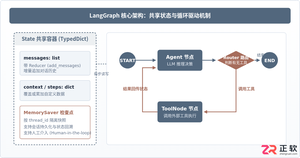
本篇LangGraph Python中文入门教程详解,系统梳理StateGraph状态机定义、节点编写、边与条件路由、检查点持久化(MemorySaver)等核心机制,提供从环境安装到完整循环智能体构建的代码示例与实操指导。
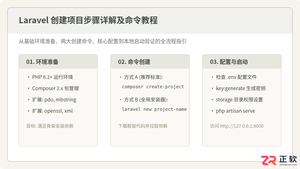
详解使用Composer与Laravel安装器创建Laravel项目的完整步骤、核心命令及环境配置,包含目录权限、环境文件与常见报错排查。

本教程详细介绍 Google ADK(Android Accessory Development Kit)在 Python 环境下的安装与配置方法,涵盖 Python 基础环境检查、虚拟环境搭建、依赖库与包安装、以及硬件通信权限排查。
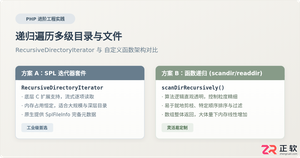
深入解析在PHP中递归遍历多级目录文件的两种核心方案:基于SPL标准库的RecursiveDirectoryIterator高效流式迭代,与基于scandir/opendir的自定义递归函数实现,剖析执行机制、内存表现与实战避坑指南。

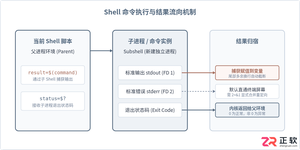
详细讲解在Shell脚本中执行命令并获取执行结果的常用方法,涵盖标准输出捕获、退出状态码判断、错误流重定向、多行结果处理及常见避坑要点。
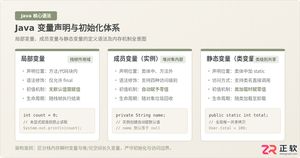
系统解析Java局部变量、成员变量与静态变量的定义语法、声明与初始化机制、生命周期及JVM内存驻留规则,结合图解与代码示例分析常见编译错误与认知误区。
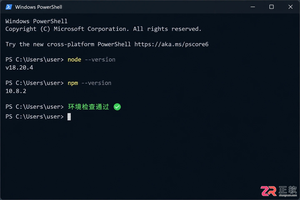
详解如何在Windows 10/11上安装Claude Code。涵盖WSL与Git Bash终端选择、Node.js版本检查、npm全局安装步骤、身份验证流程及claude doctor诊断方法,帮助开发者快速搭建本地AI编码助手。

深入浅出解析TypeScript是什么语言。本文详细介绍TypeScript的语言定义、超集架构、核心运行原理、与JavaScript的核心对比以及四类典型工业级应用场景,帮助读者全面看懂TS的价值与用途。

详解如何在 Windows 电脑上通过 Microsoft Store 安装 Codex 桌面应用,包括启动登录、切换 Codex 模式、关联本地代码项目及终端环境配置的界面操作指引。




WPS Office是一款面向macOS用户的综合办公套件,将文字处理、电子表格、演示文稿、PDF工具、模板与云协作整合在同一应用中。它兼容常见Microsoft Office格式,支持Intel及Apple芯片Mac,基础功能可免费使用,

Shapr3D是一款面向工业设计、机械工程、建筑概念和三维打印工作流的CAD软件。Mac版采用Parasolid建模内核,支持草图约束、实体建模、工程图、可视化渲染及常见CAD格式交换,并可通过账户在多台设备之间同步项目。

REAPER是Cockos开发的数字音频工作站,提供多轨音频与MIDI录制、剪辑、处理、混音和母带制作工具。Mac版兼容Intel与Apple芯片,支持AU、VST、VST3、CLAP等插件格式,并提供高度可定制的工作流程。

Adobe Photoshop 是面向摄影师、设计师和内容创作者的专业图像处理工具,可在 Windows 上完成照片修饰、选区抠图、图层合成、文字排版、绘画及生成式编辑。软件采用订阅授权,由 Creative Cloud 管理安装、更新与许

Adobe InDesign 是面向印刷与数字出版的专业页面排版工具,可制作书籍、杂志、宣传册、海报、交互式 PDF 和电子书。它提供精细的文字样式、多页面管理、印前检查及多格式输出能力,并能与 Photoshop、Illustrator

Adobe Illustrator 是用于绘制矢量图形、插画、图标、徽标和版式的专业设计工具。它以路径和锚点为核心,作品放大后仍能保持清晰,并提供画板、文字、渐变、图像描摹及精确变换等功能,适合品牌视觉、印刷物料、数字界面和商业插画创作。