Java如何实现登录窗口?
登录窗口主类packageccnu.paint;importjava.awt.Color;importjava.awt.Font;importjava.awt.GridLayout;importjava.awt.Point;importjava.awt.event.ActionEvent;importjava.awt.event.ActionListener;importjava.awt.event.MouseAdapter;importjava.awt.event.MouseEvent;importja
登录窗口主类
package ccnu.paint;

import java.awt.Color;
import java.awt.Font;
import java.awt.GridLayout;
import java.awt.Point;
import java.awt.event.ActionEvent;
import java.awt.event.ActionListener;
import java.awt.event.MouseAdapter;
import java.awt.event.MouseEvent;
import java.io.File;
import java.io.FileInputStream;
import java.io.IOException;
import java.util.Enumeration;
import java.util.Properties;

import javax.swing.ImageIcon;
import javax.swing.JButton;
import javax.swing.JFrame;
import javax.swing.JLabel;
import javax.swing.JOptionPane;
import javax.swing.JPanel;
import javax.swing.JPasswordField;
import javax.swing.JTextField;

import ccnu.util.Answer;
import ccnu.util.Verification;

public class Login extends JFrame
{
    private static final long serialVersionUID = 1L;

    private Properties pro = new Properties();

    private boolean ver_code = false; // 默认输入验证码错误

    private Answer answer = null;

    private JPanel p1 = new JPanel(); // 添加到JPanel中的组件默认为流式布局
    private JLabel luser = new JLabel("username: ");
    private JTextField username = new JTextField(20);

    private JPanel p2 = new JPanel();
    private JLabel lpwd = new JLabel("password: ");
    private JPasswordField pwd = new JPasswordField(20);

    private JPanel p4 = new JPanel();
    private JLabel lVer = new JLabel("verification: ");
    private JTextField ver = new JTextField(10);
    private JLabel img = new JLabel();
    private JLabel result = new JLabel();

    private JPanel p3 = new JPanel();
    private JButton ok = new JButton("ok");
    private JButton cancel = new JButton("cancel");
    private JButton signUp = new JButton("Sign up"); // 用于账户注册

    // 设置组件的监听
    public void initListener()
    {
        username.addActionListener(new ActionListener()
        {
            @Override
            public void actionPerformed(ActionEvent e)
            {// JTextField的action是回车键
                String name = username.getText();
                // Login.this.setTitle(name);
                // System.out.println(name.hashCode() + "***" +"".hashCode());
                if (name.equals(""))
                {
                    JOptionPane.showMessageDialog(Login.this, "Please input a userName!");
                } else
                {
                    pwd.grabFocus();
                }
            }
        });

        pwd.addActionListener(new ActionListener(){
            @Override
            public void actionPerformed(ActionEvent e)
            {
                String password = new String(pwd.getPassword());
                if(password.equalsIgnoreCase(""))
                {
                    JOptionPane.showMessageDialog(Login.this, "please input a password!");
                }else{
                    ver.grabFocus();
                }
            }

        });

        ok.addActionListener(new ActionListener(){

            @Override
            public void actionPerformed(ActionEvent e)
            {
                // 重新加载最新的账户文件
                try
                {
                    pro.load(new FileInputStream(new File("src/res/accouts.properties")));
                } catch (IOException e1)
                {
                    e1.printStackTrace();
                }
                check();
            }

        });

        // 判断验证码是否正确
        ver.addActionListener(new ActionListener(){
            @Override
            public void actionPerformed(ActionEvent e)
            {
                String verCode = ver.getText();
                if(verCode.equals(""))
                {
                    JOptionPane.showMessageDialog(Login.this, "Please input a verification!");
                }else{
                    if(verCode.equals(answer.getResult()))
                    {
                        result.setIcon(new ImageIcon(Login.this.getClass().getResource("/res/right.jpg"))); // 显示提示的图片信息(如√图片)
                        ver_code = true;
                        // 检查之前,重新加载最新的账户文件
                        try
                        {
                            pro.load(new FileInputStream(new File("src/res/accouts.properties"))); // 将账户文件加载进来
                        } catch (IOException e1)
                        {
                            e1.printStackTrace();
                        }
                        check();
                    }else{
                        result.setIcon(new ImageIcon(Login.this.getClass().getResource("/res/error.jpg"))); // 显示提示的图片信息(如×图片)
                        ver_code = false;
                    }
                }
            }
        });

        // 点击图片会更改验证码
        img.addMouseListener(new MouseAdapter(){

            @Override
            public void mouseClicked(MouseEvent e)
            {
                answer = Verification.verification();
                img.setIcon(new ImageIcon(answer.getBufferedImage())); // 设置验证码图案
            }
        });

        cancel.addActionListener(new ActionListener()
        {
            @Override
            public void actionPerformed(ActionEvent e)
            {
                int option = JOptionPane.showConfirmDialog(Login.this, "Are you sure to exit?");
//              System.out.println("option = " + option);
                if (option == 0)
                {// Yes
                    Login.this.dispose();
                }
            }
        });

        signUp.addActionListener(new ActionListener(){

            @Override
            public void actionPerformed(ActionEvent e)
            {
                new SignUp();
            }
        });
    }

    // 初始化登录窗口及其组件的设置监听
    public Login()
    {
        super("Login");

        // 加载账户文件
        try
        {
            pro.load(new FileInputStream(new File("src/res/accouts.properties"))); // 从指定位置将账户文件加载进来
        } catch (IOException e)
        {
            e.printStackTrace();
        }

        initListener();
        answer = Verification.verification(); // 生成验证码
        img.setIcon(new ImageIcon(answer.getBufferedImage())); // 设置初始验证码

        this.setLocation(new Point(200, 200));
        this.setSize(500, 300);
        this.setLayout(new GridLayout(4, 1, 0, 20)); // 垂直间隙为20px
        p1.add(luser);
        p1.add(username);
        p2.add(lpwd);
        p2.add(pwd);
        p4.add(this.lVer);
        p4.add(this.ver);
        p4.add(this.img);
        result.setForeground(Color.red);
        result.setFont(new Font("楷体", Font.BOLD, 20));
        p4.add(result);
        p3.add(ok);
        p3.add(cancel);
        p3.add(signUp);
        this.add(p1);
        this.add(p2);
            this.add(p4);
        this.add(p3);

//      this.setBackground(Color.blue); // JFrame的上层还有一个ContentPane
        this.getContentPane().setBackground(Color.gray);
        this.setResizable(false);
        this.setVisible(true);
        this.setDefaultCloseOperation(JFrame.EXIT_ON_CLOSE); // 等价于Frame中的windowClosing事件
    }

    // 检查用户名或密码
    public void check()
    {

        String verCode = ver.getText();
        if(verCode.equals(""))
        {
            JOptionPane.showMessageDialog(Login.this, "Please input a verification!");
            return;
        }else{
            if(verCode.equals(answer.getResult()))
            {
                result.setIcon(new ImageIcon(Login.this.getClass().getResource("/res/right.jpg")));
                ver_code = true;
            }else{
                result.setIcon(new ImageIcon(Login.this.getClass().getResource("/res/error.jpg")));
                ver_code = false;
            }
        }

        if(ver_code == false)
        {
            JOptionPane.showMessageDialog(this, "verification is error!");
            return;
        }
        String name = username.getText();
        String password = new String(pwd.getPassword()); // return char[]
//      if (name.equalsIgnoreCase("admin") && password.equals("123456"))
        if (isPass(name, password))
        {
//          new PaintApp(name);
            JOptionPane.showMessageDialog(this, "-^_^-   OK..."); // 此处可以加上其他的登陆成功后进一步处理的窗口
            this.dispose();
        } else
        {
            JOptionPane.showMessageDialog(this, "userName or password is incorrect!");
            username.setText("");
            pwd.setText("");
            ver.setText("");
            answer = Verification.verification();
            img.setIcon(new ImageIcon(answer.getBufferedImage()));
            result.setIcon(null);
        }
    }

    // 验证用户输入的账户名和密码是否正确(通过与加载进来的账户 pro 比对)
    public boolean isPass(String name, String password)
    {
        Enumeration en = pro.propertyNames();
        while(en.hasMoreElements())
        {
            String curName = (String)en.nextElement();
//          System.out.println(curName + "---" + pro.getProperty(curName));
            if(curName.equalsIgnoreCase(name))
            {
                if(password.equalsIgnoreCase(pro.getProperty(curName)))
                {
                    return true;
                }
            }
        }
        return false;
    }

    public static void main(String[] args)
    {
        new Login();
    }
}
账户注册类
package ccnu.paint;

import java.awt.GridLayout;
import java.awt.Point;
import java.awt.event.ActionEvent;
import java.awt.event.ActionListener;
import java.io.File;
import java.io.FileInputStream;
import java.io.FileOutputStream;
import java.io.IOException;
import java.util.Enumeration;
import java.util.Properties;

import javax.swing.JButton;
import javax.swing.JFrame;
import javax.swing.JLabel;
import javax.swing.JOptionPane;
import javax.swing.JPanel;
import javax.swing.JPasswordField;
import javax.swing.JTextField;

public class SignUp extends JFrame
{
    private static final long serialVersionUID = 3054293481122038909L;

    private Properties pro = new Properties(); // 最好时静态的,因为账户是共享的

    private JPanel panel = new JPanel();
    private JLabel label = new JLabel("username: ");
    private JTextField field = new JTextField(15);

    private JPanel panel2 = new JPanel();
    private JLabel label2 = new JLabel("password: ");
    private JPasswordField field2 = new JPasswordField(15);

    private JPanel panel3 = new JPanel();
    private JLabel label3 = new JLabel("confirmation: ");
    private JPasswordField field3 = new JPasswordField(15);

    private JPanel panel4 = new JPanel();
    private JButton button = new JButton("OK");
    private JButton button2 = new JButton("Cancel");

    public void initListener()
    {
        field.addActionListener(new ActionListener()
        {

            @Override
            public void actionPerformed(ActionEvent e)
            {
                field2.grabFocus();
            }

        });

        field2.addActionListener(new ActionListener()
        {

            @Override
            public void actionPerformed(ActionEvent e)
            {
                field3.grabFocus();
            }
        });
        field3.addActionListener(new ActionListener()
        {

            @Override
            public void actionPerformed(ActionEvent e)
            {
                ok_actionPerformed(e);
            }

        });

        // OK
        button.addActionListener(new ActionListener()
        {

            @Override
            public void actionPerformed(ActionEvent e)
            {
                ok_actionPerformed(e);
            }
        });

        // Cancel
        button2.addActionListener(new ActionListener()
        {

            @Override
            public void actionPerformed(ActionEvent e)
            {
                cancel_actionPerformed(e);
            }
        });
    }

    public void ok_actionPerformed(ActionEvent e)
    {
        String userName = field.getText();
        String password = new String(field2.getPassword());
        String password2 = new String(field3.getPassword());
        if (userName.equals(""))
        {
            JOptionPane.showMessageDialog(SignUp.this, "username cannot be empty!");
        } else
        {
            if (password.equalsIgnoreCase(""))
            {
                JOptionPane.showMessageDialog(SignUp.this, "password cannot be empty!");
            } else
            {
                if (password2.equalsIgnoreCase(password))
                {
                    if (isExist(userName))
                    {
                        JOptionPane.showMessageDialog(SignUp.this, "username has been existed!");
                        field.setText("");
                        field2.setText("");
                        field3.setText("");
                    } else
                    {
                        pro.setProperty(userName, password);
                        JOptionPane.showMessageDialog(SignUp.this, "SignUp success!");
                        writeToPro(userName, password); // 将其写入到账户文件中
                        SignUp.this.dispose();
                    }
                } else
                {
                    JOptionPane.showMessageDialog(SignUp.this, "password is not consistent!");
                    field2.setText("");
                    field3.setText("");
                }
            }
        }
    }

    public void cancel_actionPerformed(ActionEvent e)
    {
        System.exit(0);
    }

    public SignUp()
    {
        super("Sign up");

        // 加载账户文件
        try
        {
            pro.load(new FileInputStream(new File("src/res/accouts.properties")));
        } catch (IOException e)
        {
            e.printStackTrace();
        }

        // 初始化窗口组件的监听
        initListener();

        this.setLocation(new Point(300, 230));
        this.setSize(280, 210);

        this.setLayout(new GridLayout(4, 1, 0, 20)); // 垂直间隙为20px
        panel.add(label);
        panel.add(field);
        panel2.add(label2);
        panel2.add(field2);
        panel3.add(label3);
        panel3.add(field3);
        panel4.add(button);
        panel4.add(button2);
        this.add(panel);
        this.add(panel2);
        this.add(panel3);
        this.add(panel4);

        this.setAlwaysOnTop(true);
        this.setResizable(false);
        this.setVisible(true);
    }

    // 如果注册始终可用,就要保存起来,否则不需要写入文件中,注册账户本次使用
    // 将账户名与其对应密码保存到指定的账户文件中
    public void writeToPro(String userName, String password)
    {
        pro.setProperty(userName, password);
        try
        {
            pro.store(new FileOutputStream(new File("src/res/accouts.properties")), "allAccouts");
        } catch (IOException e)
        {
            e.printStackTrace();
        }
    }


    // 判断此用户名是否已经存在
    public boolean isExist(String userName)
    {
        Enumeration enumer = pro.propertyNames();
        while (enumer.hasMoreElements())
        {
            String temp = (String) enumer.nextElement();
            if (temp.equals(userName))
            {
                return true;
            }
        }
        return false;
    }
}
生成验证码类
package ccnu.util;

import java.awt.Color;
import java.awt.Font;
import java.awt.Graphics;
import java.awt.Point;
import java.awt.image.BufferedImage;
import java.util.Random;

// 用于生成验证码
public class Verification
{
    private static Answer answer = new Answer();
    private static BufferedImage bufferedImage = null;
    private static String result = null;
    private static String words = null;
    private static String words2 = null;

    // 生成验证码
    public static Answer verification()
    {

        bufferedImage = new BufferedImage(200, 35, BufferedImage.TYPE_INT_RGB);
        Graphics g = bufferedImage.getGraphics();
        Random rand = new Random();
        for (int i = 0; i < 20; i++)
        {
            Point p1 = new Point(rand.nextInt(200), rand.nextInt(30));
            Point p2 = new Point(rand.nextInt(200), rand.nextInt(30));
            g.drawLine(p1.x, p1.y, p2.x, p2.y);
        }
        g.setColor(Color.RED);
        g.setFont(new Font("楷体", Font.BOLD, 22));
        int plan = 2;
        switch (rand.nextInt(plan))
        {
        case 0:
            plan(g);
            break;
        case 1:
            plan1(g);
            break;
        default:
            break;
        }
        answer.setBufferedImage(bufferedImage);
        answer.setResult(result);
        g.dispose();
        return answer;
    }

    // 方案一
    private static void plan(Graphics g)
    {
        words = ReadTxt.read("/res/words.txt"); // 指定生成验证码问题的资源文件的路径
        Random rand = new Random();
        String first = String.valueOf(words.charAt(rand.nextInt(words.length())));
        String second = String.valueOf(words.charAt(rand.nextInt(words.length())));
        String third = String.valueOf(words.charAt(rand.nextInt(words.length())));
        g.drawString(first, rand.nextInt(40) + 20, rand.nextInt(12) + 15);
        g.drawString(second, rand.nextInt(40) + 80, rand.nextInt(12) + 15);
        g.drawString(third, rand.nextInt(40) + 140, rand.nextInt(12) + 15);
        result = first + second + third;
    }

    // 方案二
    private static void plan1(Graphics g)
    {
        words2 = ReadTxt.read("/res/words2.txt"); // 指定生成验证码问题的资源文件的路径
        Random rand = new Random();
        String first = String.valueOf(words2.charAt(rand.nextInt(words2.length() - 2)));
        String second = String.valueOf(words2.charAt(rand.nextInt(2) + 9));
        String third = String.valueOf(words2.charAt(rand.nextInt(words2.length() - 2)));
        g.drawString(first, rand.nextInt(30) + 20, rand.nextInt(12) + 15);
        g.drawString(second, rand.nextInt(40) + 60, rand.nextInt(12) + 15);
        g.drawString(third, rand.nextInt(30) + 110, rand.nextInt(12) + 15);
        g.drawString("=", rand.nextInt(40) + 150, rand.nextInt(12) + 15);
        if(second.equals("+"))
        {
            result = String.valueOf(Integer.valueOf(first) + Integer.valueOf(third));
        }else{
            result = String.valueOf(Integer.valueOf(first) - Integer.valueOf(third));
        }
    }

}
读取生成验证码所需文件类
package ccnu.util;

import java.io.BufferedReader;
import java.io.IOException;
import java.io.InputStreamReader;

// 专门用于读取文件
public class ReadTxt
{
    public static String read(String path) // 根据指定路径path来读取它,并返回它所包含的内容
    {
        StringBuffer sb = new StringBuffer();
        try
        {
            BufferedReader br = new BufferedReader(new InputStreamReader(Verification.class.getResourceAsStream(path)));
            String temp = null;
            while(null != (temp = br.readLine()))
            {
                sb.append(temp);
            }
            br.close();
        } catch (IOException e)
        {
            e.printStackTrace();
        }
        return sb.toString();
    }

}得到生成的验证码所包含的信息类(图案、问题)
package ccnu.util;

import java.awt.image.BufferedImage;

// 用于将生成的验证码的图案信息以及问题结果封装
public class Answer
{
    private BufferedImage bufferedImage = null; // 验证码图像
    private String result = null; // 验证码图像问题的答案

    public BufferedImage getBufferedImage()
    {
        return bufferedImage;
    }
    public void setBufferedImage(BufferedImage bufferedImage)
    {
        this.bufferedImage = bufferedImage;
    }
    public String getResult()
    {
        return result;
    }
    public void setResult(String result)
    {
        this.result = result;
    }

}
验证码生成汉字识别的问题的文件words.txt
如: 中国湖北省武汉市汉东大学政法学院
验证码生成算术运算的问题的文件words2.txt
123456789+-
提示图片


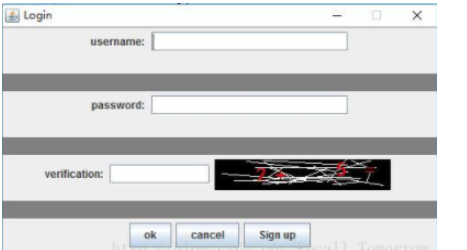
登录效果
深入解析C++中动态数组的初始化机制,涵盖new操作符的不同用法、基本类型与类对象的初始化差异,以及为何在现代C++开发中应优先使用std::vector。

谷歌浏览器Mac版官方安装指南 谷歌浏览器Mac版官方安装入口是https://www.google.com/chrome/,需macOS 12+系统、500MB空间,下载.dmg后拖入应用程序安装,支持多设备同步、性能优化与隐私保护功能。 苹果电脑Chrome的安装入口究竟在哪里?这个问题最近可是

Chrome中JavaScript未执行需依次检查:一、移除站点级禁用并添加允许域名;二、开启全局JavaScript开关;三、禁用干扰扩展;四、在开发者工具中启用JavaScript;五、重置内容设置为默认。 有时在Chrome里打开网页,会发现交互按钮点了没反应,数据加载不出来,页面仿佛“静止”

IE浏览器怀旧版在线网址:一次精准的技术时光回溯 最近,不少老用户和怀旧爱好者在反复搜索一个问题:那个经典的Internet Explorer,如今还能在哪里原汁原味地体验到?答案指向一个特定的地址:https://ie.microsoft.com/legacy/。 这个网站远不止是一个简单的“皮肤


Chrome官方免验证入口为https://www.google.cn/chrome/,提供全平台安装包、免登录即用、本地化安全机制及引擎级性能优化。 到底该去哪里找正版、免费且无需繁琐验证的Chrome浏览器入口?这个问题困扰了不少网友。今天,我们就来直通核心,为大家详细拆解Chrome引擎的官方

Java堆是JVM存储对象的核心内存区域,配置需结合场景:单体应用适中设置;大数据处理需大堆并关注GC停顿;微服务强调快速启动;高并发需精细划分堆区域。关键参数-Xms和-Xmx建议等值以稳定性能。垃圾回收器选择影响效率,如G1适用于大堆,ZGC可实现低停顿。内存错误时需监控堆状态。

Java堆内存溢出错误通常因内存泄漏、数据处理需求过大或JVM参数配置不当引起。排查时可借助jmap、堆转储及MAT等工具定位问题。解决方案包括调整JVM内存参数(如-Xmx)、修复代码中的内存泄漏、优化大数据处理逻辑,并建立持续监控与预防机制,以保障应用稳定运行。

XML在Java开发中用于配置、数据交换等场景。解析方式主要有DOM、SAX、StAX及第三方库。DOM适合操作小文件,SAX/StAX适合处理大文件流,JAXB用于对象与XML映射。选型需结合数据大小、内存、性能及团队熟悉度,现代框架常封装底层解析。
命名空间的基本概念与常见引入问题在C++等编程语言中,命名空间(namespace)是一种将代码标识符(如变量、函数、类名)封装在特定名称下的机制,其主要目的是避免命名冲突,尤其是在大型项目或使用多个第三方库时。使用“using namespace”指令可以将指定命名空间中的所有名称引入当前作用域,






Windows 10 是一款微软推出的经典操作系统,拥有硬件兼容性与多任务处理能力。它更偏向把系统状态查看和常用调节动作放在一起,适合需要持续观察和微调设备状态的场景。

极度公式是一款跨平台专业LaTeX公式识别编辑软件,支持OCR公式识别和多平台编辑。和使用说明,避免使用,享受完整功能与稳定支持。做扫描整理、文字提取和表格转换时,它能把识别后的处理步骤接得更顺,资料录入这类场景会省下不少时间。