

RPA实战:用FlaUI自动发送微信消息
一直以来,我都希望能够实现微信的群发功能,但由于担心违法而未能实现。记得某公司因为破解了微信的接口,结果被起诉并罚了巨额罚款。这时,我想到,如果我采用RPA技术,就不会对微信造成任何影响,因为我只是在模拟自己的电脑操作,微信公司也无法识别我的行为是否违法。因此,这种基于安全技术的方法可能就是可行的。于是,我尝试了一下,同时也参考了网络上的资料,这给了我一些启发。一、什么是FlaUI?FlaUI是一个基于微软UIAutomation技术的工具,自从WindowsVista发布以来,它提供了一套新的U
一直以来,我都希望能够实现微信的群发功能,但由于担心违法而未能实现。记得某公司因为破解了微信的接口,结果被起诉并罚了巨额罚款。
这时,我想到,如果我采用RPA技术,就不会对微信造成任何影响,因为我只是在模拟自己的电脑操作,微信公司也无法识别我的行为是否违法。
因此,这种基于安全技术的方法可能就是可行的。
于是,我尝试了一下,同时也参考了网络上的资料,这给了我一些启发。
一、什么是FlaUI?FlaUI 是一个基于微软 UIAutomation 技术的工具,自从Windows Vista发布以来,它提供了一套新的UI自动化测试技术,简称UIA。在最新的Windows SDK中,UIA与MSAA等其他支持UI自动化的组件一起发布,称为Windows Automation API。
UIA定义了一套全新的、专为UI自动化设计的接口和模式。包括用于遍历和条件查询UI元素的TreeWalker/FindAll,定义了UI元素属性的UIA Property,如Name、ID、Type、ClassName、Location、Visibility等。还定义了UI元素行为的UIA Pattern,如Select、Expand、Resize、Check、Value等。此外,还引入了UIA Event接口,允许测试程序在特定事件发生后得到通知,例如新窗口打开事件等。
目前,FlaUI使用的是UIA2和UIA3两种技术。我主要使用的是UIA3。
二、使用步骤
- 引入Nuget包:
Install-Package FlaUI.UIA3 -Version 3.2.0
- 实现一个简单的给指定人发送消息的示例代码如下:
Process[] processes = Process.GetProcessesByName("WeChat");
if (processes.Count() != 1)
{
    Console.WriteLine("微信未启动或启动多个微信");
}
else
{
    //1.附加到微信进程
    using (var app = Application.Attach(processes.First().Id))
    {
        using (var automation = new UIA3Automation())
        {
            //2.获取主界面
            var mainWindow = app.GetMainWindow(automation);
            Console.WriteLine("获取主界面");
            //3.切换到通讯录
            var elements = mainWindow.FindAll(FlaUI.Core.Definitions.TreeScope.Subtree, TrueCondition.Default);
            var addressBook = mainWindow.FindFirstDescendant(cf => cf.ByName("通讯录"));
            addressBook.DrawHighlight(System.Drawing.Color.Red);
            var path = Debug.GetXPathToElement(addressBook);
            Console.WriteLine("点击通讯录");
            addressBook.Click();
            //4.搜索
            string target = "文件传输助手";
            var searchTextBox = mainWindow.FindFirstDescendant(cf => cf.ByName("搜索")).AsTextBox();
            searchTextBox.Click();
            Keyboard.Type(target);
            Keyboard.Type(VirtualKeyShort.RETURN);
            Console.WriteLine("搜索目标对象");
            //5.切换到对话框
            Thread.Sleep(500);
            var searchList = mainWindow.FindFirstDescendant(cf => cf.ByName("搜索结果"));
            if (searchList != null)
            {
                var searchItem = searchList.FindAllDescendants().FirstOrDefault(cf => cf.Name == target && cf.ControlType == FlaUI.Core.Definitions.ControlType.ListItem);
                searchItem?.DrawHighlight(System.Drawing.Color.Red);
                searchItem?.AsListBoxItem().Click();
            }
            else
            {
                Console.WriteLine("没有搜索到内容");
            }
            Thread.Sleep(500);
            //6.输入文本
            string sendMsg = "这个是我微信的输入信息:" + DateTime.Now.ToString();
            var msgInput = mainWindow.FindFirstDescendant(cf => cf.ByName("输入")).AsTextBox();
            msgInput?.Click();
            System.Windows.Forms.Clipboard.SetText(sendMsg);
            Keyboard.TypeSimultaneously(new[] { VirtualKeyShort.CONTROL, VirtualKeyShort.KEY_V });
            var sendBtn = mainWindow.FindFirstDescendant(cf => cf.ByName("sendBtn"));
            sendBtn?.DrawHighlight(System.Drawing.Color.Red);
            sendBtn?.Click();
        }
    }
}
这段代码带有注释,易于理解。它的功能是搜索特定的人,然后向其发送指定的信息,完成任务。
图示效果如下:

- 实现一个获取会话列表并批量发送消息的示例代码如下:
Process[] processes = Process.GetProcessesByName("WeChat");
if (processes.Count() != 1)
{
    Console.WriteLine("微信未启动或启动多个微信");
}
else
{
    //1.附加到微信进程
    using (var app = Application.Attach(processes.First().Id))
    {
        using (var automation = new UIA3Automation())
        {
            //2.获取主界面
            var mainWindow = app.GetMainWindow(automation);
            Console.WriteLine("获取主界面");
            //3.切换到聊天目录
            var elements = mainWindow.FindAll(TreeScope.Subtree, TrueCondition.Default);
            var addressBook = mainWindow.FindFirstDescendant(cf => cf.ByName("聊天"));
            addressBook.DrawHighlight(System.Drawing.Color.Red);
            var path = Debug.GetXPathToElement(addressBook);
            addressBook.Click();
            Console.WriteLine("切换到聊天");
            Thread.Sleep(2000);
            //4.获取聊天列表
            //只发前六个
            var count = 0;
            var searchTextBox = mainWindow.FindFirstDescendant(cf => cf.ByName("会话")).AsListBoxItem();
            while (searchTextBox != null)
            {
                var list = searchTextBox.FindAllChildren();
                foreach (var item in list)
                {
                    count++;
                    var name = item.Name;
                    item.Click();
                    var type = item.ControlType;
                    item.DrawHighlight(System.Drawing.Color.Red);
                    var MsgSend = mainWindow.FindFirstDescendant(cf => cf.ByName("输入")).AsTextBox();
                    var MsgSendButton = mainWindow.FindFirstDescendant(cf => cf.ByName("sendBtn"));
                    if (MsgSend != null && MsgSendButton != null)
                    {
                        MsgSend.Click();
                        System.Windows.Forms.Clipboard.SetText($"群发消息,请忽略:{DateTime.Now}");
                        Keyboard.TypeSimultaneously(new[] { VirtualKeyShort.CONTROL, VirtualKeyShort.KEY_V });
                        MsgSendButton.Click();
                        Console.WriteLine($"发送信息:{name}");
                        Thread.Sleep(500);
                    }
                    if (count == 6)
                    {
                        break;
                    }
                }
                if (count == 6)
                {
                    break;
                }
                for (int i = 0; i < 5; i++)
                {
                    Keyboard.Type(VirtualKeyShort.DOWN);
                }
                searchTextBox = mainWindow.FindFirstDescendant(cf => cf.ByName("会话")).AsListBoxItem();
                Thread.Sleep(2000);
            }
        }
    }
}
这个代码的主要作用是向前六个会话发送群发消息,如果会话没有发送按钮,则不会发送,以避免影响更多人。
图示效果如下:

我录制了好几次,最后还有人把我删除了,尴尬。
- 如何使用FlaUI获取页面信息
可以通过FlaUinspect工具来获取页面的信息。
FlaUInspect[1]

可以通过以下方式看到XPath地址:


这个FlaUinspect项目是一个WPF项目,如果你想深入研究,可以查看源码,并进行跟踪调试。
主要可以通过以下两种方式获取所需的内容:
第一种是通过同一页面独一无二的名字来获取:
var addressBook = mainWindow.FindFirstDescendant(cf => cf.ByName("聊天"));第二种是通过XPath地址来找到所需的控件:
var infoData = automationElement.FindAllByXPath("/Pane/Pane[1]");总结
总的来说,这种技术还是非常方便的,但对于使用自绘技术的QQ以及基于QT、JAVA的应用程序可能无法实现,只能针对微软的技术产品,如WinForms和WPF等。
总体来说,它降低了使用时的难度。
例如,这个微信发送信息的功能,你可以自己扩展,比如指定人发送、群发、定时发送、标签发送等,对于个人来说,作用还是不错的。
参考资料[1]
FlaUInspect: https://github.com/FlaUI/FlaUInspect

企业微信怎么设置部门架构_企业微信组织架构搭建教程【实用】 在企业微信里搭建一个清晰、好用的组织架构,这事儿听起来简单,但要是没走对步骤,后续管理起来可就麻烦了。如果你正面临这个问题,那多半是还没在管理后台完成部门创建和成员归属的初始化配置。别急,下面这份详细的搭建指南,能帮你一步步搞定。 一、登录

微信字体大小可通过不同方式调整。一、安卓手机可打开微信进入“设置→通用→字体大小”滑动调节,或通过系统设置调节全局字体;二、苹果手机需在系统“设置→微信→显示与文字大小”中调整较大文字并拖动滑块,同时可开启加粗文本;三、目前微信不支持单独调整聊天窗口字体,但可通过深色模式、公众号内“调整字体”及浏览器缩放改善阅读体验。以上方法均不影响他人显示效果。
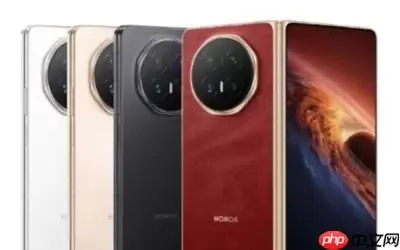
荣耀YOYO实现与微信的A2A(设备到设备)深度协同,用户仅需一句话即可快速完成发送微信消息、进行语音或视频通话。全程采用双重授权安全机制,确保用户隐私安全。该功能已向荣耀全系在售机型全面推送。

微信灰度测试AI助手“小微”,基于自研WeLM与DeepSeek混合模型,具备基础执行、生态调用、内容理解、生成小工具四层能力,核心打通小程序全链路闭环并深度融入社交链。但面临社交边界与隐私压力等挑战。
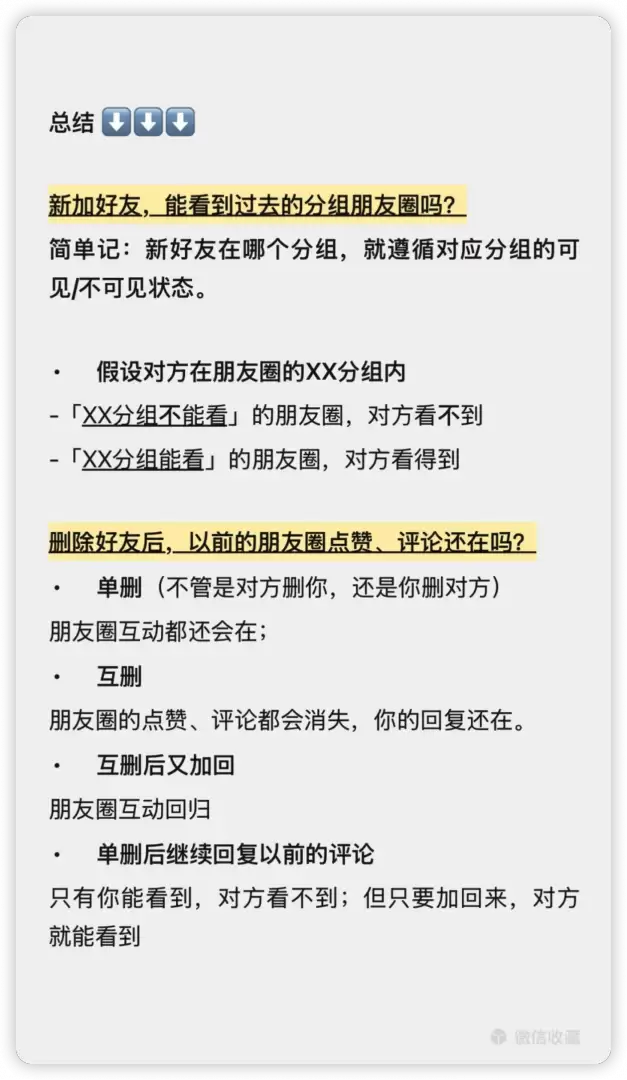
新加好友可见朋友圈的范围取决于当前分组,而非发圈时的设定。单删好友后互动痕迹保留,互删后对方点赞评论消失,重新加回可恢复。单删状态下可回复但对方收不到。

Mac微信无法单独设置文字粗体,但可通过系统辅助功能全局启用粗体文本,或配合HiDPI优化及WeChatExtension-ForMac插件实现定制化加粗效果。Mac微信本身不提供独立开启字体粗体的开关,所有文字渲染完全依赖系统级字体配置与应用内字号设置,无法像Word那样为特定文字加粗。但可通过系

Mac微信不提供已读回执功能,既不发送也不接收,界面上不会显示“已读”标记;v8.0.52最新版仍维持此设计限制,仅支持“已送达”或错误提示,无法确认对方是否已读。Mac微信里发完重要消息后,总想确认对方到底看了没有,但翻遍设置和聊天窗口都找不到“已读回执”状态显示——这是因为Mac版微信不提供已读

Mac微信不支持收藏标签功能,所谓“标签”实为按内容类型(如网页、图片)自动生成的筛选项,不可新建或编辑;iOS/Android端同样无此功能;第三方工具如知拾收藏可实现标签化管理。Mac版微信没有“收藏标签”这一功能,最新客户端也不支持为收藏项添加自定义标签或分类标签。你所看到的所谓“标签”,实际

若想在银河麒麟系统中安装微信桌面版,需留意系统版本、CPU架构以及网络环境的匹配。这里推荐通过软件商店来安装手机游戏;若选择终端安装,则需补装kylin-activation等组件;要是手动安装DEB包,那就必须使用apt --fix-broken来修复依赖;而CROSSOVER方案,比较适合旧版系
8月21日微信一个新功能冲上热搜引起网友热议不少网友反映,聊天输入框提示变为“可按住 转文字”,部分版本取消右侧麦克风图标。长按输入框说话,松开后语音自动转为文字并直接发送,无需手动点击发送键。 同时,转换过程中或松手前,用户可选择“编辑”手动修改,或上滑取消发送。 腾讯客服称,此功能目前仅在iOS




Postman是一套面向API全生命周期的开发与测试平台,可在Mac上发送和调试多种协议请求,管理集合、环境及认证信息,并完成脚本测试、模拟服务、监控、文档发布和团队协作。它适合开发、测试及运维人员使用,提供个人免费方案。

Docker Desktop 是 Docker 官方为 Mac 提供的容器开发环境,集成 Docker Engine、命令行工具、Compose、Build、Kubernetes 与图形化管理界面。

Android Studio 是 Google 面向安卓应用开发提供的官方集成开发环境,基于 IntelliJ IDEA 构建。它整合智能代码编辑、Gradle 构建、界面预览、设备模拟、性能分析、调试测试及 APK 分析等工具。

PixPix 是面向品牌、卖家和内容团队的在线 AI 图片视频创作平台,提供图视频 Agent、无限画布、图片生成、视频生成、自然语言编辑及商品套图、产品精修和带货视频等电商工具。

Postman 是面向 API 全生命周期的开发与协作平台。Windows 桌面版可用于构建和发送 HTTP、GraphQL、gRPC、WebSocket、MQTT 等请求,并提供环境变量、集合、脚本测试、模拟服务、监控、文档及团队工作区等

Docker Desktop 为 Windows 开发者提供集成式容器环境,内置 Docker Engine、命令行工具、Compose、Build 与 Kubernetes 等组件,可在本机完成镜像构建、容器运行、日志查看和资源管理。