

Ubuntu C++如何实现并发控制
在Ubuntu上使用C++实现并发控制 想在Ubuntu环境下用C++玩转并发编程?这事儿说复杂也复杂,说简单也简单。自从C++11把标准线程库()纳入麾下,多线程开发的门槛就大大降低了,安全性和便捷性也上了一个台阶。今天,咱们就来聊聊几个核心的并发控制概念,并看看如何在Ubuntu上用C++把它们
在Ubuntu上使用C++实现并发控制
想在Ubuntu环境下用C++玩转并发编程?这事儿说复杂也复杂,说简单也简单。自从C++11把标准线程库(
1. 创建线程
万事开头难?其实不然。创建一个新线程,用std::thread就能轻松搞定。下面这个例子,能让你直观地感受线程是怎么“跑”起来的。
#include
#include

void helloFunction() {
    std::cout << “Hello from a thread!” << std::endl;
}

int main() {
    std::thread t(helloFunction);
    t.join(); // 等待线程完成
    return 0;
}
2. 线程同步
线程一旦多起来,麻烦也就跟着来了。最典型的问题就是数据竞争:多个线程同时读写一块共享内存,结果很可能一团糟。这时候,同步机制就该登场了,互斥锁(std::mutex)就是其中最常用的一种“交通警察”。
#include
#include
#include

std::mutex mtx; // 创建一个互斥锁

void printMessage(const std::string& msg) {
    mtx.lock(); // 锁定互斥锁
    std::cout << msg << std::endl;
    mtx.unlock(); // 解锁互斥锁
}

int main() {
    std::thread t1(printMessage, “Hello from thread 1”);
    std::thread t2(printMessage, “Hello from thread 2”);
    t1.join();
    t2.join();
    return 0;
}
3. 条件变量
光有锁还不够。有时候,线程需要等待某个条件成立才能继续执行,比如等待任务队列非空。这种场景下,条件变量(std::condition_variable)就是最佳拍档,它通常和互斥锁携手工作,实现更精细的线程间协调。
#include
#include
#include
#include

std::mutex mtx;
std::condition_variable cv;
bool ready = false;

void printId(int id) {
    std::unique_lock lck(mtx);
    cv.wait(lck, []{return ready;}); // 等待直到ready为true
    std::cout << “Thread ” << id << std::endl;
}

void go() {
    std::lock_guard lck(mtx);
    ready = true;
    cv.notify_all(); // 通知所有等待的线程
}

int main() {
    std::thread threads[10];
    // spawn 10 threads:
    for (int i = 0; i < 10; ++i)
        threads[i] = std::thread(printId, i);

    std::cout << “10 threads ready to race...” << std::endl;
    go(); // go!

    for (auto& th : threads) th.join();
    return 0;
}
4. 原子操作
锁用多了,性能难免受影响。对于一些简单的操作,比如计数器增减,有没有更轻量级的方案?答案是肯定的,那就是原子操作(std::atomic)。它能在硬件层面保证操作的不可分割性,从而实现高效的无锁编程。
#include
#include
#include

std::atomic counter(0);

void incrementCounter() {
    for (int i = 0; i < 1000; ++i) {
        counter.fetch_add(1, std::memory_order_relaxed);
    }
}

int main() {
    std::thread t1(incrementCounter);
    std::thread t2(incrementCounter);
    t1.join();
    t2.join();
    std::cout << “Counter value: ” << counter.load() << std::endl;
    return 0;
}
编译和运行
纸上谈兵终觉浅。在Ubuntu上把代码变成可执行文件,这一步很关键。使用g++编译器时,记住要加上-pthread参数来链接线程库。
g++ -pthread your_program.cpp -o your_program
./your_program
以上这些,算是C++并发编程的“入门四式”。它们涵盖了创建、同步、协调和高效访问这几个基本维度。当然,实际项目中的挑战往往更复杂,需要根据具体的应用场景,灵活组合甚至设计更高级的并发控制策略。但万变不离其宗,理解了这些基础,后面的路就好走多了。
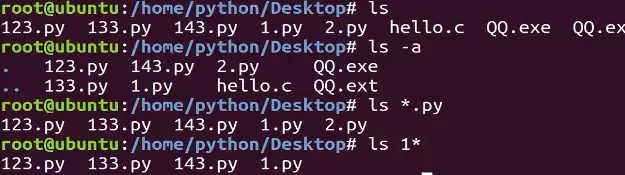
本教程指导Ubuntu新手打开终端,通过pwd、ls、cd、mkdir和touch命令完成基础文件目录操作。适用于桌面版、虚拟机及WSL环境,提供从查看路径到创建测试文件的完整验证步骤,帮助读者建立命令行操作的安全意识与正确习惯。
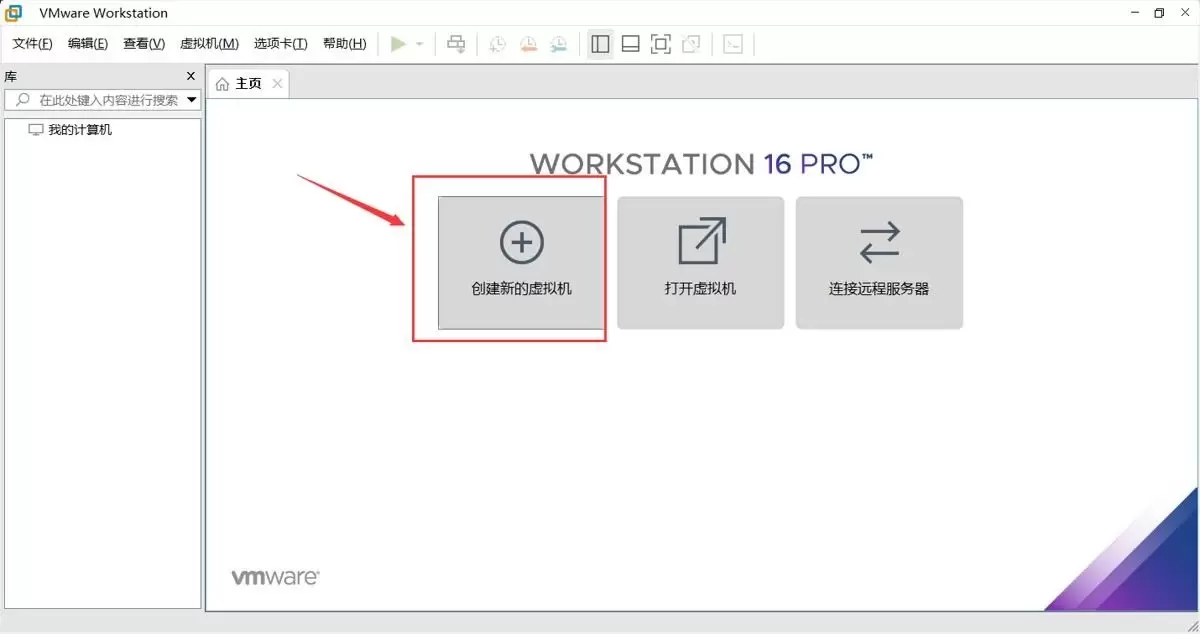
本文提供在VMware中安装Ubuntu并验证启动的完整流程。适用于首次练习Linux或搭建开发环境的用户。按步骤完成虚拟机创建、ISO挂载、硬件分配与安装后,可通过终端命令确认版本、内核与网络状态,确保系统可正常使用。
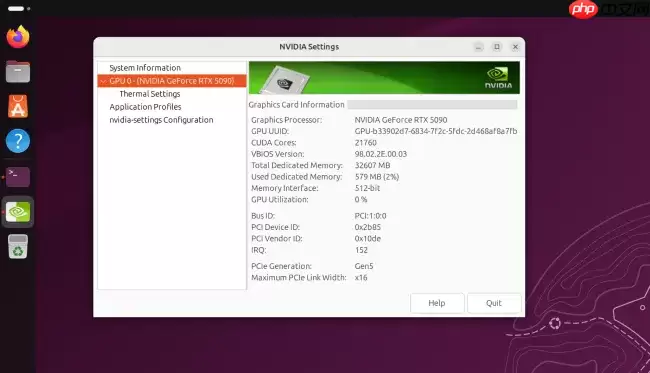
Ubuntu26.04LTS针对英伟达显卡在Wayland+GNOME环境进行性能调优,通过修改gbm_surface_lock_front_buffer函数,将帧渲染等待时间从毫秒级降至微秒级,显著提升UI响应和画面流畅度。该补丁已作为发行版专属补丁集成,确保LTS用户无需等待上游整合即可获得优化体验。

UbuntuTouch24.04-2.0Beta发布,底层升级至Ubuntu24.04,浏览器引擎从Chromium87跃升至134,网页兼容性显著提升;新增屏幕刘海区域自动适配、截图编辑器、网络指示器改进、移动数据可靠性增强、数据加密稳定,并新增NothingPhone(1)等设备支持。

ufw status仅显示高层策略和显式添加的规则(如“80 ALLOW Anywhere”),不反映默认策略绕过、IPv6独立规则、Docker等直写nftables的bypass规则,也无法体现本地回环流量不受管控等底层细节。Ubuntu 默认用 ufw 管理防火墙,但规则实际由 nftable

锁屏背景和桌面壁纸之所以不同,是因为GNOME默认会复制桌面壁纸,然后强制叠加高斯模糊和亮度调整效果,这个效果是由lockDialogGroup的CSS来控制的。要是想去除模糊,建议使用Control Blur Effect On Lock Screen扩展,把Adjust Sigma设置为0就行。
Ubuntu Swapper(一般就是指Ubuntu的交换分区或者交换文件)在服务器上的应用成效,是由多个因素共同决定的,像服务器的硬件配置情况、工作负载的类型以及交换空间的大小和具体配置等。下面为大家带来一些有关Ubuntu Swapper在服务器上应用效果的一般性评价:正面效果内存管理:交换空间

根本原因是纯命令行tty默认不支持UTF-8及中文字体渲染,locale设置仅影响字符解析逻辑,不解决字体绘制问题;图形终端自带UTF-8渲染,而tty需借助fbterm等工具实现中文显示。为什么终端里中文显示为问号或方块 纯命令行(tty,例如通过Ctrl+Alt+F3进入的界面)默认不会加载UT

通过分析Tomcat日志来提升Ubuntu服务器性能是一个很好的方法。以下是一些步骤和建议,帮助你通过Tomcat日志来优化服务器性能:1. 收集日志首先,得保证你的Tomcat服务器有详细的日志记录配置。在conf/logging.properties文件里,你可以对日志级别和输出格式进行调整。o

直接修改PS1是最为可控且轻量的方法。因为GNOME Terminal主题难以区分提示符、命令输入与输出,而PS1搭配ANSI转义码能够精准地为各个字段上色,并且需要用[ ]进行包裹,以防止光标出现错位的情况。直接改 PS1 是最可控、最轻量的方式,不需要装框架或改终端全局配色。 为什么不用改 GN




IntelliJ IDEA 是 JetBrains 推出的专业集成开发环境,重点服务于 Java、Kotlin 与 JVM 项目开发。软件集成代码补全、静态检查、重构、调试、测试、版本控制及构建工具,并可借助插件扩展语言和框架支持。

JetBrains PyCharm 是面向 Python 开发者的集成开发环境,提供智能补全、代码检查、重构、调试、测试、版本控制及虚拟环境管理功能。Mac 版兼容 Intel 与 Apple 芯片,核心功能可免费使用。

JetBrains WebStorm 是面向 JavaScript、TypeScript 和现代 Web 技术的专业集成开发环境,可智能理解项目结构,提供代码补全、重构、错误检查、运行调试、测试及 Git 工具。

JetBrains IntelliJ IDEA 是以 Java、Kotlin 和 JVM 项目为核心的专业集成开发环境,提供智能补全、代码检查、安全重构、调试、测试、版本控制及构建工具集成。统一发行版的核心功能可免费用于商业和非商业项目,

PhpStorm 是 JetBrains 面向 PHP 与现代 Web 开发打造的专业集成开发环境,提供代码补全、静态检查、重构、调试、测试、数据库、版本控制及前端语言支持。Windows 用户可直接下载安装程序,

PyCharm 是 JetBrains 推出的 Python 集成开发环境,提供智能代码补全、错误检查、重构、调试、测试、Git、终端及 Jupyter Notebook 支持。统一版安装后可体验 30 天 Pro 功能,


