

LNMP如何实现自动化
LNMP自动化的总体思路 想把LNMP环境部署从繁琐的手工操作中解放出来?核心思路其实很清晰:用一套标准化的自动化流程,彻底替代那些重复且容易出错的人工步骤。整个过程可以拆解为几个关键阶段:从系统准备开始,到组件安装、配置生成,再到服务启动,最后别忘了健康检查、安全加固以及建立长效的监控与备份机制。
LNMP自动化的总体思路

想把LNMP环境部署从繁琐的手工操作中解放出来?核心思路其实很清晰:用一套标准化的自动化流程,彻底替代那些重复且容易出错的人工步骤。整个过程可以拆解为几个关键阶段:从系统准备开始,到组件安装、配置生成,再到服务启动,最后别忘了健康检查、安全加固以及建立长效的监控与备份机制。
那么,具体该选择哪种自动化方式呢?这得看你的场景和规模:
- 以标准化流程替代手工操作:系统准备 → 组件安装 → 配置生成 → 服务启动 → 健康检查 → 安全加固 → 监控与备份。
- 选择自动化方式:小规模用Shell脚本或一键安装包;多机与标准化用Ansible;追求一致性可用容器化;上线交付接入CI/CD。
- 关键目标:可重复、可回滚、可审计、可扩展,避免硬编码敏感信息,部署前后具备验证与备份机制。
快速落地方案
理论说完了,来看看能立刻上手的几种方案。它们各有侧重,总有一款适合你当下的需求。
- 一键安装包(最快)
- 适用:个人/小团队、快速交付。
- 做法:使用lnmp.org或OneinStack提供的脚本,按向导选择Nginx/MySQL/MariaDB/PHP版本,自动处理依赖与服务启动,部分工具支持Let’s Encrypt证书自动化。
- 示例(OneinStack):执行官方生成的一键命令,按提示选择组件与版本即可完成安装与基础配置。
- Shell脚本(可控、易定制)
- 适用:需要自定义目录、模块、参数与流程。
- 要点:以root或sudo运行;使用set -e快速失败;将密码等抽离为变量或加密文件;输出日志便于排查;安装前检测80/443/3306端口占用;完成后做健康检查(Nginx、MariaDB、PHP)。
- Ansible(批量与标准化)
- 适用:多台服务器、团队交付、版本化管理。
- 做法:在控制节点安装Ansible,配置SSH免密;编写Playbook定义安装、配置、服务与防火墙;一次编排,处处运行。
示例一 Shell脚本最小可用模板 CentOS
#!/usr/bin/env bash
set -e
exec > >(tee lnmp_install.log) 2>&1

# 0) 参数
DB_ROOT_PASS="${DB_ROOT_PASS:-YourStrongDBPass!}"
NGINX_CONF="/etc/nginx/conf.d/default.conf"
PHP_TEST="/usr/share/nginx/html/info.php"

# 1) 基础准备
yum update -y
yum install -y epel-release wget gcc make pcre-devel openssl-devel \
mariadb-server mariadb php php-fpm php-mysql php-mbstring php-xml php-gd php-opcache

# 2) Nginx
systemctl enable --now nginx

# 3) MariaDB
systemctl enable --now mariadb
mysql_secure_installation < "$NGINX_CONF" <<'EOF'
server {
    listen 80;
    server_name localhost;
    root /usr/share/nginx/html;
    index index.php index.html;

    location / { try_files $uri $uri/ =404; }
    location ~ \.php$ {
        fastcgi_pass 127.0.0.1:9000;
        fastcgi_index index.php;
        fastcgi_param SCRIPT_FILENAME $document_root$fastcgi_script_name;
        include fastcgi_params;
    }
}
EOF

# 6) 测试页
echo "" > "$PHP_TEST"

# 7) 重载与验证
systemctl reload nginx php-fpm
echo "Done. Check: http://$(curl -s ifconfig.me)/info.php" - 使用:chmod +x lnmp.sh && sudo ./lnmp.sh;如需静默传参,export DB_ROOT_PASS=… 后再执行。
示例二 Ansible Playbook最小可用模板 CentOS
---
- name: Deploy LNMP on CentOS
  hosts: webservers
  become: yes
  vars:
    db_root_pass: "YourStrongDBPass!"
  tasks:
    - name: Update cache
      yum:
        name: "*"
        state: latest
        update_cache: yes

    - name: Install packages
      yum:
        name:
          - epel-release
          - nginx
          - mariadb-server
          - mariadb
          - php
          - php-fpm
          - php-mysql
          - php-mbstring
          - php-xml
          - php-gd
          - php-opcache
        state: present

    - name: Enable and start services
      service:
        name: "{{ item }}"
        state: started
        enabled: yes
      loop:
        - nginx
        - mariadb
        - php-fpm

    - name: Secure MariaDB
      command: >
        mysql_secure_installation
      args:
        stdin: "y\n{{ db_root_pass }}\n{{ db_root_pass }}\ny\ny\ny\ny\n"

    - name: Configure Nginx for PHP
      copy:
        dest: /etc/nginx/conf.d/default.conf
        content: |
          server {
              listen 80;
              server_name localhost;
              root /usr/share/nginx/html;
              index index.php index.html;

              location / { try_files $uri $uri/ =404; }
              location ~ \.php$ {
                  fastcgi_pass 127.0.0.1:9000;
                  fastcgi_index index.php;
                  fastcgi_param SCRIPT_FILENAME $document_root$fastcgi_script_name;
                  include fastcgi_params;
              }
          }

    - name: Create PHP info
      copy:
        dest: /usr/share/nginx/html/info.php
        content: ""

    - name: Reload Nginx
      service:
        name: nginx
state: reloaded- 使用:ansible-playbook -i inventory.ini lnmp.yml。
上线与运维自动化
环境部署好了只是第一步。要让这套系统真正稳定、可靠地跑起来,并且能应对未来的变化,还得把自动化的思维延伸到上线和日常运维中去。
- CI/CD交付
- 工具:Jenkins/GitLab CI;流程:拉取代码 → 安装依赖(如Composer)→ 单元测试(如PHPUnit)→ 构建产物 → 发布到**/var/www/html**或发布机 → 可选蓝绿/金丝雀切换 → 重启服务或热更新。
- 监控与告警
- 系统与服务监控:Prometheus + Grafana、Zabbix;可视化展示与阈值告警,异常时可联动脚本自动重启服务或通知。
- 日志管理
- 集中式收集与分析:ELK Stack(Elasticsearch/Logstash/Kibana)或轻量替代方案,统一收集Nginx、PHP-FPM、MariaDB日志,便于审计与故障定位。
- 安全与合规
- 避免硬编码密码,使用Vault/环境变量/加密文件;部署前备份网站与数据库;完成后立即验证访问、登录与扩展加载;按需开启防火墙放行80/443/3306并限制数据库远程访问。
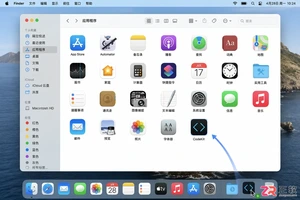
详解 CodeKit 在 macOS 下的安装步骤、项目导入方法、Sass与JavaScript编译设置及浏览器自动刷新功能,助您快速搭建高效的前端开发环境。
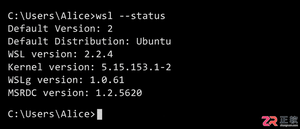
详解Windows环境下安装OpenAI Codex CLI的步骤,包括WSL环境检查、Node.js/npm配置、npm全局安装命令及首次启动验证,适合开发者快速上手。
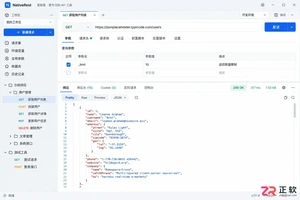
学习如何配置 NativeRest REST API 客户端。涵盖 Windows/macOS/Linux 安装后的工作区创建、环境变量管理、请求编辑及响应查看步骤,帮助开发者快速完成基础环境搭建与连通性测试。
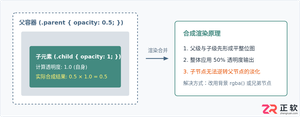
深入解析CSS中设置透明度的核心属性opacity,剖析子元素继承、事件穿透、层叠上下文等关键注意事项,并提供与rgba、hsla的实用选型对比。
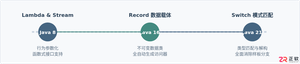
本文通过具体的旧版与新版代码对比,详细剖析Java 8引入的Lambda表达式、Java 14/16引入的Record类,以及Java 12至21逐步演进完善的Switch表达式与模式匹配,展示代码简化路径与避坑要点。
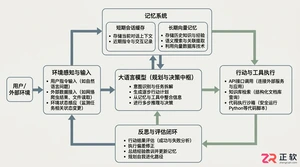
系统梳理AI智能体开发培训的核心知识模块、技术栈选型与典型实战项目,解析低代码平台与纯代码框架的差异,提供从零构建可落地智能体的完整学习与实施路径。
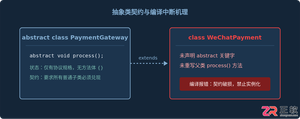
针对Java开发中常见的“子类未实现抽象方法”编译错误,深入分析报错原因,提供重写实现、声明抽象子类两种标准修复路径,并总结参数签名、访问修饰符等典型避坑要点。
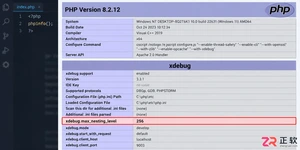
遇到PHP递归报错时,不要盲目调大max_nesting_level。本文教你区分Xdebug限制、内存耗尽和正则递归错误,提供代码级的终止条件优化与迭代替代方案,彻底解决栈溢出问题。
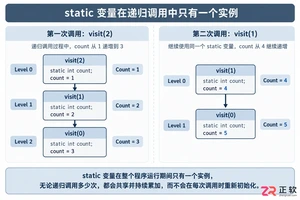
本文分析PHP递归中static变量导致的状态污染及引用传递引发的共享数据修改问题。提供具体的代码复现、缓存键设计建议及调试打印技巧,帮助开发者避免隐蔽的逻辑错误。




SketchUp Pro 是面向建筑、室内、景观及产品设计工作的专业三维建模套件,提供直观的推拉建模、精准尺寸控制、二维文档制作、模型资源库、扩展插件和云端协作能力。Mac 用户可使用桌面建模器与 LayOut。

Twinmotion是Epic Games推出的实时三维可视化软件,主要服务于建筑、景观、室内设计、城市规划及施工展示。它可导入常见CAD、BIM和三维模型,利用材质、植被、人物、天气与灯光资源快速搭建场景。

Vectorworks Architect是一款面向建筑师、室内设计师及AEC团队的专业BIM设计软件,可在统一环境中完成概念草图、二维制图、三维建模、建筑信息管理、施工文档和效果展示,并支持IFC、Revit、DWG、SketchUp及点


Photoshop 2026 是 Adobe 推出的专业图像处理与视觉设计软件,支持 Windows、macOS 和 iPad 等平台,广泛应用于摄影修图、电商设计、平面海报、数字绘画及视觉合成等创作场景。

Blender 是一款免费开源、跨平台的专业 3D 创作软件,集建模、动画、渲染、视频编辑与视觉合成等功能于一体,广泛应用于影视动画、游戏设计和建筑可视化等领域。软件支持 Cycles 物理渲染器与 Eevee 实时渲染引擎,并提供多边形建模、骨骼绑定、物理模拟等专业工具。Blender 兼容 Windows、macOS 和 Linux 系统,安装包轻巧、运行流畅,依托活跃的全球开发者社区持续更新,是从初学者到专业创作者都值得选择的正版 3D 创作工具。