Debian如何利用JS提升用户体验
在基于Debian的系统上,现代Ja vaScript技术栈配合稳健的工程实践,能够从多个层面重塑用户体验。具体来说,我们可以从前端性能、交互响应、自动化运维以及系统可观测性这四个关键维度入手,实现体验的显著跃升。 前端性能与交互优化 这个环节的目标很明确:让应用加载更快、运行更顺、交互更跟手。具体

在基于Debian的系统上,现代Ja vaScript技术栈配合稳健的工程实践,能够从多个层面重塑用户体验。具体来说,我们可以从前端性能、交互响应、自动化运维以及系统可观测性这四个关键维度入手,实现体验的显著跃升。
前端性能与交互优化
这个环节的目标很明确:让应用加载更快、运行更顺、交互更跟手。具体怎么做?
- 代码与规范:采用ES6+语法和模块化开发是基础。配合ESLint和Prettier统一代码风格,能极大提升团队协作效率。而用Jest或Mocha进行单元与集成测试,并集成到CI流程中,则是保障长期稳定性的安全网。
- 资源加载:用户可没耐心等待。启用代码分割(Code Splitting)和动态导入(import())实现按需加载,再用Terser等工具进行压缩。传输层面,HTTP/2和多路复用、配合CDN分发是加速利器。别忘了设置合理的Cache-Control和ETag,并利用Service Worker实现离线缓存,让应用在弱网环境下也能从容应对。
- 渲染与事件:频繁操作DOM是性能杀手。优先使用DocumentFragment或虚拟DOM技术来批量更新。事件处理上,采用事件委托减少监听器数量,并对scroll、resize这类高频事件应用防抖(Debounce)或节流(Throttle)。遇到计算密集型任务?果断交给Web Workers,别让主线程卡住界面响应。
- 动画与布局:动画效果务必优先使用CSS动画并触发GPU加速,这能有效减少重绘和回流。布局则推荐Flexbox或Grid,它们比传统的浮动布局更高效、更易维护。
- 监控与诊断:优化不能靠猜。开发阶段,Chrome DevTools的Performance面板和Lighthouse是定位瓶颈的黄金组合。上线后,则需要接入New Relic、Datadog这类应用性能监控(APM)工具,进行持续的性能观测。
- 示例 Webpack 配置(生产):下面是一个典型的生产环境Webpack配置示例,它集成了代码压缩、哈希和分块等优化策略:
综合运用上述策略,能够有效缩短TTFB(首字节时间)、FP(首次绘制)、FCP(首次内容绘制)和LCP(最大内容绘制)等核心指标,同时提升交互流畅度与离线可用性。const path = require('path'); const TerserPlugin = require('terser-webpack-plugin'); const MiniCssExtractPlugin = require('mini-css-extract-plugin'); module.exports = { entry: './src/index.js', output: { filename: '[name].[contenthash].js', path: path.resolve(__dirname, 'dist'), }, mode: 'production', optimization: { minimize: true, minimizer: [new TerserPlugin()], splitChunks: { chunks: 'all' }, }, module: { rules: [ { test: /\.css$/, use: [MiniCssExtractPlugin.loader, 'css-loader'], }, ], }, plugins: [ new MiniCssExtractPlugin({ filename: '[name].[contenthash].css' }), ], };
Node.js 自动化与系统运维
让机器去做重复、枯燥的工作,是提升效率和可靠性的不二法门。Node.js在Debian的自动化运维场景中大有可为。
- 运行环境:首先,在Debian上安装Node.js和npm。使用nvm(Node Version Manager)来管理多个Node.js版本,能轻松应对不同项目对环境的要求。
- 定时任务:借助node-cron这样的库,可以像写Cron表达式一样轻松编排计划任务。例如,下面这段代码实现了每日凌晨2点自动备份指定目录:
const cron = require('node-cron'); const { exec } = require('child_process'); const fs = require('fs'); const path = require('path'); const backupDir = '/path/to/backup'; const sourceDir = '/path/to/source'; if (!fs.existsSync(backupDir)) fs.mkdirSync(backupDir, { recursive: true }); cron.schedule('0 2 * * *', () => { const ts = new Date().toISOString().replace(/:/g, '-'); const file = path.join(backupDir, `backup-${ts}.tar.gz`); exec(`tar -czvf ${file} ${sourceDir}`, (err, stdout, stderr) => { if (err) console.error('备份失败:', err.message); else if (stderr) console.error('备份错误:', stderr); else console.log('备份成功:', stdout); }); }); - 进程守护与自启:脚本写好了,如何保证它7x24小时稳定运行?答案是systemd。创建一个服务单元文件(如automate.service),内容如下:
保存后,执行[Unit] Description=Automate JS Tasks After=network.target [Service] ExecStart=/usr/bin/node /path/to/your_script.js Restart=always User=your_username [Install] WantedBy=multi-user.targetsudo systemctl daemon-reload && sudo systemctl enable --now automate.service即可启用并开机自启。需要查看实时日志?journalctl -u automate.service -f命令能派上用场。 - 适用场景:这类自动化脚本的用武之地非常广泛:日志轮转与归档、定时生成业务报表、批量处理图片或视频、定期检查SSL证书有效期和备份完整性等。其核心价值在于减少人工干预,降低因疏忽导致的运维风险。
日志与可观测性
系统出了问题却找不到原因?那感觉就像在黑暗中摸索。构建完善的日志与可观测性体系,就是为你点亮一盏灯。
- 应用日志:在Node.js应用中,别再用简单的console.log了。采用Winston或Bunyan这类专业日志库,可以输出结构化的JSON日志,便于后续的检索、过滤和聚合分析。例如:
const winston = require('winston'); const logger = winston.createLogger({ level: 'info', format: winston.format.json(), transports: [ new winston.transports.File({ filename: '/var/log/nodejs_system.log' }), ], }); logger.info('服务启动', { pid: process.pid }); - 系统日志联动:应用日志要管,系统日志也不能放过。通过
sudo journalctl -u automate.service -f可以实时追踪托管服务的输出。对于前端异常,可以接入Sentry或Bugsnag进行捕获和上报。这样,就形成了从前端到后端的一体化可观测链条。 - 监控告警:日志用于事后排查,监控则着眼于事前预警。接入Prometheus+Grafana组合,或直接使用New Relic、Datadog等商业APM工具,对HTTP请求延迟、错误率、内存及CPU使用率等关键指标进行持续监控。一旦指标超过预设阈值,立即通过邮件、信息或钉钉/Slack发送告警,从而大幅缩短故障发现与恢复的时间(MTTD/MTTR)。
部署与运行环境建议
最后的成功,往往取决于细节。以下这些部署与环境配置建议,能确保你的应用跑得更稳、更快。
- 版本与进程管理:保持Debian系统、Node.js运行时及npm/yarn包管理器处于最新的稳定版本。使用nvm灵活切换项目所需的Node版本。生产环境强烈推荐使用PM2进行进程守护,它提供了自动重启、负载均衡和资源监控等强大功能。
- 传输与缓存:在Nginx等Web服务器中,务必启用Gzip或Brotli压缩以减少传输体积,并开启HTTP/2以提升并发性能。为静态资源(如JS、CSS、图片)设置长期的Cache-Control头,并配合ETag验证。结合CDN的边缘缓存能力,能进一步将内容推近用户。
- 资源与网络:硬件是性能的基石。优先使用SSD硬盘以优化磁盘I/O,并确保内存充足。在公网部署时,启用HTTP/2或HTTP/3可以显著减少连接握手开销,提升网络传输效率。
- 持续交付:将代码规范检查(ESLint)、自动化测试(Jest)、构建打包及产物校验等步骤集成到CI/CD流水线中。实现自动部署到Nginx静态目录或由PM2托管的Node服务,并确保每次部署都具备可回滚的能力,从而保障线上环境的一致性与可靠性。
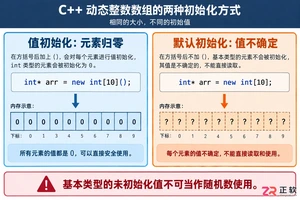
深入解析C++中动态数组的初始化机制,涵盖new操作符的不同用法、基本类型与类对象的初始化差异,以及为何在现代C++开发中应优先使用std::vector。
命名空间的基本概念与常见引入问题在C++等编程语言中,命名空间(namespace)是一种将代码标识符(如变量、函数、类名)封装在特定名称下的机制,其主要目的是避免命名冲突,尤其是在大型项目或使用多个第三方库时。使用“using namespace”指令可以将指定命名空间中的所有名称引入当前作用域,

理解递归的基本原理在C语言中,递归是一种函数调用自身的编程技术。要掌握它,首先需要理解其核心思想:将一个复杂的大问题,分解为一个或几个与原问题相似但规模更小的子问题,直到子问题足够简单,可以直接求解。这个过程通常包含两个关键部分:递归出口和递归体。递归出口定义了问题何时不再继续分解,即最简单、可直接

递归函数的基本概念与适用场景在C语言编程中,递归是一种函数调用自身的编程技巧。它并非适用于所有问题,但在处理某些具有自相似结构的问题时,能提供极其清晰和优雅的解决方案。递归的核心思想是将一个大规模问题分解为一个或多个同类型但规模更小的子问题,直到子问题简单到可以直接求解。典型的适用场景包括树形结构的
理解内存管理的基石在Objective-C的编程世界中,内存管理是开发者必须掌握的核心技能之一。它直接关系到应用的性能、稳定性与资源利用效率。与一些采用自动垃圾回收机制的语言不同,Objective-C在很长一段时间里,依赖一套基于引用计数的、需要开发者部分介入的管理规则。这套规则的核心思想是明确的
理解 dealloc 的角色与时机在 iOS 应用开发中,内存管理是保障应用性能与稳定性的基石。dealloc 方法是 Objective-C 中对象生命周期结束时的关键回调,它标志着对象即将被系统回收内存。正确理解其触发时机至关重要:当一个对象的引用计数降为零时,运行时系统会自动调用该对象的 de
内存管理的基石在Objective-C的世界里,内存管理是开发者必须掌握的核心技能之一。作为一门在手动引用计数(MRC)时代诞生的语言,Objective-C要求程序员对对象的生命周期有清晰的认识。dealloc方法正是这一生命周期中至关重要的终点站。它是一个实例方法,当对象的引用计数降为零时,系统

native2ascii 工具的基本定位在Ja va应用程序的国际化与本地化开发过程中,处理非拉丁字符集是一个常见且关键的环节。Ja va内部使用Unicode字符集来统一表示全球各种语言的文字,但其属性文件(.properties)在历史上要求使用ASCII编码,或者更准确地说,要求非ASCII字

理解 native2ascii 工具的基本用途在软件开发,特别是涉及国际化处理的场景中,开发者常常需要处理不同编码的文本资源。native2ascii 是 Ja va 开发工具包(JDK)中提供的一个命令行实用程序,其主要功能是将包含本地字符编码(非ASCII字符)的文件,转换为包含 Unicode

native2ascii 命令的由来与作用在Ja va开发中,处理国际化资源文件是一个常见需求。资源文件通常以.properties格式存储,用于支持多语言界面。然而,Ja va属性文件默认采用ISO-8859-1字符集编码,这导致了一个直接的问题:当文件中包含非拉丁字符(如中文、日文、韩文等)时,






Windows 10 是一款微软推出的经典操作系统,拥有硬件兼容性与多任务处理能力。它更偏向把系统状态查看和常用调节动作放在一起,适合需要持续观察和微调设备状态的场景。

极度公式是一款跨平台专业LaTeX公式识别编辑软件,支持OCR公式识别和多平台编辑。和使用说明,避免使用,享受完整功能与稳定支持。做扫描整理、文字提取和表格转换时,它能把识别后的处理步骤接得更顺,资料录入这类场景会省下不少时间。