inotify如何实现跨平台监控
inotify仅支持Linux,无法跨平台。使用Python的watchdog或Go的fsnotify,封装各平台原生接口,实现统一的文件系统监控,无需关心底层差异。
inotify 是 Linux 下监控文件系统事件的一把好手,但它的硬伤也很明显——只认 Linux。一旦你需要在 Windows、macOS 之间切换,或者写一个跨平台的工具,inotify 自己就无能为力了。好在社区早就想好了对策,下面这几条路,基本覆盖了主流的需求场景。

1. 用跨平台的库,把底层差异藏起来
a. watchdog —— Python 首选
watchdog 是 Python 生态里最成熟的文件监控库,Windows、Linux、macOS 通吃,API 统一,上手极快。
安装:
pip install watchdog示例代码:
import time
from watchdog.observers import Observer
from watchdog.events import FileSystemEventHandler

class MyHandler(FileSystemEventHandler):
    def on_modified(self, event):
        print(f'File {event.src_path} has been modified')
    def on_created(self, event):
        print(f'File {event.src_path} has been created')
    def on_deleted(self, event):
        print(f'File {event.src_path} has been deleted')

if __name__ == "__main__":
    path = "/path/to/monitor"
    event_handler = MyHandler()
    observer = Observer()
    observer.schedule(event_handler, path, recursive=True)
    observer.start()
    try:
        while True:
            time.sleep(1)
    except KeyboardInterrupt:
        observer.stop()
    observer.join()
这段代码的逻辑很直白:定义事件处理器,然后启动后台线程去监听。你只需要替换 path 就能跑起来,底层用的是操作系统原生的监控机制(Linux 下就是 inotify,Windows 下用 ReadDirectoryChangesW,macOS 用 FSEvents),完全不需要关心平台差异。
b. fsnotify —— Go 语言的好搭档
如果你写 Go 程序,fsnotify 是标准选择。它同样封装了各平台的原生接口,API 简洁。
安装:
go get github.com/fsnotify/fsnotify示例代码:
package main

import (
    "log"
    "os"
    "github.com/fsnotify/fsnotify"
)

func main() {
    watcher, err := fsnotify.NewWatcher()
    if err != nil {
        log.Fatal(err)
    }
    defer watcher.Close()

    done := make(chan bool)
    go func() {
        for {
            select {
            case event, ok := <-watcher.Events:
                if !ok {
                    return
                }
                log.Println("event:", event)
            case err, ok := <-watcher.Errors:
                if !ok {
                    return
                }
                log.Println("error:", err)
            }
        }
    }()

    err = watcher.Add("/path/to/monitor")
    if err != nil {
        log.Fatal(err)
    }
    <-done
}
这里用 channel 处理事件流,Go 开发者应该很熟悉。同样的,/path/to/monitor 换成你实际要监听的目录即可。
2. 用命令行工具,单靠 Shell 也能干活
a. inotifywait + WSL / Cygwin
如果你对 inotify-tools 里的 inotifywait 情有独钟,又想把它带到 Windows 上,可以考虑 WSL 或 Cygwin。本质上是在 Windows 里跑一个 Linux 子系统,然后安装 inotify-tools。
Linux 上安装:
sudo apt-get install inotify-toolsWindows 上通过 WSL 安装同样的命令:
sudo apt-get install inotify-tools使用示例:
inotifywait -m /path/to/monitor -e modify,create,delete这种方式虽然能在 Windows 上工作,但毕竟多了 WSL 这一层,性能和集成度不如原生方案。
b. fswatch —— 真正的跨平台命令行工具
fswatch 是专门为解决跨平台文件监控而生的小工具,Windows、Linux、macOS 都原生支持,不需要虚拟机或子系统。
Linux 安装:
sudo apt-get install fswatchmacOS 安装:
brew install fswatchWindows 上可以通过 Chocolatey 安装:
choco install fswatch使用示例:
fswatch -0 /path/to/monitor | xargs -0 -I {} echo "File {} has been modified"fswatch 的输出风格和 inotifywait 类似,但它在底层自动选择了最适合当前操作系统的接口(Linux 用 inotify,macOS 用 FSEvents,Windows 用 ReadDirectoryChangesW),省心不少。
说到底,选哪种方案取决于你的场景:如果是写 Python 脚本,watchdog 最省力;如果是 Go 项目,fsnotify 是标配;如果只想在 shell 里快速解决问题,fswatch 是最优雅的跨平台命令行武器。
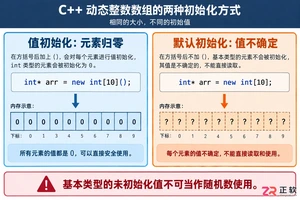
深入解析C++中动态数组的初始化机制,涵盖new操作符的不同用法、基本类型与类对象的初始化差异,以及为何在现代C++开发中应优先使用std::vector。

引言 Hashcat 被广泛认为是世界上最快、最先进的密码恢复工具。它是渗透测试人员和安全专业人员武器库中的必备工具。在使用它破解哈希(hashes)之前,你必须首先确保它已在你的系统上正确安装并完全可用。 在本实验(lab)中,你将执行一系列简单的检查,以验证 Hashcat 在你的 Kali L

引言 Gobuster 是一个强大的工具,用于目录和文件暴力破解、DNS 子域暴力破解以及 S3 存储桶枚举。它是渗透测试人员和安全爱好者发现 Web 服务器上隐藏路径和资源的重要实用程序。 在本实验中,你将学习在 Kali Linux 环境中安装 Gobuster 的基本步骤。你将使用 CODE_

谷歌计划为Pixel7至10系列进行Linux内核重大升级,从旧版本统一跃升至Linux6.12。新内核优化了CPU调度和内存管理,有望提升流畅度、安全性与发热控制,并可能改善Pixel10的GPU性能。该更新预计随Android17QPR2年底推送,Pixel6因支持终止无缘升级。












Windows 10 是一款微软推出的经典操作系统,拥有硬件兼容性与多任务处理能力。它更偏向把系统状态查看和常用调节动作放在一起,适合需要持续观察和微调设备状态的场景。

极度公式是一款跨平台专业LaTeX公式识别编辑软件,支持OCR公式识别和多平台编辑。和使用说明,避免使用,享受完整功能与稳定支持。做扫描整理、文字提取和表格转换时,它能把识别后的处理步骤接得更顺,资料录入这类场景会省下不少时间。