Java定时器怎么实现?Timer和线程池方法全攻略
 发布于2026-07-15 阅读(0)
扫一扫,手机访问
Ja va实现定时任务,在开发中算是一个高频需求了。虽然JDK本身提供了多种方案,但在实际项目中,到底选哪一种、怎么用更合理,还是有讲究的。下面把这几种常见方式拆开来看,从基础工具到框架集成,一步步说清楚。
方法一、使用Timer
Timer和TimerTask是ja va.util包下的原生类,专门用来处理定时任务。使用起来非常直接:
- 第一步:创建TimerTask定时器任务
- 第二步:创建Timer定时器,调用定时器的方法执行任务
TimerTask实现了Runnable接口,所以它的实例本质上就是一个可执行的任务。Timer中提供了两个核心方法来调度任务:schedule()和scheduleAtFixedRate()。
schedule()
void schedule(TimerTask task, Date time)
在指定的时间点执行一次任务。如果那个时间已经过去了,任务会立即执行。
void schedule(TimerTask task, long delay)
延迟指定毫秒数后执行一次任务。
void schedule(TimerTask task, long delay, long period)
延迟delay毫秒后,每period毫秒周期性地执行任务。
public void schedule(TimerTask task, Date firstTime, long period)
从firstTime指定时间开始,每period毫秒执行一次。
scheduleAtFixedRate()
void scheduleAtFixedRate(TimerTask task, long delay, long period)
延迟delay毫秒后,按固定频率每period毫秒执行一次。
void scheduleAtFixedRate(TimerTask task, Date firstTime,long period)
从firstTime指定时间开始,按固定频率每period毫秒执行一次。
看个完整案例:
import ja va.util.Date;
import ja va.util.Timer;
import ja va.util.TimerTask;

public class TimerExample {

    public static void main(String[] args) {
        Timer timer = new Timer();

        TimerTask task = new TimerTask() {
            @Override
            public void run() {
                System.out.println("Hello world!");
            }
        };

        timer.schedule(task, new Date()); // 立即执行一次
        timer.schedule(task, 1000); // 1秒后执行一次
        timer.schedule(task, new Date(), 2000); // 每2秒执行一次
        timer.schedule(task, 2000, 2000); // 2秒后每2秒执行一次

        timer.scheduleAtFixedRate(task, 3000, 3000); // 3秒后每3秒执行一次
        timer.scheduleAtFixedRate(task, new Date(), 4000); // 每3秒执行一次
    }

}
方法二、使用线程池
Ja va线程池体系中有一个专门用来执行定时任务的类——ScheduledExecutorService。它提供了三个核心方法:
- schedule()
- scheduleAtFixedRate()
- scheduleWithFixedDelay()
其中TimeUnit是一个枚举,用来指定时间单位,比如NANOSECONDS、MICROSECONDS、MILISECONDS、SECONDS、MINUTES、HOURS、DAYS等。与Timer相比,ScheduledExecutorService的方法多了一个返回值,类型是ScheduledFuture,这在需要取消任务或获取结果时非常有用。
schedule()
public ScheduledFuture schedule(Runnable command, long delay, TimeUnit unit)
延迟指定时间单位后执行一次任务。
publicScheduledFuture schedule(Callable callable, long delay, TimeUnit unit)
延迟指定时间单位后执行一次Callable任务,并返回结果。
scheduleAtFixedRate()
public ScheduledFuture scheduleAtFixedRate(Runnable command, long initialDelay, long period, TimeUnit unit)
延迟initialDelay个时间单位后,按period个时间单位固定频率执行。
scheduleWithFixedDelay()
public ScheduledFuture scheduleWithFixedDelay(Runnable command, long initialDelay, long delay, TimeUnit unit)
延迟initialDelay后,每次任务执行完后等待delay个时间单位再执行下一次。
案例代码:
import ja va.util.concurrent.Callable;
import ja va.util.concurrent.Executors;
import ja va.util.concurrent.ScheduledExecutorService;
import ja va.util.concurrent.TimeUnit;
public class ScheduledExecutorServiceExample {
public static void main(String[] args) {
Runnable task = new Runnable() {
@Override
public void run() {
System.out.println("Hello world!");
}
};
ScheduledExecutorService scheduledThreadPool = Executors.newScheduledThreadPool(2);
scheduledThreadPool.schedule(task, 3, TimeUnit.SECONDS); // 3秒后执行一次
scheduledThreadPool.schedule(new Callable
方法三、使用Spring Task
如果项目用了Spring Boot,那么Spring Task是最省心的方案。只需要两步:
第一步:在启动类上添加@EnableScheduling注解,开启定时任务支持。
import org.springframework.boot.SpringApplication;
import org.springframework.boot.autoconfigure.SpringBootApplication;
import org.springframework.scheduling.annotation.EnableScheduling;

@EnableScheduling
@SpringBootApplication
public class TimerApplication {

    public static void main(String[] args) {
        SpringApplication.run(TimerApplication.class, args);
    }

}
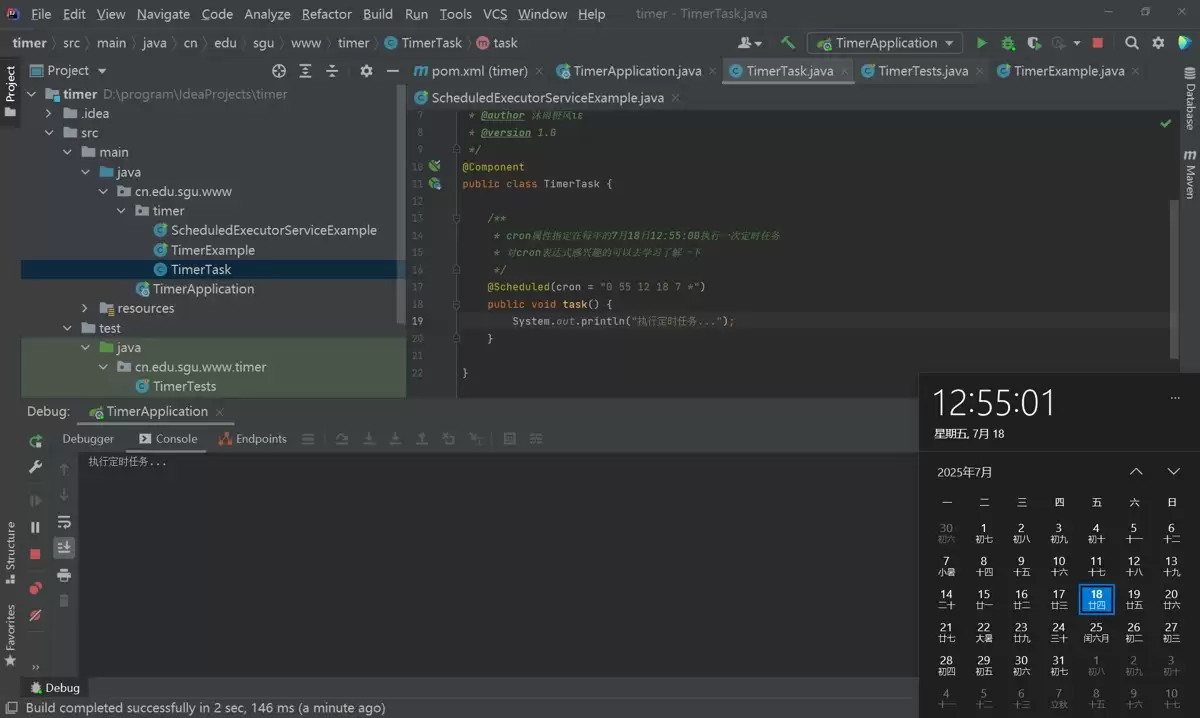
第二步:创建一个组件,在方法上添加@Scheduled注解,并通过cron属性指定执行时间。
import org.springframework.scheduling.annotation.Scheduled;
import org.springframework.stereotype.Component;

@Component
public class TimerTask {

    /**
     * cron属性指定在每年的7月18日12:55:00执行一次定时任务
     */
    @Scheduled(cron = "0 55 12 18 7 *")
    public void task() {
        System.out.println("执行定时任务...");
    }

}
时间一到,控制台就会输出结果。
方法四、使用Quartz任务调度框架
Quartz是一个功能更强大的任务调度框架,Spring Boot对其有很好的集成支持。步骤如下:
第一步:在pom.xml中添加依赖。
    org.springframework.boot
    spring-boot-starter-quartz
第二步:创建一个任务类,实现Job接口。
import org.quartz.Job;
import org.quartz.JobExecutionContext;
import org.springframework.stereotype.Component;

@Component
public class QuartzJob implements Job {

    @Override
    public void execute(JobExecutionContext jobExecutionContext) {
        System.out.println("执行QuartzJob定时任务...");
    }

}
第三步:配置任务触发条件。用JobDetail绑定任务类,用Trigger定义触发规则(比如Cron表达式)。
import org.quartz.*;
import org.springframework.context.annotation.Bean;
import org.springframework.context.annotation.Configuration;

@Configuration
public class QuartzConfig {

    @Bean
    public JobDetail jobDetail() {
        return JobBuilder.newJob(QuartzJob.class)
                .withIdentity("quartzJob")
                .storeDurably()
                .build();
    }

    @Bean
    public Trigger trigger(JobDetail jobDetail) {
        CronScheduleBuilder cronScheduleBuilder = CronScheduleBuilder.cronSchedule("0/10 * * * * ?");

        return TriggerBuilder.newTrigger()
                .forJob(jobDetail)
                .withIdentity("trigger")
                .withSchedule(cronScheduleBuilder)
                .build();
    }

}
总结
从原生的Timer到线程池的ScheduledExecutorService,再到Spring Task和Quartz,每种方案都有各自的适用场景。Timer简单但缺少线程池管理能力,ScheduledExecutorService灵活且可靠,Spring Task开箱即用,Quartz则适合复杂的企业级调度需求。掌握这些,日常开发中的定时任务基本都能覆盖了。
免责声明:正软商城发布此文仅为传递信息,不代表正软商城认同其观点或证实其描述。
产品推荐
-

售后无忧
立即购买>- DAEMON Tools Lite 10【序列号终身授权 + 中文版 + Win】
-
¥150.00
office旗舰店
-

售后无忧
立即购买>- DAEMON Tools Ultra 5【序列号终身授权 + 中文版 + Win】
-
¥198.00
office旗舰店
-

售后无忧
立即购买>- DAEMON Tools Pro 8【序列号终身授权 + 中文版 + Win】
-
¥189.00
office旗舰店
-

售后无忧
立即购买>- CorelDRAW X8 简体中文【标准版 + Win】
-
¥1788.00
office旗舰店
-
 正版软件
正版软件
- ~a在C语言中是按位取反操作符,用于对变量a的每一位进行取反操作。具体来说,如果某一位是0,则变为1;如果是1,则变为0。需要注意的是,C语言中并没有“~”这个
- 在C语言中,~操作符的作用是对操作数的每一位进行取反操作。1)对于整数5,取反后变为-6;2)在嵌入式系统中,可用于控制LED灯开关;3)需注意有符号整数取反可能导致符号位变化;4)在网络编程中,可用于快速切换标志位状态。
- 23小时前 13:51 150
-
 正版软件
正版软件
- using namespace 使用中遇到的问题怎么解决
- 命名空间的基本概念与常见引入问题在C++等编程语言中,命名空间(namespace)是一种将代码标识符(如变量、函数、类名)封装在特定名称下的机制,其主要目的是避免命名冲突,尤其是在大型项目或使用多个第三方库时。使用“using namespace”指令可以将指定命名空间中的所有名称引入当前作用域,
- 12天前 0
-
 正版软件
正版软件
- c语言函数递归 实操经验总结:这些技巧很实用
- 理解递归的基本原理在C语言中,递归是一种函数调用自身的编程技术。要掌握它,首先需要理解其核心思想:将一个复杂的大问题,分解为一个或几个与原问题相似但规模更小的子问题,直到子问题足够简单,可以直接求解。这个过程通常包含两个关键部分:递归出口和递归体。递归出口定义了问题何时不再继续分解,即最简单、可直接
- 12天前 0
-
 正版软件
正版软件
- c语言函数递归 怎么选?常见方案对比分析
- 递归函数的基本概念与适用场景在C语言编程中,递归是一种函数调用自身的编程技巧。它并非适用于所有问题,但在处理某些具有自相似结构的问题时,能提供极其清晰和优雅的解决方案。递归的核心思想是将一个大规模问题分解为一个或多个同类型但规模更小的子问题,直到子问题简单到可以直接求解。典型的适用场景包括树形结构的
- 12天前 0
-
 正版软件
正版软件
- Objective-C 内存管理入门:从 alloc 到 dealloc 的生命周期详解
- 理解内存管理的基石在Objective-C的编程世界中,内存管理是开发者必须掌握的核心技能之一。它直接关系到应用的性能、稳定性与资源利用效率。与一些采用自动垃圾回收机制的语言不同,Objective-C在很长一段时间里,依赖一套基于引用计数的、需要开发者部分介入的管理规则。这套规则的核心思想是明确的
- 12天前 0
最新发布
-
 1
1
-
 2
2
-
 3
3
- C语言中\n是什么意思?换行转义字符详解
- 345天前
-
4
- 探析Spring Boot框架的优点和特色
- 661天前
-
5
- 深入比较PyCharm社区版和专业版的功能
- 599天前
-
6
- 专家观点:谷歌是否会继续支持Golang的探讨
- 575天前
-
 7
7
-
 8
8
- Python实战教程:批量转换多种音乐格式
- 1207天前
-
9
- 如何在在线答题中实现试卷的自动批改和自动评分
- 1035天前
相关推荐
热门关注
-

- Nero AI Video Upscaler
- ¥27.30-¥39.00
-

- DockFlow
- ¥45.00-¥45.00
-

- 远离手机
- ¥10.00-¥10.00
-
- Trym
- ¥19.00-¥19.00
-
- Scherlokk
- ¥99.00-¥99.00