

NIO文件系统异常分析与解决方法
在使用nio加载文件时,在idea中运行没有问题,但打成jar包后在windows和linux下都有问题:代码语言:javascript代码运行次数:0运行复制publicstaticvoidmain(String[]args)throwsException{//SpringApplication.run(MarketCollectApplication.class,args);URIuri=MarketCollectApplication.cla
public static void main(String[] args) throws Exception{ // SpringApplication.run(MarketCollectApplication.class,args); URI uri = MarketCollectApplication.class.getClassLoader().getResource("conf/sh.txt").toURI(); FileSystem aDefault = FileSystems.getDefault(); System.out.println(aDefault.getClass()); FileSystemProvider provider = FileSystems.getDefault().provider(); System.out.println(provider.getClass()); System.out.println("====================" + uri.getScheme()); List fileSystemProviders = FileSystemProvider.installedProviders(); fileSystemProviders.forEach(p -> { System.out.println(p.getClass()); }); Path path = Paths.get(uri); } class sun.nio.fs.WindowsFileSystemclass sun.nio.fs.WindowsFileSystemProvider====================fileclass sun.nio.fs.WindowsFileSystemProviderclass com.sun.nio.zipfs.ZipFileSystemProvider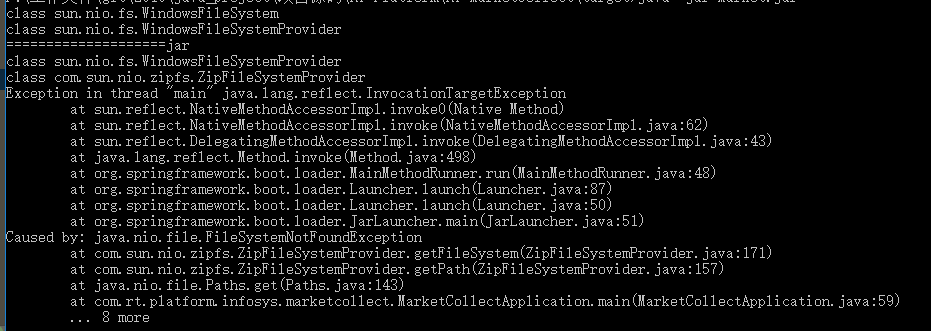
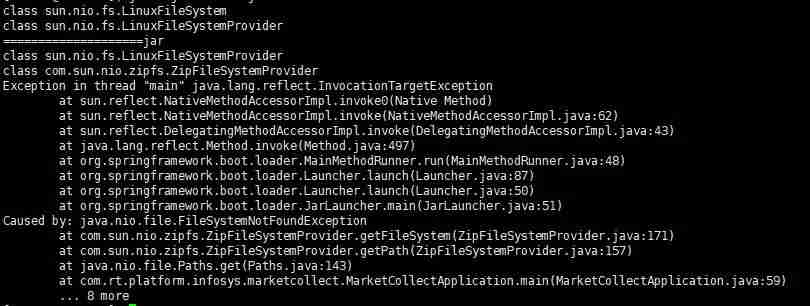
public static Path get(URI uri) { String scheme = uri.getScheme(); if (scheme == null) throw new IllegalArgumentException("Missing scheme"); // check for default provider to avoid loading of installed providers if (scheme.equalsIgnoreCase("file")) return FileSystems.getDefault().provider().getPath(uri); // try to find provider for (FileSystemProvider provider: FileSystemProvider.installedProviders()) { if (provider.getScheme().equalsIgnoreCase(scheme)) { return provider.getPath(uri); } } throw new FileSystemNotFoundException("Provider \"" + scheme + "\" not installed"); } Path path = null; try{ path = Paths.get(uri); }catch (Exception e){ //@see https://stackoverflow.com/questions/25032716/getting-filesystemnotfoundexception-from-zipfilesystemprovider-when-creating-a-p //@see http://docs.oracle.com/javase/7/docs/technotes/guides/io/fsp/zipfilesystemprovider.html FileSystem zipfs = FileSystems.newFileSystem(uri, env); path = Paths.get(uri); }或者使用其他办法加载资源文件:
代码语言:javascript代码运行次数:0运行复制byte[] data;try (InputStream in = getClass().getResourceAsStream("/elasticsearch/segmentsIndex.json")) { data = IOUtils.toByteArray(in);}
ApacheHttpClient是处理HTTP通信的强大工具库,能简化网络操作并提升效率。首先需配置HttpClient实例,设置超时和连接池以优化性能。通过各类请求对象发送GET或POST等请求,并正确处理响应状态码和响应体,注意使用try-with-resources管理资源。高级功能包括连接池管理、重试机制和拦截器,有助于增强健壮性。实践中应复用客户端

运行JAR文件的先决条件在Linux系统上运行JAR文件需要安装Java运行时环境(JRE),它是执行Java应用程序所需的基本组件,包括Java虚拟机(JVM)、核心类库等。许多主流Linux发行版,如Ubuntu、Debian、Fedora、openSUSE等,都提供了JRE包的软件库,方便用户进行安装。后文将详细介绍在流行的发行版上安装JRE的步骤。设置完JRE后,可以根据个人喜好选择使用命令行终端或图形用户界面来启动JAR文件。您的选择可能取决于对Linuxshell的熟悉程度和个人偏好。在Lin

Maven实战指南:轻松导入Jar包的实用技巧Maven是Java项目管理工具中使用广泛的一个工具,通过它可以有效管理项目的构建、依赖等。在Java开发中,经常会遇到需要导入第三方Jar包的情况,而Maven可以帮助我们高效地管理这些依赖。本文将介绍几种实用的技巧,帮助读者轻松导入Jar包,并附带具体的代码示例。技巧一:在pom.xml文件中添加依赖在Mav

maven的命令:1.mvncleanpackage-DskipTests:在项目目录下运行此命令,在target目录下生成jar包或war包。2.mvnclean:清理项目生产的临时文件,一般是模块下的target目录3.mvncompile-DskipTests:模块安装命令将打包的的jar/war文件复制到你的本地仓库中,供其他模块使用-Dmaven.test.skip=true跳过测试(同时会跳过testcompile).4.mvntest:测试命令,或执行src/test/java/下junit
具体代码如下所示:#!/bin/bashcd`dirname$0`cur_shell_dir=`pwd`cur_shell_name=`basename${bash_source}`#修改这里jar包名即可jar_name="xxxxxxxxxxxx.jar"jar_path=$cur_shell_dir/$jar_name#java_mem_opts="-server-xms1024m-xmx1024m-xx:permsize=128m"java_mem_opts=""#spring_profiles_
一.springboot的jar包是内嵌tomcat的,所以只要导出之后,直接运行就行。二.然后来到IDEA的pom.xml文件夹,增加一个packaging标签0.0.1-SNAPSHOTjar三.IDEA左下角选择MavenProjects,先clean一下,在双击package开始打包。四.等运行完,会发现项目中多了一个target文件夹,里面就有生成的jar包。五.Window+R调出运行窗口,然后cmd,进入jar包所在位置,然后java-jar再加上jar包的名称,jar包成功在后台运行!!六

部署到webapps目录启动本文使用的Spring版本为Spring6,SpringBoot版本为3,JDK为17,可能会和之前有细微不同,但整体流程差不太大。如果部署应用到tomcatwebapps目录下面启动,则需要在项目中配置web.xml文件web.xml文件配置Spring应用上下文contextConfigLocation/WEB-INF/spring/application-context.xmlorg.springframework.web.context.ContextLoaderLis
由于springboot常用war包部署,改为cloud开发模式多端口情况下,部署反而不习惯毕竟,war包要不要项目名访问都必须放在tomcat的root目录下而此目录限制只能放置一个项目,并且登录端口限制为tomcat的接口了因此,jar包部署就成了必然的方式了1、添加pom设置静态文件需要访问,所以静态文件webapp下的文件需要重新指定位置,具体配置如下src/main/webappMETA-INF/resources**/*.*false2、打包方式从war包改为jar包1.注释war包模式jar
主要配置:${project.artifactId}org.springframework.bootspring-boot-maven-plugin配置输出:cdpackage-optimize-level0mvncleaninstallls-lhpackage-optimize-app1/target/package-optimize-app1.jar-rw-r--r--1lixiawheel16MFeb2421:06package-optimize-app1/target/package-optimi

背景某项目,客户要求使用已有的weblogic部署已经开发好的springboot,于是乎对springboot进行了部分配置的调整,主要包括去除tomcat依赖,增加启动类的处理。一般都会比较顺利,实际上总会遇到些小问题。问题1打包后发布到weblogic上启动时,如下图所示的错误:从异常内容可以很容易判断出,这是jar包冲突导致的错误。经过定位,weblogic有个目录wls12213\oracle_common\modules\thirdparty,其中存放了一些第三方的默认的jar包,项目启动过程




Postman是一套面向API全生命周期的开发与测试平台,可在Mac上发送和调试多种协议请求,管理集合、环境及认证信息,并完成脚本测试、模拟服务、监控、文档发布和团队协作。它适合开发、测试及运维人员使用,提供个人免费方案。

Docker Desktop 是 Docker 官方为 Mac 提供的容器开发环境,集成 Docker Engine、命令行工具、Compose、Build、Kubernetes 与图形化管理界面。

Android Studio 是 Google 面向安卓应用开发提供的官方集成开发环境,基于 IntelliJ IDEA 构建。它整合智能代码编辑、Gradle 构建、界面预览、设备模拟、性能分析、调试测试及 APK 分析等工具。

Postman 是面向 API 全生命周期的开发与协作平台。Windows 桌面版可用于构建和发送 HTTP、GraphQL、gRPC、WebSocket、MQTT 等请求,并提供环境变量、集合、脚本测试、模拟服务、监控、文档及团队工作区等

Docker Desktop 为 Windows 开发者提供集成式容器环境,内置 Docker Engine、命令行工具、Compose、Build 与 Kubernetes 等组件,可在本机完成镜像构建、容器运行、日志查看和资源管理。

Android Studio 是 Google 面向 Android 应用开发提供的官方集成开发环境,以 IntelliJ IDEA 为基础,集成智能代码编辑、Gradle 构建、设备模拟、界面预览、调试测试及性能分析工具,