

springboot与mybatis整合的方法
整合MyBatis新建SpringBoot项目,或以Chapter1为基础来操作pom.xml中引入依赖这里用到spring-boot-starter基础和spring-boot-starter-test用来做单元测试验证数据访问引入连接mysql的必要依赖mysql-connector-java引入整合MyBatis的核心依赖mybatis-spring-boot-starter这里不引入spring-boot-starter-jdbc依赖,是由于mybatis-spring-boot-starter中
整合MyBatis
新建Spring Boot项目,或以Chapter1为基础来操作
pom.xml中引入依赖
这里用到spring-boot-starter基础和spring-boot-starter-test用来做单元测试验证数据访问
引入连接mysql的必要依赖mysql-connector-java
引入整合MyBatis的核心依赖mybatis-spring-boot-starter
这里不引入spring-boot-starter-jdbc依赖,是由于mybatis-spring-boot-starter中已经包含了此依赖
 org.springframework.boot
 spring-boot-starter-parent
 1.3.2.RELEASE


 org.springframework.boot
 spring-boot-starter


 org.springframework.boot
 spring-boot-starter-test
 test


 org.mybatis.spring.boot
 mybatis-spring-boot-starter
 1.1.1


 mysql
 mysql-connector-java
 5.1.21
同之前介绍的使用jdbc和spring-data连接数据库一样,在application.properties中配置mysql的连接配置
spring.datasource.url=jdbc:mysql://localhost:3306/test
spring.datasource.username=root
spring.datasource.password=123456
spring.datasource.driver-class-name=com.mysql.jdbc.Driver
同其他Spring Boot工程一样,简单且简洁的的完成了基本配置,下面看看如何在这个基础下轻松方便的使用MyBatis访问数据库。
使用MyBatis
在Mysql中创建User表,包含id(BIGINT)、name(INT)、age(VARCHAR)字段。同时,创建映射对象User
public class User {
  private Long id;
  private String name;
  private Integer age;
  // 省略getter和setter
}
创建User映射的操作UserMapper,为了后续单元测试验证,实现插入和查询操作
@Mapper
public interface UserMapper {
  @Select("SELECT * FROM USER WHERE NAME = #{name}")
  User findByName(@Param("name") String name);
  @Insert("INSERT INTO USER(NAME, AGE) VALUES(#{name}, #{age})")
  int insert(@Param("name") String name, @Param("age") Integer age);
}
创建Spring Boot主类
@SpringBootApplication
public class Application {
 public static void main(String[] args) {
 SpringApplication.run(Application.class, args);
 }
}
创建单元测试
测试逻辑:插入一条name=AAA,age=20的记录,然后根据name=AAA查询,并判断age是否为20
测试结束回滚数据,保证测试单元每次运行的数据环境独立
@RunWith(SpringJUnit4ClassRunner.class)
@SpringApplicationConfiguration(classes = Application.class)
public class ApplicationTests {
 @Autowired
 private UserMapper userMapper;
 @Test
 @Rollback
 public void findByName() throws Exception {
 userMapper.insert("AAA", 20);
 User u = userMapper.findByName("AAA");
 Assert.assertEquals(20, u.getAge().intValue());
 }
} 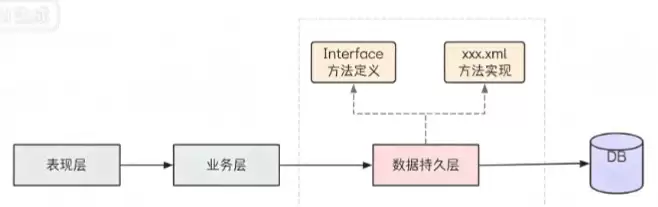
MyBatisXML开发方式适合复杂SQL逻辑,通过配置数据库连接与mapper路径,在接口和XML映射文件中实现增删改查操作。XML支持多表查询及结果映射,#{}使用预编译防注入,${}直接拼接需注意字符串引号。
MyBatis通过动态代理自动生成Mapper接口实现类,运行时将接口方法绑定到SQL语句,结合XML映射文件中的SQL与参数配置,由SqlSession执行并返回结果,避免了手动编写实现类的繁琐过程。
MyBatis常见问题包含:1.实体类属性与数据库字段不一致,解决方案为使用@Column注解映射;2.执行更新操作失败,需要配置update元素并检查SQL语句;3.查询结果映射出错,需检查resultMap配置是否正确;4.解析SQL参数失败,要使用#{}占位符并确保参数类型匹配。
MyBatis框架广泛应用设计模式,包括:工厂模式:创建SqlSessionFactory对象,管理数据库连接和查询;代理模式:实现延迟加载和懒加载,提高性能。外观模式:封装对数据库访问,简化代码维护。其中,一对多关系映射可以通过User和Order类、Mapper接口和MapperXML配置实现,使用延迟加载和嵌套resultMap优化性能。
MyBatis动态SQL解析:原理:使用TAG和OGNL表达式动态构建SQL语句。实现:通过SqlNode、SqlSource和ParameterHandler接口实现。优化:避免不必要的动态SQL、优化OGNL表达式、使用PreparedStatement缓存和配置查询超时。
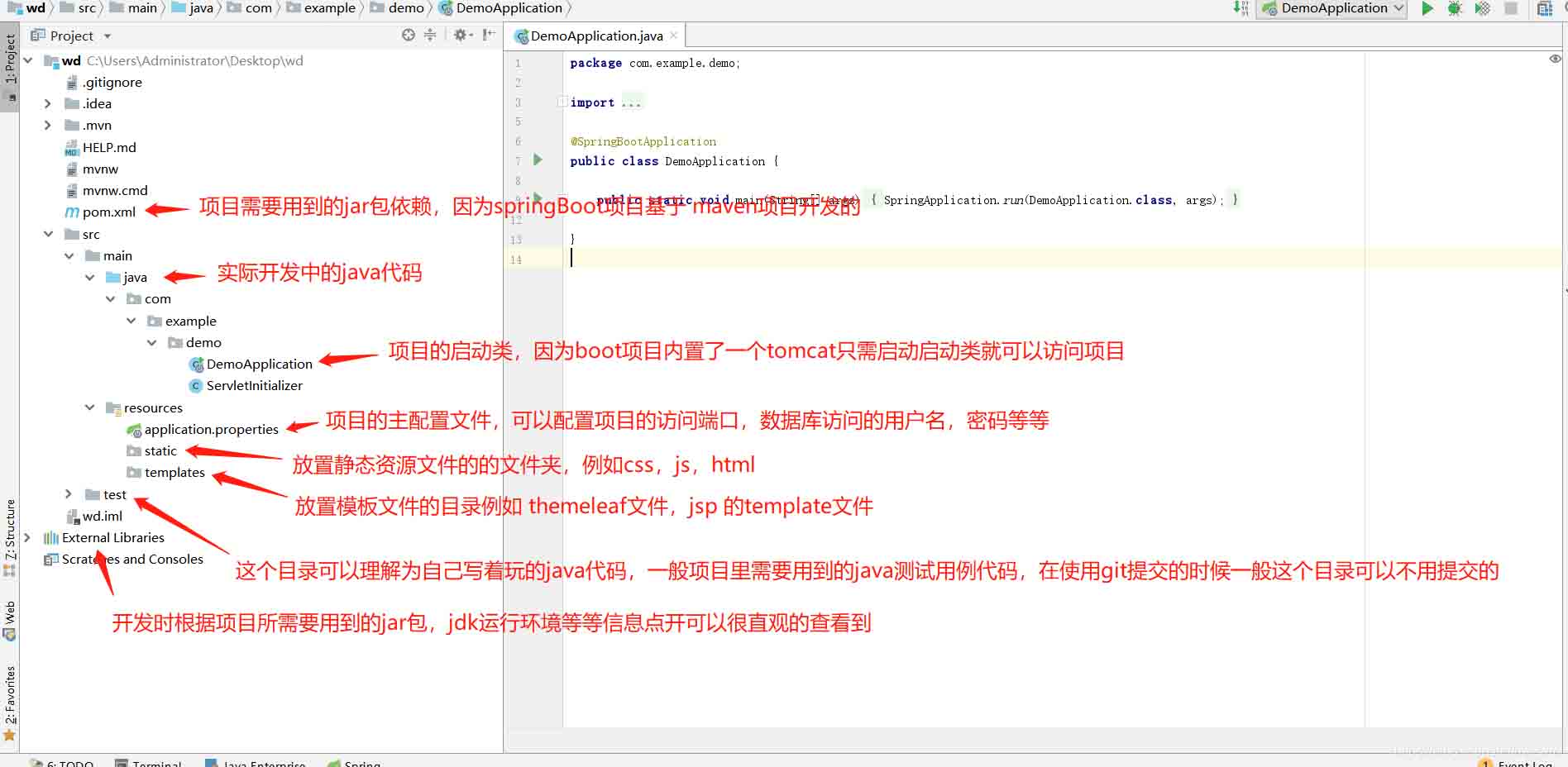
springBoot项目常用目录springBoot项目的目录结构及名规范介绍基于SpringBoot开发时的目录结构及命名规范,通过介绍能够为你解决,在实际项目中如何规划目录结构?如何命名目录更规范?各个目录分别代表什么含义?等三个问题。目录说明servicex//项目名|-admin-ui//管理服务前端代码(一般将UI和SERVICE放到一个工程中,便于管理)|-servicex-auth//模块1|-servicex-common//模块2|-servicex-gateway//模块3|-serv

MyBatis是一个用Java语言编写的持久层框架,广泛用于数据库操作。在MyBatis中,使用小于号(<)进行条件查询是很常见的操作。但是,小于号在MyBatis中有一些使用注意事项,本文将介绍MyBatis小于号的正确使用方法,并提供具体的代码示例。1.在MyBatis中使用小于号的基本方法在MyBatis中使用小于号进行条件查询,一般是在SQL
MyBatis的缓存机制解析:一级缓存与二级缓存的区别与应用在MyBatis框架中,缓存是一个非常重要的特性,可以有效提升数据库操作的性能。其中,一级缓存和二级缓存是MyBatis中常用的两种缓存机制。本文将详细解析一级缓存与二级缓存的区别与应用,并提供具体的代码示例进行说明。一、一级缓存一级缓存也被称为本地缓存,它默认开启且不可关闭。一级缓存是SqlSes
MyBatis缓存机制详解:一文读懂缓存存储原理引言在使用MyBatis进行数据库访问时,缓存是一个非常重要的机制,能够有效减少对数据库的访问,提高系统性能。本文将详细介绍MyBatis的缓存机制,包括缓存的分类、存储原理和具体的代码示例。一、缓存的分类MyBatis的缓存主要分为一级缓存和二级缓存两种。一级缓存一级缓存是SqlSession级别的缓存,当在
MyBatis中小于号的写法详解MyBatis是一个优秀的持久层框架,广泛应用于Java开发中。在使用MyBatis进行数据库操作的过程中,我们经常会用到小于号(<)进行条件查询。但是,MyBatis中小于号的写法并不像普通的SQL语句那样直接使用小于号符号,而是需要使用特定的方式来实现。本文将详细解释MyBatis中小于号的写法,并提供具体的代码示例





火山引擎是字节跳动旗下企业级云与AI服务平台。聚焦大模型核心能力,依托字节自研豆包多模态大模型,凭借火山方舟一站式平台,提供模型精调、推理部署、智能应用搭建等全链路服务,结合高性能AI算力,助力各行业快速落地大模型数字化与智能化应用。



