

SpringBoot LocalDateTime格式转换的方法是什么
简介说明项目我们经常会有前后端时间转换的场景,比如:创建时间、更新时间等。一般情况下,前后端使用时间戳或者年月日的格式进行传递。如果后端收到了前端的参数每次都手动转化为想要的格式,后端每次将数据传给前端时都手动处理为想要的格式实在是太麻烦了。方案简介要分两种情景进行配置(根据Content-Type的不同):1.application/x-www-form-urlencoded和multipart/form-data本处将此种情况记为:不使用@RequestBody2.application/json即:
简介
说明
项目我们经常会有前后端时间转换的场景,比如:创建时间、更新时间等。一般情况下,前后端使用时间戳或者年月日的格式进行传递。
如果后端收到了前端的参数每次都手动转化为想要的格式,后端每次将数据传给前端时都手动处理为想要的格式实在是太麻烦了。
方案简介
要分两种情景进行配置(根据Content-Type的不同):
1.application/x-www-form-urlencoded 和 multipart/form-data
本处将此种情况记为:不使用@RequestBody
2.application/json
即:使用@RequestBody的接口
本处将此种情况记为:使用@RequestBody
备注
有人说,可以这样配置:
spring:
jackson:
date-format: yyyy-MM-dd HH:mm:ss
time-zone: GMT+8
serialization:
write-dates-as-timestamps: false
这种配置只适用于Date这种,不适用于LocalDateTime等。
Date序列化/反序列化时都是用的这种格式:"2020-08-19T16:30:18.823+00:00"。
不使用@RequestBody
方案1:@ControllerAdvice+@InitBinder
配置类
package com.example.config;

import org.springframework.web.bind.WebDataBinder;
import org.springframework.web.bind.annotation.ControllerAdvice;
import org.springframework.web.bind.annotation.InitBinder;

import java.beans.PropertyEditorSupport;
import java.time.LocalDate;
import java.time.LocalDateTime;
import java.time.LocalTime;
import java.time.format.DateTimeFormatter;

@ControllerAdvice
public class LocalDateTimeAdvice {
    @InitBinder
    protected void initBinder(WebDataBinder binder) {
        binder.registerCustomEditor(LocalDateTime.class, new PropertyEditorSupport() {
            @Override
            public void setAsText(String text) throws IllegalArgumentException {
                setValue(LocalDateTime.parse(text, DateTimeFormatter.ofPattern("yyyy-MM-dd HH:mm:ss")));
            }
        });

        binder.registerCustomEditor(LocalDate.class, new PropertyEditorSupport() {
            @Override
            public void setAsText(String text) throws IllegalArgumentException {
                setValue(LocalDate.parse(text, DateTimeFormatter.ofPattern("yyyy-MM-dd")));
            }
        });

        binder.registerCustomEditor(LocalTime.class, new PropertyEditorSupport() {
            @Override
            public void setAsText(String text) throws IllegalArgumentException {
                setValue(LocalTime.parse(text, DateTimeFormatter.ofPattern("HH:mm:ss")));
            }
        });
    }
}
Entity
package com.example.business.entity;

import lombok.AllArgsConstructor;
import lombok.Data;

import java.time.LocalDateTime;

@Data
@AllArgsConstructor
public class User {
    private Long id;

    private String userName;

    private LocalDateTime createTime;
}
Controller
package com.example.business.controller;

import com.example.business.entity.User;
import org.springframework.web.bind.annotation.PostMapping;
import org.springframework.web.bind.annotation.RequestMapping;
import org.springframework.web.bind.annotation.RestController;

@RestController
@RequestMapping("user")
public class UserController {
    @PostMapping("save")
    public User save(User user) {
        System.out.println("保存用户:" + user);
        return user;
    }
}
测试
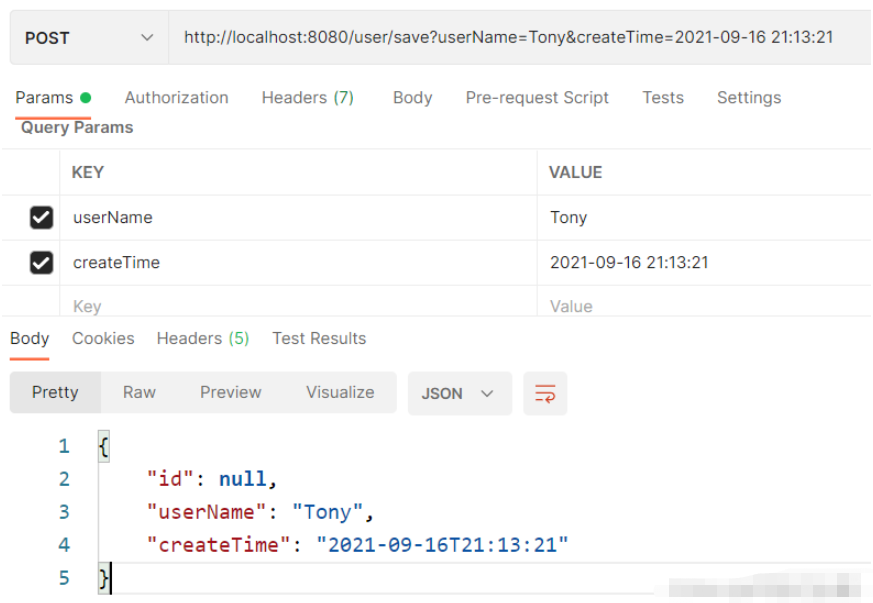
postman访问:http://localhost:8080/user/save?userName=Tony&createTime=2021-09-16 21:13:21
postman结果:
后端结果:

方案2:自定义参数转换器(Converter)
实现 org.springframework.core.convert.converter.Converter,自定义参数转换器。
配置类
package com.example.config;

import org.springframework.context.annotation.Bean;
import org.springframework.context.annotation.Configuration;
import org.springframework.core.convert.converter.Converter;

import java.time.LocalDateTime;
import java.time.format.DateTimeFormatter;

@Configuration
public class LocalDateTimeConfig {

    @Bean
    public Converter localDateTimeConverter() {
        return new LocalDateTimeConverter();
    }

    public static class LocalDateTimeConverter implements Converter {
        @Override
        public LocalDateTime convert(String s) {
            return LocalDateTime.parse(s, DateTimeFormatter.ofPattern("yyyy-MM-dd HH:mm:ss"));
        }
    }
}
Entity
package com.example.business.entity;

import lombok.AllArgsConstructor;
import lombok.Data;

import java.time.LocalDateTime;

@Data
@AllArgsConstructor
public class User {
    private Long id;

    private String userName;

    private LocalDateTime createTime;
}
Controller
package com.example.business.controller;

import com.example.business.entity.User;
import org.springframework.web.bind.annotation.PostMapping;
import org.springframework.web.bind.annotation.RequestMapping;
import org.springframework.web.bind.annotation.RestController;

@RestController
@RequestMapping("user")
public class UserController {
    @PostMapping("save")
    public User save(User user) {
        System.out.println("保存用户:" + user);
        return user;
    }
}
测试
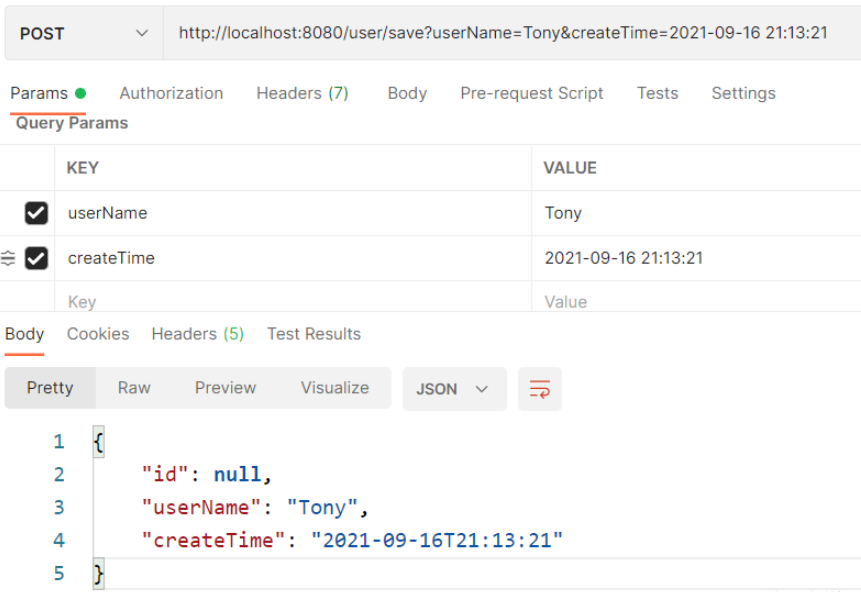
postman访问:http://localhost:8080/user/save?userName=Tony&createTime=2021-09-16 21:13:21
postman结果:
后端结果

使用@RequestBody
方案1:配置ObjectMapper
法1:只用配置类
本方法只配置ObjectMapper即可,Entity不需要加@JsonFormat。
配置类
package com.knife.example.config;

import com.fasterxml.jackson.core.JsonParser;
import com.fasterxml.jackson.databind.DeserializationContext;
import com.fasterxml.jackson.databind.MapperFeature;
import com.fasterxml.jackson.databind.ObjectMapper;
import com.fasterxml.jackson.databind.deser.std.DateDeserializers;
import com.fasterxml.jackson.databind.ser.std.DateSerializer;
import com.fasterxml.jackson.datatype.jsr310.JavaTimeModule;
import com.fasterxml.jackson.datatype.jsr310.deser.LocalDateDeserializer;
import com.fasterxml.jackson.datatype.jsr310.deser.LocalDateTimeDeserializer;
import com.fasterxml.jackson.datatype.jsr310.deser.LocalTimeDeserializer;
import com.fasterxml.jackson.datatype.jsr310.ser.LocalDateSerializer;
import com.fasterxml.jackson.datatype.jsr310.ser.LocalDateTimeSerializer;
import com.fasterxml.jackson.datatype.jsr310.ser.LocalTimeSerializer;
import lombok.SneakyThrows;
import org.springframework.boot.autoconfigure.jackson.JacksonProperties;
import org.springframework.context.annotation.Bean;
import org.springframework.context.annotation.Configuration;
import org.springframework.http.converter.json.Jackson2ObjectMapperBuilder;

import java.text.SimpleDateFormat;
import java.time.LocalDate;
import java.time.LocalDateTime;
import java.time.LocalTime;
import java.time.format.DateTimeFormatter;
import java.util.Date;

@Configuration
public class JacksonConfig {

    @Bean
    public ObjectMapper objectMapper(Jackson2ObjectMapperBuilder builder,
									 JacksonProperties jacksonProperties) {
        ObjectMapper objectMapper = builder.build();

		// 把“忽略重复的模块注册”禁用,否则下面的注册不生效
		objectMapper.disable(MapperFeature.IGNORE_DUPLICATE_MODULE_REGISTRATIONS);
        objectMapper.registerModule(configTimeModule());
		// 重新设置为生效,避免被其他地方覆盖
		objectMapper.enable(MapperFeature.IGNORE_DUPLICATE_MODULE_REGISTRATIONS);
        return objectMapper;
    }

    private JavaTimeModule configTimeModule() {
		JavaTimeModule javaTimeModule = new JavaTimeModule();

		String localDateTimeFormat = "yyyy-MM-dd HH:mm:ss";
		String localDateFormat = "yyyy-MM-dd";
		String localTimeFormat = "HH:mm:ss";
		String dateFormat = "yyyy-MM-dd HH:mm:ss";

		// 序列化
		javaTimeModule.addSerializer(
				LocalDateTime.class,
				new LocalDateTimeSerializer(DateTimeFormatter.ofPattern(localDateTimeFormat)));
		javaTimeModule.addSerializer(
				LocalDate.class,
				new LocalDateSerializer(DateTimeFormatter.ofPattern(localDateFormat)));
		javaTimeModule.addSerializer(
				LocalTime.class,
				new LocalTimeSerializer(DateTimeFormatter.ofPattern(localTimeFormat)));
		javaTimeModule.addSerializer(
				Date.class,
				new DateSerializer(false, new SimpleDateFormat(dateFormat)));

		// 反序列化
		javaTimeModule.addDeserializer(
				LocalDateTime.class,
				new LocalDateTimeDeserializer(DateTimeFormatter.ofPattern(localDateTimeFormat)));
		javaTimeModule.addDeserializer(
				LocalDate.class,
				new LocalDateDeserializer(DateTimeFormatter.ofPattern(localDateFormat)));
		javaTimeModule.addDeserializer(
				LocalTime.class,
				new LocalTimeDeserializer(DateTimeFormatter.ofPattern(localTimeFormat)));
		javaTimeModule.addDeserializer(Date.class, new DateDeserializers.DateDeserializer(){
			@SneakyThrows
			@Override
			public Date deserialize(JsonParser jsonParser, DeserializationContext dc){
				String text = jsonParser.getText().trim();
				SimpleDateFormat sdf = new SimpleDateFormat(dateFormat);
				return sdf.parse(text);
			}
		});

		return javaTimeModule;
	}

}
Entity
package com.example.business.entity;

import lombok.Data;

import java.time.LocalDateTime;

@Data
public class User {
    private Long id;

    private String userName;

    private LocalDateTime createTime;
}
Controller
package com.example.business.controller;

import com.example.business.entity.User;
import org.springframework.web.bind.annotation.PostMapping;
import org.springframework.web.bind.annotation.RequestBody;
import org.springframework.web.bind.annotation.RequestMapping;
import org.springframework.web.bind.annotation.RestController;

@RestController
@RequestMapping("user")
public class UserController {
    @PostMapping("save")
    public User save(@RequestBody User user) {
        System.out.println("保存用户:" + user);
        return user;
    }
}
测试
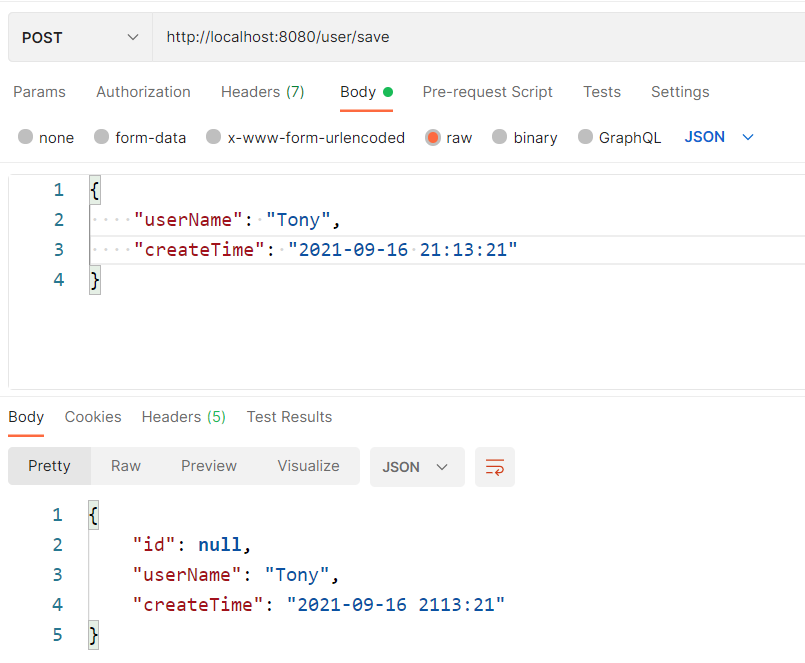
后端结果
保存用户:User(id=null, userName=Tony, createTime=2021-09-16T21:13:21)
法2:配置类+@JsonFormat
本方法需要配置ObjectMapper,Entity也需要加@JsonFormat。
配置类
 import com.fasterxml.jackson.databind.ObjectMapper;
import com.fasterxml.jackson.datatype.jdk8.Jdk8Module;
import com.fasterxml.jackson.datatype.jsr310.JavaTimeModule;
import com.fasterxml.jackson.module.paramnames.ParameterNamesModule;
import org.springframework.boot.autoconfigure.jackson.JacksonProperties;
import org.springframework.boot.jackson.JsonComponent;
import org.springframework.context.annotation.Bean;
import org.springframework.context.annotation.Configuration;
import org.springframework.http.converter.json.Jackson2ObjectMapperBuilder;

@Configuration
public class JacksonConfig {

    @Bean
    public ObjectMapper serializingObjectMapper(Jackson2ObjectMapperBuilder builder,
                                                JacksonProperties jacksonProperties) {
        ObjectMapper objectMapper = builder.build();

		// 把“忽略重复的模块注册”禁用,否则下面的注册不生效
		objectMapper.disable(MapperFeature.IGNORE_DUPLICATE_MODULE_REGISTRATIONS);

        // 自动扫描并注册相关模块
        objectMapper.findAndRegisterModules();

        // 手动注册相关模块
        // objectMapper.registerModule(new ParameterNamesModule());
        // objectMapper.registerModule(new Jdk8Module());
        // objectMapper.registerModule(new JavaTimeModule());

		// 重新设置为生效,避免被其他地方覆盖
		objectMapper.enable(MapperFeature.IGNORE_DUPLICATE_MODULE_REGISTRATIONS);

        return objectMapper;
    }

}
Entity
package com.example.business.entity;

import com.fasterxml.jackson.annotation.JsonFormat;
import lombok.Data;

import java.time.LocalDateTime;

@Data
public class User {
    private Long id;

    private String userName;

    @JsonFormat(pattern = "yyyy-MM-dd HH:mm:ss", timezone = "GMT+8")
    private LocalDateTime createTime;
}
Controller
package com.example.business.controller;

import com.example.business.entity.User;
import org.springframework.web.bind.annotation.PostMapping;
import org.springframework.web.bind.annotation.RequestBody;
import org.springframework.web.bind.annotation.RequestMapping;
import org.springframework.web.bind.annotation.RestController;

@RestController
@RequestMapping("user")
public class UserController {
    @PostMapping("save")
    public User save(@RequestBody User user) {
        System.out.println("保存用户:" + user);
        return user;
    }
}
测试
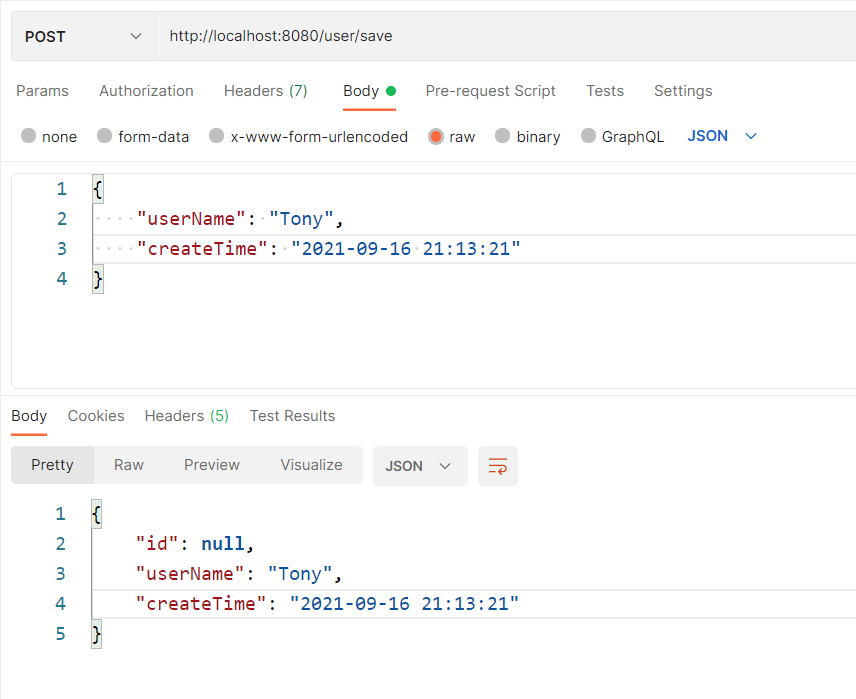
后端结果
保存用户:User(id=null, userName=Tony, createTime=2021-09-16T21:13:21)
方案2:Jackson2ObjectMapperBuilderCustomizer
import com.fasterxml.jackson.datatype.jsr310.deser.LocalDateDeserializer;
import com.fasterxml.jackson.datatype.jsr310.deser.LocalDateTimeDeserializer;
import com.fasterxml.jackson.datatype.jsr310.deser.LocalTimeDeserializer;
import com.fasterxml.jackson.datatype.jsr310.ser.LocalDateSerializer;
import com.fasterxml.jackson.datatype.jsr310.ser.LocalDateTimeSerializer;
import com.fasterxml.jackson.datatype.jsr310.ser.LocalTimeSerializer;
import org.springframework.boot.autoconfigure.jackson.Jackson2ObjectMapperBuilderCustomizer;
import org.springframework.context.annotation.Bean;
import org.springframework.context.annotation.Configuration;

import java.time.LocalDate;
import java.time.LocalDateTime;
import java.time.LocalTime;
import java.time.format.DateTimeFormatter;

@Configuration
public class LocalDateTimeConfig {

    private final String localDateTimeFormat = "yyyy-MM-dd HH:mm:ss";
    private final String localDateFormat = "yyyy-MM-dd";
    private final String localTimeFormat = "HH:mm:ss";

    @Bean
    public Jackson2ObjectMapperBuilderCustomizer jackson2ObjectMapperBuilderCustomizer() {
        return builder -> {

            // 反序列化(接收数据)
            builder.deserializerByType(LocalDateTime.class,
                    new LocalDateTimeDeserializer(DateTimeFormatter.ofPattern(localDateTimeFormat)));
            builder.deserializerByType(LocalDate.class,
                    new LocalDateDeserializer(DateTimeFormatter.ofPattern(localDateFormat)));
            builder.deserializerByType(LocalTime.class,
                    new LocalTimeDeserializer(DateTimeFormatter.ofPattern(localTimeFormat)));

            // 序列化(返回数据)
            builder.serializerByType(LocalDateTime.class,
                    new LocalDateTimeSerializer(DateTimeFormatter.ofPattern(localDateTimeFormat)));
            builder.serializerByType(LocalDate.class,
                    new LocalDateSerializer(DateTimeFormatter.ofPattern(localDateFormat)));
            builder.serializerByType(LocalTime.class,
                    new LocalTimeSerializer(DateTimeFormatter.ofPattern(localTimeFormat)));
        };
    }
} 
详细讲解在Java中获取当前系统时间并进行格式化输出的两种核心方案:基于Java 8全新日期时间API的DateTimeFormatter与传统遗留的SimpleDateFormat,包含完整代码示例、线程安全机制对比及生产选型建议。
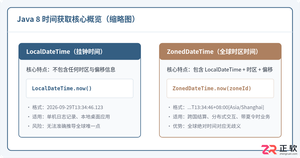
深入讲解Java 8中获取当前时间的两种核心类LocalDateTime与ZonedDateTime。详细对比两者的时区机制、常用API用法、代码示例、相互转换与生产环境防坑指南。
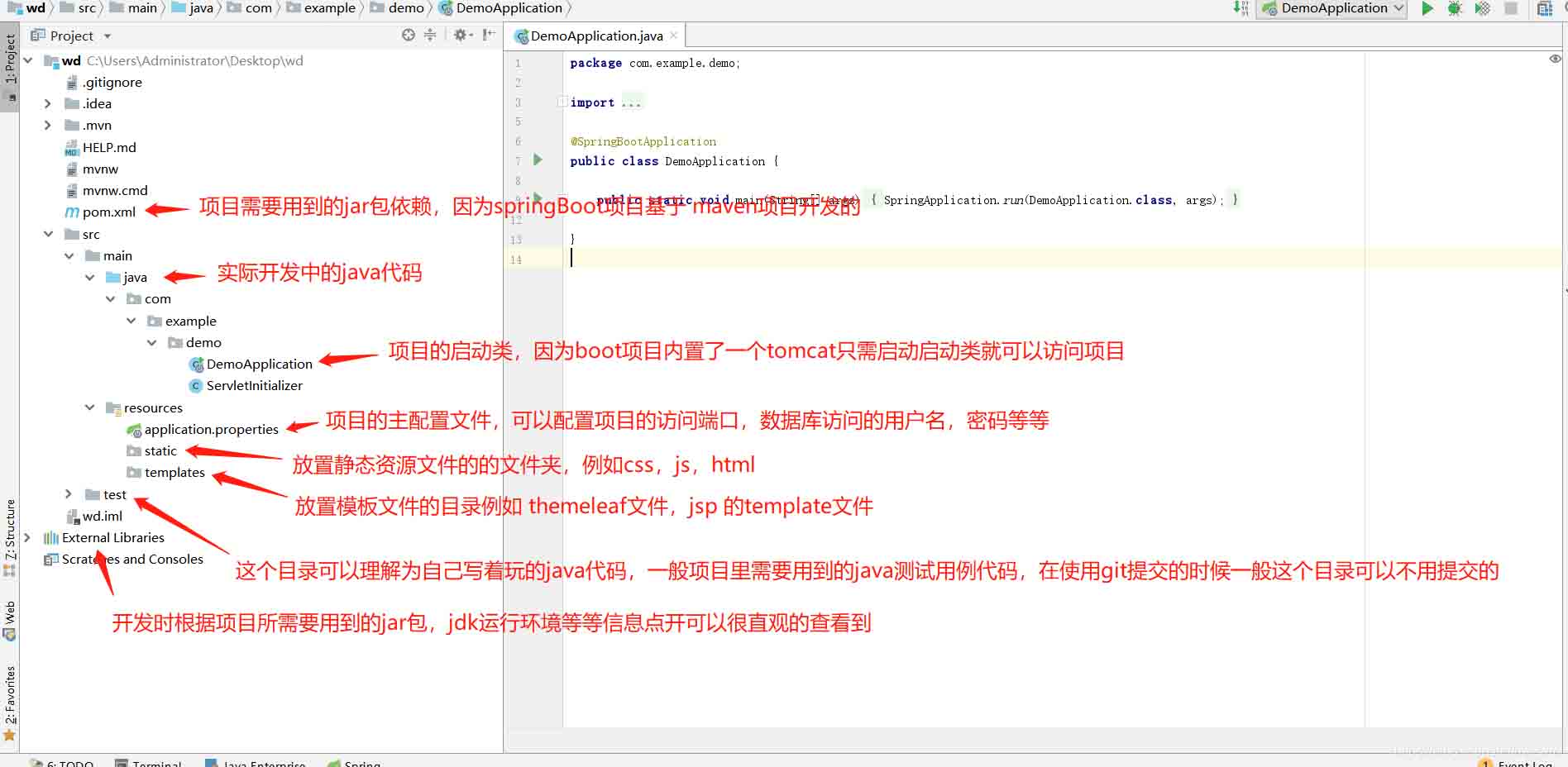
springBoot项目常用目录springBoot项目的目录结构及名规范介绍基于SpringBoot开发时的目录结构及命名规范,通过介绍能够为你解决,在实际项目中如何规划目录结构?如何命名目录更规范?各个目录分别代表什么含义?等三个问题。目录说明servicex//项目名|-admin-ui//管理服务前端代码(一般将UI和SERVICE放到一个工程中,便于管理)|-servicex-auth//模块1|-servicex-common//模块2|-servicex-gateway//模块3|-serv

解析SpringBoot和SpringMVC之间的异同SpringBoot和SpringMVC是Java领域中非常重要的开发框架。虽然它们都属于Spring框架的一部分,但是在使用和功能上有一些明显的区别。本文将对SpringBoot和SpringMVC进行比较,解析它们之间的异同。首先,让我们来了解一下SpringBoot。SpringBo
近年来,随着云计算和分布式架构的兴起,微服务架构的应用越来越广泛。而SpringCloud和SpringBoot作为Java开发中的两个重要框架,对于微服务的实现起到了重要的作用。然而,很多人对于它们在微服务领域的不同应用方式还存在一定的疑惑。本文将从不同的角度探索SpringCloud和SpringBoot在微服务中的应用方式。首先,我们来了解一下Spri
SpringBoot与SpringMVC的不同之处在哪里?SpringBoot和SpringMVC是两个非常流行的Java开发框架,用于构建Web应用程序。尽管它们经常分别被使用,但它们之间的不同之处也是很明显的。首先,SpringBoot可以被看作是一个Spring框架的扩展或者增强版。它旨在简化Spring应用程序的初始化和配置过程,以帮助开发人
SpringBoot和SpringMVC都是Java开发中常用的框架,但它们之间有一些明显的差异。本文将探究这两个框架的特点和用途,并对它们的差异进行比较。首先,我们来了解一下SpringBoot。SpringBoot是由Pivotal团队开发的,它旨在简化基于Spring框架的应用程序的创建和部署。它提供了一种快速、轻量级的方式来构建独立的、可执行
SpringBoot和SpringMVC是Java开发中常用的两个框架,它们都是由Spring框架所提供的,但在功能和使用方式上有着一些区别。本文将分别介绍SpringBoot和SpringMVC的特点和区别。一、SpringBoot的特点:简化配置:SpringBoot通过约定优于配置的原则,大大简化了项目的配置过程。它可以自动配置项目所需要的参数,开发人
SpringCloud和SpringBoot是目前Java领域中最热门的开源框架,它们分别提供了一套完善的微服务架构和快速构建应用程序的解决方案。本文将对它们的功能进行比较,并给出选择指南,以帮助读者了解它们的优势和适用场景。SpringBoot是一个用于开发Java应用程序的框架,它提供了一个简化的开发流程,集成了大量常用的功能和组件,减少了开发者的工作量
深入剖析SpringCloud和SpringBoot的异同引言:在构建企业级应用程序时,Spring框架已经成为开发者们的首选。它提供了一种简单而强大的方式来构建独立于平台的应用程序。Spring框架由两个核心模块组成:SpringBoot和SpringCloud。虽然它们都可以帮助开发者快速搭建应用程序,但它们的目标和用途存在一些差异。本文将深入剖析Spr





火山引擎是字节跳动旗下企业级云与AI服务平台。聚焦大模型核心能力,依托字节自研豆包多模态大模型,凭借火山方舟一站式平台,提供模型精调、推理部署、智能应用搭建等全链路服务,结合高性能AI算力,助力各行业快速落地大模型数字化与智能化应用。



