SpringBoot怎么使用druid配置多数据源
一、背景使用springboot配置多数据源,数据源分别为postgresql、mysql二、版本介绍springboot——2.5.4druid——1.2.11postgresql——12mysql——8.0.16maven——3.0idea——2019三、项目结构javapackage目录resource目录存放mapper.xml文件,按照数据源创建pack
一、背景
使用spring boot配置多数据源,数据源分别为postgresql、mysql
二、版本介绍
spring boot——2.5.4
druid——1.2.11
postgresql——12
mysql——8.0.16
maven——3.0
idea——2019
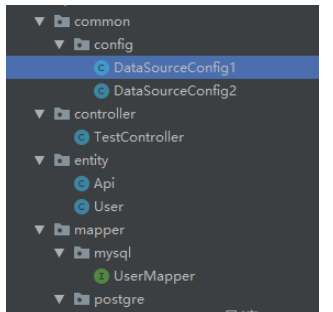
三、项目结构
java package目录
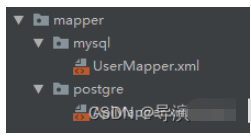
resource目录存放mapper.xml文件,按照数据源创建package
四、maven依赖
            org.springframework.boot
            spring-boot-starter-data-jpa


            org.springframework.boot
            spring-boot-starter-test
            test


            org.springframework.boot
            spring-boot-starter-web


            com.alibaba
            fastjson
            2.0.4


            com.alibaba
            druid-spring-boot-starter
            1.2.11


            org.mybatis.spring.boot
            mybatis-spring-boot-starter
            1.3.2


            org.postgresql
            postgresql
            runtime


            mysql
            mysql-connector-java
五、yaml配置文件
server:
  port: 8081
spring:
  datasource:
    type: com.alibaba.druid.pool.DruidDataSource
    druid:
      web-stat-filter:
        enabled: true #是否启用StatFilter默认值true
        url-pattern: /*
        exclusions: /druid/*,*.js,*.gif,*.jpg,*.bmp,*.png,*.css,*.ico
        session-stat-enable: true
        session-stat-max-count: 10
      stat-view-servlet:
        enabled: true #是否启用StatViewServlet默认值true
        url-pattern: /druid/*
        reset-enable: true
        login-username: admin
        login-password: admin
        allow:

      db1:
        username: postgres
        password: localhost
        url: jdbc:postgresql://localhost:5432/test
        driver-class-name: org.postgresql.Driver
        initial-size: 5  # 初始化大小
        min-idle: 5  # 最小
        max-active: 100  # 最大
        max-wait: 60000  # 配置获取连接等待超时的时间
        validation-query: select version()
        time-between-eviction-runs-millis: 60000  # 配置间隔多久才进行一次检测,检测需要关闭的空闲连接,单位是毫秒
        min-evictable-idle-time-millis: 300000  # 指定一个空闲连接最少空闲多久后可被清除,单位是毫秒
        filters: config,wall,stat  # 配置监控统计拦截的filters,去掉后监控界面sql无法统计,'wall'用于防火墙
        # 通过connectProperties属性来打开mergeSql功能;慢SQL记录
        connectionProperties: druid.stat.slowSqlMillis=200;druid.stat.logSlowSql=true;config.decrypt=false
        test-while-idle: true
        test-on-borrow: true
        test-on-return: false
        # 是否缓存preparedStatement,也就是PSCache  官方建议MySQL下建议关闭   个人建议如果想用SQL防火墙 建议打开
        pool-prepared-statements: true
        max-pool-prepared-statement-per-connection-size: 20

      db2:
        username: root
        password: localhost
        url: jdbc:mysql://localhost:3306/springboot?characterEncoding=utf8&useUnicode=true&useSSL=false&serverTimezone=Asia/Shanghai
        driver-class-name: com.mysql.cj.jdbc.Driver
        initial-size: 5  # 初始化大小
        min-idle: 5  # 最小
        max-active: 100  # 最大
        max-wait: 60000  # 配置获取连接等待超时的时间
        validation-query: select 'x'
        time-between-eviction-runs-millis: 60000  # 配置间隔多久才进行一次检测,检测需要关闭的空闲连接,单位是毫秒
        min-evictable-idle-time-millis: 300000  # 指定一个空闲连接最少空闲多久后可被清除,单位是毫秒
        filters: config,wall,stat  # 配置监控统计拦截的filters,去掉后监控界面sql无法统计,'wall'用于防火墙
        # 通过connectProperties属性来打开mergeSql功能;慢SQL记录
        connectionProperties: druid.stat.slowSqlMillis=200;druid.stat.logSlowSql=true;config.decrypt=false
        test-while-idle: true
        test-on-borrow: true
        test-on-return: false
        # 是否缓存preparedStatement,也就是PSCache  官方建议MySQL下建议关闭   个人建议如果想用SQL防火墙 建议打开
        pool-prepared-statements: true
        max-pool-prepared-statement-per-connection-size: 20

mybatis:
  mapper-locations: classpath:com/demo/mapper/*.xml
  type-aliases-package: com.demo.entity
  configuration:
    log-impl:
    mapUnderscoreToCamelCase: true

#showSql
logging:
  level:
    java.sql: debug
    org.apache.ibatis: debug
    com.demo.mapper: debug
  config: classpath:logback-spring.xml
六、数据源配置文件
@Configuration
@MapperScan(basePackages = "com.demo.mapper.postgre.**", sqlSessionFactoryRef = "oneSqlSessionFactory")
public class DataSourceConfig1 {
    // 将这个对象放入Spring容器中
    @Bean(name = "oneDataSource")
    // 表示这个数据源是默认数据源
    @Primary
    // 读取application.properties中的配置参数映射成为一个对象
    // prefix表示参数的前缀
    @ConfigurationProperties(prefix = "spring.datasource.druid.db1")
    public DataSource getDateSource1() {
        return DataSourceBuilder.create().type(DruidDataSource.class).build();
    }

    @Bean(name = "oneSqlSessionFactory")
    // 表示这个数据源是默认数据源
    @Primary
    // @Qualifier表示查找Spring容器中名字为oneDataSource的对象
    public SqlSessionFactory oneSqlSessionFactory(@Qualifier("oneDataSource") DataSource datasource)
            throws Exception {
        SqlSessionFactoryBean bean = new SqlSessionFactoryBean();
        bean.setDataSource(datasource);
        bean.setMapperLocations(
                // 设置mybatis的xml所在位置
                new PathMatchingResourcePatternResolver().getResources("classpath*:com.demo.mapper.postgre/*.xml"));
        return bean.getObject();
    }

    @Bean("oneSqlSessionTemplate")
    // 表示这个数据源是默认数据源
    @Primary
    public SqlSessionTemplate oneSqlSessionTemplate(
            @Qualifier("oneSqlSessionFactory") SqlSessionFactory sessionFactory) {
        return new SqlSessionTemplate(sessionFactory);
    }

}
@Configuration
@MapperScan(basePackages = "com.demo.mapper.mysql", sqlSessionFactoryRef = "twoSqlSessionFactory")
public class DataSourceConfig2 {
// 将这个对象放入Spring容器中
@Bean(name = "twoDataSource")
// 读取application.properties中的配置参数映射成为一个对象
// prefix表示参数的前缀
@ConfigurationProperties(prefix = "spring.datasource.druid.db2")
public DataSource getDateSource1() {
return DataSourceBuilder.create().type(DruidDataSource.class).build();
}
@Bean(name = "twoSqlSessionFactory")
// 表示这个数据源是默认数据源
//@Primary
// @Qualifier表示查找Spring容器中名字为oneDataSource的对象
public SqlSessionFactory oneSqlSessionFactory(@Qualifier("twoDataSource") DataSource datasource)
throws Exception {
SqlSessionFactoryBean bean = new SqlSessionFactoryBean();
bean.setDataSource(datasource);
bean.setMapperLocations(
// 设置mybatis的xml所在位置
new PathMatchingResourcePatternResolver().getResources("classpath*:com.demo.mapper.mysql/*.xml"));
return bean.getObject();
}
@Bean("twoSqlSessionTemplate")
// 表示这个数据源是默认数据源
//@Primary
public SqlSessionTemplate oneSqlSessionTemplate(
@Qualifier("twoSqlSessionFactory") SqlSessionFactory sessionFactory) {
return new SqlSessionTemplate(sessionFactory);
}
}七、启动类配置
关键点:去除 exclude = {DataSourceAutoConfiguration.class} 及扫描 com.demo.mapper目录
@MapperScan("com.demo.mapper")
@SpringBootApplication(exclude = {DataSourceAutoConfiguration.class})
public class DemoApplication {

    public static void main(String[] args) {
        SpringApplication.run(DemoApplication .class, args);
    }
}
八、druid管理页面
输入地址 localhost://8081/druid,输入 admin/admin
命名空间的基本概念与常见引入问题在C++等编程语言中,命名空间(namespace)是一种将代码标识符(如变量、函数、类名)封装在特定名称下的机制,其主要目的是避免命名冲突,尤其是在大型项目或使用多个第三方库时。使用“using namespace”指令可以将指定命名空间中的所有名称引入当前作用域,

理解递归的基本原理在C语言中,递归是一种函数调用自身的编程技术。要掌握它,首先需要理解其核心思想:将一个复杂的大问题,分解为一个或几个与原问题相似但规模更小的子问题,直到子问题足够简单,可以直接求解。这个过程通常包含两个关键部分:递归出口和递归体。递归出口定义了问题何时不再继续分解,即最简单、可直接

递归函数的基本概念与适用场景在C语言编程中,递归是一种函数调用自身的编程技巧。它并非适用于所有问题,但在处理某些具有自相似结构的问题时,能提供极其清晰和优雅的解决方案。递归的核心思想是将一个大规模问题分解为一个或多个同类型但规模更小的子问题,直到子问题简单到可以直接求解。典型的适用场景包括树形结构的

理解内存管理的基石在Objective-C的编程世界中,内存管理是开发者必须掌握的核心技能之一。它直接关系到应用的性能、稳定性与资源利用效率。与一些采用自动垃圾回收机制的语言不同,Objective-C在很长一段时间里,依赖一套基于引用计数的、需要开发者部分介入的管理规则。这套规则的核心思想是明确的
理解 dealloc 的角色与时机在 iOS 应用开发中,内存管理是保障应用性能与稳定性的基石。dealloc 方法是 Objective-C 中对象生命周期结束时的关键回调,它标志着对象即将被系统回收内存。正确理解其触发时机至关重要:当一个对象的引用计数降为零时,运行时系统会自动调用该对象的 de
内存管理的基石在Objective-C的世界里,内存管理是开发者必须掌握的核心技能之一。作为一门在手动引用计数(MRC)时代诞生的语言,Objective-C要求程序员对对象的生命周期有清晰的认识。dealloc方法正是这一生命周期中至关重要的终点站。它是一个实例方法,当对象的引用计数降为零时,系统

native2ascii 工具的基本定位在Ja va应用程序的国际化与本地化开发过程中,处理非拉丁字符集是一个常见且关键的环节。Ja va内部使用Unicode字符集来统一表示全球各种语言的文字,但其属性文件(.properties)在历史上要求使用ASCII编码,或者更准确地说,要求非ASCII字

理解 native2ascii 工具的基本用途在软件开发,特别是涉及国际化处理的场景中,开发者常常需要处理不同编码的文本资源。native2ascii 是 Ja va 开发工具包(JDK)中提供的一个命令行实用程序,其主要功能是将包含本地字符编码(非ASCII字符)的文件,转换为包含 Unicode

native2ascii 命令的由来与作用在Ja va开发中,处理国际化资源文件是一个常见需求。资源文件通常以.properties格式存储,用于支持多语言界面。然而,Ja va属性文件默认采用ISO-8859-1字符集编码,这导致了一个直接的问题:当文件中包含非拉丁字符(如中文、日文、韩文等)时,

内存监控工具的价值与挑战在软件开发,尤其是使用C/C++这类手动管理内存的语言时,内存错误是程序员最常遭遇的难题之一。其中,野指针问题因其隐蔽性和破坏性,往往成为最难定位的“幽灵”缺陷。它可能潜伏在代码中,在特定条件下才被触发,导致程序崩溃、数据损坏或难以预测的行为。传统的调试手段,如打印日志或使用






Windows 10 是一款微软推出的经典操作系统,拥有硬件兼容性与多任务处理能力。它更偏向把系统状态查看和常用调节动作放在一起,适合需要持续观察和微调设备状态的场景。

极度公式是一款跨平台专业LaTeX公式识别编辑软件,支持OCR公式识别和多平台编辑。和使用说明,避免使用,享受完整功能与稳定支持。做扫描整理、文字提取和表格转换时,它能把识别后的处理步骤接得更顺,资料录入这类场景会省下不少时间。