

SpringBoot动态定时任务如何实现
执行定时任务的线程池配置类importorg.springframework.context.annotation.Bean;importorg.springframework.context.annotation.Configuration;importorg.springframework.scheduling.TaskScheduler;importorg.springframework.scheduling.concurrent.ThreadPoolTaskScheduler;@Configura
执行定时任务的线程池配置类
import org.springframework.context.annotation.Bean;
import org.springframework.context.annotation.Configuration;
import org.springframework.scheduling.TaskScheduler;
import org.springframework.scheduling.concurrent.ThreadPoolTaskScheduler;

@Configuration
public class SchedulingConfig {
    @Bean
    public TaskScheduler taskScheduler() {
        ThreadPoolTaskScheduler taskScheduler = new ThreadPoolTaskScheduler();
        // 定时任务执行线程池核心线程数
        taskScheduler.setPoolSize(6);
        taskScheduler.setRemoveOnCancelPolicy(true);
        taskScheduler.setThreadNamePrefix("TaskSchedulerThreadPool-");
        return taskScheduler;
    }
}
ScheduledFuture的包装类
ScheduledFuture是ScheduledExecutorService定时任务线程池的执行结果。
import java.util.concurrent.ScheduledFuture;

public final class ScheduledTask {

    volatile ScheduledFuture future;
    /**
     * 取消定时任务
     */
    public void cancel() {
        ScheduledFuture future = this.future;
        if (future != null) {
            future.cancel(true);
        }
    }
}
Runnable接口实现类
被定时任务线程池调用,用来执行指定bean里面的方法。
import com.ying.demo.utils.springContextUtils;
import org.slf4j.Logger;
import org.slf4j.LoggerFactory;
import org.springframework.util.ReflectionUtils;
import org.springframework.util.StringUtils;
import java.lang.reflect.Method;
import java.util.Objects;

public class SchedulingRunnable implements Runnable {

   private static final Logger logger = LoggerFactory.getLogger(SchedulingRunnable.class);

   private String beanName;

   private String methodName;

   private String params;

   public SchedulingRunnable(String beanName, String methodName) {
      this(beanName, methodName, null);
   }

   public SchedulingRunnable(String beanName, String methodName, String params) {
      this.beanName = beanName;
      this.methodName = methodName;
      this.params = params;
   }

   @Override
   public void run() {
      logger.info("定时任务开始执行 - bean:{},方法:{},参数:{}", beanName, methodName, params);
      long startTime = System.currentTimeMillis();

      try {
         Object target = springContextUtils.getBean(beanName);

         Method method = null;
         if (!StringUtils.isEmpty(params)) {
            method = target.getClass().getDeclaredMethod(methodName, String.class);
         } else {
            method = target.getClass().getDeclaredMethod(methodName);
         }

         ReflectionUtils.makeAccessible(method);
         if (!StringUtils.isEmpty(params)) {
            method.invoke(target, params);
         } else {
            method.invoke(target);
         }
      } catch (Exception ex) {
         logger.error(String.format("定时任务执行异常 - bean:%s,方法:%s,参数:%s ", beanName, methodName, params), ex);
      }

      long times = System.currentTimeMillis() - startTime;
      logger.info("定时任务执行结束 - bean:{},方法:{},参数:{},耗时:{} 毫秒", beanName, methodName, params, times);
   }

   @Override
   public boolean equals(Object o) {
      if (this == o) return true;
      if (o == null || getClass() != o.getClass()) return false;
      SchedulingRunnable that = (SchedulingRunnable) o;
      if (params == null) {
         return beanName.equals(that.beanName) &&
               methodName.equals(that.methodName) &&
               that.params == null;
      }

      return beanName.equals(that.beanName) &&
            methodName.equals(that.methodName) &&
            params.equals(that.params);
   }

   @Override
   public int hashCode() {
      if (params == null) {
         return Objects.hash(beanName, methodName);
      }

      return Objects.hash(beanName, methodName, params);
   }
}
定时任务注册类
用来增加、删除定时任务
@Component
public class CronTaskRegistrar implements DisposableBean {

   private final Map scheduledTasks = new ConcurrentHashMap<>(16);

   @Autowired
   private TaskScheduler taskScheduler;

   public TaskScheduler getScheduler() {
      return this.taskScheduler;
   }

   public void addCronTask(Runnable task, String cronExpression) {
      addCronTask(new CronTask(task, cronExpression));
   }

   public void addCronTask(CronTask cronTask) {
      if (cronTask != null) {
         Runnable task = cronTask.getRunnable();
         if (this.scheduledTasks.containsKey(task)) {
            removeCronTask(task);
         }

         this.scheduledTasks.put(task, scheduleCronTask(cronTask));
      }
   }

   public void removeCronTask(Runnable task) {
      ScheduledTask scheduledTask = this.scheduledTasks.remove(task);
      if (scheduledTask != null)
         scheduledTask.cancel();
   }

   public ScheduledTask scheduleCronTask(CronTask cronTask) {
      ScheduledTask scheduledTask = new ScheduledTask();
      scheduledTask.future = this.taskScheduler.schedule(cronTask.getRunnable(), cronTask.getTrigger());

      return scheduledTask;
   }


   @Override
   public void destroy() {
      for (ScheduledTask task : this.scheduledTasks.values()) {
         task.cancel();
      }

      this.scheduledTasks.clear();
   }
}
定时任务示例类
@Slf4j
@Component("taskDemo")
public class Task1 {
    public void taskByParams(String params) {
        log.info("taskByParams执行时间:{}", new SimpleDateFormat("yyyy-MM-dd HH:mm:ss").format(new Date()));
        log.info("taskByParams执行有参示例任务:{}",params);
    }

    public void taskNoParams() {
        log.info("taskByParams执行时间:{}", new SimpleDateFormat("yyyy-MM-dd HH:mm:ss").format(new Date()));
        log.info("taskNoParams执行无参示例任务");
    }

    public void test(String params) {
        log.info("test执行时间:{}", new SimpleDateFormat("yyyy-MM-dd HH:mm:ss").format(new Date()));
        log.info("test执行有参示例任务:{}",params);
    }
}
数据库表设计
CREATE TABLE `schedule_setting` (
  `job_id` int NOT NULL AUTO_INCREMENT COMMENT '任务ID',
  `bean_name` varchar(255) CHARACTER SET utf8mb4 COLLATE utf8mb4_0900_ai_ci DEFAULT NULL COMMENT 'bean名称',
  `method_name` varchar(255) CHARACTER SET utf8mb4 COLLATE utf8mb4_0900_ai_ci DEFAULT NULL COMMENT '方法名称',
  `method_params` varchar(255) CHARACTER SET utf8mb4 COLLATE utf8mb4_0900_ai_ci DEFAULT NULL COMMENT '方法参数',
  `cron_expression` varchar(255) CHARACTER SET utf8mb4 COLLATE utf8mb4_0900_ai_ci DEFAULT NULL COMMENT 'cron表达式',
  `remark` varchar(255) CHARACTER SET utf8mb4 COLLATE utf8mb4_0900_ai_ci DEFAULT NULL COMMENT '备注',
  `job_status` int DEFAULT NULL COMMENT '状态(1正常 0暂停)',
  `create_time` datetime DEFAULT NULL COMMENT '创建时间',
  `update_time` datetime DEFAULT NULL COMMENT '修改时间',
  PRIMARY KEY (`job_id`)
) ENGINE=InnoDB AUTO_INCREMENT=7 DEFAULT CHARSET=utf8mb4 COLLATE=utf8mb4_0900_ai_ci;
实体类
@Data public class ScheduleSetting extends Model{ /** * 任务ID */ @Id private Integer jobId; /** * bean名称 */ private String beanName; /** * 方法名称 */ private String methodName; /** * 方法参数 */ private String methodParams; /** * cron表达式 */ private String cronExpression; /** * 状态(1正常 0暂停) */ private Integer jobStatus; /** * 备注 */ private String remark; /** * 创建时间 */ private Date createTime; /** * 更新时间 */ private Date updateTime; }
定时任务预热
spring boot项目启动完成后,加载数据库里状态为正常的定时任务
@Service
public class SysJobRunner implements CommandLineRunner {

    private static final Logger logger = LoggerFactory.getLogger(SysJobRunner.class);

    @Autowired
    private CronTaskRegistrar cronTaskRegistrar;

    @Override
    public void run(String... args) {
        // 初始加载数据库里状态为正常的定时任务
        ScheduleSetting existedSysJob = new ScheduleSetting();
        List jobList = existedSysJob.selectList(new QueryWrapper().eq("job_status", 1));
        if (CollectionUtils.isNotEmpty(jobList)) {
            for (ScheduleSetting job : jobList) {
                SchedulingRunnable task = new SchedulingRunnable(job.getBeanName(), job.getMethodName(), job.getMethodParams());
                cronTaskRegistrar.addCronTask(task, job.getCronExpression());
            }
            logger.info("定时任务已加载完毕...");
        }
    }
}
工具类
用来从spring容器里获取bean
@Component
public class SpringContextUtils implements ApplicationContextAware {

    private static ApplicationContext applicationContext;

    @Override
    public void setApplicationContext(ApplicationContext applicationContext)
            throws BeansException {
        SpringContextUtils.applicationContext = applicationContext;
    }

    public static Object getBean(String name) {
        return applicationContext.getBean(name);
    }

    public static  T getBean(Class requiredType) {
        return applicationContext.getBean(requiredType);
    }

    public static  T getBean(String name, Class requiredType) {
        return applicationContext.getBean(name, requiredType);
    }

    public static boolean containsBean(String name) {
        return applicationContext.containsBean(name);
    }

    public static boolean isSingleton(String name) {
        return applicationContext.isSingleton(name);
    }

    public static Class getType(String name) {
        return applicationContext.getType(name);
    }
}
定时任务的:增/删/改/启动/暂停
@RestController
public class TestController {

   @Autowired
   private CronTaskRegistrar cronTaskRegistrar;

   /**
    * 添加定时任务
    *
    * @param sysJob
    * @return
    */
   @PostMapping("add")
   public boolean add(@RequestBody ScheduleSetting sysJob) {
      sysJob.setCreateTime(new Date());
      sysJob.setUpdateTime(new Date());

      boolean insert = sysJob.insert();
      if (!insert) {
         return false;
      }else {
         if (sysJob.getJobStatus().equals(1)) {// 添加成功,并且状态是1,直接放入任务器
            SchedulingRunnable task = new SchedulingRunnable(sysJob.getBeanName(), sysJob.getMethodName(), sysJob.getMethodParams());
            cronTaskRegistrar.addCronTask(task, sysJob.getCronExpression());
         }
      }
      return insert;
   }

   /**
    * 修改定时任务
    *
    * @param sysJob
    * @return
    */
   @PostMapping("update")
   public boolean update(@RequestBody ScheduleSetting sysJob) {
      sysJob.setCreateTime(new Date());
      sysJob.setUpdateTime(new Date());

      // 查询修改前任务
      ScheduleSetting existedSysJob = new ScheduleSetting();
      existedSysJob = existedSysJob.selectOne(new QueryWrapper().eq("job_id", sysJob.getJobId()));
      // 修改任务
      boolean update = sysJob.update(new UpdateWrapper().eq("job_id", sysJob.getJobId()));
      if (!update) {
         return false;
      } else {
         // 修改成功,则先删除任务器中的任务,并重新添加
         SchedulingRunnable task1 = new SchedulingRunnable(existedSysJob.getBeanName(), existedSysJob.getMethodName(), existedSysJob.getMethodParams());
         cronTaskRegistrar.removeCronTask(task1);
         if (sysJob.getJobStatus().equals(1)) {// 如果修改后的任务状态是1就加入任务器
            SchedulingRunnable task = new SchedulingRunnable(sysJob.getBeanName(), sysJob.getMethodName(), sysJob.getMethodParams());
            cronTaskRegistrar.addCronTask(task, sysJob.getCronExpression());
         }
      }
      return update;
   }

   /**
    * 删除任务
    *
    * @param jobId
    * @return
    */
   @PostMapping("del/{jobId}")
   public boolean del(@PathVariable("jobId") Integer jobId) {
      // 先查询要删除的任务信息
      ScheduleSetting existedSysJob = new ScheduleSetting();
      existedSysJob = existedSysJob.selectOne(new QueryWrapper().eq("job_id", jobId));

      // 删除
      boolean del = existedSysJob.delete(new QueryWrapper().eq("job_id", jobId));
      if (!del)
         return false;
      else {// 删除成功时要清除定时任务器中的对应任务
         SchedulingRunnable task = new SchedulingRunnable(existedSysJob.getBeanName(), existedSysJob.getMethodName(), existedSysJob.getMethodParams());
         cronTaskRegistrar.removeCronTask(task);
      }
      return del;
   }

   // 停止/启动任务
   @PostMapping("changesStatus/{jobId}/{stop}")
   public boolean changesStatus(@PathVariable("jobId") Integer jobId, @PathVariable("stop") Integer stop) {
      // 修改任务状态
      ScheduleSetting scheduleSetting = new ScheduleSetting();
      scheduleSetting.setJobStatus(stop);
      boolean job_id = scheduleSetting.update(new UpdateWrapper().eq("job_id", jobId));
      if (!job_id) {
         return false;
      }
      // 查询修改后的任务信息
      ScheduleSetting existedSysJob = new ScheduleSetting();
      existedSysJob = existedSysJob.selectOne(new QueryWrapper().eq("job_id", jobId));

      // 如果状态是1则添加任务
      if (existedSysJob.getJobStatus().equals(1)) {
         SchedulingRunnable task = new SchedulingRunnable(existedSysJob.getBeanName(), existedSysJob.getMethodName(), existedSysJob.getMethodParams());
         cronTaskRegistrar.addCronTask(task, existedSysJob.getCronExpression());
      } else {
         // 否则清除任务
         SchedulingRunnable task = new SchedulingRunnable(existedSysJob.getBeanName(), existedSysJob.getMethodName(), existedSysJob.getMethodParams());
         cronTaskRegistrar.removeCronTask(task);
      }
      return true;
} 
cron
cron表达式语法:
[秒] [分] [小时] [日] [月] [周] [年]
注:[年]不是必须的域,可以省略[年],则一共6个域
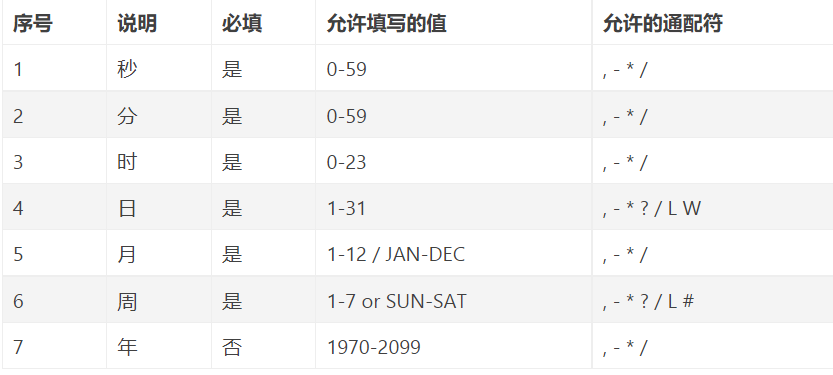
通配符说明:
* 表示所有值。 例如:在分的字段上设置 *,表示每一分钟都会触发。
? 表示不指定值。使用的场景为不需要关心当前设置这个字段的值。例如:要在每月的10号触发一个操作,但不关心是周几,所以需要周位置的那个字段设置为”?” 具体设置为 0 0 0 10 * ?
- 表示区间。例如 在小时上设置 “10-12”,表示 10,11,12点都会触发。
, 表示指定多个值,例如在周字段上设置 “MON,WED,FRI” 表示周一,周三和周五触发
/ 用于递增触发。如在秒上面设置”5/15” 表示从5秒开始,每增15秒触发(5,20,35,50)。 在日字段上设置’1/3’所示每月1号开始,每隔三天触发一次。
L 表示最后的意思。在日字段设置上,表示当月的最后一天(依据当前月份,如果是二月还会依据是否是润年[leap]), 在周字段上表示星期六,相当于”7”或”SAT”。如果在”L”前加上数字,则表示该数据的最后一个。例如在周字段上设置”6L”这样的格式,则表示“本月最后一个星期五”
W 表示离指定日期的最近那个工作日(周一至周五). 例如在日字段上置”15W”,表示离每月15号最近的那个工作日触发。如果15号正好是周六,则找最近的周五(14号)触发, 如果15号是周未,则找最近的下周一(16号)触发.如果15号正好在工作日(周一至周五),则就在该天触发。如果指定格式为 “1W”,它则表示每月1号往后最近的工作日触发。如果1号正是周六,则将在3号下周一触发。(注,”W”前只能设置具体的数字,不允许区间”-“)。
# 序号(表示每月的第几个周几),例如在周字段上设置”6#3”表示在每月的第三个周六.注意如果指定”#5”,正好第五周没有周六,则不会触发该配置(用在母亲节和父亲节再合适不过了) ;小提示:’L’和 ‘W’可以一组合使用。如果在日字段上设置”LW”,则表示在本月的最后一个工作日触发;周字段的设置,若使用英文字母是不区分大小写的,即MON与mon相同。
示例:
每隔5秒执行一次:*/5 * * * * ?
每隔1分钟执行一次:0 */1 * * * ?
每天23点执行一次:0 0 23 * * ?
每天凌晨1点执行一次:0 0 1 * * ?
每月1号凌晨1点执行一次:0 0 1 1 * ?
每月最后一天23点执行一次:0 0 23 L * ?
每周星期六凌晨1点实行一次:0 0 1 ? * L
在26分、29分、33分执行一次:0 26,29,33 * * * ?
每天的0点、13点、18点、21点都执行一次:0 0 0,13,18,21 * * ?
cron在线表达式生成器:http://tools.jb51.net/code/Quartz_Cron_create
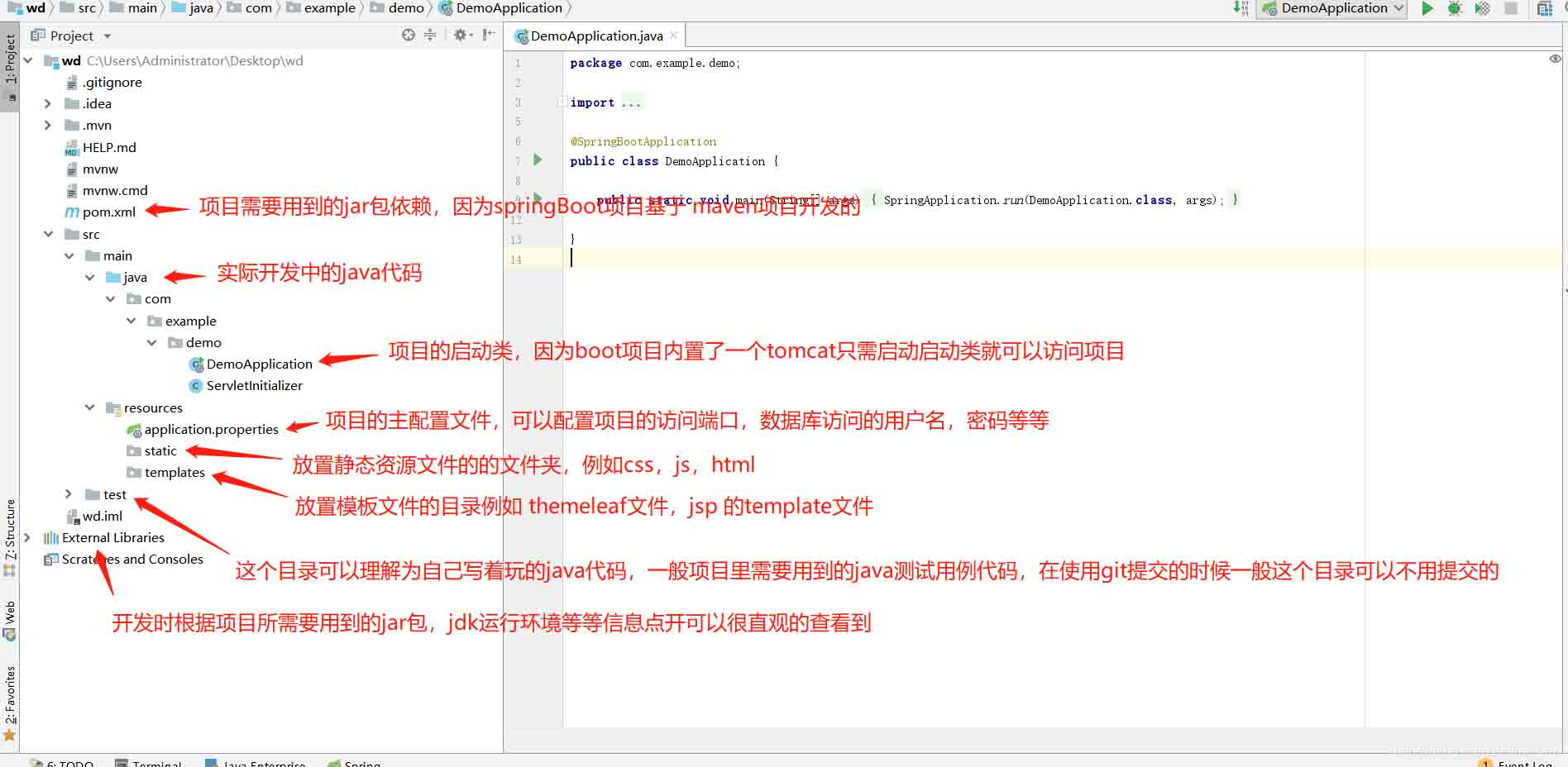
springBoot项目常用目录springBoot项目的目录结构及名规范介绍基于SpringBoot开发时的目录结构及命名规范,通过介绍能够为你解决,在实际项目中如何规划目录结构?如何命名目录更规范?各个目录分别代表什么含义?等三个问题。目录说明servicex//项目名|-admin-ui//管理服务前端代码(一般将UI和SERVICE放到一个工程中,便于管理)|-servicex-auth//模块1|-servicex-common//模块2|-servicex-gateway//模块3|-serv

解析SpringBoot和SpringMVC之间的异同SpringBoot和SpringMVC是Java领域中非常重要的开发框架。虽然它们都属于Spring框架的一部分,但是在使用和功能上有一些明显的区别。本文将对SpringBoot和SpringMVC进行比较,解析它们之间的异同。首先,让我们来了解一下SpringBoot。SpringBo
近年来,随着云计算和分布式架构的兴起,微服务架构的应用越来越广泛。而SpringCloud和SpringBoot作为Java开发中的两个重要框架,对于微服务的实现起到了重要的作用。然而,很多人对于它们在微服务领域的不同应用方式还存在一定的疑惑。本文将从不同的角度探索SpringCloud和SpringBoot在微服务中的应用方式。首先,我们来了解一下Spri
SpringBoot与SpringMVC的不同之处在哪里?SpringBoot和SpringMVC是两个非常流行的Java开发框架,用于构建Web应用程序。尽管它们经常分别被使用,但它们之间的不同之处也是很明显的。首先,SpringBoot可以被看作是一个Spring框架的扩展或者增强版。它旨在简化Spring应用程序的初始化和配置过程,以帮助开发人
SpringBoot和SpringMVC都是Java开发中常用的框架,但它们之间有一些明显的差异。本文将探究这两个框架的特点和用途,并对它们的差异进行比较。首先,我们来了解一下SpringBoot。SpringBoot是由Pivotal团队开发的,它旨在简化基于Spring框架的应用程序的创建和部署。它提供了一种快速、轻量级的方式来构建独立的、可执行
SpringBoot和SpringMVC是Java开发中常用的两个框架,它们都是由Spring框架所提供的,但在功能和使用方式上有着一些区别。本文将分别介绍SpringBoot和SpringMVC的特点和区别。一、SpringBoot的特点:简化配置:SpringBoot通过约定优于配置的原则,大大简化了项目的配置过程。它可以自动配置项目所需要的参数,开发人
SpringCloud和SpringBoot是目前Java领域中最热门的开源框架,它们分别提供了一套完善的微服务架构和快速构建应用程序的解决方案。本文将对它们的功能进行比较,并给出选择指南,以帮助读者了解它们的优势和适用场景。SpringBoot是一个用于开发Java应用程序的框架,它提供了一个简化的开发流程,集成了大量常用的功能和组件,减少了开发者的工作量
深入剖析SpringCloud和SpringBoot的异同引言:在构建企业级应用程序时,Spring框架已经成为开发者们的首选。它提供了一种简单而强大的方式来构建独立于平台的应用程序。Spring框架由两个核心模块组成:SpringBoot和SpringCloud。虽然它们都可以帮助开发者快速搭建应用程序,但它们的目标和用途存在一些差异。本文将深入剖析Spr
从架构角度看SpringCloud与SpringBoot的差异引言:在当今的互联网时代,构建分布式系统已经成为了一种必要的需求。而SpringBoot和SpringCloud正是为了满足这个需求而诞生的。尽管它们都是由Spring框架所提供的解决方案,但从架构角度来看,它们存在着一些重要的差异。本文将从架构的角度出发,对SpringBoot和SpringCl
JavaAPI开发中使用SpringBoot的利弊分析随着互联网的快速发展和技术的不断更新迭代,Java技术在开发中的广泛应用引起了人们的重视。而SpringBoot作为一种微服务架构的解决方案,已经逐渐成为Java开发中的热门选择。那么,在JavaAPI开发中使用SpringBoot,到底有哪些利弊呢?下面来分析一下。利:简化开发





火山引擎是字节跳动旗下企业级云与AI服务平台。聚焦大模型核心能力,依托字节自研豆包多模态大模型,凭借火山方舟一站式平台,提供模型精调、推理部署、智能应用搭建等全链路服务,结合高性能AI算力,助力各行业快速落地大模型数字化与智能化应用。