SpringBoot项目中如何利用application.yml文件配置数据库密码加密
使用@SpringBootApplication注解启动的项目,只需增加maven依赖我们对信息加解密是使用这个jar包的:编写加解密测试类:packagecn.linjk.ehome;importorg.jasypt.encryption.pbe.StandardPBEStringEncryptor;importorg.jasypt.encryption.pbe.config.EnvironmentPBEConfig;importorg.junit.Test;publicclassJasyptTest{
使用@SpringBootApplication注解启动的项目,只需增加maven依赖
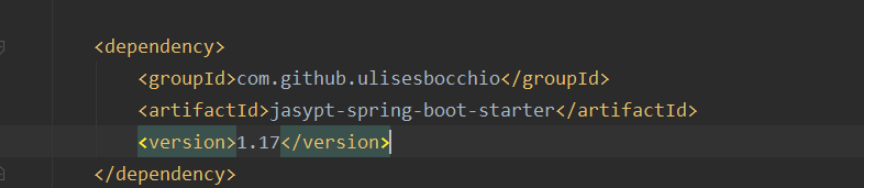
我们对信息加解密是使用这个jar包的:
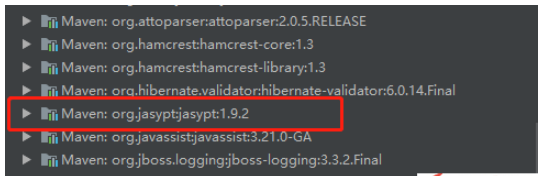
编写加解密测试类:
package cn.linjk.ehome;

import org.jasypt.encryption.pbe.StandardPBEStringEncryptor;
import org.jasypt.encryption.pbe.config.EnvironmentPBEConfig;
import org.junit.Test;

public class JasyptTest {
  @Test
  public void testEncrypt() throws Exception {
    StandardPBEStringEncryptor standardPBEStringEncryptor = new StandardPBEStringEncryptor();
    EnvironmentPBEConfig config = new EnvironmentPBEConfig();

    config.setAlgorithm("PBEWithMD5AndDES");     // 加密的算法,这个算法是默认的
    config.setPassword("test");            // 加密的密钥
    standardPBEStringEncryptor.setConfig(config);
    String plainText = "88888888";
    String encryptedText = standardPBEStringEncryptor.encrypt(plainText);
    System.out.println(encryptedText);
  }

  @Test
  public void testDe() throws Exception {
    StandardPBEStringEncryptor standardPBEStringEncryptor = new StandardPBEStringEncryptor();
    EnvironmentPBEConfig config = new EnvironmentPBEConfig();

    config.setAlgorithm("PBEWithMD5AndDES");
    config.setPassword("test");
    standardPBEStringEncryptor.setConfig(config);
    String encryptedText = "ip10XNIEfAMTGQLdqt87XnLRsshu0rf0";
    String plainText = standardPBEStringEncryptor.decrypt(encryptedText);
    System.out.println(plainText);
  }
}
加密串拿到了,现在来修改application.yml的配置:
我们把加密串放在ENC({加密串})即可。
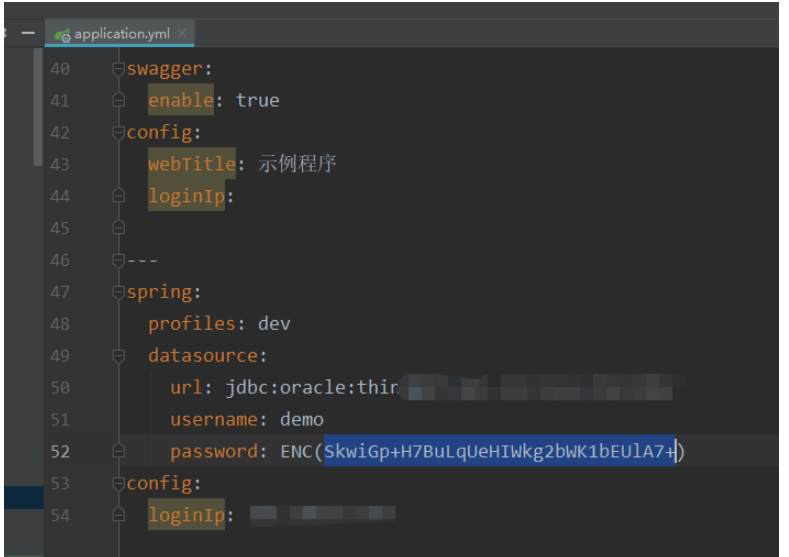
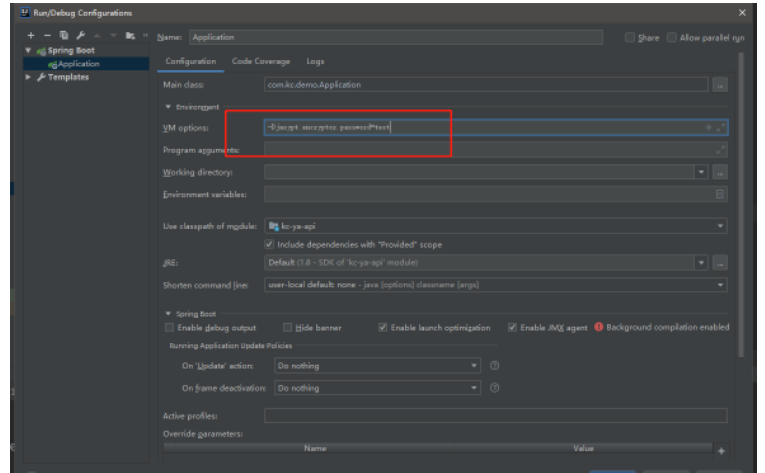
启动时需要配置 秘钥
将秘钥加入启动参数

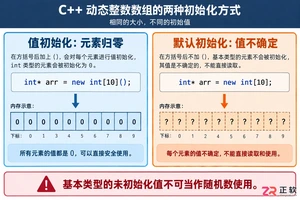
深入解析C++中动态数组的初始化机制,涵盖new操作符的不同用法、基本类型与类对象的初始化差异,以及为何在现代C++开发中应优先使用std::vector。

2026GBASE技术云享会聚焦数据库技术演进与行业实践,探讨AI原生数据库能力、全栈产品迭代及开源生态共建。产业正从高速增长迈入高质量发展阶段,技术实力是国产数据库立足根本。
命名空间的基本概念与常见引入问题在C++等编程语言中,命名空间(namespace)是一种将代码标识符(如变量、函数、类名)封装在特定名称下的机制,其主要目的是避免命名冲突,尤其是在大型项目或使用多个第三方库时。使用“using namespace”指令可以将指定命名空间中的所有名称引入当前作用域,

理解递归的基本原理在C语言中,递归是一种函数调用自身的编程技术。要掌握它,首先需要理解其核心思想:将一个复杂的大问题,分解为一个或几个与原问题相似但规模更小的子问题,直到子问题足够简单,可以直接求解。这个过程通常包含两个关键部分:递归出口和递归体。递归出口定义了问题何时不再继续分解,即最简单、可直接

递归函数的基本概念与适用场景在C语言编程中,递归是一种函数调用自身的编程技巧。它并非适用于所有问题,但在处理某些具有自相似结构的问题时,能提供极其清晰和优雅的解决方案。递归的核心思想是将一个大规模问题分解为一个或多个同类型但规模更小的子问题,直到子问题简单到可以直接求解。典型的适用场景包括树形结构的
理解内存管理的基石在Objective-C的编程世界中,内存管理是开发者必须掌握的核心技能之一。它直接关系到应用的性能、稳定性与资源利用效率。与一些采用自动垃圾回收机制的语言不同,Objective-C在很长一段时间里,依赖一套基于引用计数的、需要开发者部分介入的管理规则。这套规则的核心思想是明确的
理解 dealloc 的角色与时机在 iOS 应用开发中,内存管理是保障应用性能与稳定性的基石。dealloc 方法是 Objective-C 中对象生命周期结束时的关键回调,它标志着对象即将被系统回收内存。正确理解其触发时机至关重要:当一个对象的引用计数降为零时,运行时系统会自动调用该对象的 de
内存管理的基石在Objective-C的世界里,内存管理是开发者必须掌握的核心技能之一。作为一门在手动引用计数(MRC)时代诞生的语言,Objective-C要求程序员对对象的生命周期有清晰的认识。dealloc方法正是这一生命周期中至关重要的终点站。它是一个实例方法,当对象的引用计数降为零时,系统

native2ascii 工具的基本定位在Ja va应用程序的国际化与本地化开发过程中,处理非拉丁字符集是一个常见且关键的环节。Ja va内部使用Unicode字符集来统一表示全球各种语言的文字,但其属性文件(.properties)在历史上要求使用ASCII编码,或者更准确地说,要求非ASCII字
理解 native2ascii 工具的基本用途在软件开发,特别是涉及国际化处理的场景中,开发者常常需要处理不同编码的文本资源。native2ascii 是 Ja va 开发工具包(JDK)中提供的一个命令行实用程序,其主要功能是将包含本地字符编码(非ASCII字符)的文件,转换为包含 Unicode






Windows 10 是一款微软推出的经典操作系统,拥有硬件兼容性与多任务处理能力。它更偏向把系统状态查看和常用调节动作放在一起,适合需要持续观察和微调设备状态的场景。

极度公式是一款跨平台专业LaTeX公式识别编辑软件,支持OCR公式识别和多平台编辑。和使用说明,避免使用,享受完整功能与稳定支持。做扫描整理、文字提取和表格转换时,它能把识别后的处理步骤接得更顺,资料录入这类场景会省下不少时间。