

SpringBoot项目如何使用hutool工具进行http接口调用
hutool简单介绍关于hutool工具包其实本人使用的不多哈,这里面其实封装处理了大量的开发日常小工具方法:时间格式化,时间转换,时间校验http接口调用字符串格式化处理国标加密....对于一个稍微大型的项目来说是一个很好用的封装工具包('宝藏男孩'),更多的好东西需要大家去探索实践这里说明一下hutool封装了httpclient也是能使用的但是它高度封装了,所以我使用的是HttpRequest灵活性更高!!!引用依赖cn.hutoolhutool-all5.7.7junitjunit
hutool简单介绍
关于hutool工具包其实本人使用的不多哈 ,这里面其实封装处理了大量的开发日常小工具方法:
时间格式化,时间转换,时间校验
http 接口调用
字符串格式化处理
国标加密....
对于一个稍微大型的项目来说是一个很好用的封装工具包('宝藏男孩'),更多的好东西需要大家去探索
实践
这里说明一下hutool封装了httpclient 也是能使用的但是它高度封装了,所以我使用的是
HttpRequest
灵活性更高!!!
引用依赖
    cn.hutool
    hutool-all
    5.7.7


    junit
    junit
post
简单接口调用
@Test
public void huToolPost() {
    System.out.println("--------------------------------post请求-----------------------------------");
    HashMap paramMaps = new HashMap<>(4);
    paramMaps.put("pid", "463669875660294144");
    paramMaps.put("mobile", "123456.");
    paramMaps.put("name", "123456.");
    paramMaps.put("message", "");
    HttpResponse response = HttpRequest.post("http://192.168.99.202:8202/thySystem/pg-biz-sae/app/opinion/add")
            .header("Content-Type", "application/json")
            .header("token", "710515329923024896")
            .header("kong-request-id", "710515329923024896")
            .body(JSON.toJSONString(paramMaps))
            .execute();

    int status = response.getStatus();
    System.out.println("请求响应状态码:" + status);
    String body = response.body();
    System.out.println(body);
    JSONObject jsonObject = JSONObject.parseObject(body);
    Object msg = jsonObject.get("msg");
    System.out.println(msg);
    Object code = jsonObject.get("code");
    System.out.println(code);

}
文件上传
/**
 * 文件上传测试
 */
@Test
public void huToolUploadFile(){
    File f1 = new File("C:\Users\12043\Desktop\cat.jpeg");
    File f2 = new File("C:\Users\12043\Desktop\cat.jpeg");
    File[] files = new File[2];
    files[0] = f1;
    files[1] = f2;
    HttpResponse response = HttpRequest.post("url")
            .form("param", "test")
            .form("key", files)
            .execute();
}
get 请求
@Test
public void huToolGet(){
    System.out.println("--------------------------------get请求-----------------------------------");
    HashMap getParamMaps = new HashMap<>(5);
    getParamMaps.put("sortStr", "recordFlag,baseInfo.createTime");
    getParamMaps.put("sortDirection", "ASC");
    getParamMaps.put("filterStr", "flowAbleInfo.nodeId==craCheck");
    getParamMaps.put("pageSize", 10);
    getParamMaps.put("pageNo", 0);
    HttpResponse getResponse = HttpRequest.get("http://192.168.99.202:8202/thySystem/pg-biz-sae/sae/list")
            .header("Content-Type", "application/json")
            .header("token", "710515329923024896")
            .header("kong-request-id", "710515329923024896").form(getParamMaps).execute();

    int status1 = getResponse.getStatus();
    System.out.println("请求响应状态码:" + status1);
    String body1 = getResponse.body();
    System.out.println(body1);
    JSONObject jsonObject1 = JSONObject.parseObject(body1);
    Object msg1 = jsonObject1.get("msg");
    System.out.println(msg1);
    Object code1 = jsonObject1.get("code");
    System.out.println(code1);
} 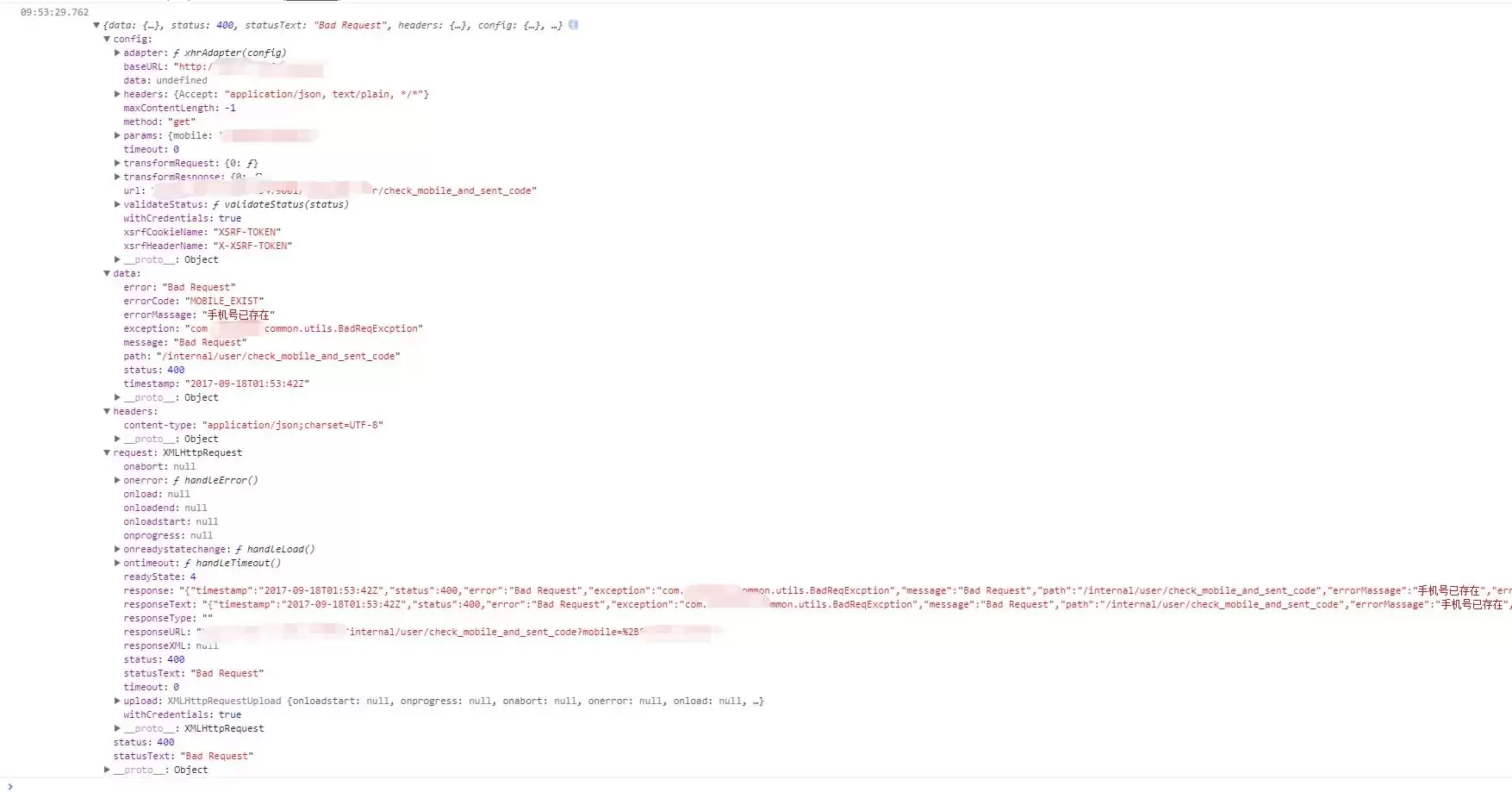
调用后端接口遇到400状态码时,仅捕获error.message无法获取具体错误信息。需在catch中通过error.response对象获取状态码、响应体及业务描述等详细数据,从而精准定位后端返回的业务错误。
在SUSE 10.3中安装http apache2的依赖问题解决 在SUSE 10.3系统上安装Apache2时,很多人都会遇到一个典型的依赖错误。系统会明确提示你缺少几个关键的库文件,具体信息通常是这样: libapr1 >= 1.0 is needed by apache2-2.2.3-16.2

使用httptest可高效测试GolangHTTPAPI。1.用NewRecorder模拟请求并检查状态码、响应体和头信息;2.测试路由和中间件时将ServeMux注入测试;3.用NewServer启动临时服务进行端到端验证。

前言通过前面的总结,我们了解到,当客户端通过HTTP向服务端发送请求后,期望服务端能够作出响应。在服务端的响应中,信息头包含一个称为StatusCode的属性,其值是一个三位数字,我们称之为HTTP状态码。HTTP状态码是HTTP协议的重要组成部分,用来表示服务端对当前请求的响应状态。概念HTTP状态码(英语:HTTPStatusCode)是用来表示网页服务器HTTP协议响应状态的三位数字代码。它由RFC2616规范定义,并得到RFC2518、RFC2817、R

大家好,又见面了,我是你们的朋友全栈君。WrapPanel布局面板将各个控件从左至右按照行或列的顺序罗列,当长度或高度不够是就会自动调整进行换行,后续排序按照从上至下或从右至左的顺序进行。Orientation——根据内容自动换行。当Horizontal选项看上去类似于Windows资源管理器的缩略图视图:元素是从左向右排列的,然后自上至下自动换行。Vertical选项看上去类似于Windows资源管理器的列表视图:元素是从上向下排列的,然后从左至右自动换行。ItemHeight——所有子元素
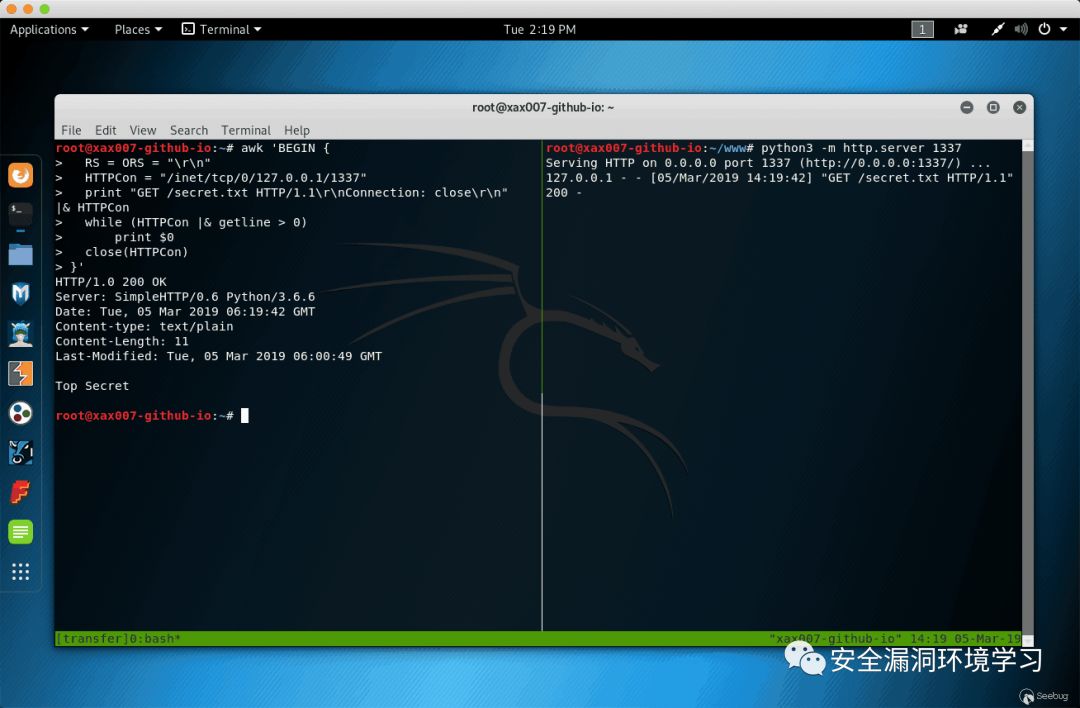
在红队渗透测试中,常常需要最大限度地利用现有环境,绕过严密防守的系统防火墙、入侵检测系统(IDS)和入侵防御系统(IPS)等监控和报警系统进行文件传输。本文将介绍多种使用操作系统自带工具进行文件传输的技巧。搭建HTTP服务器使用Python对于Python2用户:python-mSimpleHTTPServer1337

在探讨GB28181协议的细节之前,让我们先了解一下与之相关的HTTP和SSDP协议的基本概念。这将帮助我们更好地理解GB28181协议的工作原理。1、HTTP协议与SSDP协议SSDP协议与HTTP协议在结构上非常相似,实际上,它们的相似之处主要在于协议内容的格式。然而,SSDP协议在使用时需要忽略端口和D类地址。当我向其他员工或面试者解释时,我总是强调深入理解HTTP协议的重要性,因为掌握了HTTP协议,理解SSDP协议就变得相对容易。许多人可能会认为HTTP协议仅仅是GET、POST、PUT、DEL
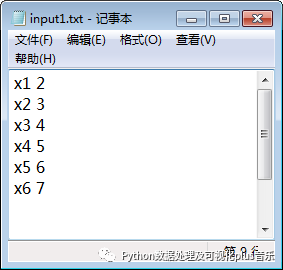
本系列开启了一个全新的项目,旨在实现用户通过自定义计算公式输入一系列值(固定格式,假设为文本格式),并自动生成一系列计算后的值。这些新值将被追加到原始文本中。核心在于用户无需编程即可通过提供的UI界面操作,操作一次生成程序,以后进行同类工作无需重复操作。本项目主要涉及的模块包括traitsui和traits。Part1:目标输入:如图所示,input1.txt文本中包含一系列数值。输出:经过程序处理后,生成output1.txt,新文件是在原始文件的基础上追加了一些值,追加值的数值取决于具体的公式。这里
如何处理HTTP异常?在Golang中,HTTP异常处理包括以下方法:自定义HTTP错误处理程序:使用http.Error自定义错误响应。内置异常处理:使用recover()恢复异常,并使用errorHandler发送错误响应。实战案例:处理无效请求:根据请求方法发送错误响应。处理服务器内部错误:使用deferrecover()捕获异常并发送错误响应。处理其他异常:通过类似的方法进行处理。
如何在C++中实现HTTP流传输?使用Boost.Asio和asiohttps客户端库创建SSL流套接字。连接到服务器并发送HTTP请求。接收HTTP响应头并打印它们。接收HTTP响应正文并打印它。





火山引擎是字节跳动旗下企业级云与AI服务平台。聚焦大模型核心能力,依托字节自研豆包多模态大模型,凭借火山方舟一站式平台,提供模型精调、推理部署、智能应用搭建等全链路服务,结合高性能AI算力,助力各行业快速落地大模型数字化与智能化应用。



