Python操作ArangoDB教程:python-arango使用详解
选择python-arango库的核心优势在于其官方支持、全面的API覆盖、异步操作能力、良好的类型提示与异常处理机制以及内置连接池管理;2.它能通过直观的Pythonic接口实现文档的增删改查、AQL参数化查询、批量操作和索引管理,显著提升开发效率与运行性能;3.在处理图数据时,该库提供图对象抽象,支持顶点和边集合的便捷管理,可通过图结构定义关系并执行高效图遍历操作,是Python与ArangoDB交互的成熟可靠方案。
选择python-arango库的核心优势在于其官方支持、全面的API覆盖、异步操作能力、良好的类型提示与异常处理机制以及内置连接池管理;2. 它能通过直观的Pythonic接口实现文档的增删改查、AQL参数化查询、批量操作和索引管理,显著提升开发效率与运行性能;3. 在处理图数据时,该库提供图对象抽象,支持顶点和边集合的便捷管理,可通过图结构定义关系并执行高效图遍历操作,是Python与ArangoDB交互的成熟可靠方案。

Python操作ArangoDB,最直接且推荐的方式是利用其官方支持的python-arango库。这个库提供了一整套API,让开发者能够便捷地连接到ArangoDB实例,执行文档的增删改查、运行复杂的AQL查询,甚至管理集合和图结构,可以说,它是Python与ArangoDB之间沟通的桥梁,相当成熟可靠。
要用python-arango操作ArangoDB,首先得安装它。
pip install python-arango
连接到数据库是第一步,通常需要指定主机、端口、数据库名和认证信息。
from arango import ArangoClient
from arango.exceptions import DocumentInsertError, ArangoClientError

# 初始化客户端
try:
    client = ArangoClient(hosts="http://localhost:8529")

    # 连接到数据库(需要用户名和密码)
    # 如果是_system数据库,直接db = client.db("_system", username="root", password="your_password")
    # 如果是其他数据库,需要先确保该数据库存在并有权限
    db = client.db("my_new_database", username="root", password="your_password")

    # 确保数据库存在,如果不存在则创建(可选,需要_system数据库的root权限)
    # if not db.verify():
    #     print("Database 'my_new_database' does not exist or credentials are wrong.")
    #     client.create_database("my_new_database") # 这需要在_system数据库的root权限下执行
    #     db = client.db("my_new_database", username="root", password="your_password")
    #     print("Database 'my_new_database' created.")

    # 获取一个集合对象
    collection = db.collection("my_documents")

    # 如果集合不存在,创建它
    if not collection.exists():
        collection.create()
        print("Collection 'my_documents' created.")

    # 插入文档
    new_doc = {"name": "Alice", "age": 30, "city": "New York"}
    result = collection.insert(new_doc)
    print(f"Inserted document: {result['_key']}")

    # 读取文档
    fetched_doc = collection.get(result['_key'])
    print(f"Fetched document: {fetched_doc}")

    # 更新文档
    updated_doc_data = {"age": 31, "occupation": "Engineer"}
    updated_doc = collection.update(fetched_doc, updated_doc_data)
    print(f"Updated document: {updated_doc}")

    # 删除文档
    # collection.delete(updated_doc)
    # print(f"Deleted document: {updated_doc['_key']}")

    # 执行AQL查询
    cursor = db.aql.execute(
        "FOR d IN my_documents FILTER d.age > @min_age RETURN d",
        bind_vars={"min_age": 30}
    )
    print("Documents with age > 30:")
    for doc in cursor:
        print(doc)

except ArangoClientError as e:
    print(f"ArangoDB Client Error: {e}")
except Exception as e:
print(f"An unexpected error occurred: {e}")为什么选择python-arango库,它有哪些核心优势?
我个人觉得,选择python-arango,很大程度上是因为它的“官方血统”和社区活跃度。这不仅仅意味着它能紧跟ArangoDB服务端的功能更新,更重要的是,你在遇到问题时,能找到相对丰富的文档和社区支持。它的API设计,我用下来感觉是相当直观的,比如对集合、文档、AQL查询的抽象,都比较符合Pythonic的习惯。
它的优势体现在几个方面:
- 全面的API覆盖: 不论是基础的文档操作、复杂的AQL查询,还是图数据管理、事务处理,甚至数据库和集合的生命周期管理,
python-arango都提供了对应的接口。你不需要为了某个特定功能再去引入别的库,一套搞定。 - 异步支持: 对于需要高并发的应用场景,
python-arango提供了AsyncArangoClient,可以配合asyncio实现非阻塞操作,这在现代Web服务中是相当重要的特性。避免了I/O阻塞带来的性能瓶颈。 - 类型提示和异常处理: 库内部有不错的类型提示,对IDE的代码补全很友好。同时,它对ArangoDB返回的错误码做了封装,提供了具体的异常类,方便开发者进行精细化的错误捕获和处理,而不是一堆模糊的HTTP状态码。
- 连接池管理: 在高负载环境下,频繁地建立和关闭数据库连接是性能杀手。
python-arango内置了连接池管理,可以有效地复用连接,降低开销,提升应用响应速度。
我记得有一次,我需要快速搭建一个原型,涉及大量AQL查询和图遍历。python-arango的直观性让我省去了不少查阅文档的时间,直接上手就能写,这种开发效率的提升是实实在在的。
在实际项目中,如何高效地进行文档操作和AQL查询?
在实际项目中,尤其数据量上来后,效率是个大问题。我总结了一些经验:
批量操作: 单个文档的插入、更新、删除,在数据量小的时候没问题,但如果一次性要处理成百上千甚至更多,逐个操作的网络开销会非常大。
python-arango提供了批量插入(insert_many)、批量更新(update_many)等方法。# 批量插入示例 docs_to_insert = [ {"name": "Bob", "age": 25, "city": "London"}, {"name": "Charlie", "age": 35, "city": "Paris"} ] results = collection.insert_many(docs_to_insert) print(f"Inserted {len(results)} documents in bulk.")这能显著减少网络往返次数,提升吞吐量。
AQL参数化查询: 永远不要直接拼接SQL(或AQL)字符串!这不仅是安全问题(SQL注入),更是性能问题。
python-arango的db.aql.execute方法支持bind_vars参数,传入字典形式的绑定变量。# 避免:f"FOR d IN my_documents FILTER d.name == '{user_input_name}' RETURN d" # 推荐: user_input_name = "Alice" cursor = db.aql.execute( "FOR d IN my_documents FILTER d.name == @target_name RETURN d", bind_vars={"target_name": user_input_name} ) for doc in cursor: print(doc)这样做,ArangoDB可以缓存查询计划,每次执行时只需替换参数,效率更高。
索引优化: AQL查询慢,十有八九是索引没建好。在使用
python-arango执行查询前,先想想你的查询条件涉及哪些字段,是否已经在ArangoDB中为这些字段创建了哈希索引、跳表索引或全文索引。python-arango本身不能帮你优化AQL,但它能让你方便地管理索引:# 创建哈希索引 if not collection.has_index(["name", "city"]): collection.add_hash_index(["name", "city"], unique=False) print("Hash index on 'name' and 'city' created.")我之前就遇到过一个查询,跑了十几秒,加上一个复合索引后,瞬间降到几十毫秒,效果立竿见影。
游标管理: 对于返回大量结果的AQL查询,
db.aql.execute会返回一个游标对象。这个游标是可迭代的,它会按批次从数据库拉取数据,而不是一次性全部加载到内存。这对于内存管理和网络带宽都很有利。记得及时关闭游标(虽然Python的垃圾回收机制通常会处理)。
处理ArangoDB图数据时,python-arango提供了哪些便利?
ArangoDB最吸引人的特性之一就是它的多模型能力,尤其是图数据。python-arango在图操作上,也做得相当到位,让Python开发者能比较自然地处理节点(vertex)和边(edge)。
图对象的抽象: 你可以很方便地获取一个图对象,然后通过它来管理图中的顶点集合和边集合。
# 获取或创建图
graph = db.graph("my_social_graph")
if not graph.exists():
    # 创建图时可以指定边定义,这里简化
    graph.create()
    print("Graph 'my_social_graph' created.")

# 获取顶点集合和边集合
users_collection = graph.vertex_collection("users")
follows_collection = graph.edge_collection("follows")

# 如果集合不存在,创建它们
if not users_collection.exists():
    users_collection.create()
if not follows_collection.exists():
    # 边集合需要定义来源和目标顶点集合
    graph.add_edge_definition(
        edge_collection_name="follows",
        from_vertex_collections=["users"],
        to_vertex_collections
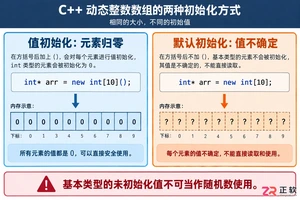
深入解析C++中动态数组的初始化机制,涵盖new操作符的不同用法、基本类型与类对象的初始化差异,以及为何在现代C++开发中应优先使用std::vector。
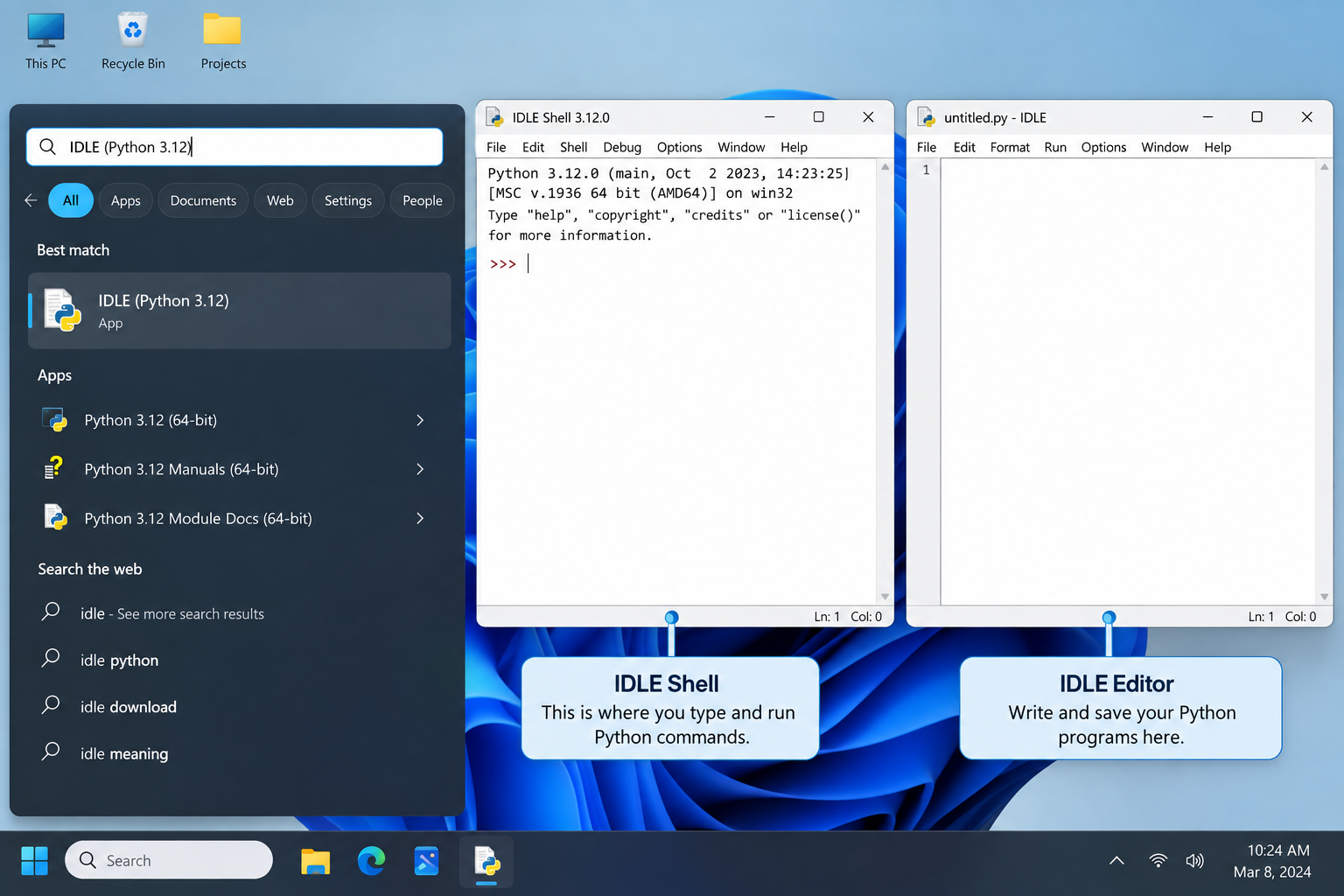
刚在Windows安装好Python却不知道如何启动?本文详细演示如何通过开始菜单找到并打开IDLE集成开发环境,以及如何在PowerShell或命令提示符中使用python和py命令启动交互式解释器、运行.py脚本文件。包含退出解释器的方法及常见启动问题排查,帮助初学者快速验证安装成功并开始编写代码。
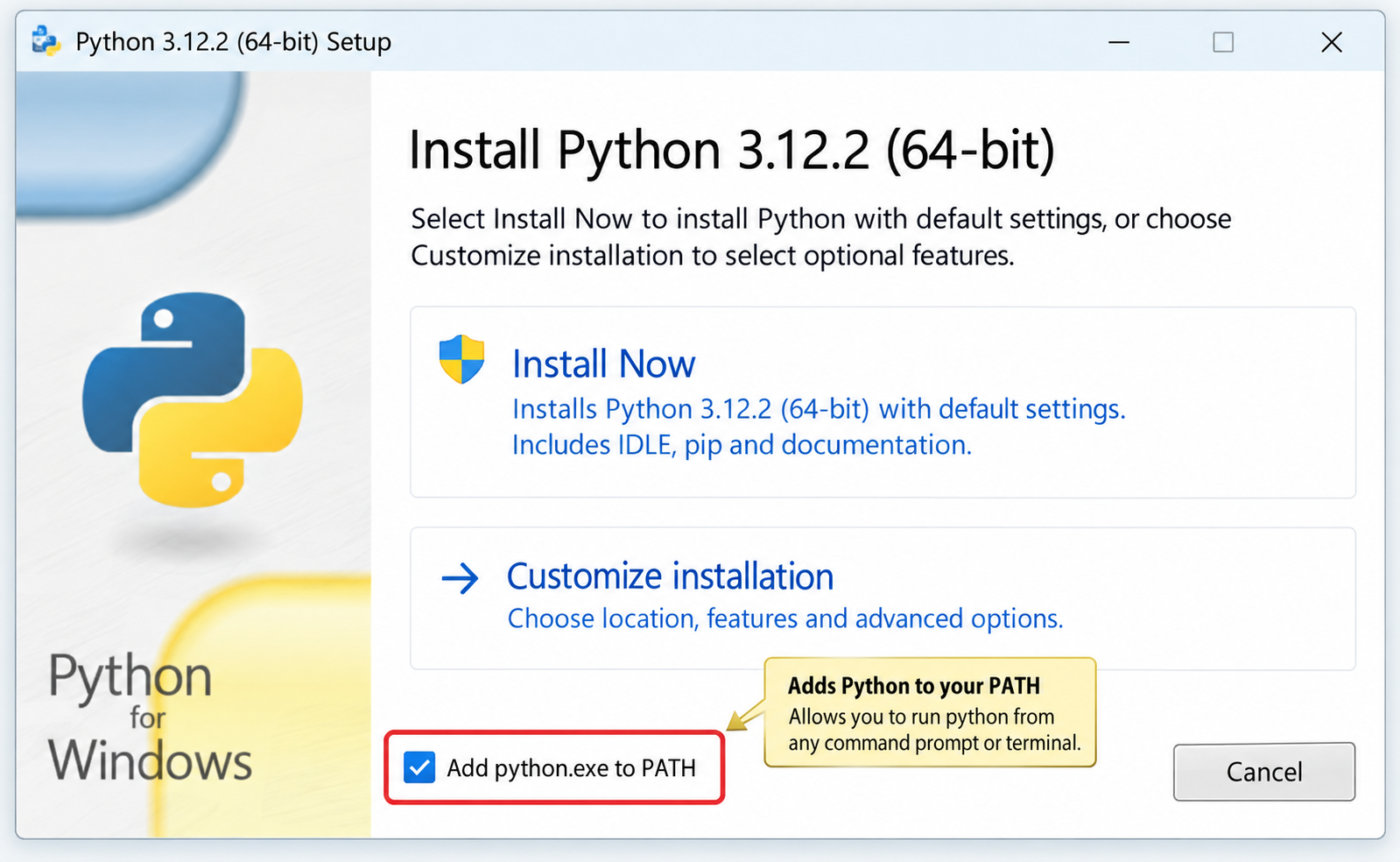
针对Windows初学者的Python安装实战指南。详细讲解如何从Python官网下载匹配架构的安装包,重点演示安装首屏勾选“Add python.exe to PATH”的关键操作,并提供使用python --version和py命令验证环境变量的具体步骤,帮助新手快速搭建开发环境并排查路径问题。

要想确认麒麟OS中Python程序的运行状态以及资源占用情况,我们可以这样做:用ps -ef | grep python来筛选进程;通过top命令,按P键排序查看实时负载;使用pgrep -f "script.py"精准获取PID;借助lsof -p PID验证文件打开状态。另外,还可以结合syst

在Debian系统上配置SSL证书通常涉及以下几个步骤:安装Web服务器:首先,你需要一个Web服务器,比如Apache或Nginx。这里以Apache为例。sudo apt updatesudo apt install apache2获取SSL证书:你可以从Let’s Encrypt免费获取SSL

要想让Python项目在统信UOS上正常运行,得先安装python3、python3-pip、python3-venv、python3-dev以及build-essential等组件。具体操作就是执行sudo apt install命令来一步到位完成安装,同时别忘了配置清华镜像源来给pip加速哦。在
在互联网上的各类网站中,无论大小,基本上都会有一个搜索框,用来给用户对内容进行搜索,小到站点搜索,大到搜索引擎搜索。从简单的来说,搜索功能确实很简单,一个简单的select语句就可以实现数据的搜索。而从复杂的来看,无论是搜索的精度还是搜索的效率,都是有很深的研究范围的。对于简单的搜索功能来说,一个s

立即在终端输入sudo shutdown -c取消倒计时关机,成功后显示“Shutdown cancelled”;若存在pmset重复任务,需再执行sudo pmset repeat cancel清除。Mac因Python脚本执行了os.system("sudo shutdown -h +10")或

之前写过一篇同步场景下用 Python 管理多个固定出口 IP 的实践(ExitPool + requests/httpx),覆盖了健康检查、故障转移和连接池复用。但在实际业务中,越来越多的场景用 asyncio 做高并发采集或批量接口调用——异步事件循环下多出口的管理方式和同步场景完全不同:单线程

写在前面:为什么静态出口 IP 不是"买了就行"不少团队在引入静态出口 IP 产品时,第一反应往往是:“地址配上去,这事就算完了。”可真到了真实业务里,静态出口 IP 真正能体现价值的地方,往往不在分配这一步,而在分配之后怎么管:地址有没有漂移,质量是否达标,某一条线路突然不可用时怎么切换,连接层又






Windows 10 是一款微软推出的经典操作系统,拥有硬件兼容性与多任务处理能力。它更偏向把系统状态查看和常用调节动作放在一起,适合需要持续观察和微调设备状态的场景。

极度公式是一款跨平台专业LaTeX公式识别编辑软件,支持OCR公式识别和多平台编辑。和使用说明,避免使用,享受完整功能与稳定支持。做扫描整理、文字提取和表格转换时,它能把识别后的处理步骤接得更顺,资料录入这类场景会省下不少时间。