

Gson解析JSON数组转List方法详解
本文详解Gson反序列化时出现ClassCastException:CannotcastJsonPrimitivetoJsonObject的根本原因,重点解决ChatColor类型不匹配、缺失字段及JSON结构误判等问题,并提供可直接复用的修复方案。

本文详解 Gson 反序列化时出现 ClassCastException: Cannot cast JsonPrimitive to JsonObject 的根本原因,重点解决 ChatColor 类型不匹配、缺失字段及 JSON 结构误判等问题,并提供可直接复用的修复方案。
本文详解 Gson 反序列化时出现 `ClassCastException: Cannot cast JsonPrimitive to JsonObject` 的根本原因,重点解决 `ChatColor` 类型不匹配、缺失字段及 JSON 结构误判等问题,并提供可直接复用的修复方案。
该错误看似发生在 Gson 解析阶段(fromJson(...)),实则根源在于 Java 类型定义与 JSON 数据结构严重不一致。从你提供的 JSON 示例 ["{...}"] 可知,API 返回的是标准 JSON 数组,但 Gson 在尝试将其中某个元素(如字符串 "WHITE")强制转为 JsonObject 时失败——这通常意味着 Gson 正在解析一个本应是对象(JsonObject)的位置,却遇到了原始值(JsonPrimitive),典型诱因有以下三点:
? 根本原因分析
ChatColor color 字段类型失配
JSON 中 "color": "WHITE" 是字符串字面量,而你的 Rank 类中声明为 ChatColor(Spigot 的枚举类)。Gson 默认无法自动将字符串 "WHITE" 映射为 ChatColor.WHITE,若未注册自定义 TypeAdapter,Gson 会尝试以泛型方式解析该字段,最终因类型擦除和内部反射逻辑错乱,触发 JsonPrimitive → JsonObject 的非法强转。inheritFromId 字段缺失且无默认值
JSON 示例中未包含 "inheritFromId" 字段,而 Rank 构造器为全参 @AllArgsConstructor,Lombok 会生成要求所有字段非 null 的构造函数。Gson 在反序列化时若找不到对应键,将传入 null,导致后续构造失败或空指针异常(日志末尾的 NullPointerException 已佐证)。JSON 响应体可能非纯数组(隐藏陷阱)
虽然你确认返回的是 [{"id":"default",...}],但需严格验证 getJsonResponse() 方法是否始终返回合法 JSON 数组字符串。常见错误包括:- API 错误时返回 {"error":"..."}(单个对象而非数组)
- 网络异常返回空字符串或 HTML 错误页
- getJsonResponse() 内部逻辑意外截断/拼接了非 JSON 内容
✅ 正确解决方案
步骤 1:为 ChatColor 注册 TypeAdapter(关键!)
// 创建 Gson 实例时注入适配器
Gson gson = new GsonBuilder()
    .registerTypeAdapter(ChatColor.class, new JsonDeserializer() {
        @Override
        public ChatColor deserialize(JsonElement json, Type typeOfT,
                                   JsonDeserializationContext context) throws JsonParseException {
            if (json.isJsonNull()) return null;
            String colorName = json.getAsString().toUpperCase();
            try {
                return ChatColor.valueOf(colorName);
            } catch (IllegalArgumentException e) {
                // 处理未知颜色名,例如回退到 WHITE 或抛出定制异常
                return ChatColor.WHITE;
            }
        }
    })
    .create();
步骤 2:修正 Rank 类结构(兼容缺失字段)
@Getter
@NoArgsConstructor // 必须添加无参构造器,Gson 反序列化必需
@AllArgsConstructor(access = AccessLevel.PRIVATE) // 私有全参构造,避免外部滥用
public class Rank {
    private String id;
    private String displayName;
    private String prefix;
    private String inheritFromId; // 改为 String 类型(更安全),或设为 @Nullable
    private ChatColor color;
    private List permissions;
    private int weight;
    private boolean staff;

    // 若需保留继承关系,可添加带默认值的构造器
    public Rank(String id, String displayName, String prefix, String inheritFromId,
                ChatColor color, List permissions, int weight, boolean staff) {
        this.id = id;
        this.displayName = displayName;
        this.prefix = prefix;
        this.inheritFromId = inheritFromId != null ? inheritFromId : ""; // 安全默认值
        this.color = color;
        this.permissions = permissions != null ? permissions : new ArrayList<>();
        this.weight = weight;
        this.staff = staff;
    }
}
步骤 3:健壮的反序列化调用(含错误防护)
public void refresh() {
    String jsonResponse = Juke.INSTANCE.getApiHandler().request("/ranks").getJsonResponse();

    // 强制校验 JSON 合法性(防御性编程)
    if (jsonResponse == null || jsonResponse.trim().isEmpty()) {
        throw new IllegalStateException("API returned empty or null JSON response");
    }

    try {
        // 使用预配置的 Gson 实例
        Type listType = new TypeToken>() {}.getType();
        this.ranks = gson.fromJson(jsonResponse, listType);

        // 可选:验证解析结果
        if (this.ranks == null) {
            throw new IllegalStateException("Gson failed to parse JSON into List");
        }

    } catch (JsonSyntaxException e) {
        throw new RuntimeException("Invalid JSON syntax in /ranks response: " + jsonResponse, e);
    } catch (JsonParseException e) {
        throw new RuntimeException("Failed to parse Rank objects: " + e.getMessage(), e);
    }
}
⚠️ 注意事项
- 切勿依赖 @AllArgsConstructor + @Getter 的组合进行反序列化:Gson 需要无参构造器或字段级访问权限,Lombok 的全参构造器会阻止 Gson 的默认字段注入机制。
- 始终验证 API 响应内容:在 getJsonResponse() 中添加日志输出原始字符串,确认其真实结构(尤其注意引号、括号、编码问题)。
- 版本兼容性提示:Gson 2.8.6 与 2.10.1 均存在此问题,本质与版本无关,而是类型契约不一致所致;升级 Gson 并不能绕过类型映射缺陷。
通过以上三步改造,即可彻底解决 ClassCastException,并构建出稳定、可维护的 JSON 反序列化流程。
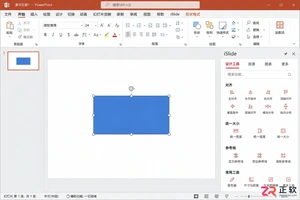
iSlide设计工具侧边栏不见了怎么办?本教程详解在Windows版PPT中通过【设计工具】按钮恢复侧边栏的方法,涵盖面板拖拽、模块隐藏检查及插件加载异常的处理,同时提供macOS用户的使用指引。
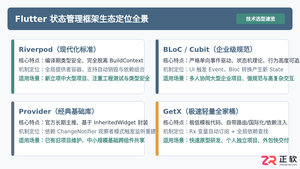
全面盘点Flutter主流状态管理框架,深度解析Provider、Riverpod、Bloc与GetX的核心机制、优缺点及适用场景,提供系统化的状态管理选型指南。
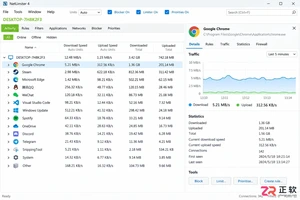
新手入门 NetLimiter 必读指南。详解 Activity 实时监控、DL/UL Limit 限速设置、Blocker 阻止规则及 Stats 流量统计功能。图文结合展示规则编辑器操作,助你轻松管理 Windows 应用网络带宽。
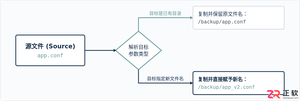
在Linux系统中,复制文件并改名并没有单独的独立命令,而是通过标准复制命令cp在指定目标路径时直接写上新文件名来完成。本文详解cp命令复制并重命名的操作语法、同目录与跨目录示例、常用安全参数及目录复制实践。
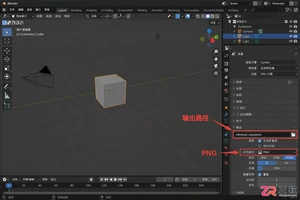
学习如何将Blender中的动态材质导出为图片序列。涵盖输出路径设置、PNG格式选择、帧范围确认及Image Sequence贴图的重新载入方法,适合需要保留透明通道或后期处理的动画贴图工作流。
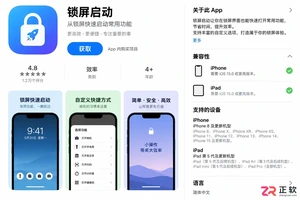
想在iPhone或iPad上实现锁屏一键直达?本文详解“锁屏启动”的安装前检查清单、系统权限配置步骤及小组件添加方法,解决组件不显示、点击无反应等常见问题,确保快捷指令、网页和App快速启动。

学习如何在Blender中使用HDRI进行渲染。通过World着色器连接Environment Texture节点,调整光照强度与环境方向,解决背景显示与曝光问题,快速提升场景真实感。
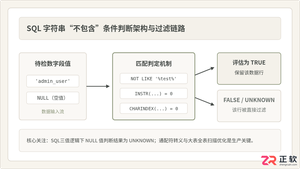
深入详解在SQL中进行条件判断字符串不包含某个子串的方法,涵盖标准NOT LIKE、各主流数据库(MySQL、PostgreSQL、SQL Server、Oracle)专有位置函数、正则表达式判断,剖析NULL值三值逻辑陷阱及全表扫描性能优化策略。
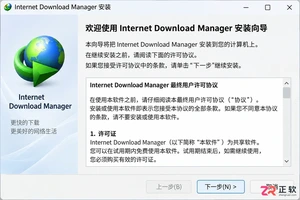
新手必读的IDM安装配置教程。从官方下载开始,逐步讲解如何完成Windows安装、启用Chrome/Edge/Firefox浏览器扩展、设置默认保存目录及调整连接线程,解决IDM不弹窗接管下载的常见问题。
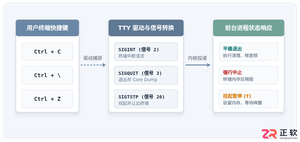
全面解析Linux终端中终止进程的核心快捷键(Ctrl+C、Ctrl+Z、Ctrl+\)的原理、区别与具体使用方法,附后台恢复与强制终止全流程指南。




Postman是一套面向API全生命周期的开发与测试平台,可在Mac上发送和调试多种协议请求,管理集合、环境及认证信息,并完成脚本测试、模拟服务、监控、文档发布和团队协作。它适合开发、测试及运维人员使用,提供个人免费方案。
Docker Desktop 是 Docker 官方为 Mac 提供的容器开发环境,集成 Docker Engine、命令行工具、Compose、Build、Kubernetes 与图形化管理界面。

Android Studio 是 Google 面向安卓应用开发提供的官方集成开发环境,基于 IntelliJ IDEA 构建。它整合智能代码编辑、Gradle 构建、界面预览、设备模拟、性能分析、调试测试及 APK 分析等工具。

Postman 是面向 API 全生命周期的开发与协作平台。Windows 桌面版可用于构建和发送 HTTP、GraphQL、gRPC、WebSocket、MQTT 等请求,并提供环境变量、集合、脚本测试、模拟服务、监控、文档及团队工作区等

Docker Desktop 为 Windows 开发者提供集成式容器环境,内置 Docker Engine、命令行工具、Compose、Build 与 Kubernetes 等组件,可在本机完成镜像构建、容器运行、日志查看和资源管理。

Android Studio 是 Google 面向 Android 应用开发提供的官方集成开发环境,以 IntelliJ IDEA 为基础,集成智能代码编辑、Gradle 构建、设备模拟、界面预览、调试测试及性能分析工具,