

PHP在CentOS中如何实现安全配置
PHP 在 CentOS 的安全配置清单 在CentOS上部署PHP应用,安全配置绝不是可有可无的选项,而是保障服务稳定运行的基石。下面这份清单,将系统性地梳理从操作系统到应用层的关键加固步骤,帮你构建一道坚实的防线。 一 系统与基础防护 安全始于底层。如果系统本身千疮百孔,上层的应用防护就如同沙上
PHP 在 CentOS 的安全配置清单

在CentOS上部署PHP应用,安全配置绝不是可有可无的选项,而是保障服务稳定运行的基石。下面这份清单,将系统性地梳理从操作系统到应用层的关键加固步骤,帮你构建一道坚实的防线。
一 系统与基础防护
安全始于底层。如果系统本身千疮百孔,上层的应用防护就如同沙上筑塔。
- 保持系统与软件包为最新,及时安装安全补丁:这是最基本也最有效的一步。定期执行
sudo yum update,堵上已知的安全漏洞。 - 仅开放必要端口:使用 firewalld 严格管理网络入口,只放行 Web 服务必需的 80/443 端口。具体操作如下:
sudo yum install -y firewalld sudo systemctl start firewalld && sudo systemctl enable firewalld sudo firewall-cmd --permanent --add-service=http --add-service=https sudo firewall-cmd --reload - 启用 SELinux:别被它的复杂性吓退。SELinux 提供的强制访问控制是最后一道强有力的屏障。生产环境强烈建议保持
enforcing模式(如未启用可执行setenforce 1),并花时间配置适合你应用的策略。 - 全站启用 HTTPS:如今,这已是标配。无论是为 Apache 安装 mod_ssl 还是配置 Nginx 的 TLS,目的都是避免敏感数据在传输过程中“裸奔”。
二 PHP 运行时安全配置
PHP 的灵活性是一把双刃剑,默认配置往往过于“友好”。调整 php.ini(或 /etc/php.d/*.ini)是核心工作:
- 关闭错误显示、开启日志记录:将错误信息展示给用户等同于给攻击者画地图。务必关闭显示,并将错误记录到专用日志文件。
display_errors = Off log_errors = On error_log = /var/log/php_errors.log - 限制远程包含与协议:除非应用明确需要,否则关闭远程文件包含功能,能杜绝一大类高危漏洞。
allow_url_fopen = Off allow_url_include = Off - 目录访问隔离:通过
open_basedir将 PHP 可访问的文件系统限制在必要目录内,例如/var/www/html:/tmp,防止跨目录读取敏感文件。 - 上传与请求边界:明确限制上传文件大小和 POST 数据体积,避免资源耗尽型攻击。
file_uploads = On upload_max_filesize = 2M post_max_size = 8M - 会话安全:为 Cookie 加上“锁”,防止跨站脚本攻击窃取会话。
session.cookie_httponly = On session.cookie_secure = On session.cookie_samesite = Strict - 禁用危险函数:这份名单上的函数,如
eval,system,shell_exec等,是许多攻击的利用目标。根据应用实际需求进行精简禁用,在安全与功能间取得平衡。disable_functions = eval,assert,system,shell_exec,passthru,exec,popen,proc_open,pcntl_exec,ini_alter,ini_restore,dl,openlog,syslog,readlink,symlink,stream_socket_server,fsock,phpinfo - 资源与性能硬化:开启并合理配置 OPcache,不仅能提升性能,也能在一定程度上增加代码注入的难度。注意共享内存大小和重启策略。
opcache.enable=1
opcache.memory_consumption=128
opcache.interned_strings_buffer=8
opcache.max_accelerated_files=4000
opcache.revalidate_freq=60
opcache.fast_shutdown=1
重要提示:完成上述任何配置变更后,别忘了重启相关服务使配置生效:sudo systemctl restart php-fpm 以及 sudo systemctl restart httpd(或 nginx)。
三 PHP-FPM 与进程隔离
当使用 PHP-FPM 时,进程模型的隔离性为安全提供了更多操作空间。
- 运行身份与权限:在
/etc/php-fpm.d/www.conf中,坚决避免以 root 身份运行。应设置为专用的非特权用户和组(如apache)。同时,建议使用 Unix 套接字进行监听,实现与 Web 服务器的同机隔离。user = apache group = apache listen = /run/php-fpm/www.sock listen.owner = apache listen.group = apache listen.mode = 0660 - 进程与超时控制:合理设置子进程数量、启动策略以及请求超时时间,这既是性能调优,也是安全防护(防止单个请求长期占用资源)。以下为示例值,需根据实际负载调整。
pm.max_children = 50 pm.start_servers = 5 pm.min_spare_servers = 5 pm.max_spare_servers = 35 request_terminate_timeout = 60s - 修改后执行
sudo systemctl restart php-fpm重启服务。
四 Web 服务器与请求过滤
Web 服务器是流量的第一道关口,它的配置直接影响着PHP应用的安全边界。
- Apache 示例:在配置中关闭目录索引,并严格控制目录的执行权限。
Options -Indexes +FollowSymLinks AllowOverride All Require all granted - Nginx 示例:正确配置 FastCGI 参数,确保脚本路径解析安全,并做好路径隔离。
server { listen 80; server_name example.com; root /var/www/html; index index.php index.html; location / { try_files $uri $uri/ =404; } location ~ \.php$ { include fastcgi_params; fastcgi_param SCRIPT_FILENAME $document_root$fastcgi_script_name; fastcgi_pass unix:/run/php-fpm/www.sock; } } - 建议叠加 WAF:对于有更高安全要求的场景,可以考虑部署像 ModSecurity 这样的 Web 应用防火墙。它能进行深度的请求过滤和规则拦截,构成应用层的纵深防御。
五 运维与加固要点
安全配置并非一劳永逸,持续的运维和审计同样关键。
- 持续更新与备份:建立定期执行系统与 PHP 更新的制度。同时,制定并严格执行网站文件与数据库的备份策略(例如每日增量、每周全量),并定期进行恢复演练,验证备份的有效性。
- 最小权限与文件权限:牢记最小权限原则。网站根目录权限建议设置为 755,避免使用危险的 777。对于需要写入的目录(如上传、缓存),按需赋予 775 或 770 权限,并确保其归属正确的用户和组。
- 安全基线复核:安全是一个动态过程。需要定期审计
disable_functions、open_basedir等关键配置,检查 PHP 错误日志和 Web 访问日志,对发现的异常流量或攻击特征及时告警和处置。
说到底,安全没有银弹。这份清单提供了一个坚实的起点,但真正的安全源于对细节的持续关注和对最佳实践的坚持执行。
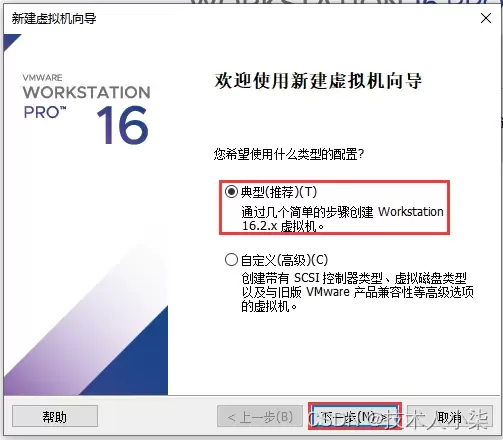
本文详细讲解如何在VMware Workstation中从零开始安装CentOS 7虚拟机。内容涵盖ISO镜像准备、典型配置创建、硬件参数分配(磁盘与内存)、安装器操作及首次启动后的版本与网络验证。通过规范化的步骤指引,帮助读者快速搭建稳定可用的Linux学习环境,并解决常见的启动与网络故障。
在CentOS系统上管理Python依赖库需先更新系统并安装Python3、pip及开发工具。安装方式包括pip(推荐)、yum/dnf(系统级)和conda。通过虚拟环境隔离依赖、用requirements.txt记录版本可避免冲突。卸载通过pip或yum/dnf完成。常见问题涉及权限、缺失系统依赖及版本兼容性。
在CentOS编译Java乱码时,需检查系统编码设为UTF-8,编译用-encodingUTF-8,运行设-Dfile.encoding=UTF-8,确保源文件编码一致,调整IDE编码,中文显示异常则安装中文字体。
通过升级JDK版本、启用增量编译与并行编译、优化JVM参数、利用构建工具高级特性、改进代码结构、进行系统级调优及持续监控分析,可显著提升CentOS环境下Java编译性能,减少重复编译,优化内存使用,从而缩短构建时间,提高开发效率。
在CentOS上编译Java程序时,需安装JDK并正确设置JAVA_HOME环境变量,通过命令查找安装路径并配置到~/.bashrc或/etc/profile中。同时关注编译器错误消息,修复代码语法或逻辑错误,确保Maven或Gradle等构建工具正确安装配置。

在CentOS上编译Golang程序,常见问题包括环境变量配置错误、依赖包管理混乱、glibc版本不兼容、编译器工具链缺失、代码或缓存异常、Go版本不匹配及权限不足,可通过逐一排查对应方法解决。

在CentOS上编译Golang:先安装开发工具包、wget和git;下载Go源码压缩包并解压至/usr/local;配置GOROOT和PATH环境变量(如添加至~/.bashrc),执行source生效;运行goversion验证安装成功。

在CentOS上提升Golang编译速度,可通过优化编译选项(如并行编译、去除调试信息)、将缓存目录指向SSD并定期清理,拆分代码为小包、消除循环依赖、使用vendor本地依赖,升级多核CPU、16GB以上内存和SSD,以及设置GOPROXY、采用PGO优化、升级Go版本等方式实现。
在CentOS编译Go程序时,需正确配置GOROOT、GOPATH等环境变量,使用GoModules管理依赖,注意Glibc版本兼容性,根据需求设置CGO_ENABLED=0实现静态链接,合理配置交叉编译参数,优化二进制文件大小,解决权限问题,并确保Go版本与项目要求一致。




IntelliJ IDEA 是 JetBrains 推出的专业集成开发环境,重点服务于 Java、Kotlin 与 JVM 项目开发。软件集成代码补全、静态检查、重构、调试、测试、版本控制及构建工具,并可借助插件扩展语言和框架支持。

JetBrains PyCharm 是面向 Python 开发者的集成开发环境,提供智能补全、代码检查、重构、调试、测试、版本控制及虚拟环境管理功能。Mac 版兼容 Intel 与 Apple 芯片,核心功能可免费使用。

JetBrains WebStorm 是面向 JavaScript、TypeScript 和现代 Web 技术的专业集成开发环境,可智能理解项目结构,提供代码补全、重构、错误检查、运行调试、测试及 Git 工具。

JetBrains IntelliJ IDEA 是以 Java、Kotlin 和 JVM 项目为核心的专业集成开发环境,提供智能补全、代码检查、安全重构、调试、测试、版本控制及构建工具集成。统一发行版的核心功能可免费用于商业和非商业项目,

PhpStorm 是 JetBrains 面向 PHP 与现代 Web 开发打造的专业集成开发环境,提供代码补全、静态检查、重构、调试、测试、数据库、版本控制及前端语言支持。Windows 用户可直接下载安装程序,

PyCharm 是 JetBrains 推出的 Python 集成开发环境,提供智能代码补全、错误检查、重构、调试、测试、Git、终端及 Jupyter Notebook 支持。统一版安装后可体验 30 天 Pro 功能,


