C++ Linux中怎样进行进程管理
在Linux环境下用C++管理进程,听起来是不是有点硬核?别担心,这套系统其实提供了好几把趁手的“工具”,从经典的底层调用到现代的高级封装,各有各的用武之地。掌握它们,你就能在程序中灵活地创建、控制和交互子进程。 1. 使用fork()和exec() 这堪称是Linux进程管理的“经典组合拳”。fo
在Linux环境下用C++管理进程,听起来是不是有点硬核?别担心,这套系统其实提供了好几把趁手的“工具”,从经典的底层调用到现代的高级封装,各有各的用武之地。掌握它们,你就能在程序中灵活地创建、控制和交互子进程。

1. 使用fork()和exec()
这堪称是Linux进程管理的“经典组合拳”。fork()负责“分身”,创建一个几乎是父进程副本的新进程;而exec()系列函数则负责“换魂”,让这个新进程摇身一变,去执行另一个全新的程序。这种先复制再替换的模式,是理解Linux进程诞生的关键。
#include
#include
#include

int main() {
    pid_t pid = fork();
    if (pid == 0) {
        // 子进程
        execl("/bin/ls", "ls", "-l", (char *)NULL);
        perror("execl");
        return 1;
    } else if (pid > 0) {
        // 父进程
        int status;
        waitpid(pid, &status, 0);
        printf("Child process exited with status %d", WEXITSTATUS(status));
    } else {
        // fork失败
        perror("fork");
        return 1;
    }
    return 0;
}
2. 使用system()
如果你只是想简单地执行一条Shell命令,并且不关心精细控制,那么system()函数无疑是条“捷径”。它把创建进程、执行命令、等待结束这些步骤打包好了,一句话就能搞定。但方便的同时,也意味着控制粒度较粗。
#include

int main() {
    int ret = system("ls -l");
    if (ret == -1) {
        perror("system");
        return 1;
    }
    return 0;
}
3. 使用popen()
有时候,我们不仅想让程序执行命令,还想拿到命令执行后的输出结果。这时候popen()就派上用场了。它会在调用进程和被执行命令之间建立一个管道,让你能够像读取文件一样,轻松读取命令的标准输出。这对于需要处理命令返回信息的场景非常有用。
#include
#include

int main() {
    FILE* pipe = popen("ls -l", "r");
    if (!pipe) {
        perror("popen");
        return 1;
    }
    char buffer[128];
    while (!feof(pipe)) {
        if (fgets(buffer, 128, pipe) != NULL)
            std::cout << buffer;
    }
    pclose(pipe);
    return 0;
}
4. 使用fork()和wait()
这其实是第一种方法的更基础形式,或者说是其核心部分。通过fork()创建子进程后,父进程可以使用wait()或其变体(如waitpid())来挂起自己,直到指定的子进程结束。这是实现进程间同步等待的标准做法。
#include
#include
#include
#include

int main() {
    pid_t pid = fork();
    if (pid == 0) {
        // 子进程
        execl("/bin/ls", "ls", "-l", (char *)NULL);
        perror("execl");
        return 1;
    } else if (pid > 0) {
        // 父进程
        int status;
        waitpid(pid, &status, 0);
        printf("Child process exited with status %d", WEXITSTATUS(status));
    } else {
        // fork失败
        perror("fork");
        return 1;
    }
    return 0;
}
5. 使用pthread库
虽然pthread库的主战场是线程管理,但在涉及多进程编程时,它提供的同步机制(如互斥锁、条件变量)同样可以用于协调进程间的某些操作。不过,这通常需要结合共享内存等进程间通信(IPC)技术来使用。
#include
#include
#include

void* thread_func(void* arg) {
    printf("Thread is running");
    sleep(2);
    printf("Thread is done");
    return NULL;
}

int main() {
    pthread_t thread;
    if (pthread_create(&thread, NULL, thread_func, NULL) != 0) {
        perror("pthread_create");
        return 1;
    }
    pthread_join(thread, NULL);
    printf("Main thread is done");
    return 0;
}
6. 使用std::process(C++20)
对于追求现代C++风格的开发者来说,C++20引入的std::process库是个好消息。它旨在提供一套类型安全、更符合C++惯用法的进程管理接口。虽然目前可能还不是所有编译器都完全支持,但它代表了未来更优雅、更集成化的进程操作方式。
#include
#include
#include
#include
namespace fs = std::filesystem;

int main() {
    try {
        auto result = std::system("ls -l");
        if (result != 0) {
            throw std::system_error(result, std::generic_category(), "Command failed");
        }
    } catch (const std::system_error& e) {
        std::cerr << "Error: " << e.what() << std::endl;
        return 1;
    }
    return 0;
}
注意事项
- 权限问题:执行某些系统命令或访问特定资源时,可能需要相应的用户权限,这点需要提前规划。
- 安全风险:尤其是使用
system()这类函数时,如果命令字符串来自不可信的输入,务必警惕Shell注入攻击,做好参数校验和转义。 - 错误处理:良好的编程习惯是,始终检查这些系统调用的返回值。进程创建或执行失败是常见情况,稳健的错误处理逻辑不可或缺。
总的来说,从底层的fork/exec到便捷的system/popen,再到面向未来的C++20标准库,Linux为C++程序员提供了多层次、多粒度的进程管理方案。根据你的具体需求——是需要绝对的控制力,还是追求开发的便捷性——来选择合适的工具,就能在程序中游刃有余地驾驭多进程任务。
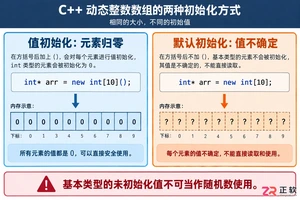
深入解析C++中动态数组的初始化机制,涵盖new操作符的不同用法、基本类型与类对象的初始化差异,以及为何在现代C++开发中应优先使用std::vector。

引言 Hashcat 被广泛认为是世界上最快、最先进的密码恢复工具。它是渗透测试人员和安全专业人员武器库中的必备工具。在使用它破解哈希(hashes)之前,你必须首先确保它已在你的系统上正确安装并完全可用。 在本实验(lab)中,你将执行一系列简单的检查,以验证 Hashcat 在你的 Kali L

引言 Gobuster 是一个强大的工具,用于目录和文件暴力破解、DNS 子域暴力破解以及 S3 存储桶枚举。它是渗透测试人员和安全爱好者发现 Web 服务器上隐藏路径和资源的重要实用程序。 在本实验中,你将学习在 Kali Linux 环境中安装 Gobuster 的基本步骤。你将使用 CODE_

谷歌计划为Pixel7至10系列进行Linux内核重大升级,从旧版本统一跃升至Linux6.12。新内核优化了CPU调度和内存管理,有望提升流畅度、安全性与发热控制,并可能改善Pixel10的GPU性能。该更新预计随Android17QPR2年底推送,Pixel6因支持终止无缘升级。












Windows 10 是一款微软推出的经典操作系统,拥有硬件兼容性与多任务处理能力。它更偏向把系统状态查看和常用调节动作放在一起,适合需要持续观察和微调设备状态的场景。

极度公式是一款跨平台专业LaTeX公式识别编辑软件,支持OCR公式识别和多平台编辑。和使用说明,避免使用,享受完整功能与稳定支持。做扫描整理、文字提取和表格转换时,它能把识别后的处理步骤接得更顺,资料录入这类场景会省下不少时间。