

SpringCloudStreamRabbitMQ动态路由Key问题
前言 在实际业务开发中,我们常常会遇到这样的场景:用户完成一系列操作后,系统需要根据不同的操作结果,发送不同类型的通知邮件。如果直接在业务逻辑里同步调用邮件服务,不仅耗时,还会拖慢主流程。这时候,引入消息中间件进行异步解耦,就成了一个自然而然的选择。 不过,新的问题也随之而来。不同的邮件类型,本质上
前言
在实际业务开发中,我们常常会遇到这样的场景:用户完成一系列操作后,系统需要根据不同的操作结果,发送不同类型的通知邮件。如果直接在业务逻辑里同步调用邮件服务,不仅耗时,还会拖慢主流程。这时候,引入消息中间件进行异步解耦,就成了一个自然而然的选择。
不过,新的问题也随之而来。不同的邮件类型,本质上对应着不同的业务逻辑,我们当然希望它们能被不同的消费者处理。在RabbitMQ的模型里,这就意味着生产者需要根据消息类型,将其投递到不同的队列。如何实现呢?核心就在于路由键(Routing Key)。
如上图所示,一个交换机(Exchange)可以根据不同的路由键,将消息精准地路由到与之绑定的队列中。这正是我们需要的效果。
要实现这个目标,思路其实很清晰:对于消费者而言,它需要声明自己只关心某个特定路由键的消息;而对于生产者,则需要在发送消息时,动态地指定这个消息的路由键。
这里还有一个Spring Cloud Stream的重要概念:group。在绑定RabbitMQ时,一个group就对应一个具体的队列。所以,要区分不同的业务,我们完全可以通过配置不同的group来实现。
例子
接下来,我们通过一个完整的代码示例,来看看如何用Spring Cloud Stream + RabbitMQ实现动态路由。示例包含一个生产者服务和一个消费者服务。
生产者
生产者的配置核心在于两点:一是定义Binder连接RabbitMQ,二是指定动态路由键的表达式。
spring:
  application:
    name: producer
  cloud:
    stream:
      binders: # 绑定MQ服务信息(此处我们是RabbitMQ)
        etpmsRabbitMQ: # 给Binder定义的名称,⽤于后⾯的关联
          type: rabbit # MQ类型,如果是Kafka的话,此处配置kafka
          environment: # MQ环境配置(⽤户名、密码等)
            spring:
              rabbitmq:
                host: localhost
                port: 5672
                username: admin
                password: xxxxxx
      bindings: # 关联整合通道和binder对象
        output: # output是我们定义的通道名称,此处不能乱改
          destination: testExchange # 要使⽤的Exchange名称(消息队列主题名称)
          content-type: text/plain # application/json # 消息类型设置,⽐如json
          binder: etpmsRabbitMQ # 关联MQ服务
      rabbit:
        bindings:
          output:
            producer:
              # 生产者配置RabbitMq的动态路由键
              routingKeyExpression: headers.type
请注意routingKeyExpression: headers.type这行配置。它告诉Spring Cloud Stream:消息的路由键,要从消息头(Header)中名为type的字段去获取。
配置好了,发送消息的代码就非常简单了:
package top.chenyt.producer;

import org.springframework.beans.factory.annotation.Autowired;
import org.springframework.cloud.stream.messaging.Source;
import org.springframework.messaging.support.MessageBuilder;
import org.springframework.stereotype.Service;

/**
 * @author yantao.chen
 */
@Service
public class ProviderService {
    /**
     * 将MessageChannel的封装对象Source注⼊到这⾥使⽤
     */
    @Autowired
    private Source source;

    public void sendMessage(String content, String type) {
        // 向mq中发送消息(并不是直接操作mq,应该操作的是spring cloud stream)
        // 使⽤通道向外发出消息(指的是Source⾥⾯的output通道)
        source.output().send(MessageBuilder.withPayload(content).setHeader("type",type).build());
    }
}
关键在于MessageBuilder.withPayload(content).setHeader("type",type).build()这一句。我们在构建消息时,通过setHeader方法设置了type这个头信息。发送时,框架会自动根据配置的表达式headers.type提取这个值,并将其作为路由键发送到RabbitMQ。
最后,别忘了在主应用类上启用绑定:
package top.chenyt;

import lombok.extern.slf4j.Slf4j;
import org.springframework.boot.SpringApplication;
import org.springframework.boot.autoconfigure.SpringBootApplication;
import org.springframework.cloud.openfeign.EnableFeignClients;
import org.springframework.cloud.stream.annotation.EnableBinding;
import org.springframework.cloud.stream.messaging.Sink;
import org.springframework.cloud.stream.messaging.Source;

/**
 * @ClassName etpms-parent
 * @Author Jinondo
 * @Date 2022/1/31 12:42
 */
@SpringBootApplication
@Slf4j
@EnableBinding({Source.class})
public class ProducerApplication {

    public static void main(String[] args)  {
        SpringApplication.run(ProducerApplication.class, args);
    }

}
总结一下生产者的关键步骤:在配置文件中定义routingKeyExpression,然后在发送消息时通过setHeader设置对应的值。
消费者
消费者的配置稍微复杂一点,因为我们需要定义多个绑定,每个绑定对应一个队列(即一个group),并指定其监听的路由键。
spring:
  application:
    name: consumer
  cloud:
    stream:
      binders: # 绑定MQ服务信息(此处我们是RabbitMQ)
        etpmsRabbitMQ: # 给Binder定义的名称,⽤于后⾯的关联
          type: rabbit # MQ类型,如果是Kafka的话,此处配置kafka
          environment: # MQ环境配置(⽤户名、密码等)
            spring:
              rabbitmq:
                host: localhost
                port: 5672
                username: admin
                password: xxxxx
      bindings: # 关联整合通道和binder对象
        input: # input是我们定义的通道名称,此处不能乱改
          destination: testExchange # 要使⽤的Exchange名称(消息队列主题名称)
          content-type: text/plain # application/json # 消息类型设置,⽐如json,自动将对象转为json
          binder: etpmsRabbitMQ # 关联MQ服务
          group: register
        my-input:
          destination: testExchange # 要使⽤的Exchange名称(消息队列主题名称)
          content-type: text/plain # application/json # 消息类型设置,⽐如json,自动将对象转为json
          binder: etpmsRabbitMQ # 关联MQ服务
          group: task
      rabbit:
        bindings:
          my-input:
            consumer:
              bindingRoutingKey: task
          input:
            consumer:
              bindingRoutingKey: register
仔细看这段配置,我们定义了两个绑定:input和my-input。它们连接的是同一个交换机testExchange,但属于不同的group(register和task),这会在RabbitMQ中创建两个独立的队列。
最关键的部分在spring.cloud.stream.rabbit.bindings下面。我们为每个绑定指定了bindingRoutingKey。这意味着:input通道对应的队列,只绑定路由键为register的消息;my-input通道对应的队列,只绑定路由键为task的消息。
接下来,我们需要定义my-input这个自定义通道的接口:
package top.chenyt.consumer;

import org.springframework.cloud.stream.annotation.Input;
import org.springframework.messaging.SubscribableChannel;

public interface MySink {

    String MY_INPUT = "my-input";

    @Input(MY_INPUT)
    SubscribableChannel myinput();

}
然后,编写消息监听器,分别监听这两个通道:
package top.chenyt.consumer;

import org.springframework.cloud.stream.annotation.StreamListener;
import org.springframework.cloud.stream.messaging.Sink;
import org.springframework.messaging.Message;
import org.springframework.stereotype.Service;

/**
 * @ClassName etpms-parent
 * @Author Jinondo
 * @Date 2022/1/31 12:42
 */
@Service
public class ConsumerMsg {

    @StreamListener(Sink.INPUT)
    public void receiveMessages(Message message) {
        System.out.println("========= input接收到的消息:" + message.getPayload());
    }

    @StreamListener(MySink.MY_INPUT)
    public void receiveMessages02(Message message) {
        System.out.println("========= myinput接收到的消息:" + message.getPayload());
    }
}
最后,在主应用类中启用这两个绑定:
package top.chenyt;

import lombok.extern.slf4j.Slf4j;
import org.springframework.boot.SpringApplication;
import org.springframework.boot.autoconfigure.SpringBootApplication;
import org.springframework.cloud.stream.annotation.EnableBinding;
import org.springframework.cloud.stream.messaging.Sink;
import top.chenyt.consumer.MySink;

/**
 * @ClassName etpms-parent
 * @Author Jinondo
 * @Date 2022/1/31 12:42
 */
@SpringBootApplication
@Slf4j
@EnableBinding({Sink.class, MySink.class})
public class ConsumerApplication {

    public static void main(String[] args)  {
        SpringApplication.run(ConsumerApplication.class, args);
    }

}
至此,整个流程就搭建完成了。当生产者发送一个type头为register的消息时,它会被路由到group为register的队列,并由receiveMessages方法处理。同理,type为task的消息则会由receiveMessages02方法处理。这就完美实现了基于消息类型的动态路由。
总结
通过上面的示例,我们可以看到,利用Spring Cloud Stream的routingKeyExpression和bindingRoutingKey配置,可以非常优雅地实现RabbitMQ的动态路由功能,而无需在代码中编写任何RabbitMQ原生API。这种方法清晰地将配置与业务代码分离,提高了可维护性。
其核心逻辑可以概括为:生产者通过消息头动态传递路由键,消费者通过配置静态声明其绑定的路由键。两者配合,再加上group对队列的隔离,就能构建出清晰、灵活的消息路由方案。希望这个实践思路能为大家在处理类似业务场景时提供一个可靠的参考。
您可能感兴趣的文章:
- SpringCloudStream+RabbitMQ使用中遇到的问题及解决
- 解决SpringCloudStream整合Kafka,两个通道对应同一个topic报错的情况
- SpringCloud Stream 快速入门实例教程
- SpringCloud使用Kafka Streams实现实时数据处理
- SpringCloudStream原理和深入使用小结
- SpringCloud中的Stream服务间消息传递详解
- SpringCloudStream中的消息分区数详解
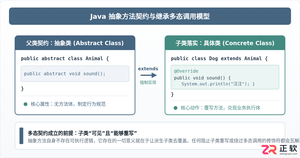
深入剖析Java中抽象方法为何严禁使用private和static修饰符。从面向对象契约规范、方法继承重写、JVM动态绑定(invokevirtual)与静态解析(invokestatic)等底层机制展开详细推导,结合编译报错示例与全景对比,彻底理清修饰符限制背后的设计逻辑。
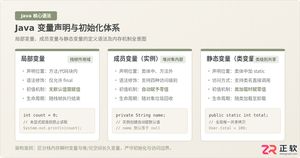
系统解析Java局部变量、成员变量与静态变量的定义语法、声明与初始化机制、生命周期及JVM内存驻留规则,结合图解与代码示例分析常见编译错误与认知误区。
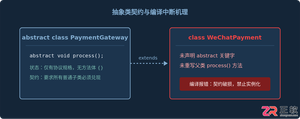
针对Java开发中常见的“子类未实现抽象方法”编译错误,深入分析报错原因,提供重写实现、声明抽象子类两种标准修复路径,并总结参数签名、访问修饰符等典型避坑要点。
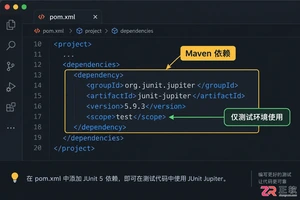
适合初学者的JUnit入门指南,详解如何配置环境、编写首个测试用例、使用断言验证结果,并分析单元测试的适用场景与例外情况。
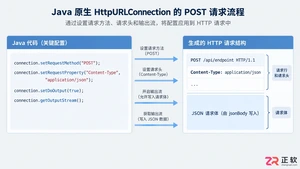
深入解析Java发送JSON格式POST请求的实现机制,对比原生API与第三方库的代码差异,提供可复制的代码示例,并探讨超时设置、编码处理及微服务场景下的例外情况。
百度官方在线入口最新版网页版直达官网是https://www.baidu.com/,界面简洁无干扰、多端同步体验一致、内容聚合维度丰富、语音与图像识别稳定、隐私控制机制可见。

谷歌浏览器Mac版官方安装指南 谷歌浏览器Mac版官方安装入口是https://www.google.com/chrome/,需macOS 12+系统、500MB空间,下载.dmg后拖入应用程序安装,支持多设备同步、性能优化与隐私保护功能。 苹果电脑Chrome的安装入口究竟在哪里?这个问题最近可是
Chrome中JavaScript未执行需依次检查:一、移除站点级禁用并添加允许域名;二、开启全局JavaScript开关;三、禁用干扰扩展;四、在开发者工具中启用JavaScript;五、重置内容设置为默认。 有时在Chrome里打开网页,会发现交互按钮点了没反应,数据加载不出来,页面仿佛“静止”
IE浏览器怀旧版在线网址:一次精准的技术时光回溯 最近,不少老用户和怀旧爱好者在反复搜索一个问题:那个经典的Internet Explorer,如今还能在哪里原汁原味地体验到?答案指向一个特定的地址:https://ie.microsoft.com/legacy/。 这个网站远不止是一个简单的“皮肤
火狐浏览器五大核心设置功能:解锁高效、安全与个性化体验 火狐浏览器功能强大,但如果不仔细挖掘,很多能大幅提升效率和安全性的设置可能就“藏着掖着”了。这就好比拥有一台高性能设备,却只用了基础模式。那么,如何把它调整到最顺手、最安全的状态?接下来,我们就聚焦于当前版本(截至2025年末)最关键的五大设置




Postman是一套面向API全生命周期的开发与测试平台,可在Mac上发送和调试多种协议请求,管理集合、环境及认证信息,并完成脚本测试、模拟服务、监控、文档发布和团队协作。它适合开发、测试及运维人员使用,提供个人免费方案。
Docker Desktop 是 Docker 官方为 Mac 提供的容器开发环境,集成 Docker Engine、命令行工具、Compose、Build、Kubernetes 与图形化管理界面。

Android Studio 是 Google 面向安卓应用开发提供的官方集成开发环境,基于 IntelliJ IDEA 构建。它整合智能代码编辑、Gradle 构建、界面预览、设备模拟、性能分析、调试测试及 APK 分析等工具。

PixPix 是面向品牌、卖家和内容团队的在线 AI 图片视频创作平台,提供图视频 Agent、无限画布、图片生成、视频生成、自然语言编辑及商品套图、产品精修和带货视频等电商工具。

Postman 是面向 API 全生命周期的开发与协作平台。Windows 桌面版可用于构建和发送 HTTP、GraphQL、gRPC、WebSocket、MQTT 等请求,并提供环境变量、集合、脚本测试、模拟服务、监控、文档及团队工作区等

Docker Desktop 为 Windows 开发者提供集成式容器环境,内置 Docker Engine、命令行工具、Compose、Build 与 Kubernetes 等组件,可在本机完成镜像构建、容器运行、日志查看和资源管理。