

如何在CentOS上实现Golang日志远程传输
在CentOS上配置Golang日志远程传输,需先让Go应用将日志输出至标准输出或文件,接着启用rsyslog服务收集日志并转发至远程服务器,远程端配置接收规则并启动监听,最后采用TLS/SSL加密通道,确保日志传输安全可靠,实现集中管理。

步骤1:配置Golang应用日志输出
Golang 标准库的 `log` 包就能搞定。你可以直接往标准输出打,或者定向到文件。看个片段:package main
import (
"log"
"os"
)
func main() {
// 日志输出到标准输出
log.SetOutput(os.Stdout)
log.Println("This is an info message")
// 或者写到文件
file, err := os.OpenFile("app.log", os.O_CREATE|os.O_WRONLY|os.O_APPEND, 0666)
if err == nil {
log.SetOutput(file)
defer file.Close()
}
log.Println("This is another info message")
}步骤2:配置rsyslog收集日志
CentOS 上首先得装 `rsyslog`:sudo yum install rsyslog# 加载imudp模块
module(load="imudp")
input(type="imudp" port="514")
# 或者加载imtcp模块
module(load="imtcp")
input(type="imtcp" port="514")
# 规则集定义
ruleset(name="remote") {
action(type="omfwd" Target="your.remote.log.server" Port="514" Protocol="udp")
}
# 应用规则集
if $fromhost-ip == 'your.local.ip' then {
call remote
}
& stop步骤3:重启rsyslog服务
配置改完后,重启服务让它生效:sudo systemctl restart rsyslog步骤4:配置远程日志服务器
远程那头同样要装 `rsyslog`,并且配置好接收规则。一般就是监听 514 端口,然后把收到的日志写到某个文件或者送进其他系统。具体配置跟步骤2类似,只是方向反过来——接收端不需要 `omfwd`,而是用 `omfile` 写到本地磁盘。步骤5:安全传输
如果日志里有机密信息,就别裸奔了。`rsyslog` 支持 TLS/SSL 加密,你需要生成证书和密钥,然后在两端配置中指定这些文件。配置起来稍微繁琐一点,但为了安全值得。 当然,这只是一个入门级的示范。实际生产环境还得考虑日志格式、轮转策略、日志级别过滤等等。规模再大一点,建议直接上 ELK Stack(Elasticsearch, Logstash, Kibana),那种专业工具能把日志玩出花来。不过从零开始,先把上面五步跑通,你已经赢了一半。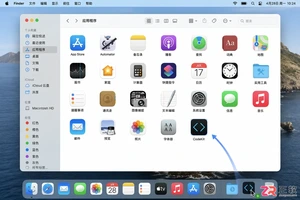
详解 CodeKit 在 macOS 下的安装步骤、项目导入方法、Sass与JavaScript编译设置及浏览器自动刷新功能,助您快速搭建高效的前端开发环境。
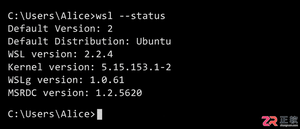
详解Windows环境下安装OpenAI Codex CLI的步骤,包括WSL环境检查、Node.js/npm配置、npm全局安装命令及首次启动验证,适合开发者快速上手。
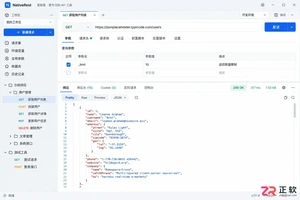
学习如何配置 NativeRest REST API 客户端。涵盖 Windows/macOS/Linux 安装后的工作区创建、环境变量管理、请求编辑及响应查看步骤,帮助开发者快速完成基础环境搭建与连通性测试。
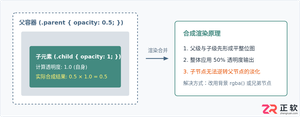
深入解析CSS中设置透明度的核心属性opacity,剖析子元素继承、事件穿透、层叠上下文等关键注意事项,并提供与rgba、hsla的实用选型对比。
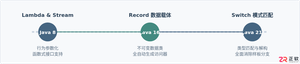
本文通过具体的旧版与新版代码对比,详细剖析Java 8引入的Lambda表达式、Java 14/16引入的Record类,以及Java 12至21逐步演进完善的Switch表达式与模式匹配,展示代码简化路径与避坑要点。
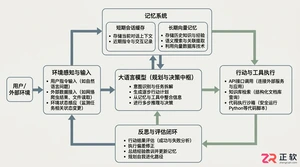
系统梳理AI智能体开发培训的核心知识模块、技术栈选型与典型实战项目,解析低代码平台与纯代码框架的差异,提供从零构建可落地智能体的完整学习与实施路径。
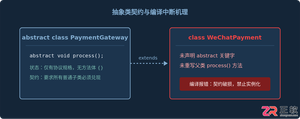
针对Java开发中常见的“子类未实现抽象方法”编译错误,深入分析报错原因,提供重写实现、声明抽象子类两种标准修复路径,并总结参数签名、访问修饰符等典型避坑要点。
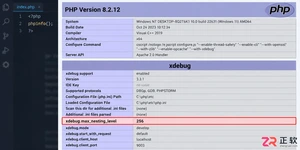
遇到PHP递归报错时,不要盲目调大max_nesting_level。本文教你区分Xdebug限制、内存耗尽和正则递归错误,提供代码级的终止条件优化与迭代替代方案,彻底解决栈溢出问题。
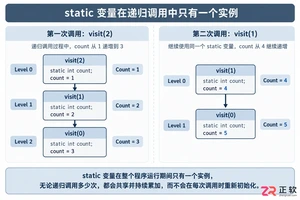
本文分析PHP递归中static变量导致的状态污染及引用传递引发的共享数据修改问题。提供具体的代码复现、缓存键设计建议及调试打印技巧,帮助开发者避免隐蔽的逻辑错误。




SketchUp Pro 是面向建筑、室内、景观及产品设计工作的专业三维建模套件,提供直观的推拉建模、精准尺寸控制、二维文档制作、模型资源库、扩展插件和云端协作能力。Mac 用户可使用桌面建模器与 LayOut。

Twinmotion是Epic Games推出的实时三维可视化软件,主要服务于建筑、景观、室内设计、城市规划及施工展示。它可导入常见CAD、BIM和三维模型,利用材质、植被、人物、天气与灯光资源快速搭建场景。

Vectorworks Architect是一款面向建筑师、室内设计师及AEC团队的专业BIM设计软件,可在统一环境中完成概念草图、二维制图、三维建模、建筑信息管理、施工文档和效果展示,并支持IFC、Revit、DWG、SketchUp及点


Photoshop 2026 是 Adobe 推出的专业图像处理与视觉设计软件,支持 Windows、macOS 和 iPad 等平台,广泛应用于摄影修图、电商设计、平面海报、数字绘画及视觉合成等创作场景。

Blender 是一款免费开源、跨平台的专业 3D 创作软件,集建模、动画、渲染、视频编辑与视觉合成等功能于一体,广泛应用于影视动画、游戏设计和建筑可视化等领域。软件支持 Cycles 物理渲染器与 Eevee 实时渲染引擎,并提供多边形建模、骨骼绑定、物理模拟等专业工具。Blender 兼容 Windows、macOS 和 Linux 系统,安装包轻巧、运行流畅,依托活跃的全球开发者社区持续更新,是从初学者到专业创作者都值得选择的正版 3D 创作工具。