SpringAI整合Ollama实现工具调用的实战全解
基于SpringAI与Ollama实现本地大模型工具调用,通过@Tool注解定义工具方法并注册至ChatClient,模型自动决策调用外部工具获取实时信息或执行计算。需使用支持函数调用的模型如qwen2.5:7b,SpringAI自动生成JSONSchema,日志调试可观察调用过程。
场景
在大模型应用开发中,工具调用(Tool Calling / Function Calling)算得上是让Agent真正“活”起来的关键能力。简单说,大模型能自己判断“什么时候该叫外援”,然后自主决定调用哪个外部工具——比如获取实时信息、执行计算,或者操作外部系统。
Spring AI 作为 Ja va 生态中的 AI 集成框架,提供了一套相当优雅的 API 来定义和管理这些工具。而 Ollama 则让开发者能在本地跑起强大的开源大模型,不用每次都往云端走。本文就是基于这两者,从环境搭建到工具的定义、注册,再到完整项目实现和问题排查,把本地大模型的工具调用这件事系统地捋一遍。文末附带了可直接运行的完整代码,拿来就能用。
工具调用的工作流程
在 Ollama + Spring AI 的组合里,一次完整的工具调用大致走这么几步:
定义工具:用 @Tool 注解或者编程式 API,把一个 Ja va 方法标记成可被调用的工具。
注册工具:在构建 ChatClient 的时候把工具注入进去。Spring AI 会自动帮你生成一份符合 OpenAI 规范的 JSON Schema。
模型决策:用户提问后,Ollama 模型会自己琢磨——这事儿要不要调用工具?如果要,就返回工具名称和所需的参数。
执行与反馈:Spring AI 拿到指令后,自动调用对应的 Ja va 方法,然后把结果返回给模型。
生成回答:模型根据工具执行的结果,生成最终的自然语言回答。整个流程行云流水。
模型兼容性要求
有一点必须说清楚:不是所有 Ollama 模型都支持工具调用。必须用原生支持 Function Calling 的模型,否则 LLM 会直接忽略你的工具列表,只给你返回一段纯文本——很尴尬。
建议用 ollama list 看看本地有哪些模型,再用 oll pull <模型名> 下载支持的模型。个人比较推荐先试试 qwen2.5:7b-instruct、llama3.1:8b 或 mistral:7b,这几款对工具调用的支持相当成熟。
两种工具定义方式
Spring AI 给了两种定义工具的方式,按需选就行。
使用 @Tool 注解(推荐)
在 Spring 管理的 Bean 方法上直接加 @Tool 注解,Spring AI 会自动把它包装成 ToolCallback。这种方式最省事,代码也最清晰。
编程式 API(无需注解)
还有一种方式是用 MethodToolCallback 来构建工具回调,适合那种需要动态创建工具、或者不方便改已有代码的场景。
import org.springframework.ai.tool.MethodToolCallback;
import org.springframework.ai.tool.ToolCallback;

public ToolCallback dynamicTool(Object target) {
    return MethodToolCallback.builder()
            .method("methodName", target)
            .description("工具描述")
            .build();
}
实现
pom.xml 依赖配置
先把依赖配好,这是基础。注意用稳定版的 Spring Boot 和 Spring AI,避免踩一些不必要的坑。
        org.springframework.boot
        spring-boot-starter-parent
        3.3.3

    com.example
    spring-ai-ollama-tool
    1.0

        17
        1.1.2


            org.springframework.boot
            spring-boot-starter-web


            org.springframework.ai
            spring-ai-starter-model-ollama
            ${spring-ai.version}


            spring-milestones
            https://repo.spring.io/milestone

                false
application.yml 配置
配置文件里的参数其实不多,但有几个关键点得留意:模型名、temperature、还有上下文窗口大小。
server:
  port: 886
spring:
  ai:
    ollama:
      base-url: http://localhost:11434
      chat:
        model: qwen2.5:7b-instruct
        options:
          temperature: 0.7
          num-ctx: 4096
logging:
  level:
    org.springframework.ai.chat.client: DEBUG
工具服务类(含 @Tool 注解)
这里定义几个实际可用的工具:获取时间、查天气、做计算。每个方法上都有清晰的描述,这样 LLM 才能明白“什么时候该用哪个工具”。
package com.badao.ai.service;

import org.springframework.ai.tool.annotation.Tool;
import org.springframework.ai.tool.annotation.ToolParam;
import org.springframework.stereotype.Service;
import ja va.time.LocalDateTime;
import ja va.time.format.DateTimeFormatter;

@Service
public class ToolService {

    @Tool(description = "获取当前系统的日期和时间,返回格式化后的时间字符串")
    public String getCurrentDateTime() {
        System.out.println("获取当前日期和时间工具被调用");
        return LocalDateTime.now()
                .format(DateTimeFormatter.ofPattern("yyyy-MM-dd HH:mm:ss"));
    }

    @Tool(description = "查询指定城市的天气信息")
    public String getWeather(@ToolParam(description = "城市名称") String city) {
        System.out.println("查询指定城市的天气信息工具被调用");
        return String.format("城市:%s,天气:晴,温度:22°C ~ 28°C,湿度:45%%,风力:3级", city);
    }

    @Tool(description = "计算两个数字的和")
    public double add(@ToolParam(description = "第一个加数") double a,
                      @ToolParam(description = "第二个加数") double b) {
        System.out.println("计算两个数字的和工具被调用");
        return a + b;
    }
}
ChatClient 配置类
这里有个点容易踩坑:在 Spring AI 1.1.2 中,单纯加 @Tool 注解并不会自动生成 ToolCallbackProvider Bean,得手动把工具服务类注入进去。下面的配置就是干这事的。
package com.badao.ai.config;

import com.badao.ai.service.ToolService;
import org.springframework.ai.chat.client.ChatClient;
import org.springframework.context.annotation.Bean;
import org.springframework.context.annotation.Configuration;

@Configuration
public class ChatConfig {

    @Bean
    public ChatClient chatClient(ChatClient.Builder chatClientBuilder,
                                 ToolService toolService) {
        return chatClientBuilder
                .defaultTools(toolService)
                .build();
    }
}
控制器
控制器这边提供了两种对话方式:普通对话和流式输出(打字机效果)。接口设计很简洁。
package com.badao.ai.controller;

import org.springframework.ai.chat.client.ChatClient;
import org.springframework.web.bind.annotation.*;

@RestController
@RequestMapping("/api")
public class ToolChatController {

    private final ChatClient chatClient;

    public ToolChatController(ChatClient chatClient) {
        this.chatClient = chatClient;
    }

    @PostMapping("/chat")
    public ChatResponse chat(@RequestBody ChatRequest request) {
        String result = chatClient.prompt()
                .user(request.getMessage())
                .call()
                .content();
        return new ChatResponse(200, "success", result);
    }

    @GetMapping(value = "/stream", produces = org.springframework.http.MediaType.TEXT_EVENT_STREAM_VALUE)
    public reactor.core.publisher.Flux streamChat(@RequestParam String msg) {
        return chatClient.prompt()
                .user(msg)
                .stream()
                .content();
    }

    public record ChatRequest(String message) {
        public String getMessage() {
            return message;
        }
    }

    public record ChatResponse(int code, String msg, String data) {}
}
测试验证
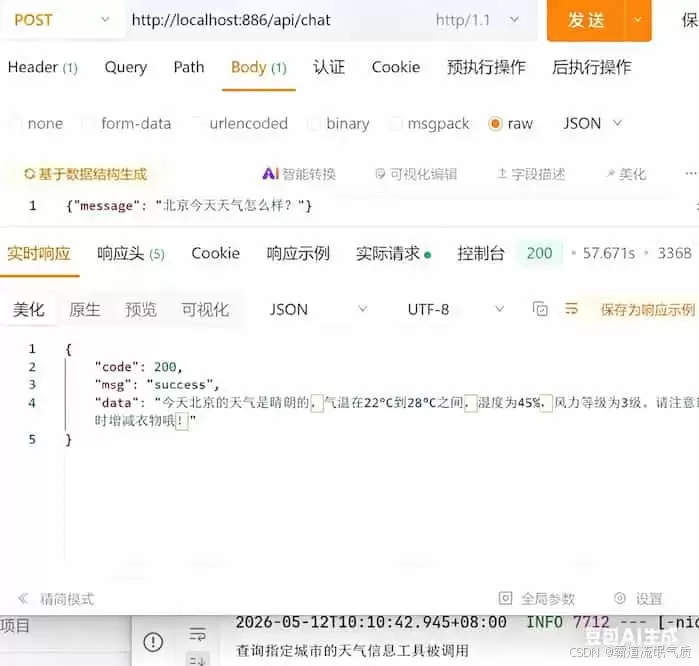
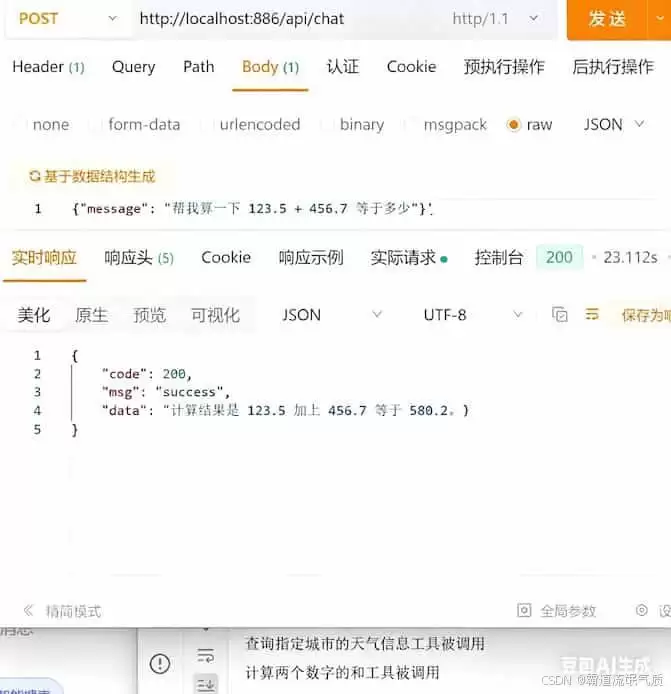
跑一下测试,看看效果。先试试天气查询,再试试计算器。如果配置没问题,模型的响应应该是准确且及时的。
常见问题与解决方案
在实际操作中,有几个典型的坑需要注意。
1、找不到 ToolCallbackProvider Bean
报错信息:Could not autowire. No beans of 'ToolCallbackProvider' type found.
原因很简单:只加 @Tool 注解是不够的,Spring AI 不会自动创建 ToolCallbackProvider Bean。解决方案就是手动注入 ToolService,并用 .defaultTools(toolService) 注册。
2、找不到 spring-ai-starter-model-ollama 依赖
报错信息:Could not find artifact org.springframework.ai:spring-ai-ollama-spring-boot-starter:pom:1.1.2
原因:artifact ID 写错了。Spring AI 1.1.2 对应的正确依赖名是 spring-ai-starter-model-ollama,注意核对。
3、模型从不调用工具,只返回文字回答
这几乎是新手最容易碰见的问题。根本原因在于模型本身不支持 Function Calling,比如 llama2 或早期版本的 qwen。解决办法就是换模型,推荐 qwen2.5:7b、llama3.1:8b 或 mistral:7b。
关键知识点总结
到这儿,其实核心的要点已经都摆出来了。再总结几个必须记住的点:
@Tool 注解:把方法标记为工具,description 字段是关键,它告诉 LLM 什么时候该调用这个工具。
@ToolParam 注解:描述工具方法参数的含义,帮 LLM 准确把参数填对。
ChatClient.defaultTools():把包含 @Tool 方法的类注入 ChatClient,工具调用能力就此激活。
模型兼容性:一定要用原生支持 Function Calling 的模型,否则白忙活。
JSON Schema 自动生成:Spring AI 会根据 Ja va 方法签名和注解自动生成符合 OpenAI 规范的 Schema,这活儿它替你干了。
日志调试:把 org.springframework.ai.chat.client 的日志级别调到 DEBUG,能看到工具调用的完整过程,排查问题时会方便很多。
深入解析C++中动态数组的初始化机制,涵盖new操作符的不同用法、基本类型与类对象的初始化差异,以及为何在现代C++开发中应优先使用std::vector。

本文解析超聚变在2026数博会发布的“智企”范式,重点阐述如何通过Token生产平台(Token Factory)与企业业务本体建模,实现从简单AI工具调用到企业应用架构系统性重构的演进。文章详细拆解了智能体编排、数字孪生及生态协同等关键技术路径,为AI时代企业数字化转型提供可落地的参考方案。

从Office转向WPS的核心操作肌肉记忆切换通常需3至7天,不影响正常办公。适应期长短取决于界面视觉差异与专属格式配置。通过切换“经典界面”、嵌入字体及开启云同步,可实现平滑过渡。本文详解格式兼容、数据迁移及AI功能适用场景,适用于需多端协同、成本控制及国产化兼容的办公人群。
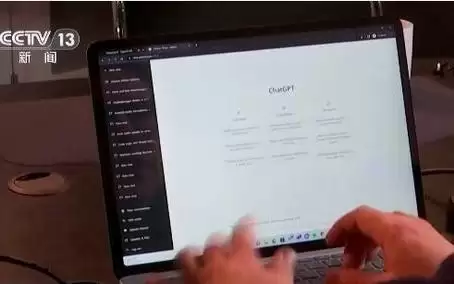
加拿大一母亲起诉OpenAI,称ChatGPT设计缺陷导致其女儿自杀,指控其优先用户参与度而非安全性,持续提供情感支持致过度依赖。专家指出AI应“陪伴但不过界”,需设定边界并引导求助。国家已出台拟人化互动服务管理办法。
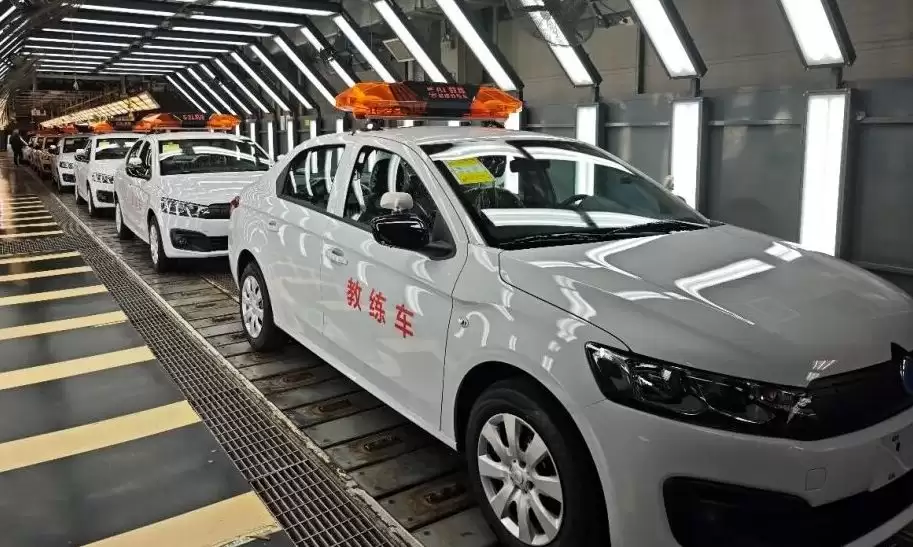
2026届高考生学车时多采用AI教练,逐步适应人机共驾。作为与生成式AI共同成长的一代,他们更易接受智能驾驶,未来可能成为首批“原生AI司机”。至2030年前后,其人生首辆车或具备L3级自动驾驶能力,驾驶角色将从操控者转向监督者。

全球股市因AI热潮呈现K型分化,半导体板块估值逼近百倍市盈率。历史警示:2000年互联网泡沫中的“四骑士”最终市值暴跌或长期盘整。投资者应警惕“错失恐惧症”,重视安全边际、护城河与能力圈,避免被高估值裹挟,关注稳健性与股息率。

Cloudflare报告显示,完成应用现代化的企业从AI投资中获得可衡量回报的概率是未现代化企业的三倍。93%的决策者视系统更新为AI先决条件,91%的领先企业已嵌入AI功能。安全与现代化协同推进可使AI成熟度提升四倍,精简技术架构成为竞争力分水岭。

据微软引用《Joule》期刊的一项研究指出,每一次典型人工智能查询耗电量零点一六至零点六零瓦时,其冷却用水量中位数不足一滴水。大规模部署下,单位查询的效率会更高,总能耗可以降低一半以上。

A股PCB概念板块掀起涨停潮,因摩根士丹利报告预测AI光模块PCB市场三年增长超5倍,2025至2028年规模从6.2亿美元增至37.7亿美元,年复合增速高达83%,远超光模块整体增速。






Windows 10 是一款微软推出的经典操作系统,拥有硬件兼容性与多任务处理能力。它更偏向把系统状态查看和常用调节动作放在一起,适合需要持续观察和微调设备状态的场景。

极度公式是一款跨平台专业LaTeX公式识别编辑软件,支持OCR公式识别和多平台编辑。和使用说明,避免使用,享受完整功能与稳定支持。做扫描整理、文字提取和表格转换时,它能把识别后的处理步骤接得更顺,资料录入这类场景会省下不少时间。