

Spring Data JPA 接入金仓数据库的详细步骤介绍
配置Kingbase8Dialect方言并启用自动表结构更新,SpringDataJPA可接入金仓数据库。通过继承JpaRepository实现基础CRUD,支持自定义SQL及分页查询。相比MyBatis减少了手动编写映射文件的工作,显著提升开发效率。
从一个需求说起
上个月接了个小任务:两周内搭一个用户中心的原型,要支持增删改查和分页。时间紧、活不多,想着能少写代码就少写。
以前用 MyBatis 的时候,每个表都要手写 mapper 接口、xml 文件、service 层——一套下来代码量不少。这次想换个思路,试试 Spring Data JPA。之前听说这玩意儿能在接口里直接写 SQL,连实现类都不用,今天正好验证一下它对金仓数据库的支持怎么样。
从配依赖到跑通整个 CRUD,大概花了一个多小时。中间还试了自定义 SQL 和分页,跑得都挺顺。今天就把这个过程整理出来。
一、先准备好连接信息
动手之前,先找 DBA 要数据库的连接信息。一般会给你一个类似这样的命令:
./ksql -U system -d test -h 192.168.1.100 -p 54321
这里面包含四个关键信息:
- 用户名:
system(默认管理员) - 数据库名:
test - IP 地址:
192.168.1.100 - 端口号:
54321(金仓默认端口)
先用命令行连一下,确认账号密码没问题,再继续下一步。
二、项目搭建
2.1 目录结构
ja va-kingbase-springdatajpa/
├── pom.xml
├── src/main/
│ ├── ja va/com/kingbase/testspringdatajpa/
│ │ ├── TestSpringDataJpaApplication.ja va # 启动类
│ │ ├── dao/
│ │ │ └── UserRepository.ja va # 数据访问接口
│ │ ├── entity/
│ │ │ └── User.ja va # 实体类
│ │ └── service/
│ │ ├── UserService.ja va # 服务接口
│ │ └── impl/UserServiceImpl.ja va # 服务实现
│ └── resources/
│ └── application.yml # 配置文件
└── src/test/
└── ja va/.../TestSpringDataJpaApplicationTests.ja va
和 MyBatis 比,少了一个 IUserMapper.xml,多了一个 service/impl 目录。JPA 的 Repository 接口自带基础 CRUD 方法,不用自己写实现类。
2.2 pom.xml:引入依赖
    4.0.0

        org.springframework.boot
        spring-boot-starter-parent
        2.7.0


    com.kingbase
    ja va-kingbase-springdatajpa
    0.0.1-SNAPSHOT

        1.8


            org.springframework.boot
            spring-boot-starter-data-jpa


            org.springframework.boot
            spring-boot-starter-web


            cn.com.kingbase
            kingbase8
            9.0.0


            com.alibaba
            druid
            1.2.8


            org.springframework.boot
            spring-boot-starter-test
            test


                org.springframework.boot
                spring-boot-ma ven-plugin
JPA 的 spring-boot-starter-data-jpa 会自动引入 Hibernate,不用单独配置。
2.3 application.yml:配置文件
server:
  servlet:
    context-path: /testspringdatajpa
  port: 8890
spring:
  datasource:
    driver-class-name: com.kingbase8.Driver
    url: jdbc:kingbase8://192.168.1.100:54321/test
    username: system
    password: 你的密码
    type: com.alibaba.druid.pool.DruidDataSource   # 用 Druid 连接池
  jpa:
    database-platform: org.hibernate.dialect.Kingbase8Dialect
    hibernate:
      ddl-auto: update        # 自动更新表结构
    show-sql: true            # 打印 SQL
    format-sql: true          # 格式化 SQL
    open-in-view: false
关键点:database-platform 必须配成 org.hibernate.dialect.Kingbase8Dialect,Hibernate 才能生成适合金仓的 SQL。
ddl-auto: update 方便开发测试,生产环境建议用 none 或 validate。
三、代码实现
3.1 实体类 User.ja va
package com.kingbase.testspringdatajpa.entity;

import ja vax.persistence.*;

@Entity
@Table(name = "test_springdatajpa_2")
public class User {

    @Id
    @GeneratedValue(strategy = GenerationType.TABLE)
    @Column(name = "id", nullable = false)
    private Integer id;

    @Column(name = "username")
    private String username;

    public User() {}

    public User(Integer id, String username) {
        this.id = id;
        this.username = username;
    }

    // getter / setter 省略...

    @Override
    public String toString() {
        return "User{" +
                "id=" + id +
                ", username='" + username + '\'' +
                '}';
    }
}
@GeneratedValue(strategy = GenerationType.TABLE) 适合老版本金仓。新版可以改用 GenerationType.IDENTITY。
3.2 Repository 接口 UserRepository.ja va
package com.kingbase.testspringdatajpa.dao;

import com.kingbase.testspringdatajpa.entity.User;
import org.springframework.data.jpa.repository.JpaRepository;
import org.springframework.data.jpa.repository.Modifying;
import org.springframework.data.jpa.repository.Query;
import org.springframework.data.repository.query.Param;
import org.springframework.stereotype.Repository;

@Repository("userRepository")
public interface UserRepository extends JpaRepository {

    // 原生 SQL + 位置参数
    @Query(value = "update test_springdatajpa_2 set username = ?1 where id = ?2",
           nativeQuery = true)
    @Modifying
    int updateById(String name, String id);

    // JPQL 写法,参数命名
    @Query("SELECT u FROM User u WHERE u.username = :username")
    User findUser(@Param("username") String username);
}
继承 JpaRepository 后,基础的 sa ve()、findById()、deleteById() 都不用写,框架自动实现。
3.3 Service 层
接口 UserService.ja va:
package com.kingbase.testspringdatajpa.service;

import com.kingbase.testspringdatajpa.entity.User;
import ja va.util.Iterator;

public interface UserService {
    void insertUser(User user);
    void deleteUser(Integer id);
    int updateUser(User user);
    int updateUserById(String name, String id);
    User selectUserById(Integer id);
    User selectUserByName(String username);
    Iterator selectUserAll(Integer pageNum, Integer pageSize);
}
实现类 UserServiceImpl.ja va:
package com.kingbase.testspringdatajpa.service.impl;

import com.kingbase.testspringdatajpa.dao.UserRepository;
import com.kingbase.testspringdatajpa.entity.User;
import com.kingbase.testspringdatajpa.service.UserService;
import org.springframework.beans.factory.annotation.Autowired;
import org.springframework.data.domain.Page;
import org.springframework.data.domain.PageRequest;
import org.springframework.data.domain.Pageable;
import org.springframework.data.domain.Sort;
import org.springframework.stereotype.Service;
import org.springframework.transaction.annotation.Transactional;
import ja va.util.Iterator;
import ja va.util.Optional;

@Service
@Transactional
public class UserServiceImpl implements UserService {

    private final UserRepository userRepository;

    @Autowired
    public UserServiceImpl(UserRepository userRepository) {
        this.userRepository = userRepository;
    }

    @Override
    public void insertUser(User user) {
        userRepository.sa ve(user);
    }

    @Override
    public void deleteUser(Integer id) {
        if (!userRepository.existsById(id)) {
            return;
        }
        userRepository.deleteById(id);
    }

    @Override
    public int updateUser(User user) {
        userRepository.sa ve(user);
        return 1;
    }

    @Override
    public int updateUserById(String name, String id) {
        return userRepository.updateById(name, id);
    }

    @Override
    public User selectUserById(Integer id) {
        Optional optional = userRepository.findById(id);
        return optional.orElse(null);
    }

    @Override
    public User selectUserByName(String username) {
        return userRepository.findUser(username);
    }

    @Override
    public Iterator selectUserAll(Integer pageNum, Integer pageSize) {
        Sort sort = Sort.by(Sort.Direction.ASC, "id");
        Pageable pageable = PageRequest.of(pageNum, pageSize, sort);
        Page users = userRepository.findAll(pageable);
        return users.iterator();
    }
}
@Transactional 确保数据库操作在同一事务中执行。
3.4 启动类
package com.kingbase.testspringdatajpa;

import org.springframework.boot.SpringApplication;
import org.springframework.boot.autoconfigure.SpringBootApplication;

@SpringBootApplication
public class TestSpringDataJpaApplication {
    public static void main(String[] args) {
        SpringApplication.run(TestSpringDataJpaApplication.class, args);
    }
}
四、测试验证
package com.kingbase.testspringdatajpa;

import com.kingbase.testspringdatajpa.entity.User;
import com.kingbase.testspringdatajpa.service.UserService;
import org.junit.jupiter.api.Test;
import org.springframework.beans.factory.annotation.Autowired;
import org.springframework.boot.test.context.SpringBootTest;
import ja va.util.Iterator;

@SpringBootTest
public class TestSpringDataJpaApplicationTests {

    @Autowired
    private UserService userService;

    @Test
    public void contextLoads() {
        // 1. 插入 10 条数据
        for (int i = 1; i <= 10; i++) {
            userService.insertUser(new User(i, "insert" + i));
        }

        // 2. 删除 id=1
        userService.deleteUser(1);

        // 3. 更新 id=2,改名为 update
        userService.updateUser(new User(2, "update"));

        // 4. 按 ID 查询
        User user = userService.selectUserById(2);
        System.out.println("user = " + user);

        // 5. 按用户名查询
        User userByName = userService.selectUserByName("insert");
        System.out.println("userByName = " + userByName);

        // 6. 分页查询(第 1 页,每页 5 条)
        Iterator userIterator = userService.selectUserAll(0, 5);
        userIterator.forEachRemaining(System.out::println);
    }
}
运行结果:
user = User{id=2, username='update'}
userByName = null
User{id=1, username='insert1'}
User{id=2, username='update'}
User{id=3, username='insert3'}
User{id=4, username='insert4'}
User{id=5, username='insert5'}
数据删掉了 id=1,更新了 id=2,分页正常返回了前 5 条。selectUserByName("insert") 返回 null 因为 id=1 被删了,剩下的用户名带数字后缀,精确匹配查不到,符合预期。
控制台还打印了 Hibernate 生成的 SQL,可以清楚地看到框架在背后的工作。
五、JPA 和 MyBatis 怎么选
两种方式都接入了金仓,顺便做个对比:
| 维度 | Spring Data JPA | MyBatis |
|---|---|---|
| 代码量 | 少(基础 CRUD 不用写) | 多(接口 + XML + Service) |
| 灵活性 | 一般 | 高(SQL 完全手写控制) |
| 复杂查询 | JPQL 有点绕 | XML 里写原生 SQL |
| 分页 | 内置支持,一行代码 | 需要插件或手写 |
| 学习成本 | 高(JPA 概念多) | 低(会 SQL 就行) |
| 性能调优 | Hibernate 生成 SQL 不好控 | SQL 完全掌控 |
建议:单表 CRUD 为主的项目,JPA 能省很多代码;查询复杂、需要精细控制 SQL 的,MyBatis 更合适。
顺便说一句,金仓对 JPA 的方言支持比较到位,Kingbase8Dialect 能正确处理分页、序列等特性,用起来基本不用操心方言适配的问题。
六、常见问题
Hibernate 不认识金仓方言:检查 database-platform 配置是否正确。老版本 Hibernate 可能没有内置金仓方言,需要升级版本或手动引入方言包。
表名或字段名大小写问题:实体类中 @Table(name = "test_springdatajpa_2") 保持小写。如果建表时用了双引号大小写敏感,查询会报“表不存在”。建议统一用小写,避免麻烦。
ddl-auto: update 不生效:检查用户有没有建表权限。普通用户可能只有 DML 权限,需要 DBA 授权。
分页查询性能问题:JPA 分页会先执行 count 再执行 limit,大表场景有性能开销。可以改用 @Query 手写分页 SQL 优化。
七、写在最后
从 MySQL 切换到金仓,Spring Data JPA 项目需要改的地方很少:pom.xml 换金仓驱动,application.yml 改数据库 URL,dialect 配成金仓专用的。如果代码里没用数据库特有的方言,基本无缝迁移。
这次体验下来,对金仓的生态兼容性有了更多信心。如果你的项目以单表 CRUD 为主,不妨试试 JPA,同样能跑得很顺。
详解 CodeKit 在 macOS 下的安装步骤、项目导入方法、Sass与JavaScript编译设置及浏览器自动刷新功能,助您快速搭建高效的前端开发环境。
详解Windows环境下安装OpenAI Codex CLI的步骤,包括WSL环境检查、Node.js/npm配置、npm全局安装命令及首次启动验证,适合开发者快速上手。
学习如何配置 NativeRest REST API 客户端。涵盖 Windows/macOS/Linux 安装后的工作区创建、环境变量管理、请求编辑及响应查看步骤,帮助开发者快速完成基础环境搭建与连通性测试。
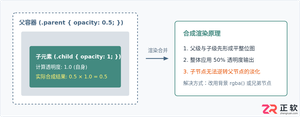
深入解析CSS中设置透明度的核心属性opacity,剖析子元素继承、事件穿透、层叠上下文等关键注意事项,并提供与rgba、hsla的实用选型对比。
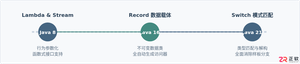
本文通过具体的旧版与新版代码对比,详细剖析Java 8引入的Lambda表达式、Java 14/16引入的Record类,以及Java 12至21逐步演进完善的Switch表达式与模式匹配,展示代码简化路径与避坑要点。
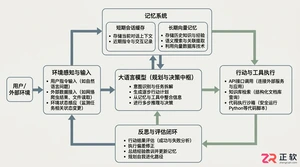
系统梳理AI智能体开发培训的核心知识模块、技术栈选型与典型实战项目,解析低代码平台与纯代码框架的差异,提供从零构建可落地智能体的完整学习与实施路径。
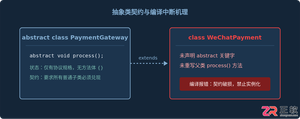
针对Java开发中常见的“子类未实现抽象方法”编译错误,深入分析报错原因,提供重写实现、声明抽象子类两种标准修复路径,并总结参数签名、访问修饰符等典型避坑要点。
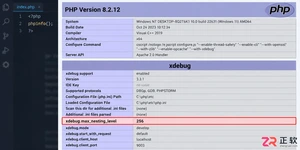
遇到PHP递归报错时,不要盲目调大max_nesting_level。本文教你区分Xdebug限制、内存耗尽和正则递归错误,提供代码级的终止条件优化与迭代替代方案,彻底解决栈溢出问题。
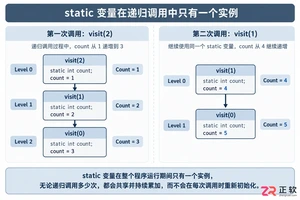
本文分析PHP递归中static变量导致的状态污染及引用传递引发的共享数据修改问题。提供具体的代码复现、缓存键设计建议及调试打印技巧,帮助开发者避免隐蔽的逻辑错误。




Photoshop 2026 是 Adobe 推出的专业图像处理与视觉设计软件,支持 Windows、macOS 和 iPad 等平台,广泛应用于摄影修图、电商设计、平面海报、数字绘画及视觉合成等创作场景。

Blender 是一款免费开源、跨平台的专业 3D 创作软件,集建模、动画、渲染、视频编辑与视觉合成等功能于一体,广泛应用于影视动画、游戏设计和建筑可视化等领域。软件支持 Cycles 物理渲染器与 Eevee 实时渲染引擎,并提供多边形建模、骨骼绑定、物理模拟等专业工具。Blender 兼容 Windows、macOS 和 Linux 系统,安装包轻巧、运行流畅,依托活跃的全球开发者社区持续更新,是从初学者到专业创作者都值得选择的正版 3D 创作工具。


Photoshop 2026 是 Adobe 推出的专业图像处理与视觉设计软件,支持 Windows、macOS 和 iPad 等平台,广泛应用于摄影修图、电商设计、平面海报、数字绘画及视觉合成等创作场景。
Blender 是一款免费开源、跨平台的专业 3D 创作软件,集建模、动画、渲染、视频编辑与视觉合成等功能于一体,广泛应用于影视动画、游戏设计和建筑可视化等领域。软件支持 Cycles 物理渲染器与 Eevee 实时渲染引擎,并提供多边形建模、骨骼绑定、物理模拟等专业工具。Blender 兼容 Windows、macOS 和 Linux 系统,安装包轻巧、运行流畅,依托活跃的全球开发者社区持续更新,是从初学者到专业创作者都值得选择的正版 3D 创作工具。