

Flex 自定义DataGrid实现根据条目某一属性值改变背景颜色
通过重写DataGrid的drawRowBackground方法,自定义组件可根据回调函数返回的颜色动态改变行背景色。示例中,回调函数比较每条记录的act与stand字段,若act小于stand则将行底色设为浅蓝色,否则保留默认白色。
package czgh.components {
    import flash.display.Sprite;
    import mx.controls.DataGrid;
    import mx.core.UIComponent;

    public class OptionalDataGrid extends DataGrid {
        private var _rowColorFunction:Function;
        private var _customed:Boolean;
        private var _customerColor:uint=0;

        public function OptionalDataGrid() {
            super();
        }

        override protected function drawRowBackground(s:Sprite, rowIndex:int, y:Number, height:Number, color:uint, dataIndex:int):void {
            color=0XFFFFFF;
            if(this._rowColorFunction != null) {
                if (dataIndex < this.dataProvider.length) {
                    var item:Object=this.dataProvider.getItemAt(dataIndex);
                    color=this._rowColorFunction.call(this, item, color);
                }
            }
            super.drawRowBackground(s, rowIndex, y, height, color, dataIndex);
        }

        override protected function drawHeaderBackground(headerBG:UIComponent):void {
            headerBG.setStyle("borderVisible","false");
        }

        public function set rowColorFunction(rowColorFunction:Function):void {
            this._rowColorFunction=rowColorFunction;
        }

        public function get rowColorFunction():Function {
            return this._rowColorFunction;
        }
    }
}
那么,在MXML里用起来也很直观。这里用了一个简单的回调函数,通过比较每条记录里`act`和`stand`字段的值,来决定这一行的背景色。
// 如果act的值小于stand,就把这一行的底色设成浅蓝色,否则就保留默认颜色
private function setCustomColor(item:Object, color:uint):uint {
    if (Number(item["act"])

这样一来,你就有了一个可以根据数据自动变色的DataGrid,非常实用。 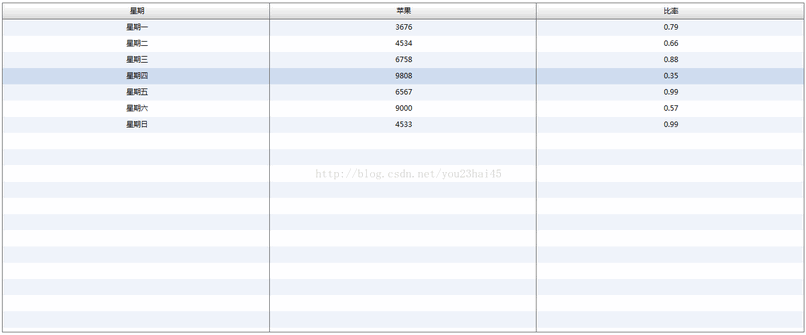
在Flex表格中,通过NumberFormatter组件设置precision为2、rounding为"up"实现向上取整保留两位小数,再借助labelFunction将格式化逻辑绑定到列,确保比率值如0.7868显示为0.79,避免四舍五入导致的累积误差,提升数据准确性。

Flex的LinkButton无默认背景色属性,可通过Graphics对象在creationComplete事件中绘制矩形填充色实现。核心代码使用beginFill和drawRect,颜色值可动态设置,不依赖外部资源。此法灵活轻量,支持扩展圆角或渐变,适用于多数场景。

Flex中遍历Object对象可使用obj["key"]方式,类似HashMap键值对结构,通过动态键名访问属性,替代传统点语法。此方法适合处理动态属性名或未知键名场景,提高代码灵活性。

在Flex4DataGrid的itemRenderer中嵌入RadioButton,通过监听selectedItems数组变化,判断当前数据项是否存在于数组中,动态设置RadioButton的selected属性,从而实现单行单选功能,确保每次仅一项被选中。

通过日期计算每月第一天及第一周星期一的日期,得出本月总天数和总周数,并确定当前日期属于本月第几周。若结果为第0周,则归入上月最后一周,确保周次划分的连续性和准确性。

通过浏览器唤起AIR应用需修改代码和配置文件。代码获取当前应用顶层窗口,利用ProductManager启动指定ID应用并关闭自身。配置文件需在应用描述符中开启允许浏览器调用的开关,否则启动请求被拦截。

Flex错误中destination为空字符串,通常因remoting-config.xml未定义对应调用目标。代码中RemoteObject请求的destination在配置文件中缺少声明,系统无法找到目标而抛出异常。需检查配置文件并正确添加目标声明,确保远程调用路径匹配。
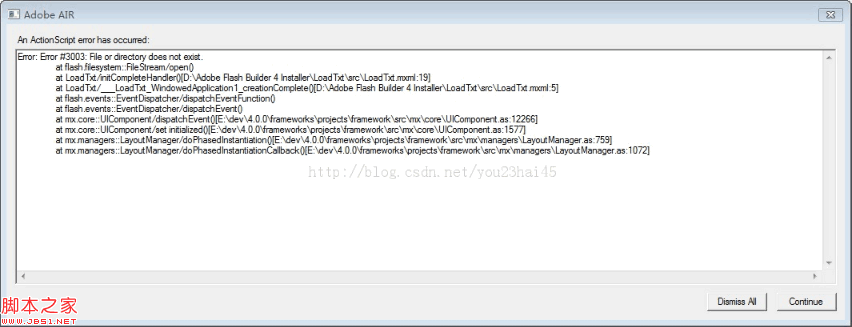
Flex开发中读取本地文件时提示“文件不存在”,通常因目标文件未放入应用程序目录或路径错误。需手动导入文件并确保路径准确,即可解决。建议检查文件位置及路径拼写,避免相对路径引用问题。
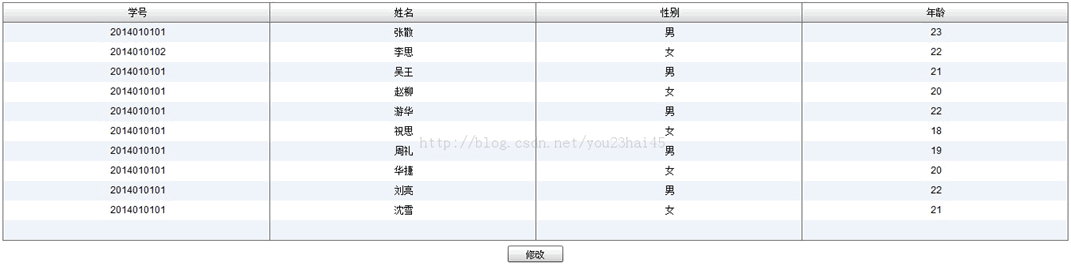
在Flex开发中,父窗口向子窗口传递参数和回调函数,子窗口修改数据后调用父窗口回调函数实现数据刷新,子窗口也可调用父窗口方法。示例展示了父窗口学生信息表格与子窗口编辑表单的交互过程。

在Flex开发中,File类是基础,用于文件操作。通过两个示例展示具体实现:使用s:WindowedApplication和File类创建File对象,路径为File.applicationDirectory.nativePath加"/test.txt",从而访问应用程序目录下的文件。




Adobe Acrobat Pro 是面向办公、法务、财务、教育及出版用户的专业PDF处理软件,可在Mac上创建、编辑、转换、合并和保护文档,并提供OCR文字识别、表单、批注、内容比较、敏感信息遮盖及电子签名功能。

Blender 是一款免费开源、跨平台的专业 3D 创作软件,集建模、动画、渲染、视频编辑与视觉合成等功能于一体,广泛应用于影视动画、游戏设计和建筑可视化等领域。软件支持 Cycles 物理渲染器与 Eevee 实时渲染引擎,并提供多边形建模、骨骼绑定、物理模拟等专业工具。Blender 兼容 Windows、macOS 和 Linux 系统,安装包轻巧、运行流畅,依托活跃的全球开发者社区持续更新,是从初学者到专业创作者都值得选择的正版 3D 创作工具。

Shapr3D是一款面向工业设计、机械工程、建筑概念和三维打印工作流的CAD软件。Mac版采用Parasolid建模内核,支持草图约束、实体建模、工程图、可视化渲染及常见CAD格式交换,并可通过账户在多台设备之间同步项目。

AutoCAD 是 Autodesk 推出的专业计算机辅助设计软件,Windows 版支持精确二维绘图、三维实体与曲面建模、图纸标注、布局发布和任务自动化,并包含多套行业专业化工具组合,适用于建筑、机械、电气、工程建设及制造设计人员。

Adobe Acrobat Pro 是面向专业 PDF 工作的综合解决方案,可在 Windows 中创建、编辑、转换、比较、整理和保护文档,并支持表单、电子签名、扫描件文字识别及敏感信息永久遮盖。订阅还包含网页、移动服务和云端协作能力,
Blender 是一款免费开源、跨平台的专业 3D 创作软件,集建模、动画、渲染、视频编辑与视觉合成等功能于一体,广泛应用于影视动画、游戏设计和建筑可视化等领域。软件支持 Cycles 物理渲染器与 Eevee 实时渲染引擎,并提供多边形建模、骨骼绑定、物理模拟等专业工具。Blender 兼容 Windows、macOS 和 Linux 系统,安装包轻巧、运行流畅,依托活跃的全球开发者社区持续更新,是从初学者到专业创作者都值得选择的正版 3D 创作工具。