

4.4.2 ContentProvider再探——Document Provider

Process Lasso是一款功能Windows进程管理工具,可有效避免电脑出现蓝屏、假死等情况。它更偏向把系统状态查看和常用调节动作放在一起,适合需要持续观察和微调设备状态的场景。
本节引言: 学完上一节,相信你已经知道如何去使用系统提供的ContentProvider或者自定义ContentProvider了, 已经基本满足日常开发的需求了,有趣的是,我在官方文档上看到了另外这几个Provider: Calendar Provider:日历提供者,就是针对针对日历相关事件的一
本节引言:
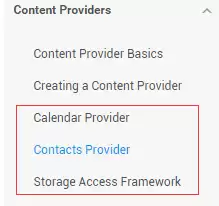
学完上一节,相信你已经知道如何去使用系统提供的ContentProvider或者自定义ContentProvider了, 已经基本满足日常开发的需求了,有趣的是,我在官方文档上看到了另外这几个Provider:
Calendar Provider:日历提供者,就是针对针对日历相关事件的一个资源库,通过他提供的API,我们 可以对日历,时间,会议,提醒等内容做一些增删改查!
Contacts Provider:联系人提供者,这个就不用说了,这个用得最多~后面有时间再回头翻译下这篇文章吧!
Storage Access Framework(SAF):存储访问框架,4.4以后引入的一个新玩意,为用户浏览手机中的 存储内容提供了便利,可供访问的内容不仅包括:文档,图片,视频,音频,下载,而且包含所有由 由特定ContentProvider(须具有约定的API)提供的内容。不管这些内容来自于哪里,不管是哪个应 用调用浏览系统文件内容的命令,系统都会用一个统一的界面让你去浏览。
其实就是一个内置的应用程序,叫做DocumentsUI,因为它的IntentFilter不带有LAUNCHER,所以我们并没有 在桌面上找到这个东东!嘿嘿,试下下面的代码,这里我们选了两个手机来对比: 分别是4.2的Lenovo S898T 和 5.0.1的Nexus 5做对比,执行下述代码:
 Intent intent = new Intent(Intent.ACTION_OPEN_DOCUMENT);
        intent.addCategory(Intent.CATEGORY_OPENABLE);
        intent.setType("image/*");
        startActivity(intent);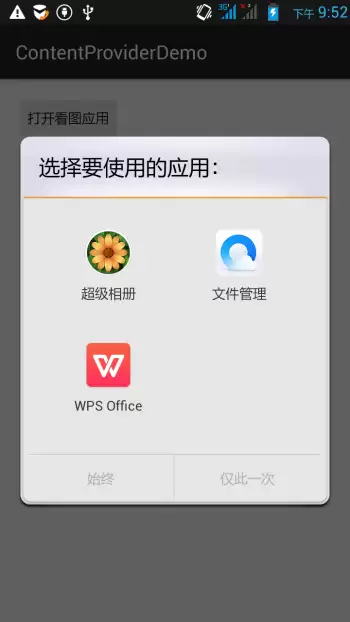
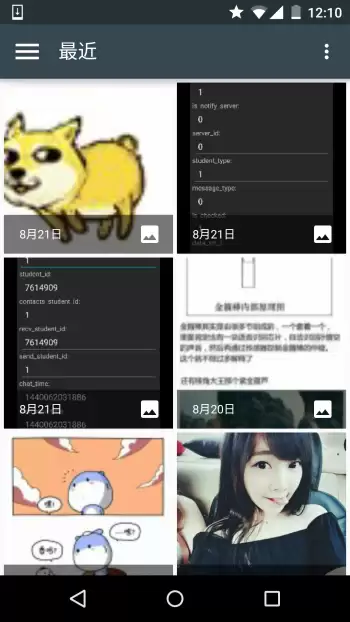
右面这个就是4.4给我们带来的新玩意了,一般我们获取文件Url的时候就可以用到它~ 接下来简单的走下文档吧~
2.简单走下文档:
1)SAF框架的组成:
- Document provider:一个特殊的ContentProvider,让一个存储服务(比如Google Drive)可以 对外展示自己所管理的文件。它是DocumentsProvider的子类,另外,document-provider的存储格式 和传统的文件存储格式一致,至于你的内容如何存储,则完全决定于你自己,Android系统已经内置了几个 这样的Document provider,比如关于下载,图片以及视频的Document provider!
- Client app:一个普通的客户端软件,通过触发ACTION_OPEN_DOCUMENT 和/或 ACTION_CREATE_DOCUMENT就可以接收到来自于Document provider返回的内容,比如选择一个图片, 然后返回一个Uri。
- Picker:类似于文件管理器的界面,而且是系统级的界面,提供额访问客户端过滤条件的 Document provider内容的通道,就是起说的那个DocumentsUI程序!
一些特性:
- 用户可以浏览所有document provider提供的内容,而不仅仅是单一的应用程序
- 提供了长期、持续的访问document provider中文件的能力以及数据的持久化, 用户可以实现添加、删除、编辑、保存document provider所维护的内容
- 支持多用户以及临时性的内容服务,比如USB storage providers只有当驱动安装成功才会出现
2)概述:
SAF的核心是实现了DocumentsProvider的子类,还是一个ContentProvider。在一个document provider 中是以传统的文件目录树组织起来的:

3)流程图:
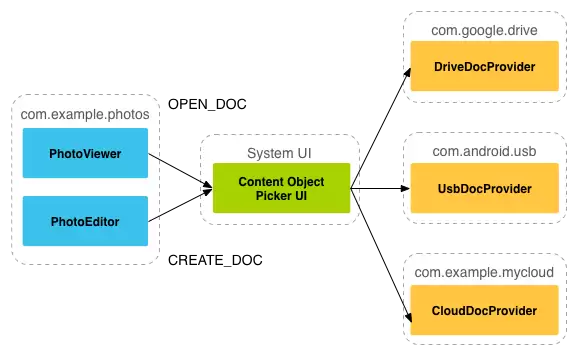
前面已经提到,document provider data对外呈现的是传统文件层级结构,但那更多只是展示方式。至于底层数据究竟怎么存、按什么组织,完全可以自行决定;关键只有一点:对外提供的接口必须能通过DocumentsProvider的 API 访问到。下面这张流程图,展示的就是一个 photo 应用接入 SAF 时可能采用的结构:
分析:
从上图,我们可以看出Picker是链接调用者和内容提供者的一个桥梁!他提供并告诉调用者,可以选择 哪些内容提供者,比如这里的DriveDocProvider,UsbDocProvider,CloundDocProvider。
当客户端触发了ACTION_OPEN_DOCUMENT或ACTION_CREATE_DOCUMENT的Intent,就会发生上述交互。 当然我们还可以在Intent中增加过滤条件,比如限制MIME type的类型为"image"!
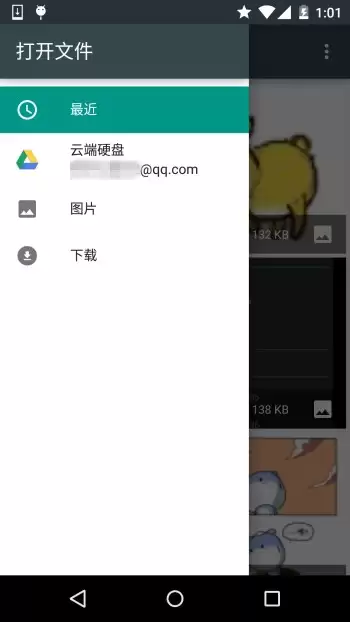
上面提到的这些内容,都会出现在这里;如果设备里还装了别的看图软件,同样也会一起显示出来。说得再直白一点:当客户端发送前面这两种 Action 对应的 Intent 之后,系统就会拉起 Picker UI,把当前可用的 Document Provider 展示给用户挑选;等用户选定之后,也就能拿到对应文件的相关信息了。
4)客户端调用,并获取返回的Uri
实现代码如下:
public class MainActivity extends AppCompatActivity implements View.OnClickListener {
    private static final int READ_REQUEST_CODE = 42;
@Override
    protected void onCreate(Bundle sa vedInstanceState) {
        super.onCreate(sa vedInstanceState);
        setContentView(R.layout.activity_main);
        Button btn_show = (Button) findViewById(R.id.btn_show);
        btn_show.setOnClickListener(this);
    }
@Override
    public void onClick(View v) {
        Intent intent = new Intent(Intent.ACTION_OPEN_DOCUMENT);
        intent.addCategory(Intent.CATEGORY_OPENABLE);
        intent.setType("image/*");
        startActivityForResult(intent, READ_REQUEST_CODE);
    }
@Override
    protected void onActivityResult(int requestCode, int resultCode, Intent data) {
        if (requestCode == READ_REQUEST_CODE && resultCode == Activity.RESULT_OK) {
            Uri uri;
            if (data != null) {
                uri = data.getData();
                Log.e("HeHe", "Uri: " + uri.toString());
            }
        }
    }
}
运行结果: 比如我们选中那只狗,然后Picker UI自己会关掉,然后Logcat上可以看到这样一个uri:
5)根据uri获取文件参数
核心代码如下:
public void dumpImageMetaData(Uri uri) {
    Cursor cursor = getContentResolver()
            .query(uri, null, null, null, null, null);
    try {
        if (cursor != null && cursor.moveToFirst()) {
            String displayName = cursor.getString(
                    cursor.getColumnIndex(OpenableColumns.DISPLAY_NAME));
            Log.e("HeHe", "Display Name: " + displayName);
            int sizeIndex = cursor.getColumnIndex(OpenableColumns.SIZE);
            String size = null;
            if (!cursor.isNull(sizeIndex)) {
                size = cursor.getString(sizeIndex);
            }else {
                size = "Unknown";
            }
            Log.e("HeHe", "Size: " + size);
        }
    }finally {
        cursor.close();
    }
}
运行结果: 还是那只狗,调用方法后会输入文件名以及文件大小,以byte为单位

6)根据Uri获得Bitmap
核心代码如下:
private Bitmap getBitmapFromUri(Uri uri) throws IOException {
        ParcelFileDescriptor parcelFileDescriptor =
        getContentResolver().openFileDescriptor(uri, "r");
        FileDescriptor fileDescriptor = parcelFileDescriptor.getFileDescriptor();
        Bitmap image = BitmapFactory.decodeFileDescriptor(fileDescriptor);
        parcelFileDescriptor.close();
        return image;
}运行结果:
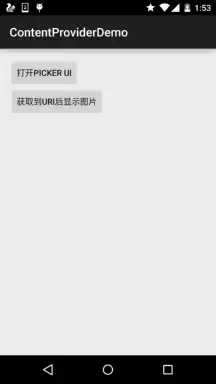
7)根据Uri获取输入流
核心代码如下:
private String readTextFromUri(Uri uri) throws IOException {
    InputStream inputStream = getContentResolver().openInputStream(uri);
    BufferedReader reader = new BufferedReader(new InputStreamReader(
            inputStream));
    StringBuilder stringBuilder = new StringBuilder();
    String line;
    while ((line = reader.readLine()) != null) {
        stringBuilder.append(line);
    }
    fileInputStream.close();
    parcelFileDescriptor.close();
    return stringBuilder.toString();
}
上述的内容只告诉你通过一个Uri你可以知道什么,而Uri的获取则是通过SAF得到的!
8) 创建新文件以及删除文件:
创建文件:
private void createFile(String mimeType, String fileName) {
    Intent intent = new Intent(Intent.ACTION_CREATE_DOCUMENT);
    intent.addCategory(Intent.CATEGORY_OPENABLE);
    intent.setType(mimeType);
    intent.putExtra(Intent.EXTRA_TITLE, fileName);
    startActivityForResult(intent, WRITE_REQUEST_CODE);
}
可在onActivityResult()中获取被创建文件的uri
删除文件:
前提是Document.COLUMN_FLAGS包含SUPPORTS_DELETE
DocumentsContract.deleteDocument(getContentResolver(), uri);9)编写一个自定义的Document Provider
如果你希望自己应用的数据也能在documentsui中打开,你就需要写一个自己的document provider。 下面介绍自定义DocumentsProvider的步骤:
- API版本为19或者更高
- 在manifest.xml中注册该Provider
- Provider的name为类名加包名,比如: com.example.android.storageprovider.MyCloudProvider
- Authority为包名+provider的类型名,如: com.example.android.storageprovider.documents
- android:exported属性的值为ture
下面是Provider的例子写法:
...
10 )DocumentsProvider的子类
至少实现如下几个方法:
- queryRoots()
- queryChildDocuments()
- queryDocument()
- openDocument()
还有些其他的方法,但并不是必须的。下面演示一个实现访问文件(file)系统的 DocumentsProvider的大致写法。
Implement queryRoots
@Override
public Cursor queryRoots(String[] projection) throws FileNotFoundException {
// Create a cursor with either the requested fields, or the default
    // projection if "projection" is null.
    final MatrixCursor result =
            new MatrixCursor(resolveRootProjection(projection));
// If user is not logged in, return an empty root cursor.  This removes our
    // provider from the list entirely.
    if (!isUserLoggedIn()) {
        return result;
    }
// It's possible to ha ve multiple roots (e.g. for multiple accounts in the
    // same app) -- just add multiple cursor rows.
    // Construct one row for a root called "MyCloud".
    final MatrixCursor.RowBuilder row = result.newRow();
    row.add(Root.COLUMN_ROOT_ID, ROOT);
    row.add(Root.COLUMN_SUMMARY, getContext().getString(R.string.root_summary));
// FLAG_SUPPORTS_CREATE means at least one directory under the root supports
    // creating documents. FLAG_SUPPORTS_RECENTS means your application's most
    // recently used documents will show up in the "Recents" category.
    // FLAG_SUPPORTS_SEARCH allows users to search all documents the application
    // shares.
    row.add(Root.COLUMN_FLAGS, Root.FLAG_SUPPORTS_CREATE |
            Root.FLAG_SUPPORTS_RECENTS |
            Root.FLAG_SUPPORTS_SEARCH);
// COLUMN_TITLE is the root title (e.g. Gallery, Drive).
    row.add(Root.COLUMN_TITLE, getContext().getString(R.string.title));
// This document id cannot change once it's shared.
    row.add(Root.COLUMN_DOCUMENT_ID, getDocIdForFile(mBaseDir));
// The child MIME types are used to filter the roots and only present to the
    //  user roots that contain the desired type somewhere in their file hierarchy.
    row.add(Root.COLUMN_MIME_TYPES, getChildMimeTypes(mBaseDir));
    row.add(Root.COLUMN_A VAILABLE_BYTES, mBaseDir.getFreeSpace());
    row.add(Root.COLUMN_ICON, R.drawable.ic_launcher);
return result;
}
Implement queryChildDocuments
public Cursor queryChildDocuments(String parentDocumentId, String[] projection,
                              String sortOrder) throws FileNotFoundException {
final MatrixCursor result = new
            MatrixCursor(resolveDocumentProjection(projection));
    final File parent = getFileForDocId(parentDocumentId);
    for (File file : parent.listFiles()) {
        // Adds the file's display name, MIME type, size, and so on.
        includeFile(result, null, file);
    }
    return result;
}
Implement queryDocument
@Override
public Cursor queryDocument(String documentId, String[] projection) throws
        FileNotFoundException {
// Create a cursor with the requested projection, or the default projection.
    final MatrixCursor result = new
            MatrixCursor(resolveDocumentProjection(projection));
    includeFile(result, documentId, null);
    return result;
}
好吧,文档中的内容大概就是这些了: 一开始是想自己翻译的,后来在泡在网上的日子上找到了这一篇文档的中文翻译,就偷下懒了~
中文翻译链接:android存储访问框架Storage Access Framework
3.Android 4.4 获取资源路径问题:
其实这个SAF我们用得较多的地方无非是获取图片的Uri而已,而从上面的例子我们也发现了: 我们这样获取的链接是这样的:
content://com.android.providers.media.documents/document/image%3A69983这样的链接,我们直接通过上面的方法获得uri即可!
当然,这个是4.4 或者以上版本的~!
如果是以前的版本:uri可能是这样的:
content://media/external/images/media/image%3A69983这里贴下在别的地方看到的一个全面的方案,原文链接:Android4.4中获取资源路径问题
public static String getPath(final Context context, final Uri uri) {
    final boolean isKitKat = Build.VERSION.SDK_INT >= Build.VERSION_CODES.KITKAT;
    // DocumentProvider
    if (isKitKat && DocumentsContract.isDocumentUri(context, uri)) {
        // ExternalStorageProvider
        if (isExternalStorageDocument(uri)) {
            final String docId = DocumentsContract.getDocumentId(uri);
            final String[] split = docId.split(":");
            final String type = split[0];
if ("primary".equalsIgnoreCase(type)) {
                return Environment.getExternalStorageDirectory() + "/" + split[1];
            }
// TODO handle non-primary volumes
        }
        // DownloadsProvider
        else if (isDownloadsDocument(uri)) {
final String id = DocumentsContract.getDocumentId(uri);
            final Uri contentUri = ContentUris.withAppendedId(
                    Uri.parse("content://downloads/public_downloads"), Long.valueOf(id));
return getDataColumn(context, contentUri, null, null);
        }
        // MediaProvider
        else if (isMediaDocument(uri)) {
            final String docId = DocumentsContract.getDocumentId(uri);
            final String[] split = docId.split(":");
            final String type = split[0];
            Uri contentUri = null;
            if ("image".equals(type)) {
                contentUri = MediaStore.Images.Media.EXTERNAL_CONTENT_URI;
            } else if ("video".equals(type)) {
                contentUri = MediaStore.Video.Media.EXTERNAL_CONTENT_URI;
            } else if ("audio".equals(type)) {
                contentUri = MediaStore.Audio.Media.EXTERNAL_CONTENT_URI;
            }
            final String selection = "_id=?";
            final String[] selectionArgs = new String[] {
                    split[1]
            };
            return getDataColumn(context, contentUri, selection, selectionArgs);
        }
    }
    // MediaStore (and general)
    else if ("content".equalsIgnoreCase(uri.getScheme())) {
        return getDataColumn(context, uri, null, null);
    }
    // File
    else if ("file".equalsIgnoreCase(uri.getScheme())) {
        return uri.getPath();
    }
    return null;
}
/**
 * Get the value of the data column for this Uri. This is useful for
 * MediaStore Uris, and other file-based ContentProviders.
 *
 * @param context The context.
 * @param uri The Uri to query.
 * @param selection (Optional) Filter used in the query.
 * @param selectionArgs (Optional) Selection arguments used in the query.
 * @return The value of the _data column, which is typically a file path.
 */
public static String getDataColumn(Context context, Uri uri, String selection,
                                   String[] selectionArgs) {
Cursor cursor = null;
    final String column = "_data";
    final String[] projection = {
            column
    };
try {
        cursor = context.getContentResolver().query(uri, projection, selection, selectionArgs,
                null);
        if (cursor != null && cursor.moveToFirst()) {
            final int column_index = cursor.getColumnIndexOrThrow(column);
            return cursor.getString(column_index);
        }
    } finally {
        if (cursor != null)
            cursor.close();
    }
    return null;
}
/**
 * @param uri The Uri to check.
 * @return Whether the Uri authority is ExternalStorageProvider.
 */
public static boolean isExternalStorageDocument(Uri uri) {
    return "com.android.externalstorage.documents".equals(uri.getAuthority());
}
/**
 * @param uri The Uri to check.
 * @return Whether the Uri authority is DownloadsProvider.
 */
public static boolean isDownloadsDocument(Uri uri) {
    return "com.android.providers.downloads.documents".equals(uri.getAuthority());
}
/**
 * @param uri The Uri to check.
 * @return Whether the Uri authority is MediaProvider.
 */
public static boolean isMediaDocument(Uri uri) {
    return "com.android.providers.media.documents".equals(uri.getAuthority());
}
本节小结:
好的,关于本节android存储访问框架SAF就到这里吧,没什么例子,后面用到再深入研究吧, 知道下就好,4.4后获取文件路径就简单多了~
Windows 10更新弹窗频繁影响工作?无需禁用服务,只需调整活动时间、安排重启和优化通知设置,即可有效减少干扰并保持系统安全。
想知道Win10自动更新是否被关闭?不要只看任务栏。本文教你通过“设置-更新和安全”、“高级选项”及“services.msc服务”三处位置,准确判断系统更新状态是暂停、运行还是受组织策略管理。
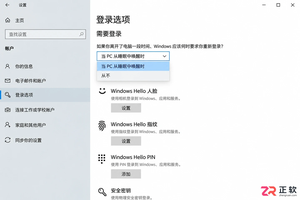
想知道Win10能否只取消休眠唤醒密码而保留开机密码?本教程详解如何通过系统设置和netplwiz工具,分别控制开机登录与睡眠唤醒后的验证要求,实现灵活的安全策略。
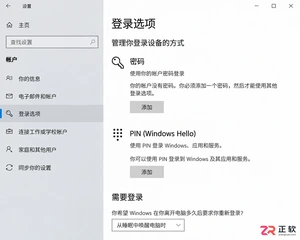
Win10取消开机密码后想恢复?本教程详解如何通过netplwiz恢复开机输入框、重新设置空密码账户、配置PIN码及调整睡眠唤醒登录策略,步骤清晰,即改即验。
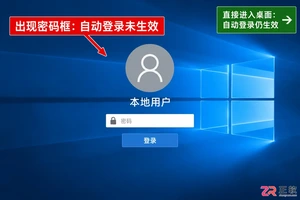
想恢复Win10开机密码保护?本文详解如何通过注册表修改AutoAdminLogon值取消自动登录,配合netplwiz工具复核,避免凭据泄露风险,适合家用及办公场景参考。
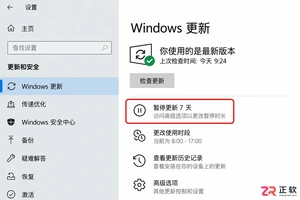
Win10一开机就占用网速下载更新?本文教你通过设置暂停更新、调整活动时间及标记计费网络来缓解干扰。区分家庭版与专业版操作差异,避免强制停止服务带来的系统风险,让更新在合适的时间进行。
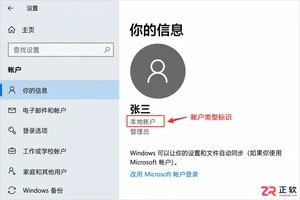
Win10取消开机密码时提示验证失败?可能是因为输错了Microsoft账户密码或误用了PIN码。本文详解如何确认账户类型、正确输入凭据及检查自动登录设置,帮你解决验证报错问题。
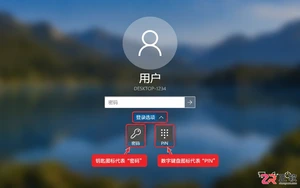
Windows 10忘记开机密码如何处理?本文根据账户类型(Microsoft账户/本地账户/PIN)提供官方支持的恢复步骤,包括在线重置、安全问题回答及管理员重置方法,避免数据丢失风险。
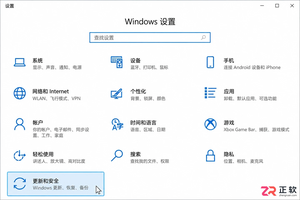
Windows 10更新提示频繁弹窗怎么办?本文详解如何通过Windows更新高级选项、系统通知设置及暂停更新功能,精准关闭不必要的重启提醒和横幅通知,同时确保系统安全更新不受影响。适用于家庭及个人用户,区分个人设置与企业策略管理。
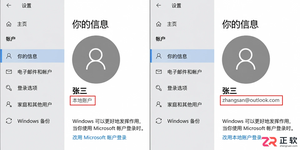
Win10家庭版如何取消开机密码?本文详解本地账户清空密码步骤及Microsoft账户自动登录设置方法,分析安全风险与例外情况,帮助用户在便捷与安全间做出合理选择。




Photoshop 2026 是 Adobe 推出的专业图像处理与视觉设计软件,支持 Windows、macOS 和 iPad 等平台,广泛应用于摄影修图、电商设计、平面海报、数字绘画及视觉合成等创作场景。

Blender 是一款免费开源、跨平台的专业 3D 创作软件,集建模、动画、渲染、视频编辑与视觉合成等功能于一体,广泛应用于影视动画、游戏设计和建筑可视化等领域。软件支持 Cycles 物理渲染器与 Eevee 实时渲染引擎,并提供多边形建模、骨骼绑定、物理模拟等专业工具。Blender 兼容 Windows、macOS 和 Linux 系统,安装包轻巧、运行流畅,依托活跃的全球开发者社区持续更新,是从初学者到专业创作者都值得选择的正版 3D 创作工具。


Photoshop 2026 是 Adobe 推出的专业图像处理与视觉设计软件,支持 Windows、macOS 和 iPad 等平台,广泛应用于摄影修图、电商设计、平面海报、数字绘画及视觉合成等创作场景。
Blender 是一款免费开源、跨平台的专业 3D 创作软件,集建模、动画、渲染、视频编辑与视觉合成等功能于一体,广泛应用于影视动画、游戏设计和建筑可视化等领域。软件支持 Cycles 物理渲染器与 Eevee 实时渲染引擎,并提供多边形建模、骨骼绑定、物理模拟等专业工具。Blender 兼容 Windows、macOS 和 Linux 系统,安装包轻巧、运行流畅,依托活跃的全球开发者社区持续更新,是从初学者到专业创作者都值得选择的正版 3D 创作工具。