

Flatnotes开源轻量笔记:基于Ubuntu系统Docker容器化部署实战记录
一、flatnotes介绍1.1 flatnotes简介flatnotes 是一个自托管的、无数据库的笔记 Web 应用程序,它利用文件夹存储 Markdown 文件。1.2 flatnotes特点移动响应式web界面。原始/所见即所得标记编辑器模式。高级搜索功能。注意“标记”功能。浅色/深色主题。
一、flatnotes介绍
1.1 flatnotes简介
flatnotes 是一个自托管的、无数据库的笔记 Web 应用程序,它利用文件夹存储 Markdown 文件。1.2 flatnotes特点
- 移动响应式web界面。
- 原始/所见即所得标记编辑器模式。
- 高级搜索功能。
- 注意“标记”功能。
- 浅色/深色主题。
- 多个身份验证选项(无、只读、用户名/密码、2FA)。
- Restful API。
1.3 flatnotes使用场景
FlatNotes 是一款自托管、无需数据库的 Web 笔记应用,放在下面这些场景里,用起来往往会格外顺手:
- 个人知识管理:对于喜欢使用Markdown格式记录学习笔记、技术心得、读书感悟等个人知识的用户,FlatNotes提供了一个简洁高效的平台。用户可以轻松地通过文件夹结构来组织和分类自己的笔记,便于日后检索和回顾。
- 团队项目协作:在小型团队或项目组内部,FlatNotes 可以作为共享知识库使用。团队成员可以共同编辑和查看项目相关的文档、会议纪要、设计规范等,利用Markdown的简洁性和可读性提高沟通效率。自托管特性确保了数据的安全性和私密性。
- 学术研究与写作:学术研究人员可以利用FlatNotes整理研究资料、撰写论文草稿、记录实验结果。Markdown支持公式、代码高亮等特性,非常适合科技文献的编写。文件夹系统有助于按研究主题或论文章节组织内容。
- 博客或个人网站内容创作:博主和内容创作者可以利用FlatNotes作为后台编辑器,先在Markdown中撰写文章,然后直接从文件系统发布到网站上。这种方式简化了内容管理和发布的流程,尤其是对于使用静态站点生成器(如Jekyll、Hugo)的用户。
- 离线优先场景:由于FlatNotes依赖文件系统而非数据库,因此在没有网络连接或者网络不稳定的情况下,用户仍然可以通过本地文件系统访问和编辑笔记,实现离线工作,之后再同步更改。
- 教育与培训:教师可以使用FlatNotes创建课程大纲、讲义和作业说明,学生则可以用来整理课堂笔记和复习资料。Markdown的易学易用性降低了技术门槛,使得更多人能够专注于内容本身。
- 开源软件文档维护:开源项目团队可以利用FlatNotes来维护项目文档、开发者指南和贡献者手册。这样不仅便于版本控制,也方便社区成员贡献和编辑文档内容,促进项目的健康发展。
二、本地环境介绍
2.1 本地环境规划
本次实践为个人测试环境,操作系统版本为centos7.6。2.2 本次实践介绍
1.本次实践部署环境为个人测试环境,生产环境请谨慎使用;2.在Docker环境下成功部署flatnotes笔记工具。
三、本地环境检查
3.1 检查Docker服务状态
检查Docker服务是否正常运行,确保Docker正常运行。[root@jeven ~]# systemctl status docker
● docker.service - Docker Application Container Engine
Loaded: loaded (/usr/lib/systemd/system/docker.service; enabled; vendor preset: disabled)
Active: active (running) since Wed 2023-08-23 23:41:16 CST; 1 weeks 1 days ago
Docs: https://docs.docker.com
Main PID: 9562 (dockerd)
Tasks: 50
Memory: 1.4G
CGroup: /system.slice/docker.service3.2 检查Docker版本
检查Docker版本[root@jeven ~]# docker version
Client: Docker Engine - Community
Version: 20.10.17
API version: 1.41
Go version: go1.17.11
Git commit: 100c701
Built: Mon Jun 6 23:05:12 2022
OS/Arch: linux/amd64
Context: default
Experimental: true
Server: Docker Engine - Community
Engine:
Version: 20.10.17
API version: 1.41 (minimum version 1.12)
Go version: go1.17.11
Git commit: a89b842
Built: Mon Jun 6 23:03:33 2022
OS/Arch: linux/amd64
Experimental: false
containerd:
Version: 1.6.6
GitCommit: 10c12954828e7c7c9b6e0ea9b0c02b01407d3ae1
runc:
Version: 1.1.2
GitCommit: v1.1.2-0-ga916309
docker-init:
Version: 0.19.0
GitCommit: de40ad03.3 检查docker compose 版本
检查Docker compose版本,确保2.0以上版本。[[root@jeven ~]# docker compose version
Docker Compose version v2.19.1四、下载flatnotes镜像
从docker hub下载flatnotes镜像[root@jeven ~]# docker pull dullage/flatnotes
Using default tag: latest
latest: Pulling from dullage/flatnotes
1d5252f66ea9: Pull complete
eefb43356e06: Pull complete
c26db0eb1f01: Pull complete
300843d99304: Pull complete
daddf7df59b6: Pull complete
fd5b7d323a9e: Pull complete
956d12ab1aba: Pull complete
3a27da5a148e: Pull complete
9bc9c825c797: Pull complete
4f4fb700ef54: Pull complete
2dff9aeca767: Pull complete
745990a309e1: Pull complete
cf33157fe535: Pull complete
1f4f074b255f: Pull complete
042bd107273a: Pull complete
Digest: sha256:666b237abff5a16d781ee7f06ccdadef9e42951de3ec320a071407a9e85666ef
Status: Downloaded newer image for dullage/flatnotes:latest
docker.io/dullage/flatnotes:latest五、部署flatnotes笔记工具
5.1 创建目录
新建挂载目录mkdir -p /data/flatnotes/data && cd /data/flatnotes/ chmod -R 777 /data/flatnotes/5.2 使用docker-cli部署
使用docker-cli命令部署flatnotes笔记工具- 生成随机KEY
[root@jeven flatnotes]# cat /dev/urandom | tr -dc 'a-zA-Z0-9' | fold -w 24 | head -n 1
Nl1rQmfg4gsnJfBfsmkXOo7G
docker run -d
--restart unless-stopped
--name flatnotes
-p "28880:8080"
-v "/data/flatnotes/data:/data"
-e "FLATNOTES_AUTH_TYPE=password"
-e "FLATNOTES_USERNAME=admin"
-e "FLATNOTES_PASSWORD=admin"
-e "FLATNOTES_SECRET_KEY=Nl1rQmfg4gsnJfBfsmkXOo7G"
-e "PORT=8080"
dullage/flatnotes:latest5.3 编辑docker-compose.yaml文件
编辑docker-compose.yaml文件,内容如下:version: '3'
services:
flatnotes:
image: dullage/flatnotes:latest
container_name: flatnotes
restart: always
ports:
- 28880:8080
volumes:
- /data/flatnotes/data:/data
environment:
- FLATNOTES_AUTH_TYPE=password
- FLATNOTES_USERNAME=admin
- FLATNOTES_PASSWORD=admin
- FLATNOTES_SECRET_KEY=Nl1rQmfg4gsnJfBfsmkXOo7G
- PORT=80805.4 创建flatnotes容器
使用docker compose快速创建flatnotes容器[root@jeven flatnotes]# docker compose up -d
[+] Running 2/2
⠿ Network flatnotes_default Created 0.1s
⠿ Container flatnotes Started 0.4s5.5 检查flatnotes容器状态
检查容器状态,确保flatnotes容器正常启动。[root@jeven flatnotes]# docker ps
CONTAINER ID IMAGE COMMAND CREATED STATUS PORTS NAMES
23eebd85b174 dullage/flatnotes:latest "/entrypoint.sh" 13 seconds ago Up 13 seconds 0.0.0.0:28880->8080/tcp, :::28880->8080/tcp flatnotes5.6 检查flatnotes容器日志
检查flatnotes容器日志,确保服务正常运行。[root@jeven flatnotes]# docker logs flatnotes
Setting up user and group...
Adding group `flatnotes' (GID 1000) ...
Done.
Adding user `flatnotes' ...
Adding new user `flatnotes' (1000) with group `flatnotes' ...
Creating home directory `/home/flatnotes' ...
Copying files from `/etc/skel' ...
Setting file permissions...
WARNING: Breaking changes introduced in version 3.x:
- The port flatnotes uses inside the Docker container has been changed to 8080 (previously 80).
- To accompany the above change, support for the PORT environment variable has been removed.
- The note directory inside the Docker container has moved from /app/data to simply /data.
Starting flatnotes...
2023-09-01 10:22:51 [INFO]: Creating new index
INFO: Started server process [1]
INFO: Waiting for application startup.
INFO: Application startup complete.
INFO: Uvicorn running on http://0.0.0.0:8080 (Press CTRL+C to quit)六、访问flatnotes
6.1 进入flatnotes登录页
访问地址:http://192.168.3.166:28880,将IP替换为自己服务器的IP地址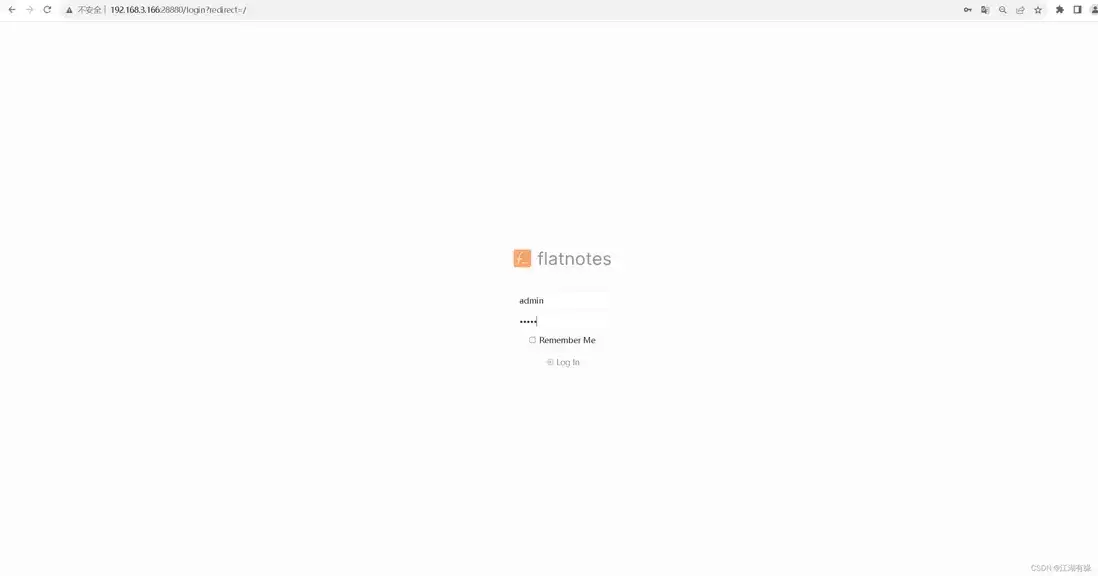
6.2 访问flatnotes首页
账号密码为自定义设置的admin/admin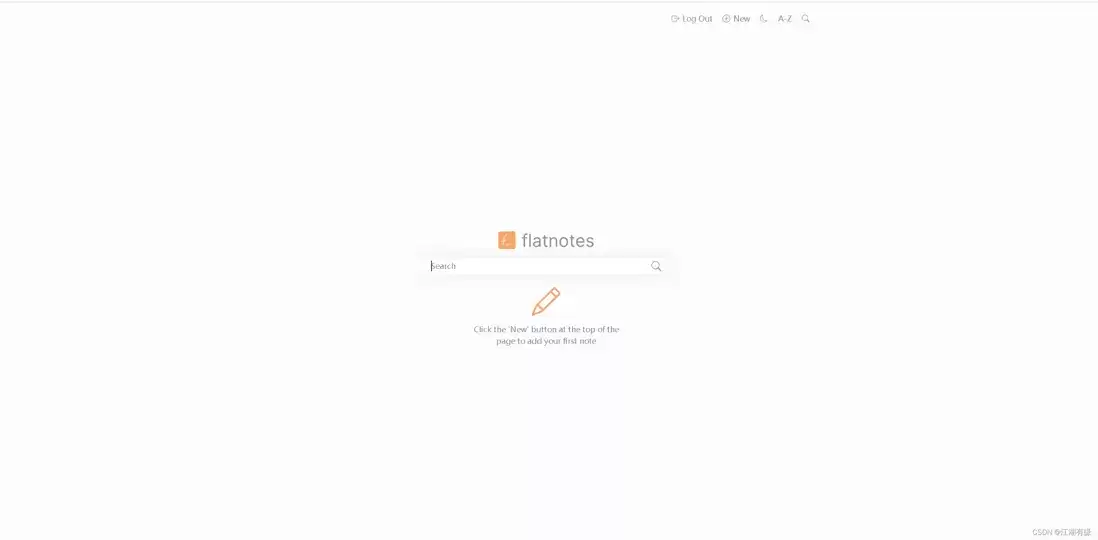
七、flatnotes的基本使用
7.1 新建笔记
点击右上角的New",新建笔记。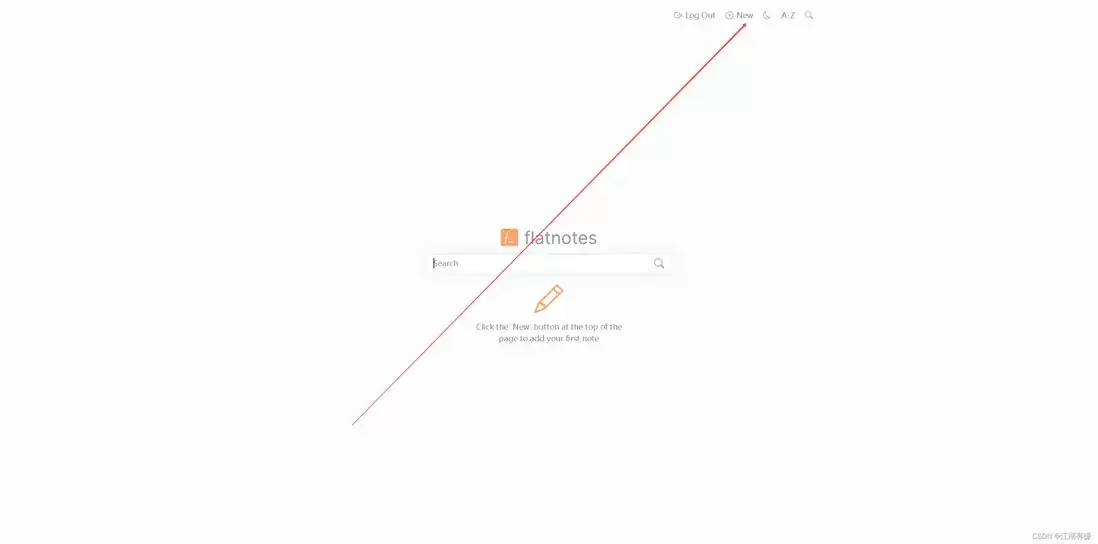
7.2 编辑笔记内容
编辑笔记内容,使用markdown格式。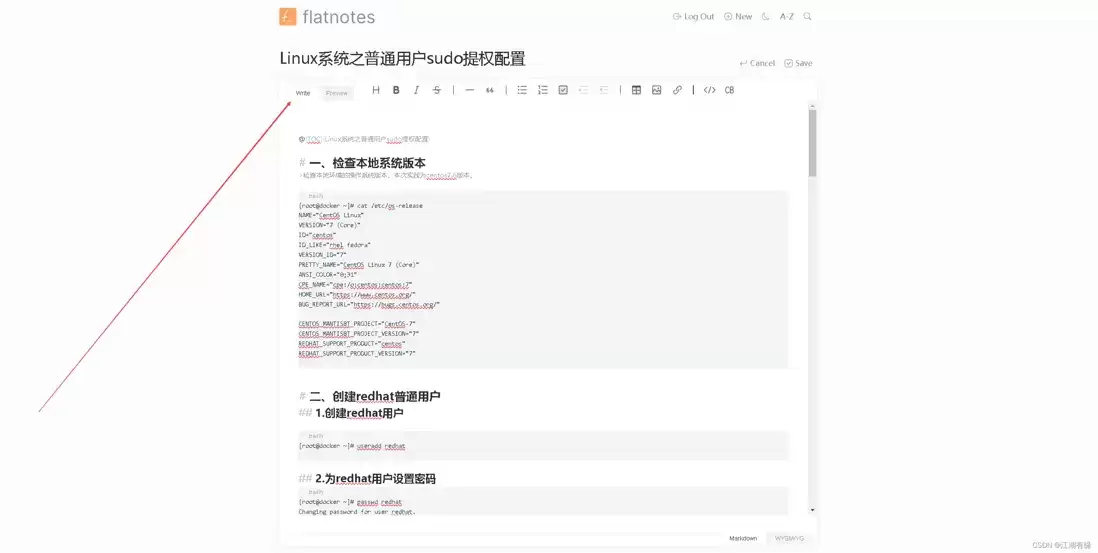
7.3 预览笔记内容
点击预览笔记内容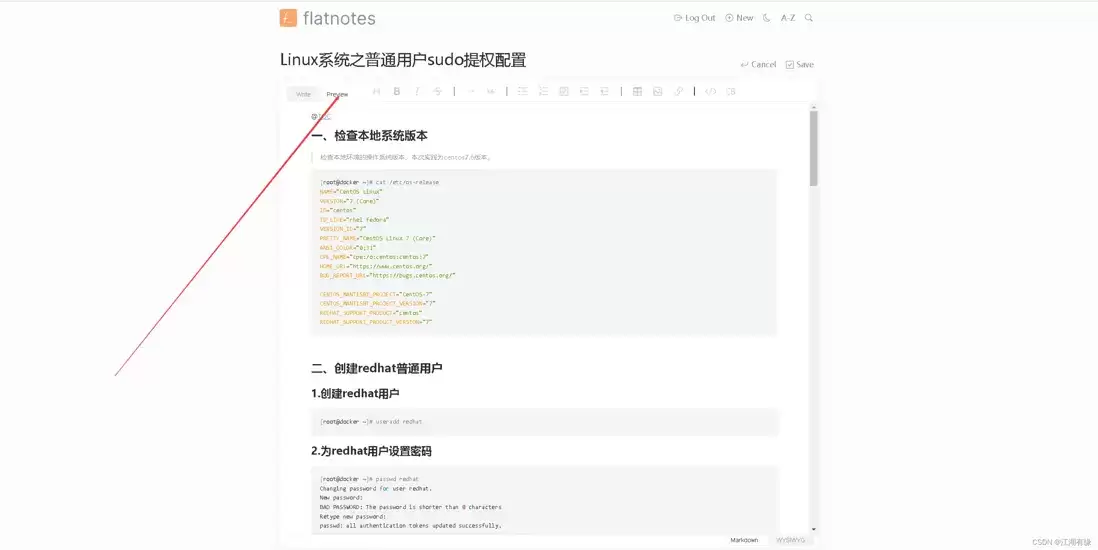
7.4 保存笔记内容
保存笔记内容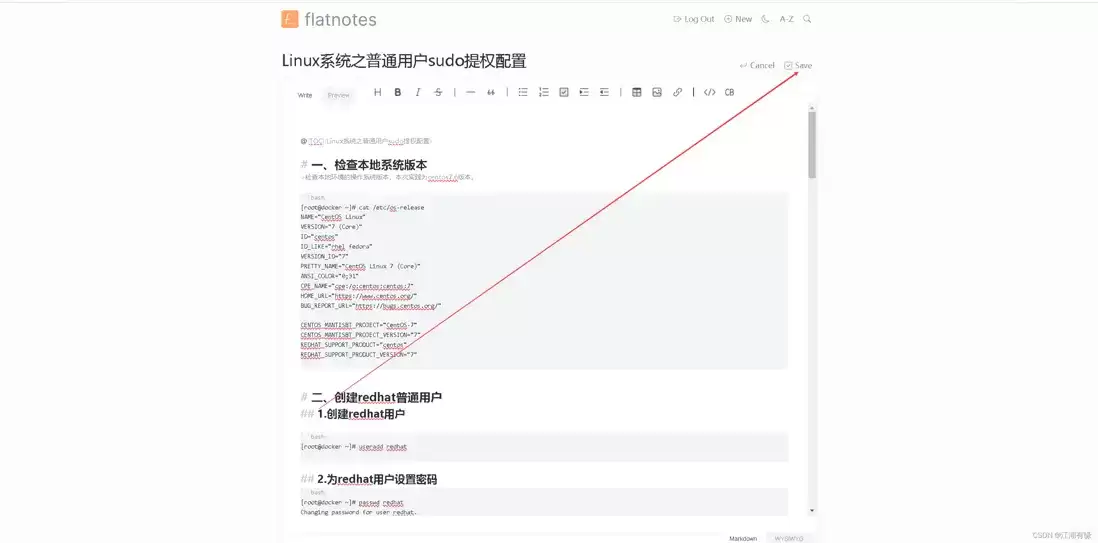
7.5 查看首页笔记
回到首页,可以看到显示刚才编辑保存的笔记。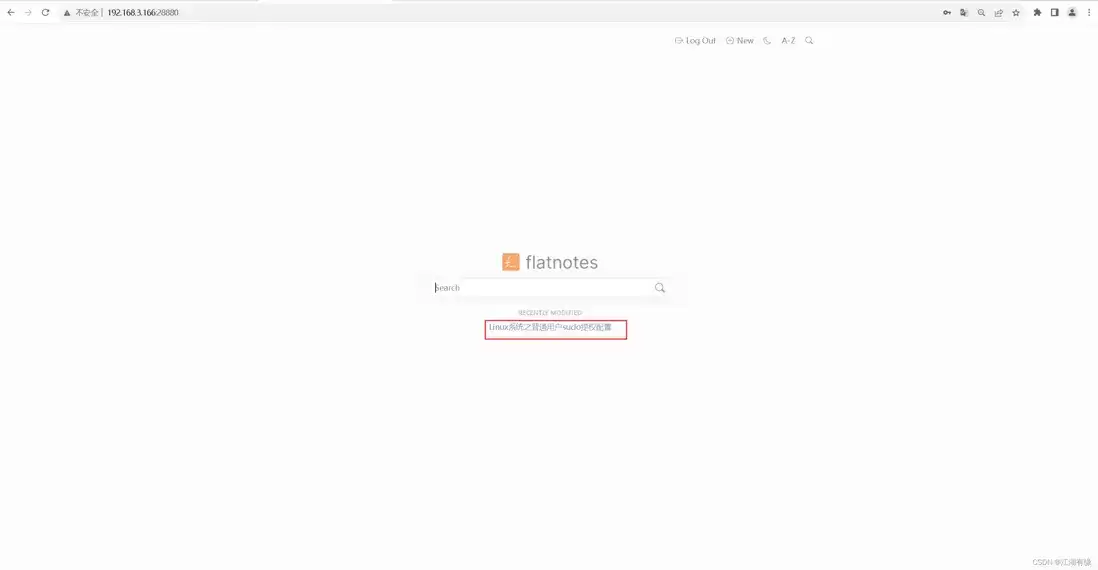
7.6 查看文件存储
在挂载目录/data/flatnotes/data上,可以看到刚才编辑保存的笔记文件。[root@jeven data]# pwd
/data/flatnotes/data
[root@jeven data]# ls -l
total 8
-rw-r--r--. 1 admin admin 5680 Sep 1 18:52 Linux系统之普通用户sudo提权配置.md八、总结
使用FlatNotes的感觉就像是拥有了一个既简约又强大的私人图书馆,所有知识和灵感都以Markdown笔记的形式井然有序地安放在各个文件夹书架上。无需担心云端数据库的繁琐与隐私问题,因为一切由我掌控,在本地或私有服务器安静地绽放。编辑体验流畅,随时离线访问让我在任何环境下都能自由思考、记录,这种返璞归真的自托管方式,让知识管理变得既直接又安心。
遇到Docker容器频繁自动重启?本文提供从查看容器日志、解读退出代码到配置Restart Policy的完整排查与修复方案,确保服务稳定性。
学习如何在Linux中使用命令行添加临时静态路由,并通过修改网络配置文件实现重启后依然有效的永久静态路由设置,涵盖CentOS和Ubuntu的不同配置方法。

摄像头连接电脑后不知如何查看画面?本教程演示如何使用Windows自带的“相机”应用快速调取实时视频流,无需下载额外软件,步骤简单直观,适用于大多数USB及内置摄像头。
针对 Windows 11 电脑在无人操作时自动关机或重启的问题,本文详解如何通过任务计划程序禁用更新重启任务,并调整电源睡眠策略,从根源解决非预期的自动关机现象。
详细讲解在Windows电脑上测试摄像头人脸识别功能的步骤,包括开启Windows Hello、录入面部数据、不同环境下的效果验证及常见问题排查,帮助用户确认设备兼容性与识别准确率。
当 Docker 容器启动后立即退出时,不要盲目重启。本文详解如何通过 docker logs 查看标准输出错误,利用 docker inspect 检查挂载与网络配置,并修正入口点脚本权限问题,提供一套高效的因果排查流程。
详解如何利用Windows 10自带功能将安卓手机画面投射至电脑屏幕,涵盖开启步骤、连接技巧及延迟分析,适合临时演示与多屏协作场景。
详细介绍如何在Windows系统中为移动硬盘解除BitLocker加密,包括解锁驱动器、关闭加密功能及监控解密进度的完整操作流程,帮助用户安全移除数据保护。
本文详解Windows 10笔记本耳机无声音的常见原因与解决方法,涵盖物理接口检查、默认播放设备切换、驱动程序更新及音频增强关闭等操作,并分析蓝牙耳机连接异常的例外场景。
还在为SATA固态硬盘装Win10怎么分区头疼?本教程详解安装过程中的分区步骤,涵盖4K对齐检查、ESP引导分区处理及容量规划建议,助你一次性搞定系统盘,避免后期卡顿与空间浪费。




Photoshop 2026 是 Adobe 推出的专业图像处理与视觉设计软件,支持 Windows、macOS 和 iPad 等平台,广泛应用于摄影修图、电商设计、平面海报、数字绘画及视觉合成等创作场景。

Blender 是一款免费开源、跨平台的专业 3D 创作软件,集建模、动画、渲染、视频编辑与视觉合成等功能于一体,广泛应用于影视动画、游戏设计和建筑可视化等领域。软件支持 Cycles 物理渲染器与 Eevee 实时渲染引擎,并提供多边形建模、骨骼绑定、物理模拟等专业工具。Blender 兼容 Windows、macOS 和 Linux 系统,安装包轻巧、运行流畅,依托活跃的全球开发者社区持续更新,是从初学者到专业创作者都值得选择的正版 3D 创作工具。


Photoshop 2026 是 Adobe 推出的专业图像处理与视觉设计软件,支持 Windows、macOS 和 iPad 等平台,广泛应用于摄影修图、电商设计、平面海报、数字绘画及视觉合成等创作场景。
Blender 是一款免费开源、跨平台的专业 3D 创作软件,集建模、动画、渲染、视频编辑与视觉合成等功能于一体,广泛应用于影视动画、游戏设计和建筑可视化等领域。软件支持 Cycles 物理渲染器与 Eevee 实时渲染引擎,并提供多边形建模、骨骼绑定、物理模拟等专业工具。Blender 兼容 Windows、macOS 和 Linux 系统,安装包轻巧、运行流畅,依托活跃的全球开发者社区持续更新,是从初学者到专业创作者都值得选择的正版 3D 创作工具。