

如何在Linux中配置具体的防火墙规则
要在firewalld中添加永久端口规则,必须先使用--permanent参数将其写入配置文件,然后再执行--reload命令加载到运行时环境中。否则,规则仅会被保存到配置文件中,但不会生效,一旦系统重启,这些规则仍会丢失。firewalld 里怎么加一条永久生效的端口规则 加完规则后,如果不执行r
要在firewalld中添加永久端口规则,必须先使用--permanent参数将其写入配置文件,然后再执行--reload命令加载到运行时环境中。否则,规则仅会被保存到配置文件中,但不会生效,一旦系统重启,这些规则仍会丢失。
firewalld 里怎么加一条永久生效的端口规则
加完规则后,如果不执行reload操作,规则是不会生效的;而加规则时若不加上 --permanent 参数,那么一旦重启,规则就会丢失。这可是大家在使用firewalld时最容易踩到的坑啦!要知道,firewalld的临时规则和永久规则是分别独立存储的,所以必须要明确地声明进行持久化操作才行哦。
- 先确认服务在运行:
firewall-cmd --state返回running才能操作 - 开放 TCP 80 端口(永久):
firewall-cmd --permanent --add-port=80/tcp - 开放 UDP 53 端口(永久):
firewall-cmd --permanent --add-port=53/udp - 必须 reload 才真正加载:
firewall-cmd --reload,否则规则只存配置文件里,没进内存 - 验证是否生效:
firewall-cmd --list-ports或firewall-cmd --list-all
iptables 怎么让规则重启后不消失
iptables 命令默认只改内存里的规则,系统一重启全清空。要持久化,得把当前规则导出到文件,并确保开机时自动恢复。
- 保存当前规则到默认路径(CentOS/RHEL):
iptables-sa ve > /etc/sysconfig/iptables - Ubuntu/Debian 系统常用:
iptables-sa ve > /etc/iptables/rules.v4 - 验证保存内容:
cat /etc/sysconfig/iptables | head -n 5,确认有*filter和COMMIT - 开机自动加载依赖 systemd 服务或网络启动脚本;RHEL 系统通常靠
iptables服务(systemctl enable iptables),但注意:该服务在 firewalld 启用时会被禁用,二者不能共存 - 别直接编辑
/etc/sysconfig/iptables文件手动改——容易格式错、缺 COMMIT、导致 restore 失败
为什么 firewall-cmd --add-service=http 没反应
没报错但端口不通,大概率是没指定 zone,或者 zone 绑定错了网卡。firewalld 规则永远绑定到具体 zone,而不是全局生效。
- 查当前活跃 zone:
firewall-cmd --get-active-zones,看你的网卡(比如ens33)绑在哪个 zone 下 - 如果网卡在
public区域,就得加:firewall-cmd --zone=public --add-service=http --permanent - 如果想让所有 zone 都开 http,得逐个加,firewalld 不支持“全局 service”
http是预定义 service,对应 TCP 80;自定义端口不能用--add-service,只能用--add-port- 加完别忘
--reload,且--list-all输出里要能看到services: http才算成功
误删规则后怎么快速回滚
firewalld 没内置 undo,iptables 更没有。所谓“回滚”,其实是靠你提前留下的快照或备份配置。
- 操作前先备份当前配置:
firewall-cmd --list-all > /root/firewall-before-20260708.bak - firewalld 永久配置存在
/etc/firewalld/下,重点备份:/etc/firewalld/zones/public.xml(或你用的 zone 文件) - iptables 备份就是
iptables-sa ve导出的文件,替换后执行iptables-restore < /path/to/backup - 别指望
systemctl restart firewalld能恢复——它只重载--permanent配置,不是撤销上一步操作 - 线上环境建议用脚本封装规则变更,并带 timestamp 和 commit msg,不然真出问题时连哪条命令动了什么都难定位
--list-all 输出里的 “permanent: yes/no” 和 “active: yes/no”,能省掉大半排查时间。 
Windows 10更新后开机突然要求输入密码?本文解析自动登录失效的真实原因,提供通过netplwiz重新保存凭据、关闭Windows Hello干扰及排查账户策略的完整步骤,助你恢复免密进入桌面。
Windows 10更新下载失败反复重试怎么办?不要直接停用服务。本文教你通过设置页面暂停更新、启用按流量计费连接以及调整活动时间,安全地暂时停止下载任务并避免意外重启。
面对Win10强制升级新版本的提示,本文解析家庭版与专业版的应对差异。介绍如何通过暂停更新、设置活动时间临时避让,以及利用组策略控制功能版本。强调Windows 10支持终止后的安全风险,避免使用高风险的禁用服务手段。
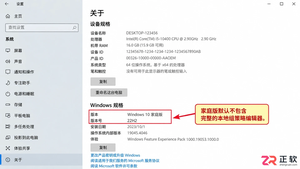
Win10组策略编辑器中找不到Windows Update选项怎么办?本文分析家庭版与专业版的权限差异,厘清本地策略与域策略的区别,提供设置页替代方案及企业环境排查思路,避免盲目修改注册表或安装非官方补丁。
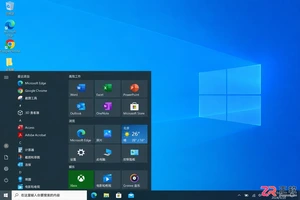
很多人为了便捷选择取消 Win10 开机密码,这会导致文件丢失吗?本文详解取消密码后文件访问权限的变化、BitLocker 加密的有效性以及更安全的替代方案,帮助用户在便利与数据安全之间做出正确选择。
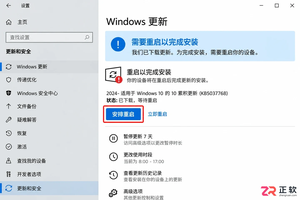
Win10弹出立即重启更新会打断工作?本文介绍如何通过Windows Update页面安排重启时间、设置活动时段以及暂停后续更新,有效延后重启操作,保护未保存的工作成果。
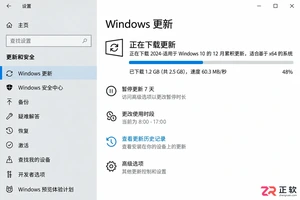
Win10晚上自动下载或重启怎么办?不要直接禁用服务。本文教你通过设置活动时间、安排指定重启时间及短期暂停更新,精准控制Windows Update行为,避免夜间网络占用和意外重启,同时保留系统安全性。
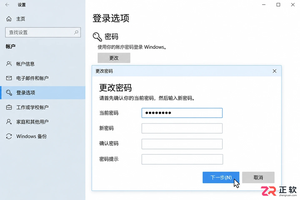
想跳过Win10开机输入密码?本文详解本地账户清空密码、netplwiz自动登录及PIN设置的步骤与区别,同时提醒Microsoft账户和域策略下的限制与风险。
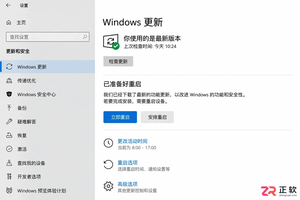
面对Win10更新重启倒计时,如何通过设置界面取消或延后?本文详解活动时间、安排重启及暂停更新的位置与作用,帮助你在不影响工作的前提下管理系统重启。
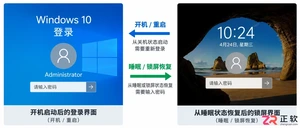
Win10设置取消密码后重启依然要求输入?这通常不是系统故障,而是自动登录配置错误或睡眠唤醒验证未关闭。本文教你区分本地账户与微软账户,正确设置netplwiz自动登录,并检查锁屏策略,彻底解决开机免密问题。




Photoshop 2026 是 Adobe 推出的专业图像处理与视觉设计软件,支持 Windows、macOS 和 iPad 等平台,广泛应用于摄影修图、电商设计、平面海报、数字绘画及视觉合成等创作场景。

Blender 是一款免费开源、跨平台的专业 3D 创作软件,集建模、动画、渲染、视频编辑与视觉合成等功能于一体,广泛应用于影视动画、游戏设计和建筑可视化等领域。软件支持 Cycles 物理渲染器与 Eevee 实时渲染引擎,并提供多边形建模、骨骼绑定、物理模拟等专业工具。Blender 兼容 Windows、macOS 和 Linux 系统,安装包轻巧、运行流畅,依托活跃的全球开发者社区持续更新,是从初学者到专业创作者都值得选择的正版 3D 创作工具。


Photoshop 2026 是 Adobe 推出的专业图像处理与视觉设计软件,支持 Windows、macOS 和 iPad 等平台,广泛应用于摄影修图、电商设计、平面海报、数字绘画及视觉合成等创作场景。
Blender 是一款免费开源、跨平台的专业 3D 创作软件,集建模、动画、渲染、视频编辑与视觉合成等功能于一体,广泛应用于影视动画、游戏设计和建筑可视化等领域。软件支持 Cycles 物理渲染器与 Eevee 实时渲染引擎,并提供多边形建模、骨骼绑定、物理模拟等专业工具。Blender 兼容 Windows、macOS 和 Linux 系统,安装包轻巧、运行流畅,依托活跃的全球开发者社区持续更新,是从初学者到专业创作者都值得选择的正版 3D 创作工具。