

如何在Ubuntu上部署静态网站
在Ubuntu上部署静态网站可以通过多种方式实现,以下是一些常见的方法:方法一:使用Apache HTTP服务器安装Apache:sudo apt updatesudo apt install apache2启用必要的模块:sudo a2enmod rewritesudo systemctl res
在Ubuntu上部署静态网站可以通过多种方式实现,以下是一些常见的方法:

方法一:使用Apache HTTP服务器
安装Apache:
sudo apt update
sudo apt install apache2启用必要的模块:
sudo a2enmod rewrite
sudo systemctl restart apache2将静态网站文件复制到Apache的默认文档根目录:
sudo cp -r /path/to/your/static/site /var/www/html/Apache配置(可选):若您有自定义配置的需求,可编辑
/etc/apache2/sites-a vailable/000-default.conf文件,并添加或修改以下内容:
    ServerAdmin webmaster@localhost
    DocumentRoot /var/www/html
    ErrorLog ${APACHE_LOG_DIR}/error.log
CustomLog ${APACHE_LOG_DIR}/access.log combined重启Apache:
sudo systemctl restart apache2
方法二:使用Nginx服务器
安装Nginx:
sudo apt update
sudo apt install nginx将静态网站文件复制到Nginx的默认文档根目录:
sudo cp -r /path/to/your/static/site /var/www/html/Nginx配置要点:对
/etc/nginx/sites-a vailable/default文件进行编辑,加入或调整如下内容:server {
listen 80 default_server;
listen [::]:80 default_server;
root /var/www/html;
index index.html index.htm index.nginx-debian.html;
server_name _;
location / {
try_files $uri $uri/ =404;
}
}重启Nginx:
sudo systemctl restart nginx
方法三:使用Node.js和Express
如果你更喜欢使用Node.js来部署静态网站,可以使用Express框架。
安装Node.js和npm:
curl -sL https://deb.nodesource.com/setup_14.x | sudo -E bash -
sudo apt-get install -y nodejs创建一个新的Node.js项目:
mkdir my-static-site
cd my-static-site
npm init -y安装Express:
npm install express创建一个简单的Express服务器:创建一个
server.js文件,添加以下内容:const express = require('express');
const path = require('path');
const app = express();
const port = 3000;
app.use(express.static(path.join(__dirname, 'public')));
app.listen(port, () => {
console.log(`Server running at http://localhost:${port}/`);
});将静态网站文件移动到
public目录:mkdir public
cp -r /path/to/your/static/site/* public/启动服务器:
node server.js
现在,你可以通过访问http://localhost:3000来查看你的静态网站。
方法四:使用Docker
如果你熟悉Docker,可以使用Docker来部署静态网站。
安装Docker:
sudo apt update
sudo apt install docker.io创建一个Dockerfile:在你的静态网站目录中创建一个
Dockerfile,添加以下内容:FROM nginx:latest
COPY . /usr/share/nginx/html构建Docker镜像:
docker build -t my-static-site .运行Docker容器:
docker run -d -p 80:80 --name my-static-site-container my-static-site
现在,你可以通过访问http://localhost来查看你的静态网站。
选择适合你的方法进行部署即可。
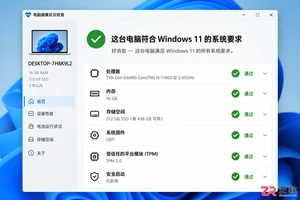
Windows 11 家庭版和专业版在安装步骤上并无本质差异,主要区别在于产品密钥激活和功能解锁。本教程指导你如何检查硬件兼容性、使用官方媒体创建工具制作安装盘,以及在安装过程中正确选择版本。同时解析安装后如何验证激活状态,以及从家庭版升级到专业版的正规路径,确保系统稳定且合规。
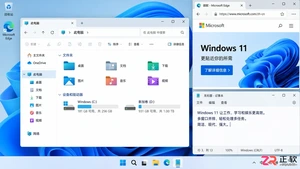
除了开始菜单的变化,Windows 11在TPM 2.0安全要求、窗口贴靠布局、驱动兼容性以及系统更新策略上与Windows 10有显著不同。本文详解两者实质差异,助你判断是否值得升级。
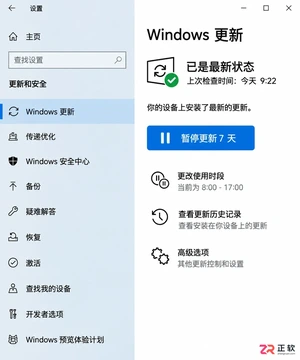
详解Windows 10家庭版和专业版在关闭或暂停自动更新时的操作区别。涵盖通用的暂停更新、活动时间设置,以及专业版独有的组策略管理入口,帮助不同版本用户合理控制更新节奏,避免系统安全风险。
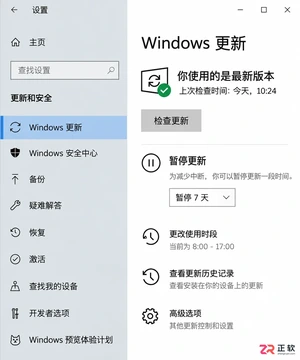
想知道Win10暂停更新最长能设多久?官方支持最长暂停35天。本文图文演示如何在设置中开启暂停、确认生效日期,以及到期后如何恢复更新或调整活动时间以避免打扰。
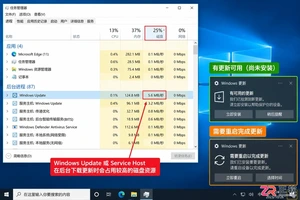
本教程介绍如何在Windows 10中通过暂停更新、设置活动时间及安排重启时间来减少更新弹窗提醒。包含通知隐藏技巧及更新失败排查步骤,帮助你在保持系统安全的同时减少工作打扰。
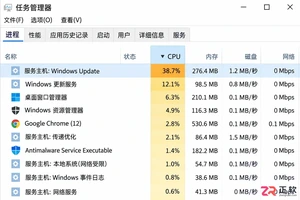
Windows 10 更新时 CPU 占用过高怎么办?本教程演示如何通过任务管理器确认更新进程,使用“暂停更新”功能临时停止后台活动,并设置“活动时间”防止自动重启干扰工作。提供安全的故障排查步骤,避免直接禁用系统服务带来的风险。
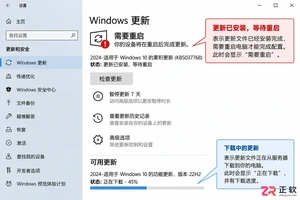
Win10玩游戏时突然弹出更新重启提示?不要强制关机。本文教你如何通过设置“活动时间”避免自动重启,利用“安排重启”规划空闲时间,以及合理使用“暂停更新”功能。区分不同状态下的应对策略,既保护游戏进度又维持系统安全。
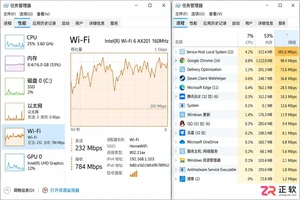
Win10自动更新抢占带宽导致游戏卡顿或网页打不开?本教程教你通过任务管理器确认更新进程,利用暂停更新、按流量计费连接和传递优化带宽限制,精准控制Windows Update下载速度,解决网络拥堵问题。
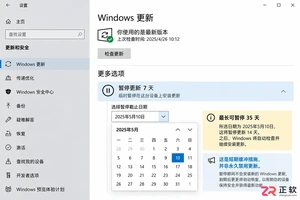
Win10家庭版用户常受强制更新困扰。本文详解如何利用系统自带的暂停更新、活动时间和安排重启功能,在不破坏系统稳定性的前提下减少更新打扰,并分析注册表修改的风险及系统支持现状。
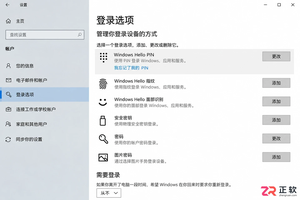
Windows 10更新后开机突然要求输入密码?本文解析自动登录失效的真实原因,提供通过netplwiz重新保存凭据、关闭Windows Hello干扰及排查账户策略的完整步骤,助你恢复免密进入桌面。




Photoshop 2026 是 Adobe 推出的专业图像处理与视觉设计软件,支持 Windows、macOS 和 iPad 等平台,广泛应用于摄影修图、电商设计、平面海报、数字绘画及视觉合成等创作场景。

Blender 是一款免费开源、跨平台的专业 3D 创作软件,集建模、动画、渲染、视频编辑与视觉合成等功能于一体,广泛应用于影视动画、游戏设计和建筑可视化等领域。软件支持 Cycles 物理渲染器与 Eevee 实时渲染引擎,并提供多边形建模、骨骼绑定、物理模拟等专业工具。Blender 兼容 Windows、macOS 和 Linux 系统,安装包轻巧、运行流畅,依托活跃的全球开发者社区持续更新,是从初学者到专业创作者都值得选择的正版 3D 创作工具。


Photoshop 2026 是 Adobe 推出的专业图像处理与视觉设计软件,支持 Windows、macOS 和 iPad 等平台,广泛应用于摄影修图、电商设计、平面海报、数字绘画及视觉合成等创作场景。
Blender 是一款免费开源、跨平台的专业 3D 创作软件,集建模、动画、渲染、视频编辑与视觉合成等功能于一体,广泛应用于影视动画、游戏设计和建筑可视化等领域。软件支持 Cycles 物理渲染器与 Eevee 实时渲染引擎,并提供多边形建模、骨骼绑定、物理模拟等专业工具。Blender 兼容 Windows、macOS 和 Linux 系统,安装包轻巧、运行流畅,依托活跃的全球开发者社区持续更新,是从初学者到专业创作者都值得选择的正版 3D 创作工具。