

解决RHEL/CentOS/Oracle Linux 7/8 安装Openonload驱动的问题
场景:Solarfare网卡安装onload-8.1.1.17驱动是报错(见红色部分),导致驱动安装失败解决方法:#kernel问题——需要通过yum安装:yuminstall-ykernel-devel后再进行驱动安装[root@localhostscripts]#./onload_installonload_install:BuildingOnload.mmakebuildtree:Nokernelbuildat‘/lib/modules/4.18.0-372.9.1.el8.x86_64

场景:
Solarfare网卡安装
onload-8.1.1.17驱动是报错(见红色部分),导致驱动安装失败
解决方法:
#kernel问题——
需要通过yum安装:
yum install -y kernel-devel
后再进行驱动安装
[root@localhost scripts]#
./onload_install
onload_install: Building Onload.
mmakebuildtree: No kernel build at ‘/lib/modules/4.18.0-372.9.1.el8.x86_64/build’
onload_build: FAILED: mmakebuildtree –driver -d x86_64_linux-4.18.0-372.9.1.el8.x86_64
onload_install: ERROR: Build failed. Not installing.
[root@localhost scripts]#
#autocompat.sh Error问题——
需要通过yum安装:
yum install -y elfutils-devel
后再进行驱动安装
[root@localhost scripts]#
./onload_install
onload_install: Building Onload.
Build tree made for linux as x86_64_linux-4.18.0-372.9.1.el8.x86_64
make: Entering directory ‘/soft/onload-8.1.1.17/build/x86_64_linux-4.18.0-372.9.1.el8.x86_64’
/soft/onload-8.1.1.17/src/driver/linux_resource/kernel_compat.sh -k /lib/modules/4.18.0-372.9.1.el8.x86_64/build -q > driver/linux_resource/autocompat.h
kernel_compat.sh: Kernel build tree is unable to build modules
make: *** [/soft/onload-8.1.1.17/src/mmake.mk:34: driver/linux_resource/autocompat.h] Error 1
make: Leaving directory ‘/soft/onload-8.1.1.17/build/x86_64_linux-4.18.0-372.9.1.el8.x86_64’
onload_build: ERROR: Failed to build driver components.
onload_install: ERROR: Build failed. Not installing.
[root@localhost scripts]#
#capability.h: No such file or directory问题——
需要通过yum安装:
yum install -y libcap*
后再进行驱动安装
make[1]: Entering directory ‘/soft/onload-8.1.1.17/build/gnu_x86_64/tools’
make[2]: Entering directory ‘/soft/onload-8.1.1.17/build/gnu_x86_64/tools/cplane’
nice cc -I. -I./../../include -I/soft/onload-8.1.1.17/src/include -I/soft/onload-8.1.1.17/src/tools/cplane -DNDEBUG -D_GNU_SOURCE -m64 -Wall -Wundef -Wpointer-arith -Wstrict-prototypes -Wnested-externs -Wno-stringop-truncation -Wno-format-truncation -Wimplicit-fallthrough=5 -fomit-frame-pointer -DTRANSPORT_CONFIG_OPT_HDR='
/soft/onload-8.1.1.17/src/tools/cplane/server.c:13:10: fatal error: sys/capability.h: No such file or directory
#include
^~~~~~~~~~~~~~~~~~
compilation terminated.
make[2]: *** [/soft/onload-8.1.1.17/mk/after.mk:151: server.o] Error 1
make[2]: Leaving directory ‘/soft/onload-8.1.1.17/build/gnu_x86_64/tools/cplane’
make[1]: *** [/soft/onload-8.1.1.17/src/tools/mmake.mk:20: all] Error 2
make[1]: Leaving directory ‘/soft/onload-8.1.1.17/build/gnu_x86_64/tools’
make: *** [/soft/onload-8.1.1.17/src/mmake.mk:25: all] Error 2
make: Leaving directory ‘/soft/onload-8.1.1.17/build/gnu_x86_64’
onload_build: ERROR: Failed to build 64-bit user-level components.
onload_install: ERROR: Build failed. Not installing.
[root@localhost scripts]#
#libc_compat.h error
问题——
需要通过yum安装以下glibc库
yum install -y glibc.i686
yum install -y glibc-devel.i686
#libsfcaffinity.so error
问题——
需要通过yum安装以下libgcc库
yum install -y libgcc
yum install -y libgcc.i686
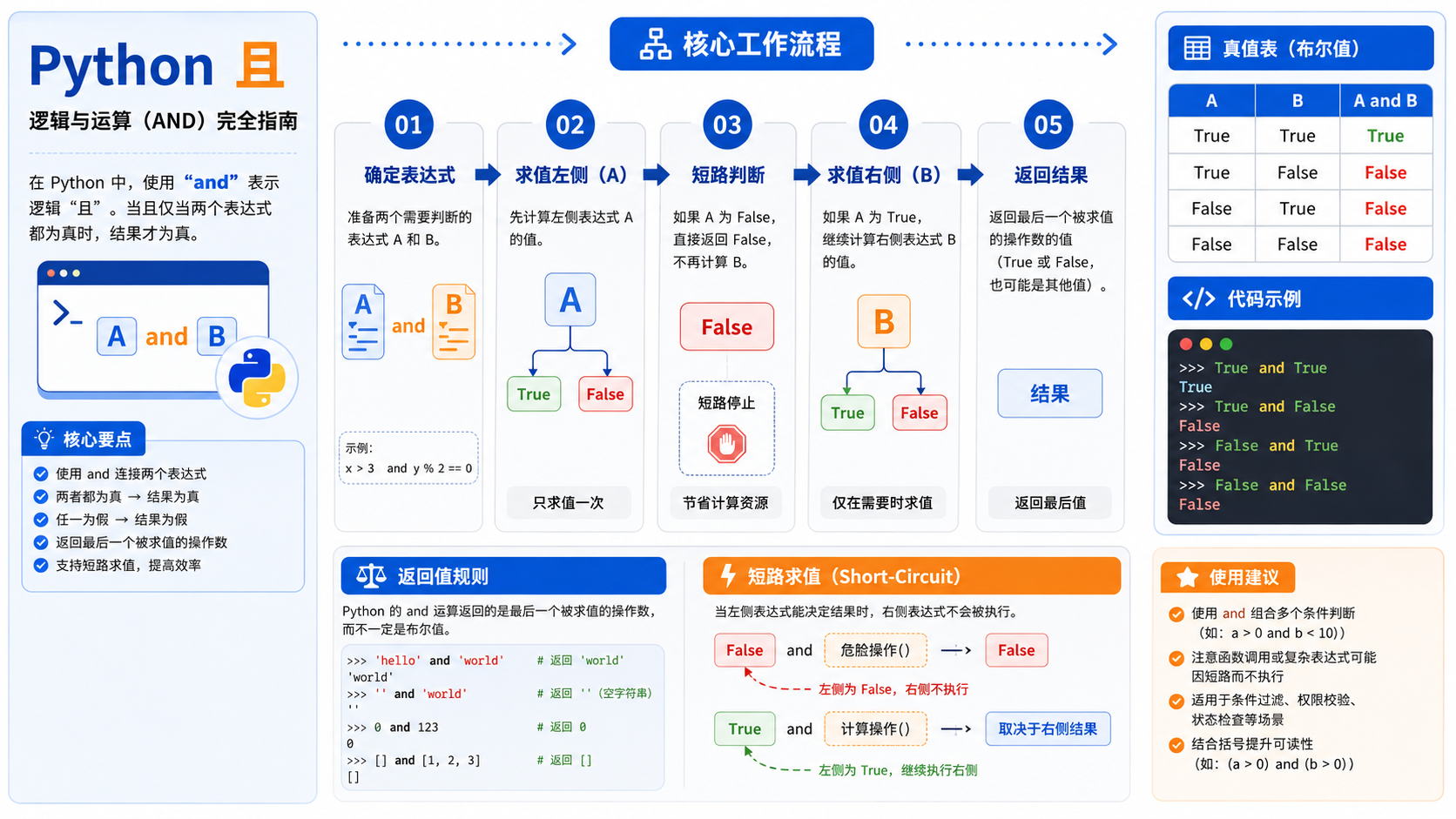
面向后端开发者的“python 且”实操指南。涵盖概念界定、虚拟环境创建、依赖安装及结果验证,提供清晰的命令示例与排错决策图,确保操作可复现且符合官方规范。
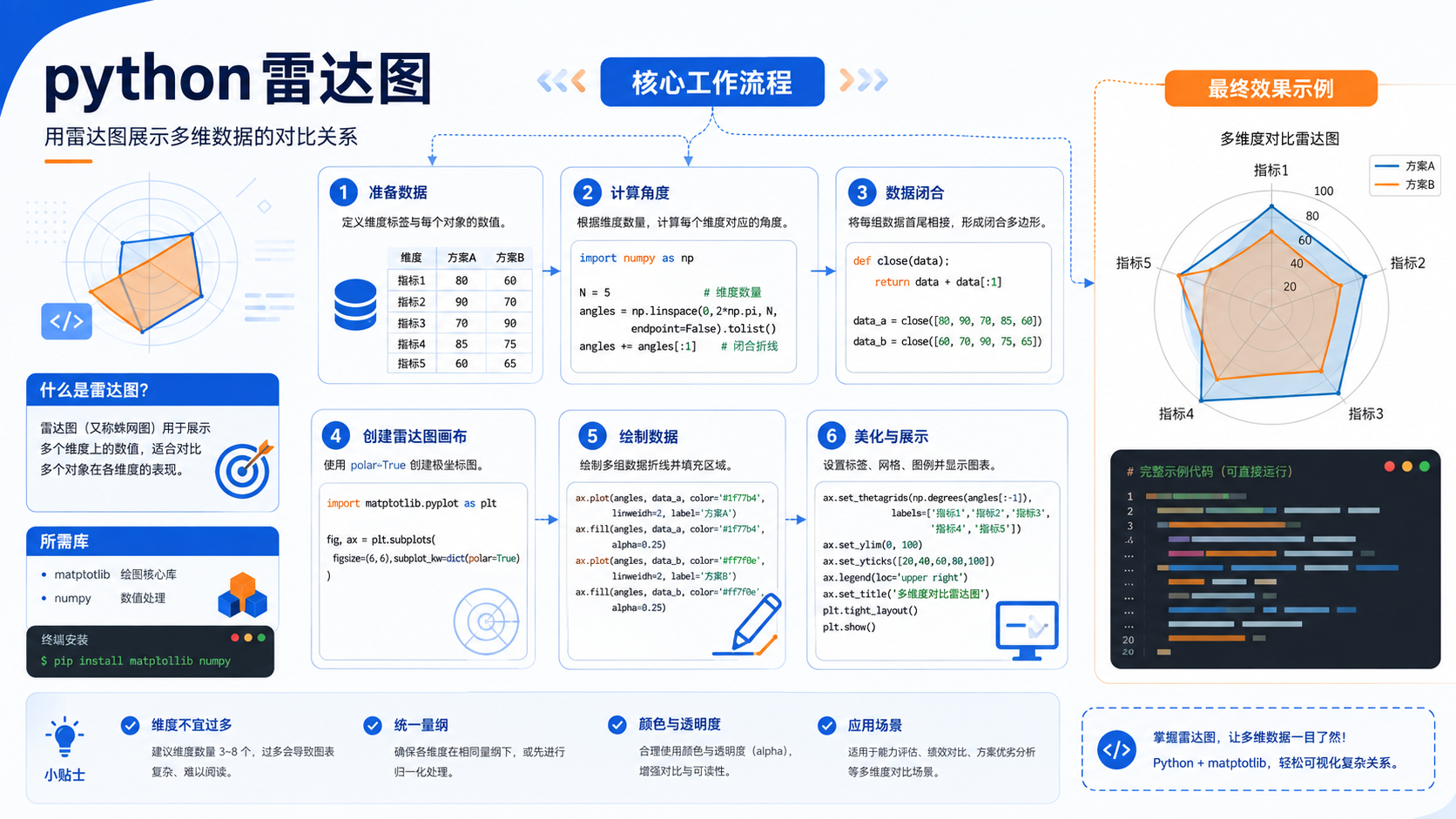
针对后端开发者的 python 雷达图实操指南。包含基于官方文档的环境准备、venv 虚拟环境创建、pip 依赖管理及验证命令,提供清晰的排错决策图与适用边界说明。
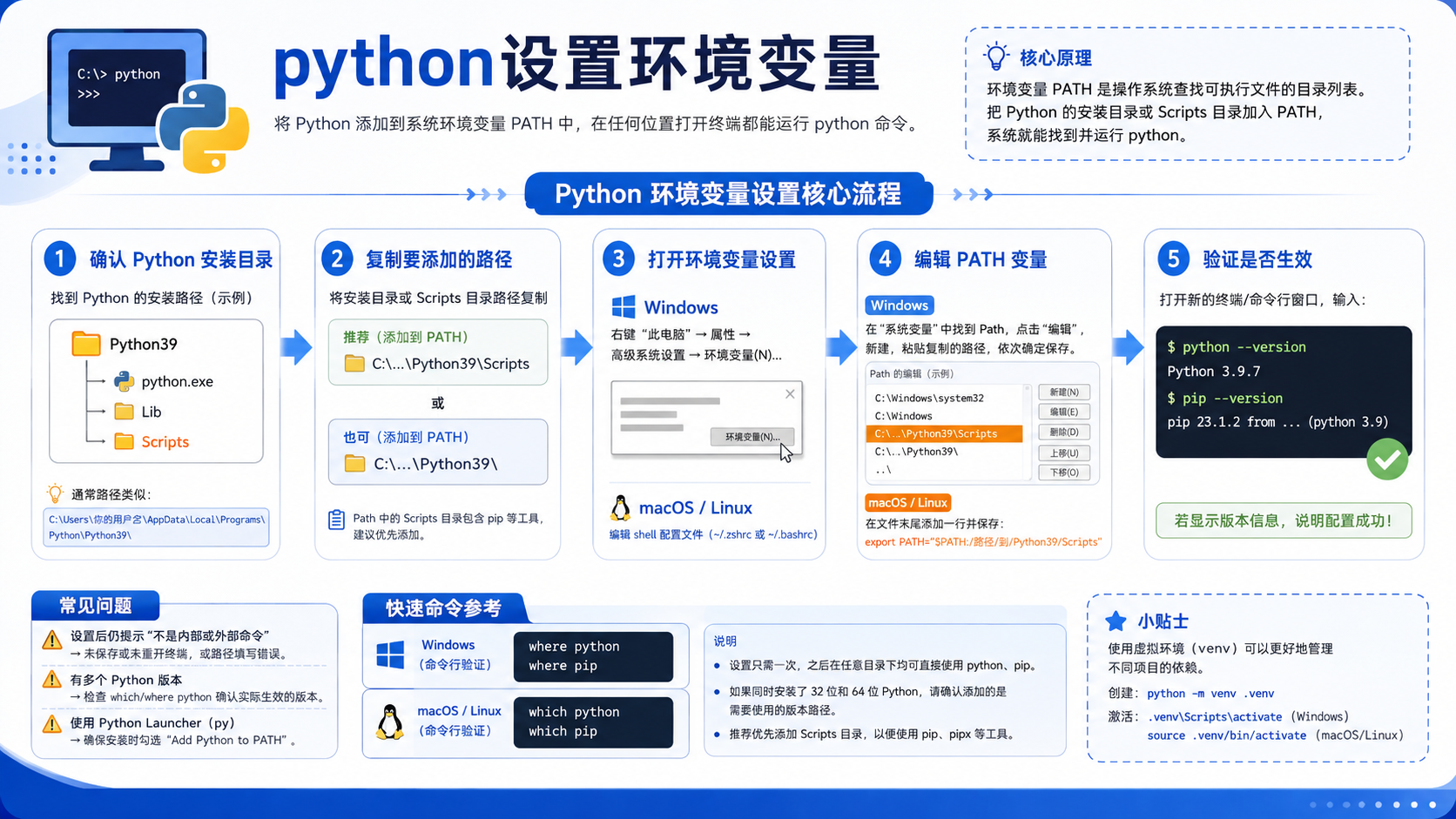
详解python设置环境变量的标准流程,涵盖venv创建、pip依赖安装及sys.executable验证方法,提供决策图与核心流程图,助力后端开发者快速排查环境故障。
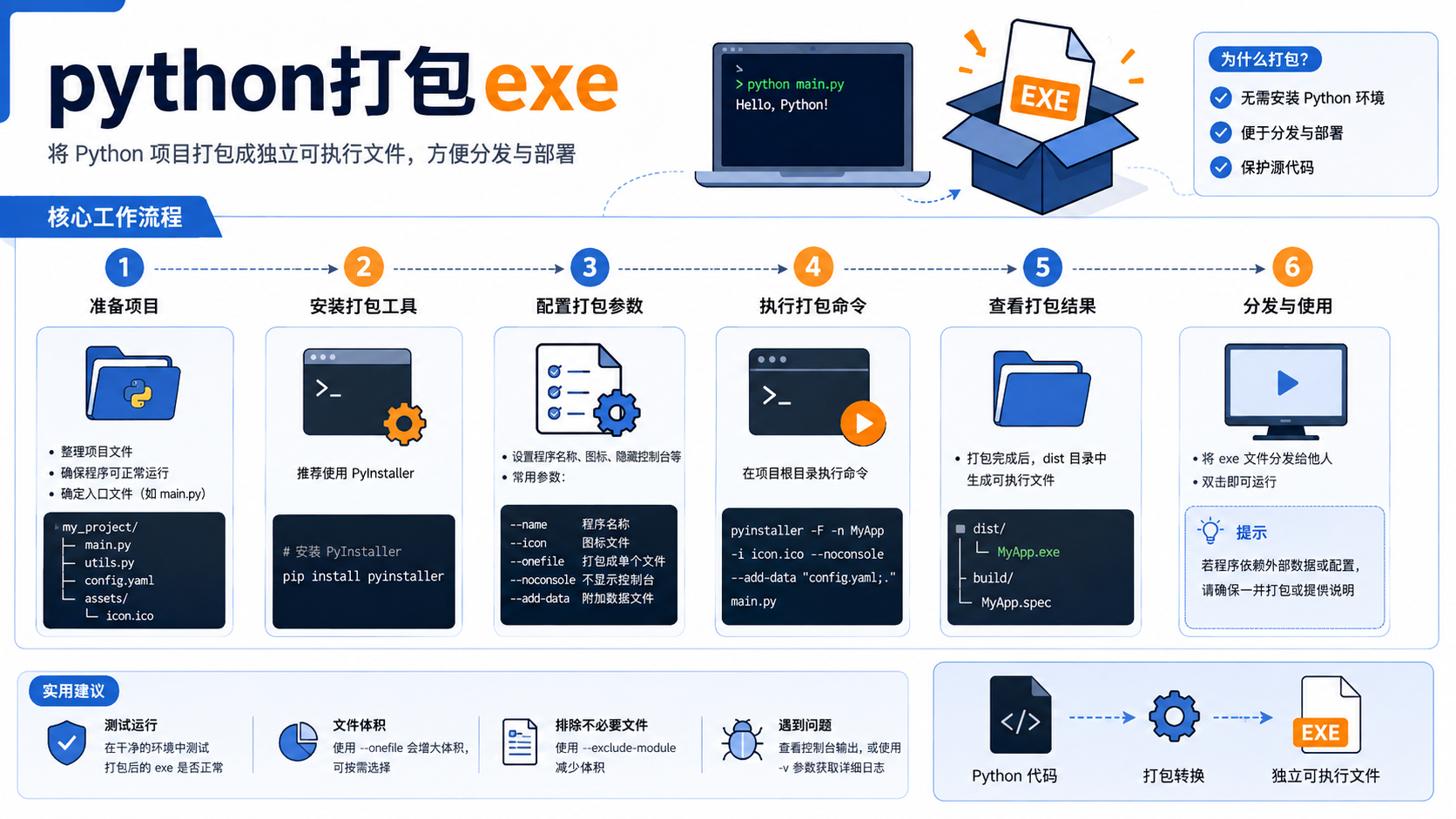
详解 python打包exe 的前置检查、虚拟环境创建、依赖安装及验证步骤。基于官方文档提供可复制的命令行操作,明确适用边界与排错逻辑,避免环境污染与版本冲突。
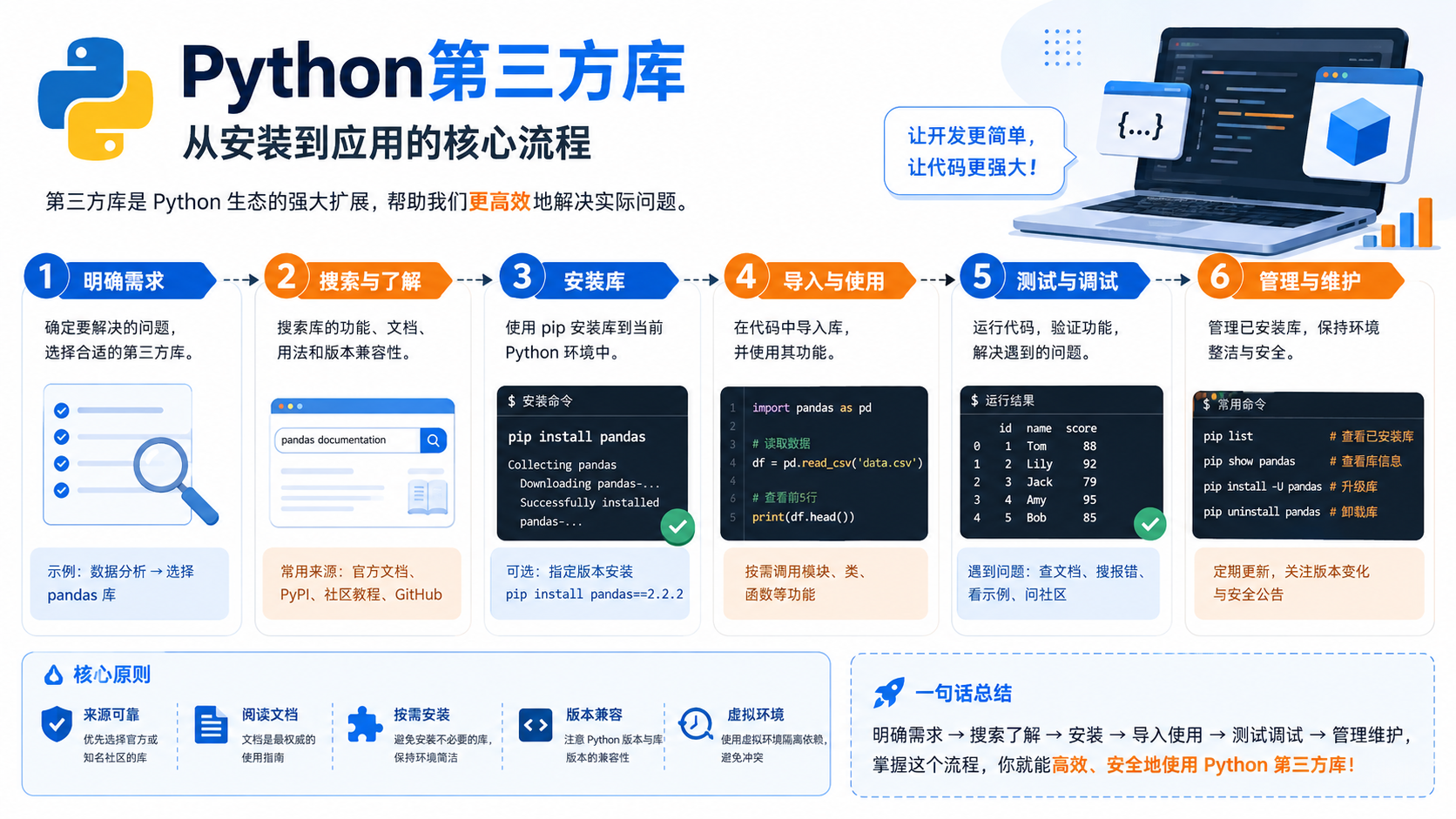
详解 python第三方库 的安装、环境隔离与验证流程。提供基于官方文档的 pip 命令示例、虚拟环境配置方法及依赖冲突排查策略,适用于后端开发场景。
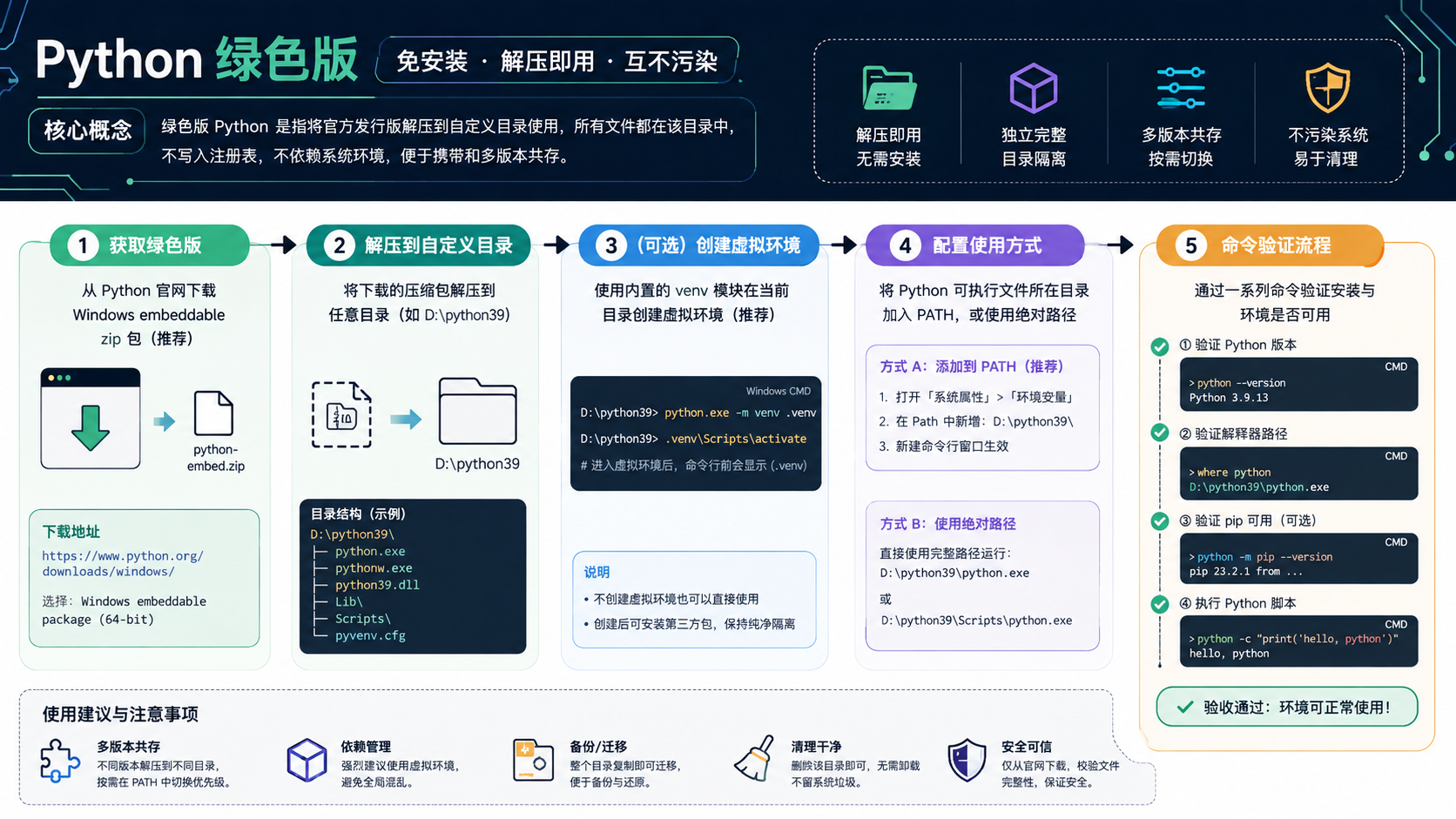
针对后端开发者,解析“python 绿色版”的核心概念,提供基于官方文档的环境隔离步骤、依赖管理命令及验证方法,避免环境冲突。
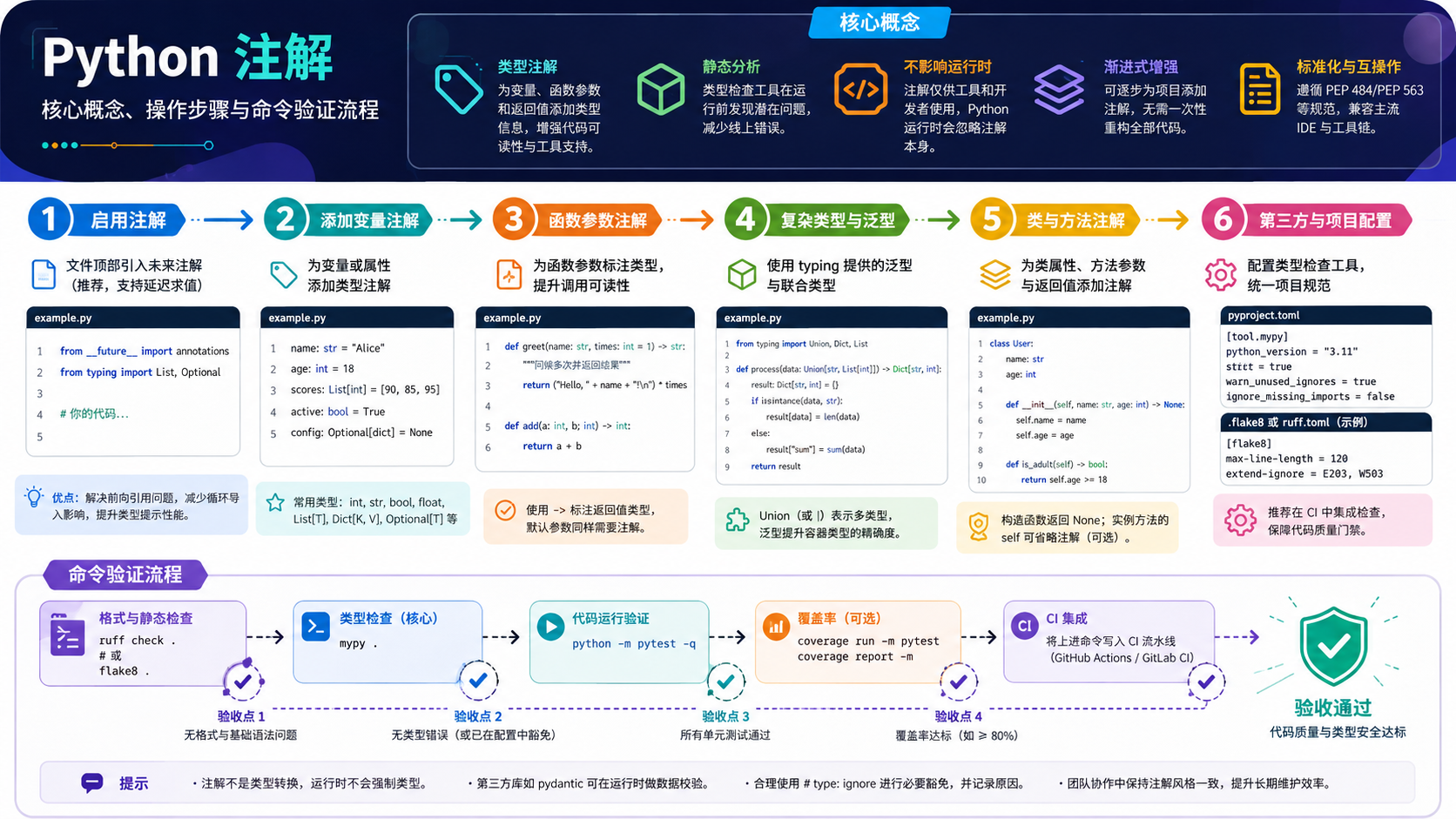
面向后端开发者的 python 注解实操指南。涵盖概念界定、venv 环境创建、pip 依赖安装及验证命令,提供清晰的决策图与排错路径,确保开发环境的一致性与可复现性。
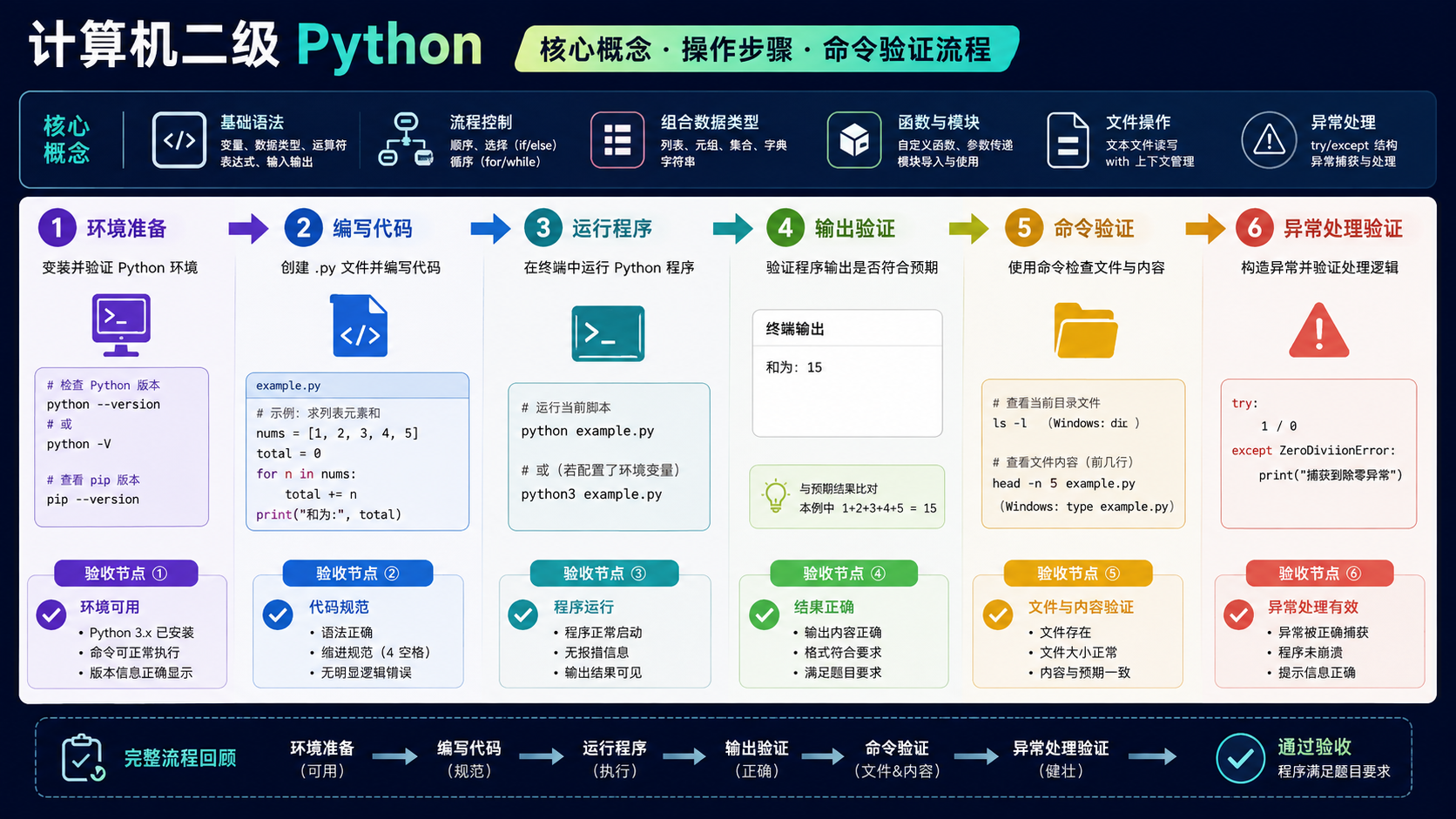
面向后端开发者的“计算机二级python”实操指南。涵盖Python官方概念界定、venv虚拟环境创建、pip依赖管理及常见排错路径,提供可验证的命令行步骤与决策流程图。
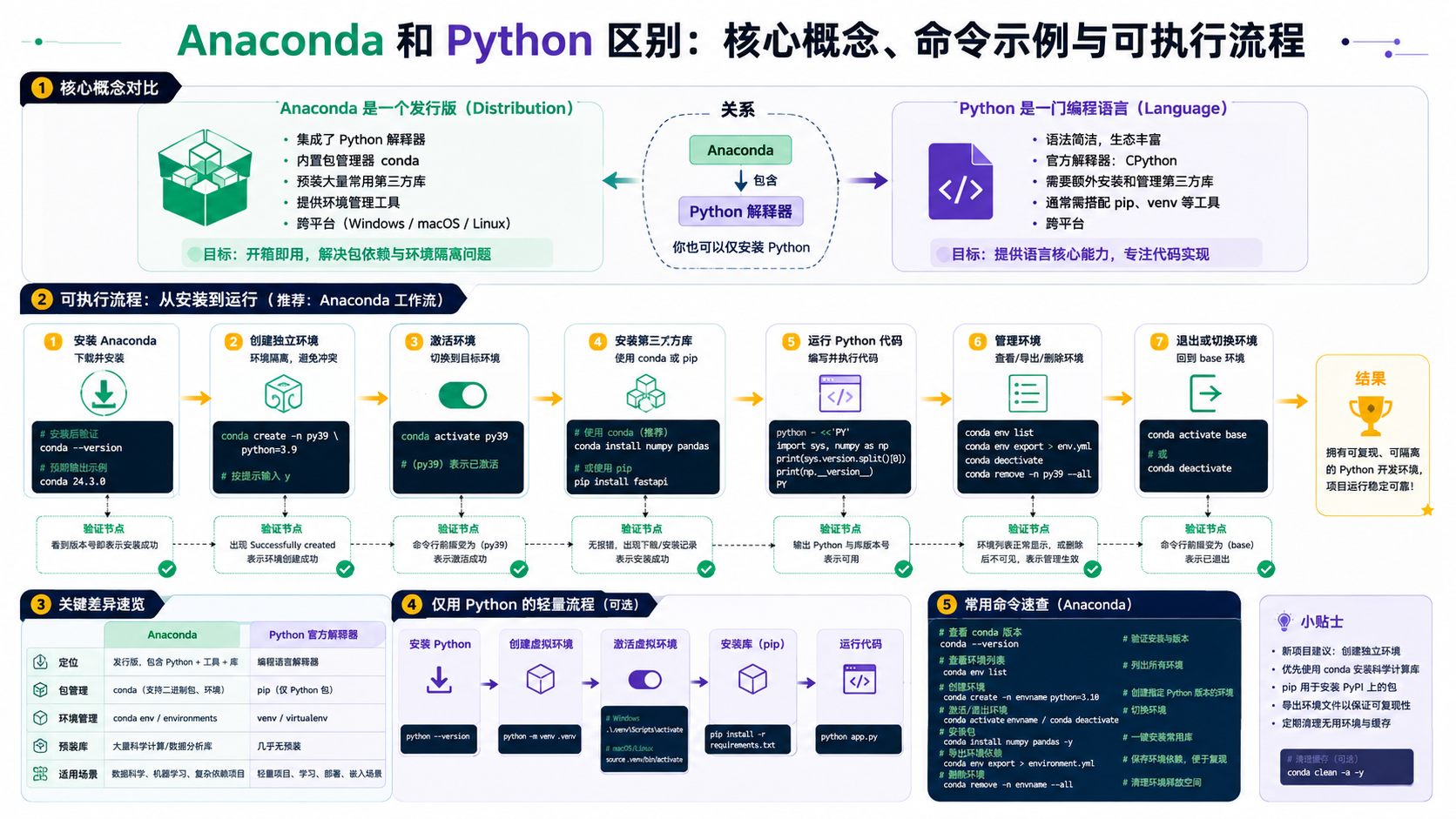
深入解析 anaconda和python区别,提供基于官方文档的环境搭建步骤、依赖安装命令及验证方法。包含核心流程图与决策图,帮助开发者快速解决环境冲突与依赖问题。
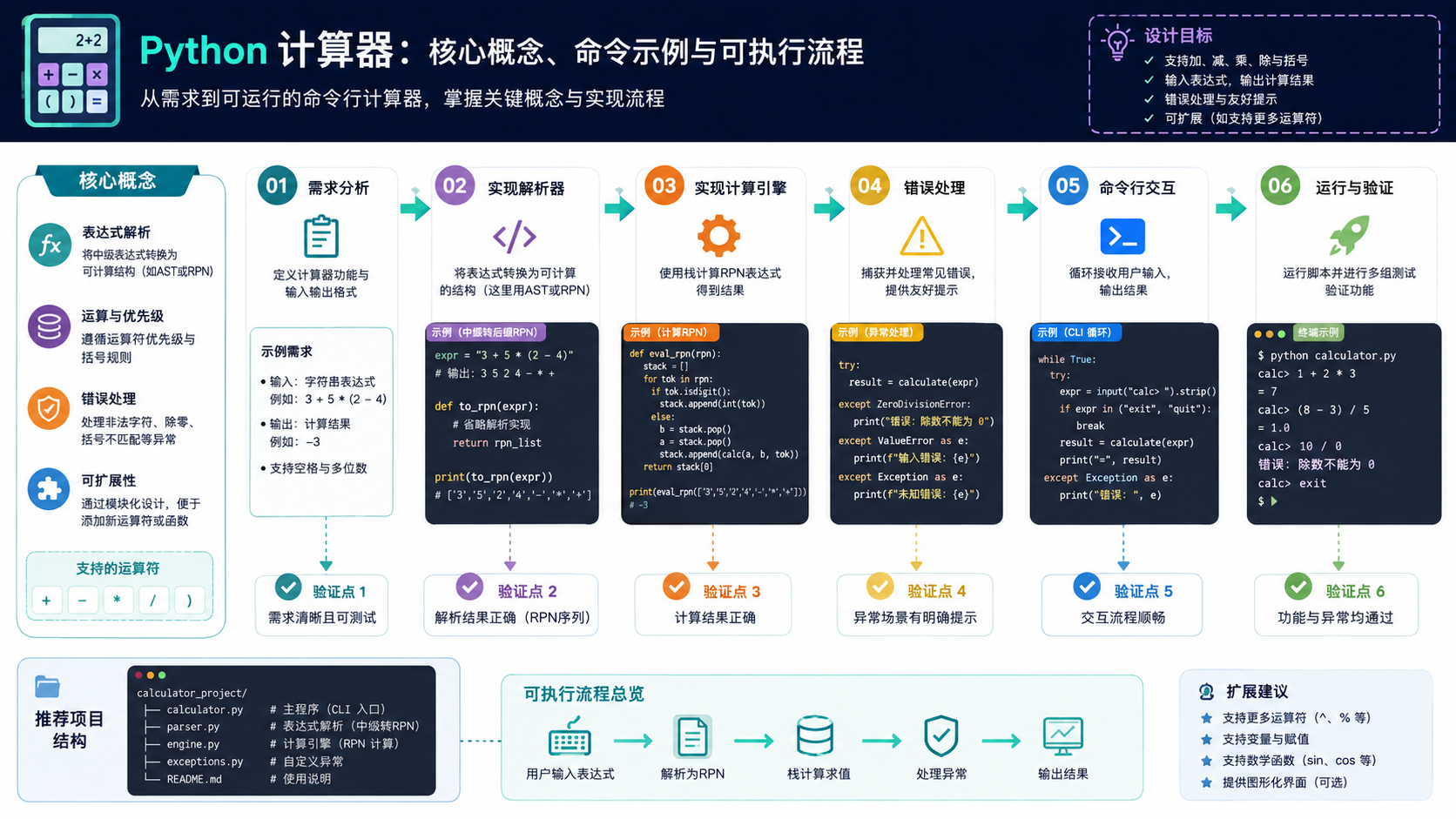
针对后端开发者的 python 计算器构建指南。详解虚拟环境配置、依赖安装及代码验证流程,提供可执行的命令与排错决策图,确保开发环境纯净且结果可靠。





火山引擎是字节跳动旗下企业级云与AI服务平台。聚焦大模型核心能力,依托字节自研豆包多模态大模型,凭借火山方舟一站式平台,提供模型精调、推理部署、智能应用搭建等全链路服务,结合高性能AI算力,助力各行业快速落地大模型数字化与智能化应用。



