

如何将Adobe Acrobat Pro9的全屏过渡设置为拆分
你们是不是和小编一样不熟悉AdobeAcrobatPro9怎么设置全屏默认过渡为拆分?没关系,下文就为我们带来了AdobeAcrobatPro9设置全屏默认过渡为拆分的方法,感兴趣的用户快来下文看看吧。首先,打开一个的AdobeAcrobat9Pro的界面当中。点击了AdobeAcrobat9Pro的菜单中的编辑的菜单。点击了编辑的菜单之后,弹出了下拉菜单选中为首选项的选项。弹出了一个首选项窗口的界面当中,点击种类的全屏选项,点击全屏的选项之后,进入到了该界面当中,点击默认过渡的选项。点击默认过渡的选项之
你们是不是和小编一样不熟悉Adobe Acrobat Pro9怎么设置全屏默认过渡为拆分?没关系,下文就为我们带来了Adobe Acrobat Pro9设置全屏默认过渡为拆分的方法,感兴趣的用户快来下文看看吧。
首先,打开一个的Adobe Acrobat 9 Pro的界面当中。

点击了Adobe Acrobat 9 Pro的菜单中的 编辑 的菜单。

点击了编辑的菜单之后,弹出了下拉菜单选中为 首选项 的选项。

弹出了一个首选项窗口的界面当中,点击种类 的 全屏 选项,
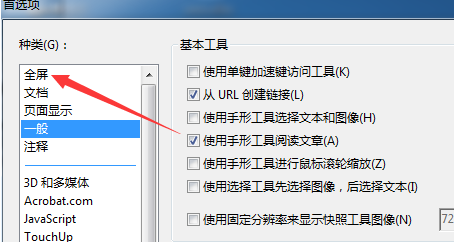
点击全屏 的选项之后,进入到了该界面当中,点击默认过渡 的选项。
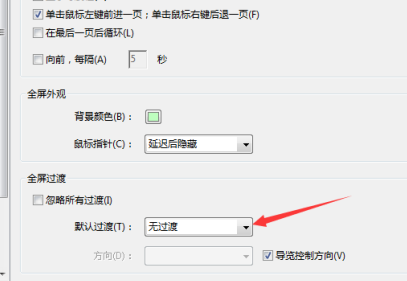
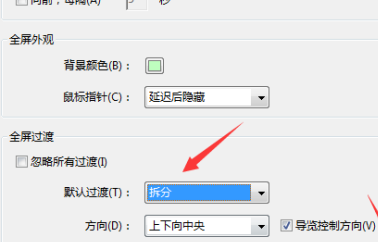
点击默认过渡的选项之后,选中为 拆分 的选项。点击 确定 保存设置。
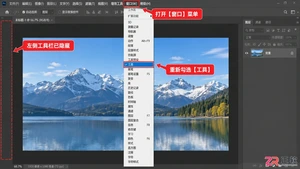
Photoshop左侧工具栏突然消失?别慌。本文提供菜单勾选、快捷键F8及工作区重置三种精准方法,助你一秒找回PS工具栏,恢复标准操作界面。
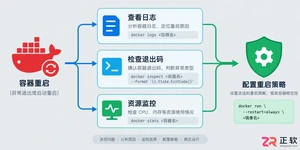
遇到Docker容器频繁自动重启?本文提供从查看容器日志、解读退出代码到配置Restart Policy的完整排查与修复方案,确保服务稳定性。
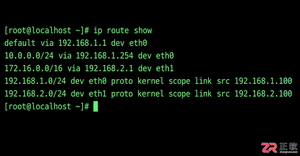
学习如何在Linux中使用命令行添加临时静态路由,并通过修改网络配置文件实现重启后依然有效的永久静态路由设置,涵盖CentOS和Ubuntu的不同配置方法。
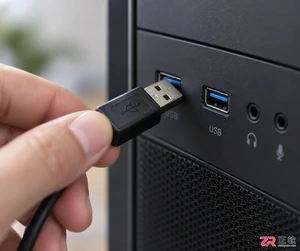
摄像头连接电脑后不知如何查看画面?本教程演示如何使用Windows自带的“相机”应用快速调取实时视频流,无需下载额外软件,步骤简单直观,适用于大多数USB及内置摄像头。
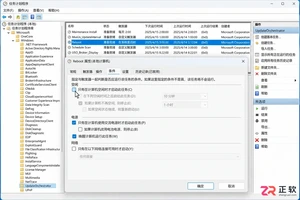
针对 Windows 11 电脑在无人操作时自动关机或重启的问题,本文详解如何通过任务计划程序禁用更新重启任务,并调整电源睡眠策略,从根源解决非预期的自动关机现象。
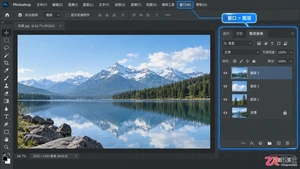
新手入门Photoshop必看的图层基础教程。通过界面区域拆解,详细讲解图层面板的新建、删除、排序、不透明度及混合模式等常用操作,配合高清界面图示,助你快速理解图层工作原理。
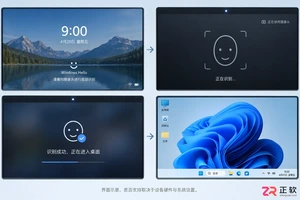
详细讲解在Windows电脑上测试摄像头人脸识别功能的步骤,包括开启Windows Hello、录入面部数据、不同环境下的效果验证及常见问题排查,帮助用户确认设备兼容性与识别准确率。
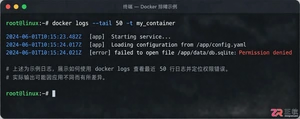
当 Docker 容器启动后立即退出时,不要盲目重启。本文详解如何通过 docker logs 查看标准输出错误,利用 docker inspect 检查挂载与网络配置,并修正入口点脚本权限问题,提供一套高效的因果排查流程。
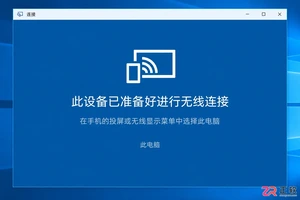
详解如何利用Windows 10自带功能将安卓手机画面投射至电脑屏幕,涵盖开启步骤、连接技巧及延迟分析,适合临时演示与多屏协作场景。
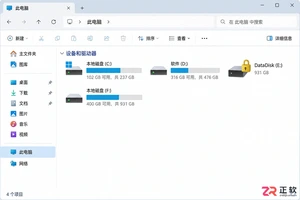
详细介绍如何在Windows系统中为移动硬盘解除BitLocker加密,包括解锁驱动器、关闭加密功能及监控解密进度的完整操作流程,帮助用户安全移除数据保护。



Photoshop 2026 是 Adobe 推出的专业图像处理与视觉设计软件,支持 Windows、macOS 和 iPad 等平台,广泛应用于摄影修图、电商设计、平面海报、数字绘画及视觉合成等创作场景。
Blender 是一款免费开源、跨平台的专业 3D 创作软件,集建模、动画、渲染、视频编辑与视觉合成等功能于一体,广泛应用于影视动画、游戏设计和建筑可视化等领域。软件支持 Cycles 物理渲染器与 Eevee 实时渲染引擎,并提供多边形建模、骨骼绑定、物理模拟等专业工具。Blender 兼容 Windows、macOS 和 Linux 系统,安装包轻巧、运行流畅,依托活跃的全球开发者社区持续更新,是从初学者到专业创作者都值得选择的正版 3D 创作工具。

Photoshop 2026 是 Adobe 推出的专业图像处理与视觉设计软件,支持 Windows、macOS 和 iPad 等平台,广泛应用于摄影修图、电商设计、平面海报、数字绘画及视觉合成等创作场景。
Blender 是一款免费开源、跨平台的专业 3D 创作软件,集建模、动画、渲染、视频编辑与视觉合成等功能于一体,广泛应用于影视动画、游戏设计和建筑可视化等领域。软件支持 Cycles 物理渲染器与 Eevee 实时渲染引擎,并提供多边形建模、骨骼绑定、物理模拟等专业工具。Blender 兼容 Windows、macOS 和 Linux 系统,安装包轻巧、运行流畅,依托活跃的全球开发者社区持续更新,是从初学者到专业创作者都值得选择的正版 3D 创作工具。