

如何使用Java绘制并展示迷宫动画?
一次性全部绘制出来实现代码importjava.awt.*;publicclassAlgoVisualizer{privatestaticintDELAY=200;privatestaticintblockSide=8;privateMazeDatadata;privateAlgoFrameframe;publicAlgoVisualizer(StringmazeFile){//初始化数据data=newMazeData(mazeFile);intsceneHeight=data.N()*blockSid
一次性全部绘制出来
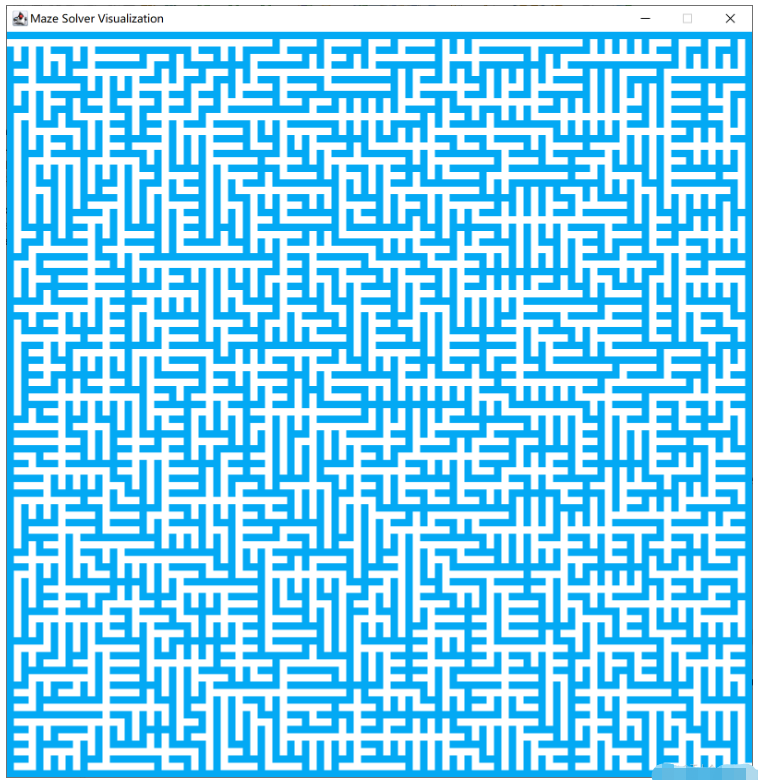
实现代码
import java.awt.*;

public class AlgoVisualizer {

    private static int DELAY = 200;
    private static int blockSide = 8;

    private MazeData data;
    private AlgoFrame frame;

    public AlgoVisualizer(String mazeFile){

        // 初始化数据
        data = new MazeData(mazeFile);
        int sceneHeight = data.N() * blockSide;
        int sceneWidth = data.M() * blockSide;


        // 初始化视图
        EventQueue.invokeLater(() -> {
            frame = new AlgoFrame("Maze Solver Visualization", sceneWidth, sceneHeight);

            new Thread(() -> {
                run();
            }).start();
        });
    }

    public void run(){

        setData();
    }

    private void setData(){

		frame.render(data);
        AlgoVisHelper.pause(DELAY);


    }


    public static void main(String[] args) {

        String mazeFile = "maze_101_101.txt";

        AlgoVisualizer vis = new AlgoVisualizer(mazeFile);

    }
}


import java.io.BufferedInputStream;
import java.io.File;
import java.io.FileInputStream;
import java.io.IOException;
import java.util.Scanner;


public class MazeData {

    public static final char ROAD = ' ';
    public static final char WALL = '#';

    private int N, M;
    private char[][] maze;


    public MazeData(String filename){

        if(filename == null)
            throw new IllegalArgumentException("Filename can not be null!");

        Scanner scanner = null;
        try{
            File file = new File(filename);
            if(!file.exists())
                throw new IllegalArgumentException("File " + filename + " doesn't exist");

            FileInputStream fis = new FileInputStream(file);
            scanner = new Scanner(new BufferedInputStream(fis), "UTF-8");

            // 读取第一行
            String nmline = scanner.nextLine();
            String[] nm = nmline.trim().split("\\s+");
            //System.out.print(nm[0] + ' ' + nm[1]);

            N = Integer.parseInt(nm[0]);
            // System.out.println("N = " + N);
            M = Integer.parseInt(nm[1]);
            // System.out.println("M = " + M);

            // 读取后续的N行
            maze = new char[N][M];
            for(int i = 0 ; i < N ; i ++){
                String line = scanner.nextLine();

                // 每行保证有M个字符
                if(line.length() != M)
                    throw new IllegalArgumentException("Maze file " + filename + " is invalid");
                for(int j = 0 ; j < M ; j ++)
                    maze[i][j] = line.charAt(j);
            }
        }
        catch(IOException e){
            e.printStackTrace();
        }
        finally {
            if(scanner != null)
                scanner.close();
        }

    }

    public int N(){ return N; }
    public int M(){ return M; }
    public char getMaze(int i, int j){
        if(!inArea(i,j))
            throw new IllegalArgumentException("i or j is out of index in getMaze!");

        return maze[i][j];
    }

    public boolean inArea(int x, int y){
        return x >= 0 && x < N && y >= 0 && y < M;
    }

    public void print(){
        System.out.println(N + " " + M);
        for(int i = 0 ; i < N ; i ++){
            for(int j = 0 ; j < M ; j ++)
                System.out.print(maze[i][j]);
            System.out.println();
        }
        return;
    }

}


import java.awt.*;
import java.awt.geom.Ellipse2D;

import java.awt.geom.Rectangle2D;
import java.lang.InterruptedException;


public class AlgoVisHelper {

    private AlgoVisHelper(){}

    public static final Color Red = new Color(0xF44336);
    public static final Color Pink = new Color(0xE91E63);
    public static final Color Purple = new Color(0x9C27B0);
    public static final Color DeepPurple = new Color(0x673AB7);
    public static final Color Indigo = new Color(0x3F51B5);
    public static final Color Blue = new Color(0x2196F3);
    public static final Color LightBlue = new Color(0x03A9F4);
    public static final Color Cyan = new Color(0x00BCD4);
    public static final Color Teal = new Color(0x009688);
    public static final Color Green = new Color(0x4CAF50);
    public static final Color LightGreen = new Color(0x8BC34A);
    public static final Color Lime = new Color(0xCDDC39);
    public static final Color Yellow = new Color(0xFFEB3B);
    public static final Color Amber = new Color(0xFFC107);
    public static final Color Orange = new Color(0xFF9800);
    public static final Color DeepOrange = new Color(0xFF5722);
    public static final Color Brown = new Color(0x795548);
    public static final Color Grey = new Color(0x9E9E9E);
    public static final Color BlueGrey = new Color(0x607D8B);
    public static final Color Black = new Color(0x000000);
    public static final Color White = new Color(0xFFFFFF);


    public static void strokeCircle(Graphics2D g, int x, int y, int r){

        Ellipse2D circle = new Ellipse2D.Double(x-r, y-r, 2*r, 2*r);
        g.draw(circle);
    }

    public static void fillCircle(Graphics2D g, int x, int y, int r){

        Ellipse2D circle = new Ellipse2D.Double(x-r, y-r, 2*r, 2*r);
        g.fill(circle);
    }

    public static void strokeRectangle(Graphics2D g, int x, int y, int w, int h){

        Rectangle2D rectangle = new Rectangle2D.Double(x, y, w, h);
        g.draw(rectangle);
    }

    public static void fillRectangle(Graphics2D g, int x, int y, int w, int h){

        Rectangle2D rectangle = new Rectangle2D.Double(x, y, w, h);
        g.fill(rectangle);
    }

    public static void setColor(Graphics2D g, Color color){
        g.setColor(color);
    }

    public static void setStrokeWidth(Graphics2D g, int w){
        int strokeWidth = w;
        g.setStroke(new BasicStroke(strokeWidth, BasicStroke.CAP_ROUND, BasicStroke.JOIN_ROUND));
    }

    public static void pause(int t) {
        try {
            Thread.sleep(t);
//            System.out.println("Dely");
        }
        catch (InterruptedException e) {
            System.out.println("Error sleeping");
        }
    }

}


import java.awt.*;
import javax.swing.*;

public class AlgoFrame extends JFrame{

    private int canvasWidth;
    private int canvasHeight;

    public AlgoFrame(String title, int canvasWidth, int canvasHeight){

        super(title);

        this.canvasWidth = canvasWidth;
        this.canvasHeight = canvasHeight;

        AlgoCanvas canvas = new AlgoCanvas();
        setContentPane(canvas);
        pack();

        setDefaultCloseOperation(JFrame.EXIT_ON_CLOSE);
        setResizable(false);

        setVisible(true);
    }

    public AlgoFrame(String title){

        this(title, 1024, 768);
    }

    public int getCanvasWidth(){return canvasWidth;}
    public int getCanvasHeight(){return canvasHeight;}

    // data
    private MazeData data;
    public void render(MazeData data){
        this.data = data;
        repaint();
    }

    private class AlgoCanvas extends JPanel{

        public AlgoCanvas(){
            // 双缓存
            super(true);
        }

        @Override
        public void paintComponent(Graphics g) {
            super.paintComponent(g);

            Graphics2D g2d = (Graphics2D)g;

            // 抗锯齿
//            RenderingHints hints = new RenderingHints(
//                    RenderingHints.KEY_ANTIALIASING,
//                    RenderingHints.VALUE_ANTIALIAS_ON);
//            hints.put(RenderingHints.KEY_RENDERING, RenderingHints.VALUE_RENDER_QUALITY);
//            g2d.addRenderingHints(hints);

            // 具体绘制
            int w = canvasWidth/data.M();
            int h = canvasHeight/data.N();


            for(int i = 0 ; i < data.N() ; i ++ )
            {
                for(int j = 0 ; j < data.M() ; j ++){
                    if (data.getMaze(i, j) == MazeData.WALL)
                        AlgoVisHelper.setColor(g2d, AlgoVisHelper.LightBlue);
                    else
                        AlgoVisHelper.setColor(g2d, AlgoVisHelper.White);

                    AlgoVisHelper.fillRectangle(g2d, j * w, i * h, w, h);
                }
            }
        }

        @Override
        public Dimension getPreferredSize(){
            return new Dimension(canvasWidth, canvasHeight);
        }
    }
}
一个一个的动画显示
DELAY时间不能太小,小了会绘制时出错,可能是线程出问题了???
import java.awt.*;

public class AlgoVisualizer {

    private static int DELAY = 10;
    private static int blockSide = 8;

    private MazeData data;
    private AlgoFrame frame;

    public AlgoVisualizer(String mazeFile){

        // 初始化数据
        data = new MazeData(mazeFile);
        int sceneHeight = data.N() * blockSide;
        int sceneWidth = data.M() * blockSide;


        // 初始化视图
        EventQueue.invokeLater(() -> {
            frame = new AlgoFrame("Maze Solver Visualization", sceneWidth, sceneHeight);

            new Thread(() -> {
                run();
            }).start();
        });
    }

    public void run(){

        for (int i = 0; i < data.N(); i++) {

        	for (int j = 0; j < data.M(); j++) {
        		setData(i, j);
			}
		}
    }

    private void setData(int i, int j){

      	data.currentN = i;
    	data.currentM = j;

		frame.render(data);
        AlgoVisHelper.pause(DELAY);

    }


    public static void main(String[] args) {

        String mazeFile = "maze_101_101.txt";

        AlgoVisualizer vis = new AlgoVisualizer(mazeFile);

    }
}


import java.awt.*;

public class AlgoVisualizer {

    private static int DELAY = 10;
    private static int blockSide = 8;

    private MazeData data;
    private AlgoFrame frame;

    public AlgoVisualizer(String mazeFile){

        // 初始化数据
        data = new MazeData(mazeFile);
        int sceneHeight = data.N() * blockSide;
        int sceneWidth = data.M() * blockSide;


        // 初始化视图
        EventQueue.invokeLater(() -> {
            frame = new AlgoFrame("Maze Solver Visualization", sceneWidth, sceneHeight);

            new Thread(() -> {
                run();
            }).start();
        });
    }

    public void run(){

        for (int i = 0; i < data.N(); i++) {

        	for (int j = 0; j < data.M(); j++) {
        		setData(i, j);
			}
		}
    }

    private void setData(int i, int j){

      	data.currentN = i;
    	data.currentM = j;

		frame.render(data);
        AlgoVisHelper.pause(DELAY);

    }


    public static void main(String[] args) {

        String mazeFile = "maze_101_101.txt";

        AlgoVisualizer vis = new AlgoVisualizer(mazeFile);

    }
}


import java.awt.*;
import javax.swing.*;

public class AlgoFrame extends JFrame{

    private int canvasWidth;
    private int canvasHeight;

    public AlgoFrame(String title, int canvasWidth, int canvasHeight){

        super(title);

        this.canvasWidth = canvasWidth;
        this.canvasHeight = canvasHeight;

        AlgoCanvas canvas = new AlgoCanvas();
        setContentPane(canvas);
        pack();

        setDefaultCloseOperation(JFrame.EXIT_ON_CLOSE);
        setResizable(false);

        setVisible(true);
    }

    public AlgoFrame(String title){

        this(title, 1024, 768);
    }

    public int getCanvasWidth(){return canvasWidth;}
    public int getCanvasHeight(){return canvasHeight;}

    // data
    private MazeData data;
    public void render(MazeData data){
        this.data = data;
        repaint();
    }

    private class AlgoCanvas extends JPanel{

        public AlgoCanvas(){
            // 双缓存
            super(true);
        }

        @Override
        public void paintComponent(Graphics g) {
           super.paintComponent(g);

            Graphics2D g2d = (Graphics2D)g;

            // 抗锯齿
//            RenderingHints hints = new RenderingHints(
//                    RenderingHints.KEY_ANTIALIASING,
//                    RenderingHints.VALUE_ANTIALIAS_ON);
//            hints.put(RenderingHints.KEY_RENDERING, RenderingHints.VALUE_RENDER_QUALITY);
//            g2d.addRenderingHints(hints);

            // 具体绘制
            int w = canvasWidth/data.M();
            int h = canvasHeight/data.N();

         先判断是不是已经绘制了
            for(int n = 0; n < data.N(); n ++ )
            {
                for(int m = 0 ; m < data.M()  ; m ++){

              	  if (data.drawFinshed[n][m]) {

                      if (data.getMaze(n, m) == MazeData.WALL)
                          AlgoVisHelper.setColor(g2d, AlgoVisHelper.LightBlue);
                      else
                          AlgoVisHelper.setColor(g2d, AlgoVisHelper.White);

                      AlgoVisHelper.fillRectangle(g2d, m * w, n * h, w, h);
  				 }
                }
            }


              for(int i = data.currentN, j = 0 ; j < data.currentM + 1 ; j ++){

                  if (data.getMaze(i, j) == MazeData.WALL)
                      AlgoVisHelper.setColor(g2d, AlgoVisHelper.LightBlue);
                  else
                      AlgoVisHelper.setColor(g2d, AlgoVisHelper.White);

                  AlgoVisHelper.fillRectangle(g2d, j * w, i * h, w, h);
                  data.drawFinshed[i][j] = true;
              }


以前一次性全部绘制显示出来
//            for(int i = 0 ; i < data.N() ; i ++ )
//            {
//                for(int j = 0 ; j < data.M() ; j ++){
//                    if (data.getMaze(i, j) == MazeData.WALL)
//                        AlgoVisHelper.setColor(g2d, AlgoVisHelper.LightBlue);
//                    else
//                        AlgoVisHelper.setColor(g2d, AlgoVisHelper.White);
//
//                    AlgoVisHelper.fillRectangle(g2d, j * w, i * h, w, h);
//                }
//            }

        }

        @Override
        public Dimension getPreferredSize(){
            return new Dimension(canvasWidth, canvasHeight);
        }
    }
} 
详细分析链表删除节点的时间复杂度,深入探讨单链表与双向链表在不同已知前提下的查找与删除开销,并结合完整代码与清晰图解进行对比总结。

想知道如何让AI写出的代码更贴合你的习惯?本文手把手教你在VS Code中调整Codex相关模型参数,通过修改配置文件优化温度值和令牌限制,解决代码建议不准确或响应慢的问题。

通过实测展示Claude Code在终端中如何理解自然语言指令、自动修改代码文件并处理复杂编程任务,帮助开发者评估其实际辅助能力。

本教程详细讲解如何使用Visual Studio创建WinForms项目,通过添加按钮和标签控件并编写点击事件代码,实现一个基础的计数器功能,适合C#初学者快速上手Windows窗体应用开发。

详解Cursor编辑器中自动补全功能的开启与优化设置,涵盖Tab触发机制、上下文窗口调整及模型切换,帮助开发者解决补全延迟、干扰大等问题,提升编码流畅度。

详解Pandas中数据格式转换的核心方法,包括astype强制转换、to_numeric容错处理及日期解析技巧,解决常见类型错误并提升数据处理效率。
详细介绍在Visual Studio Code中安装Chinese (Simplified)语言包的方法,包括通过扩展市场搜索、安装及自动重启切换至简体中文界面的完整步骤,帮助开发者快速将编辑器本地化。

针对Cursor安装包默认锁定C盘且无路径选择界面的问题,提供通过手动移动文件并创建目录联结(Symbolic Link)的解决方案,实现将软件安装在其他磁盘分区。

详解Windows系统下Rust语言的安装步骤,重点解析rustup工具链管理机制,解决环境变量配置错误及MSVC链接器缺失问题,提供可复制的命令验证方法与常见报错的因果排查思路。

详解VS Code中Chat插件的安装与核心配置步骤,重点解决API连接失败、响应慢等常见问题,通过优化上下文设置提升代码生成质量,适合希望集成AI辅助工具的开发者阅读。




Photoshop 2026 是 Adobe 推出的专业图像处理与视觉设计软件,支持 Windows、macOS 和 iPad 等平台,广泛应用于摄影修图、电商设计、平面海报、数字绘画及视觉合成等创作场景。

Blender 是一款免费开源、跨平台的专业 3D 创作软件,集建模、动画、渲染、视频编辑与视觉合成等功能于一体,广泛应用于影视动画、游戏设计和建筑可视化等领域。软件支持 Cycles 物理渲染器与 Eevee 实时渲染引擎,并提供多边形建模、骨骼绑定、物理模拟等专业工具。Blender 兼容 Windows、macOS 和 Linux 系统,安装包轻巧、运行流畅,依托活跃的全球开发者社区持续更新,是从初学者到专业创作者都值得选择的正版 3D 创作工具。


Photoshop 2026 是 Adobe 推出的专业图像处理与视觉设计软件,支持 Windows、macOS 和 iPad 等平台,广泛应用于摄影修图、电商设计、平面海报、数字绘画及视觉合成等创作场景。
Blender 是一款免费开源、跨平台的专业 3D 创作软件,集建模、动画、渲染、视频编辑与视觉合成等功能于一体,广泛应用于影视动画、游戏设计和建筑可视化等领域。软件支持 Cycles 物理渲染器与 Eevee 实时渲染引擎,并提供多边形建模、骨骼绑定、物理模拟等专业工具。Blender 兼容 Windows、macOS 和 Linux 系统,安装包轻巧、运行流畅,依托活跃的全球开发者社区持续更新,是从初学者到专业创作者都值得选择的正版 3D 创作工具。