

linux下如何安装Nginx1.16.0
安装必要依赖插件yuminstall-ygccgcc-c++pcre\pcre-develzlibzlib-developensslopenssl-develwget创建文件夹并切换过去mkdir/customer&&cd/customer下载安装包(同样如果想安装其他的版本,可以去下面官网链接,选择其他版本的链接进行拷贝替换)wgethttps://nginx.org/download/nginx-1.16.0.tar.gz解压并安装tarzxvfnginx-1.16.0.tar.gzcdnginx-1
安装必要依赖插件
yum install -y gcc gcc-c++ pcre \
pcre-devel zlib zlib-devel openssl openssl-devel wget
创建文件夹并切换过去
mkdir /customer && cd /customer
下载安装包 (同样如果想安装其他的版本,可以去下面官网链接,选择其他版本的链接进行拷贝替换)
wget https://nginx.org/download/nginx-1.16.0.tar.gz
解压并安装
tar zxvf nginx-1.16.0.tar.gz
cd nginx-1.16.0
./configure --prefix=/usr/local/nginx
make && make install
添加全局命令
ln -s /usr/local/nginx/sbin/nginx /usr/bin/nginx
测试安装
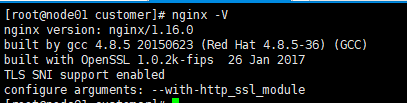
nginx -v
如下图,则安装成功:
验证服务是否启动成功
netstat -ntlp | grep nginx
如下:

添加nginx服务
vim /lib/systemd/system/nginx.service
将以下内容插入:
[unit]
description=nginx
after=network.target

[service]
type=forking
execstart=/usr/local/nginx/sbin/nginx
execreload=/usr/local/nginx/sbin/nginx -s reload
execstop=/usr/local/nginx/sbin/nginx -s quit
privatetmp=true

[install]
wantedby=multi-user.target
以服务的方式启动nginx
pkill nginx

systemctl start nginx
查看服务是否启动
 systemctl status nginx
 netstat -ntlp | grep nginx
配置nginx服务开机自动启动
systemctl enable nginx
这下子就安装完毕了 ,配置文件在:
vim /usr/local/nginx/conf/nginx.conf
可选:
nginx的版本号默认是打开的,可以在默认的错误页面和http响应头中查看到。
不同版本,特别是低版本的nginx可能存在漏洞,所以如果不希望被别人获取到版本号的话,可以选择进行版本号隐藏。
隐藏nginx版本号
cd /usr/local/nginx/conf
vim nginx.conf
nginx.conf文件的“server_tokens”修改成”off“:
http {
...
server_tokens off;
...
}
再修改fastcgi.conf
vim fastcgi.conf
修改如下行
fastcgi_param server_software nginx/$nginx_version;
# 改为:
fastcgi_param server_software nginx;
重启nginx
systemctl restart nginx
掌握Linux中删除用户和用户组的正确方法,避免残留文件和进程冲突。本文深入解析userdel和groupdel命令的参数用法,提供处理“用户仍在使用”等常见错误的实战方案。

遇到CrossOver运行错误或需要更新版本时,如何彻底卸载旧版并干净重装?本教程详解macOS和Linux下的卸载步骤、残留文件清理方法及官方下载渠道,确保软件环境纯净稳定。





火山引擎是字节跳动旗下企业级云与AI服务平台。聚焦大模型核心能力,依托字节自研豆包多模态大模型,凭借火山方舟一站式平台,提供模型精调、推理部署、智能应用搭建等全链路服务,结合高性能AI算力,助力各行业快速落地大模型数字化与智能化应用。



