

Nginx怎么编译安装
Nginx编译安装系统平台:CentOS7.4Nginx版本:nginx-1.12.2.tar.gzPcre版本:pcre-8.42.tar.gz所需依赖:gcc-c++libtool三方库:zlibzlib-developensslopenssl-develpcre一、安装编译工具及库文件>yuminstall-ymakezlibzlib-developensslopenssl-develgcc-c++>libtoolzlib库:zlib库是ngx_http_gzip_module(gzip压缩模块)所
Nginx编译安装
系统平台:CentOS 7.4
Nginx版本:nginx-1.12.2.tar.gz
Pcre版本:pcre-8.42.tar.gz
所需依赖:gcc-c++ libtool
三方库:zlib zlib-devel openssl openssl-devel pcre
一、安装编译工具及库文件
> yum install -y make zlib zlib-devel openssl openssl-devel gcc-c++
> libtool
zlib库:zlib库是ngx_http_gzip_module(gzip压缩模块)所必需的
openssl库 :--with-http_ssl_module使用该模块必需装openssl库,来实现http支持https协议
二、安装pcre库
prce库:--with-http_rewrite_module使用该模块必须装prce库,来实现对地址重定向,地址重写功能和localtion指令以及正则表达式的支持
wget https://sourceforge.net/projects/pcre/files/pcre/8.42/pcre-8.42.tar.gz
[root@linux-node1 src]# tar xf pcre-8.42.tar.gz
[root@linux-node1 src]# cd pcre-8.42
[root@linux-node1 pcre-8.42]# ./configure && make && make install && echo $?
[root@linux-node1 pcre-8.42]# pcre-config --version
三、安装Nginx
wget http://nginx.org/download/nginx-1.12.2.tar.gz
[root@linux-node1 /]# useradd -s /sbin/nolgoin nginx
[root@linux-node1 src]# tar xf nginx-1.12.2.tar.gz
[root@linux-node1 nginx-1.12.2]#./configure --prefix=/usr/local/nginx --with-http_stub_status_module --with-http_ssl_module --with-pcre=/usr/local/src/pcre-8.42 --user=nginx --group=nginx
[root@linux-node1 nginx-1.12.2]# make && make install
[root@linux-node1 /]# /usr/local/nginx/sbin/nginx -V     查看版本以及已编译的模块

[root@linux-node1 /]# /usr/local/nginx/sbin/nginx -t    检查nginx.conf文件配置是否正确
nginx: the configuration file /usr/local/nginx/conf/nginx.conf syntax is ok
nginx: configuration file /usr/local/nginx/conf/nginx.conf test is successful
四、启动Nginx
[root@linux-node1 /]# /usr/local/nginx/sbin/nginx     启动Nginx
/usr/local/nginx/sbin/nginx -s reload                 重新载入配置文件
/usr/local/nginx/sbin/nginx -s reopen                 重启 Nginx
/usr/local/nginx/sbin/nginx -s stop                   快速关闭 Nginx
/usr/local/nginx/sbin/nginx -s quit                   关闭Nginx

[root@linux-node1 /]# systemctl stop iptables.service
[root@linux-node1 /]# systemctl stop firewalld.service
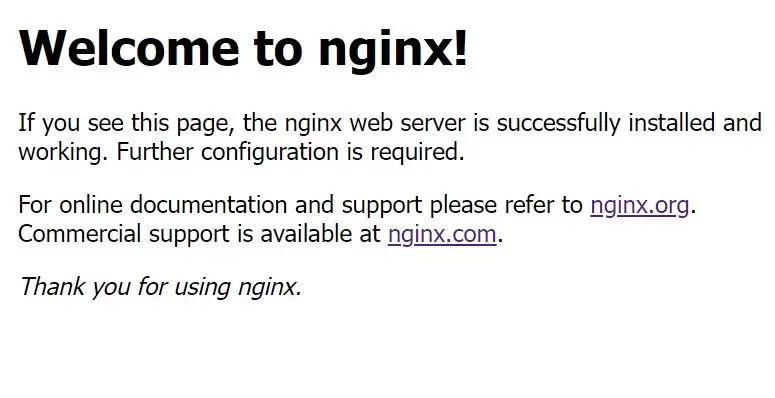
本教程针对Windows环境,详解Nginx稳定版(如1.24.0)的下载、解压、启动及验证流程。核心步骤包括:下载官方压缩包至英文目录,使用start nginx启动,通过localhost访问默认页面,并利用tasklist和nginx -t命令确认进程状态及配置语法。涵盖端口冲突排查、配置重载及停止服务的标准操作,适用于本地开发环境搭建与基础运维验证。


ngx_php这个模块,简单来说,就是给nginx插上PHP脚本的翅膀。它还有个更通俗的名字叫php-nginx-module,功能非常直观:让nginx能够直接嵌入PHP语言来处理请求。 环境兼容性 从PHP 5.3到5.6,ngx_php都支持得不错。nginx这边,从1.4.7到1.9.15这

配置LNMP环境(Linux + Nginx + MySQL + PHP)是很多后端开发者都会遇到的场景。这里以CentOS系统为例,演示如何通过编译安装的方式,将Nginx和PHP-FPM搭建起来。整个过程不依赖RPM包,适合需要定制化组件或对性能有更高要求的场景。下面直接上步骤。 (1) 编译安

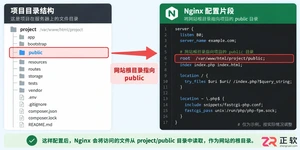
从源码编译安装PHP并配置Nginx,需先安装libxml2依赖,然后下载并解压PHP源码,执行配置、编译与安装,复制php.ini配置文件到指定位置,安装并启动php-fpm,再编辑Nginx配置文件以添加PHP支持,使其指向fastcgi与9000端口,最后重启服务即可验证PHP运行。

在Ubuntu下搭建PHP环境时,先清理旧PHP包,添加OndřejSurý的PPA源,安装PHP5.6或7.1及常用扩展,再配置Nginxlocation块将PHP请求转发至对应版本php-fpmsocket,重启Nginx即可。

在CentOS7系统上部署LNMP环境,安装PHP语言及其扩展php-mysqlnd和php-fpm,修改php.ini配置文件中的cgi.fix_pathinfo参数为0,将php-fpm服务用户更改为nginx用户,启动php-fpm服务并设置开机自启动。配置Nginx服务器支持PHP解析处理,通过fastcgi_pass指令连接本机9000端口,重启N
在PHP开发环境中调试时,需在浏览器显示错误信息。首先编辑php.ini,将错误报告级别error_reporting设为E_ERROR(仅显示致命错误),并将display_errors设为On;若启用PHP-FPM,则还需在php-fpm.conf中设置php_flag[display_errors]为on,并重启服务。这样配置后可快速定位致命错误,避免
PHP-FPM是PHP的FastCGI进程管理器,新版已集成至官方核心,编译时加--enable-fpm参数即可开启。安装前需准备gcc、libmcrypt等依赖及oniguruma库,编译安装PHP后生成配置文件,并在nginx的server段添加FastCGI转发配置,测试通过浏览器访问index.php验证。





火山引擎是字节跳动旗下企业级云与AI服务平台。聚焦大模型核心能力,依托字节自研豆包多模态大模型,凭借火山方舟一站式平台,提供模型精调、推理部署、智能应用搭建等全链路服务,结合高性能AI算力,助力各行业快速落地大模型数字化与智能化应用。



