

TensorFlow深度学习框架模型推理Pipeline进行人像抠图推理
概述为了使ModelScope的用户能够快速、方便的使用平台提供的各类模型,提供了一套功能完备的Pythonlibrary,其中包含了ModelScope官方模型的实现,以及使用这些模型进行推理,finetune等任务所需的数据预处理,后处理,效果评估等功能相关的代码,同时也提供了简单易用的API,以及丰富的使用样例。通过调用library,用户可以只写短短的几行代码,就可以完成模型的推理、训练和评估等任务,也可以在此基础上快速进行二次开发,实现自己的创新想法。目前library提供的算法模型,涵盖了图像
概述
为了使ModelScope的用户能够快速、方便的使用平台提供的各类模型,提供了一套功能完备的Python library,其中包含了ModelScope官方模型的实现,以及使用这些模型进行推理,finetune等任务所需的数据预处理,后处理,效果评估等功能相关的代码,同时也提供了简单易用的API,以及丰富的使用样例。通过调用library,用户可以只写短短的几行代码,就可以完成模型的推理、训练和评估等任务,也可以在此基础上快速进行二次开发,实现自己的创新想法。
目前library提供的算法模型,涵盖了图像,自然语言处理,语音,多模态,科学5个主要的AI领域,数十个应用场景任务,具体任务可参考文档:任务的介绍。
深度学习框架
ModelScope Library目前已支持Pytorch和Tensorflow等深度学习框架,未来将不断更新和扩展更多框架,敬请期待!所有官方模型均可通过ModelScope Library进行模型推理,有些模型还能够使用该库进行训练和评估。如需获取完整的使用信息,请查看相应模型的模型卡片。
模型推理Pipeline
模型的推理
在深度学习中,推理是指模型对数据进行预测的过程。ModelScope执行推理时会利用pipeline来顺序执行必要的操作。一个典型的pipeline通常包括数据预处理、模型前向推理和数据后处理三个步骤。
Pipeline介绍
pipeline()方法是ModelScope框架中最基础的用户方法之一,可用于快速进行各种领域的模型推理。借助pipeline()方法,用户只需一行代码即可轻松完成对特定任务的模型推理。
pipeline()方法是ModelScope框架中最基础的用户方法之一,可用于快速进行各种领域的模型推理。借助pipeline()方法,用户只需一行代码即可轻松完成对特定任务的模型推理。
Pipeline的使用
本文将简要介绍如何使用pipeline方法加载模型进行推理。通过pipeline方法,用户可以方便地从模型仓库中根据任务类型和模型名称拉取所需模型进行推理。这一方法的主要优势在于简便易用,能够快速高效地进行模型推断。pipeline方法的便利之处在于它提供了一种直接的方式来获取和应用模型,无需用户深入了解模型的具体细节,从而降低了使用模型的门槛。通过pipeline方法,用户可以更加专注于解决问题和
- 环境准备
- 重要参数
- Pipeline基本用法
- 指定预处理、模型进行推理
- 不同场景任务推理pipeline使用示例
Pipeline基本用法
中文分词
pipeline函数支持指定特定任务名称,加载任务默认模型,创建对应pipeline对象。
Python代码
from modelscope.pipelines import pipelineword_segmentation = pipeline('word-segmentation')input_str = '开源技术小栈作者是Tinywan,你知道不?'print(word_segmentation(input_str))PHP 代码
pipeline;$word_segmentation = $pipeline("word-segmentation");$input_str = "开源技术小栈作者是Tinywan,你知道不?";PyCore::print($word_segmentation($input_str));在线转换工具:https://www.swoole.com/py2php/
输出结果
/usr/local/php-8.2.14/bin/php demo.php 2024-03-25 21:41:42,434 - modelscope - INFO - PyTorch version 2.2.1 Found.2024-03-25 21:41:42,434 - modelscope - INFO - Loading ast index from /home/www/.cache/modelscope/ast_indexer2024-03-25 21:41:42,577 - modelscope - INFO - Loading done! Current index file version is 1.13.0, with md5 f54e9d2dceb89a6c989540d66db83a65 and a total number of 972 components indexed2024-03-25 21:41:44,661 - modelscope - WARNING - Model revision not specified, use revision: v1.0.32024-03-25 21:41:44,879 - modelscope - INFO - initiate model from /home/www/.cache/modelscope/hub/damo/nlp_structbert_word-segmentation_chinese-base2024-03-25 21:41:44,879 - modelscope - INFO - initiate model from location /home/www/.cache/modelscope/hub/damo/nlp_structbert_word-segmentation_chinese-base.2024-03-25 21:41:44,880 - modelscope - INFO - initialize model from /home/www/.cache/modelscope/hub/damo/nlp_structbert_word-segmentation_chinese-baseYou are using a model of type bert to instantiate a model of type structbert. This is not supported for all configurations of models and can yield errors.2024-03-25 21:41:48,633 - modelscope - WARNING - No preprocessor field found in cfg.2024-03-25 21:41:48,633 - modelscope - WARNING - No val key and type key found in preprocessor domain of configuration.json file.2024-03-25 21:41:48,633 - modelscope - WARNING - Cannot find available config to build preprocessor at mode inference, current config: {'model_dir': '/home/www/.cache/modelscope/hub/damo/nlp_structbert_word-segmentation_chinese-base'}. trying to build by task and model information.2024-03-25 21:41:48,639 - modelscope - INFO - cuda is not available, using cpu instead.2024-03-25 21:41:48,640 - modelscope - WARNING - No preprocessor field found in cfg.2024-03-25 21:41:48,640 - modelscope - WARNING - No val key and type key found in preprocessor domain of configuration.json file.2024-03-25 21:41:48,640 - modelscope - WARNING - Cannot find available config to build preprocessor at mode inference, current config: {'model_dir': '/home/www/.cache/modelscope/hub/damo/nlp_structbert_word-segmentation_chinese-base', 'sequence_length': 512}. trying to build by task and model information./home/www/anaconda3/envs/tinywan-modelscope/lib/python3.10/site-packages/transformers/modeling_utils.py:962: FutureWarning: The `device` argument is deprecated and will be removed in v5 of Transformers.warnings.warn({'output': ['开源', '技术', '小', '栈', '作者', '是', 'Tinywan', ',', '你', '知道', '不', '?']}输入多条样本
pipeline对象也支持传入多个样本列表输入,返回对应输出列表,每个元素对应输入样本的返回结果。多条文本的推理方式是输入data在pipeline内部用迭代器单条处理后append到同一个返回List中。
Python代码
from modelscope.pipelines import pipelineword_segmentation = pipeline('word-segmentation')inputs =['开源技术小栈作者是Tinywan,你知道不?','webman这个框架不错,建议你看看']print(word_segmentation(inputs))PHP 代码
pipeline;$word_segmentation = $pipeline("word-segmentation");$inputs = new PyList(["开源技术小栈作者是Tinywan,你知道不?", "webman这个框架不错,建议你看看"]);PyCore::print($word_segmentation($inputs));输出
[{'output': ['开源', '技术', '小', '栈', '作者', '是', 'Tinywan', ',', '你', '知道', '不', '?']},{'output': ['webman', '这个', '框架', '不错', ',', '建议', '你', '看看']}]批量推理
pipeline对于批量推理的支持类似于上面的“输入多条文本”,区别在于会在用户指定的batch_size尺度上,在模型forward过程实现批量前向推理。
inputs =['今天天气不错,适合出去游玩','这本书很好,建议你看看']# 指定batch_size参数来支持批量推理print(word_segmentation(inputs, batch_size=2))# 输出[{'output': ['今天', '天气', '不错', ',', '适合', '出去', '游玩']}, {'output': ['这', '本', '书', '很', '好', ',', '建议', '你', '看看']}]输入一个数据集
from modelscope.msdatasets import MsDatasetfrom modelscope.pipelines import pipelineinputs = ['今天天气不错,适合出去游玩', '这本书很好,建议你看看']dataset = MsDataset.load(inputs, target='sentence')word_segmentation = pipeline('word-segmentation')outputs = word_segmentation(dataset)for o in outputs:print(o)# 输出{'output': ['今天', '天气', '不错', ',', '适合', '出去', '游玩']}{'output': ['这', '本', '书', '很', '好', ',', '建议', '你', '看看']}指定预处理、模型进行推理
pipeline函数支持传入实例化的预处理对象、模型对象,从而支持用户在推理过程中定制化预处理、模型。
创建模型对象进行推理
Python代码
from modelscope.models import Modelfrom modelscope.pipelines import pipelinemodel = Model.from_pretrained('damo/nlp_structbert_word-segmentation_chinese-base')word_segmentation = pipeline('word-segmentation', model=model)inputs =['开源技术小栈作者是Tinywan,你知道不?','webman这个框架不错,建议你看看']print(word_segmentation(inputs))PHP 代码
Model;$pipeline = PyCore::import('modelscope.pipelines')->pipeline;$model = $Model->from_pretrained("damo/nlp_structbert_word-segmentation_chinese-base");$word_segmentation = $pipeline("word-segmentation", model: $model);$inputs = new PyList(["开源技术小栈作者是Tinywan,你知道不?", "webman这个框架不错,建议你看看"]);PyCore::print($word_segmentation($inputs));输出
[{'output': ['开源', '技术', '小', '栈', '作者', '是', 'Tinywan', ',', '你', '知道', '不', '?']},{'output': ['webman', '这个', '框架', '不错', ',', '建议', '你', '看看']}]创建预处理器和模型对象进行推理
from modelscope.models import Modelfrom modelscope.pipelines import pipelinefrom modelscope.preprocessors import Preprocessor, TokenClassificationTransformersPreprocessormodel = Model.from_pretrained('damo/nlp_structbert_word-segmentation_chinese-base')tokenizer = Preprocessor.from_pretrained(model.model_dir)# Or call the constructor directly: # tokenizer = TokenClassificationTransformersPreprocessor(model.model_dir)word_segmentation = pipeline('word-segmentation', model=model, preprocessor=tokenizer)inputs =['开源技术小栈作者是Tinywan,你知道不?','webman这个框架不错,建议你看看']print(word_segmentation(inputs))[{'output': ['开源', '技术', '小', '栈', '作者', '是', 'Tinywan', ',', '你', '知道', '不', '?']},{'output': ['webman', '这个', '框架', '不错', ',', '建议', '你', '看看']}]图像
注意:
- 确保你已经安装了OpenCV库。如果没有安装,你可以通过pip安装
pip install opencv-python
没有安装会提示:PHP Fatal error: Uncaught PyError: No module named 'cv2' in /home/www/build/ai/demo3.php:4
- 确保你已经安装深度学习框架包TensorFlow库
否则提示modelscope.pipelines.cv.image_matting_pipeline requires the TensorFlow library but it was not found in your environment. Checkout the instructions on the installation page: https://www.tensorflow.org/install and follow the ones that match your environment.。
报错信息表明,你正在尝试使用一个名为 modelscope.pipelines.cv.image_matting_pipeline 的模块,该模块依赖于 TensorFlow 库。然而,该模块无法正常工作,因为缺少必要的 TensorFlow 依赖。
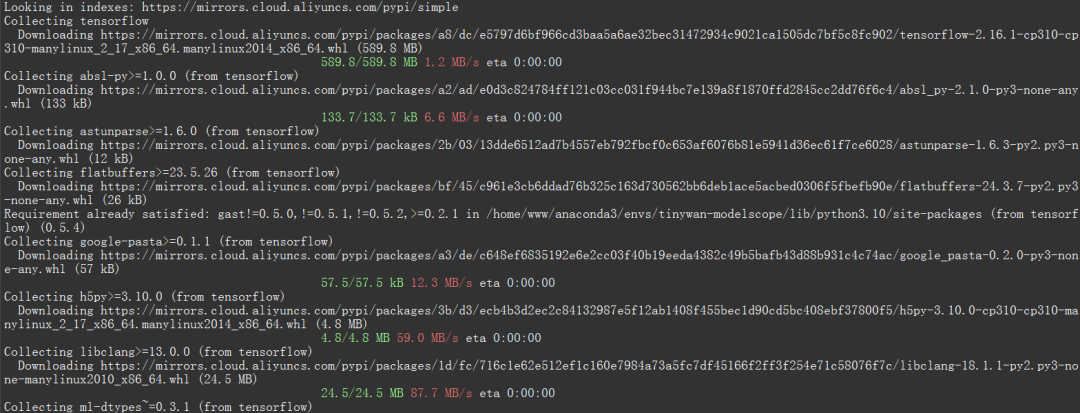
可以使用以下命令安装最新版本的 TensorFlow
pip install tensorflow
 图片
图片
人像抠图('portrait-matting')
输入图片
 图片
图片
Python 代码
import cv2from modelscope.pipelines import pipelineportrait_matting = pipeline('portrait-matting')result = portrait_matting('https://modelscope.oss-cn-beijing.aliyuncs.com/test/images/image_matting.png')cv2.imwrite('result.png', result['output_img'])PHP 代码 tinywan-images.php
pipeline;$portrait_matting = $pipeline("portrait-matting");$result = $portrait_matting("https://modelscope.oss-cn-beijing.aliyuncs.com/test/images/image_matting.png");$cv2->imwrite("tinywan_result.png", $result->__getitem__("output_img"));加载本地文件图片$result = $portrait_matting("./tinywan.png");
执行结果
/usr/local/php-8.2.14/bin/php tinywan-images.php 2024-03-25 22:17:25,630 - modelscope - INFO - PyTorch version 2.2.1 Found.2024-03-25 22:17:25,631 - modelscope - INFO - TensorFlow version 2.16.1 Found.2024-03-25 22:17:25,631 - modelscope - INFO - Loading ast index from /home/www/.cache/modelscope/ast_indexer2024-03-25 22:17:25,668 - modelscope - INFO - Loading done! Current index file version is 1.13.0, with md5 f54e9d2dceb89a6c989540d66db83a65 and a total number of 972 components indexed2024-03-25 22:17:26,990 - modelscope - WARNING - Model revision not specified, use revision: v1.0.02024-03-25 22:17:27.623085: I tensorflow/core/util/port.cc:113] oneDNN custom operations are on. You may see slightly different numerical results due to floating-point round-off errors from different computation orders. To turn them off, set the environment variable `TF_ENABLE_ONEDNN_OPTS=0`.2024-03-25 22:17:27.678592: I tensorflow/core/platform/cpu_feature_guard.cc:210] This TensorFlow binary is optimized to use available CPU instructions in performance-critical operations.To enable the following instructions: AVX2 AVX512F AVX512_VNNI FMA, in other operations, rebuild TensorFlow with the appropriate compiler flags.2024-03-25 22:17:28.551510: W tensorflow/compiler/tf2tensorrt/utils/py_utils.cc:38] TF-TRT Warning: Could not find TensorRT2024-03-25 22:17:29,206 - modelscope - INFO - initiate model from /home/www/.cache/modelscope/hub/damo/cv_unet_image-matting2024-03-25 22:17:29,206 - modelscope - INFO - initiate model from location /home/www/.cache/modelscope/hub/damo/cv_unet_image-matting.2024-03-25 22:17:29,209 - modelscope - WARNING - No preprocessor field found in cfg.2024-03-25 22:17:29,210 - modelscope - WARNING - No val key and type key found in preprocessor domain of configuration.json file.2024-03-25 22:17:29,210 - modelscope - WARNING - Cannot find available config to build preprocessor at mode inference, current config: {'model_dir': '/home/www/.cache/modelscope/hub/damo/cv_unet_image-matting'}. trying to build by task and model information.2024-03-25 22:17:29,210 - modelscope - WARNING - Find task: portrait-matting, model type: None. Insufficient information to build preprocessor, skip building preprocessorWARNING:tensorflow:From /home/www/anaconda3/envs/tinywan-modelscope/lib/python3.10/site-packages/modelscope/utils/device.py:60: is_gpu_available (from tensorflow.python.framework.test_util) is deprecated and will be removed in a future version.Instructions for updating:Use `tf.config.list_physical_devices('GPU')` instead.2024-03-25 22:17:29,213 - modelscope - INFO - loading model from /home/www/.cache/modelscope/hub/damo/cv_unet_image-matting/tf_graph.pbWARNING:tensorflow:From /home/www/anaconda3/envs/tinywan-modelscope/lib/python3.10/site-packages/modelscope/pipelines/cv/image_matting_pipeline.py:45: FastGFile.__init__ (from tensorflow.python.platform.gfile) is deprecated and will be removed in a future version.Instructions for updating:Use tf.gfile.GFile.2024-03-25 22:17:29,745 - modelscope - INFO - load model done输出图片
 图片
图片
理清幻方量化与DeepSeek的发展脉络,关键在于区分早期萤火二号的A100集群积累与DeepSeek-V3的H800训练配置。本文解析软硬件协同工程在其中的作用,避免将资金投入简单等同于模型能力。

背景由于云计算在资源成本和弹性扩容方面的天然优势,越来越多客户愿意在云上构建 AI 系统,而以容器、Kubernetes 为代表的云原生技术,已经成为释放云价值的最短路径, 在云上基于 Kubernetes 构建 AI 平台已经成为趋势。在面对较为复杂的模型训练或者大量数据时,单机的计算能力往往难以


轻量化浏览器的崛起:当极简主义成为生产力 这些年,浏览器的战场早已不再局限于功能和扩展的堆砌。一股轻量、高效的“清流”正在改变用户的上网习惯,而夸克浏览器无疑是这股潮流中的佼佼者。它以清爽的界面和高效的核心性能,成功在移动端圈粉无数。好消息是,这股清爽之风如今也吹到了电脑桌面上——通过官方网页版入口

学习通网页版登录入口:通往数字课堂的便捷通道 作为师生获取在线教育资源的关键门户,学习通网页版登录入口的设计直接影响到数字化学习体验的流畅度。下面这份指南将带你系统掌握官方认证通道的使用要领,让每次登录都成为高效学习的开端。 官方登录入口:直达学习核心区 超星官方指定的入口地址始终是最可靠的选择:点

漫画爱好者的掌上宝库:喵趣漫画官方下载全解析 对于漫画迷而言,找到合适的阅读平台至关重要。喵趣漫画官方下载入口恰好提供了这样的解决方案——这里不仅是海量正版资源的聚集地,更打造了一站式的跨终端阅读体验。应用内覆盖了热血、恋爱、悬疑等主流题材,配合智能设备适配技术,让阅读真正实现无缝衔接。界面设计简洁
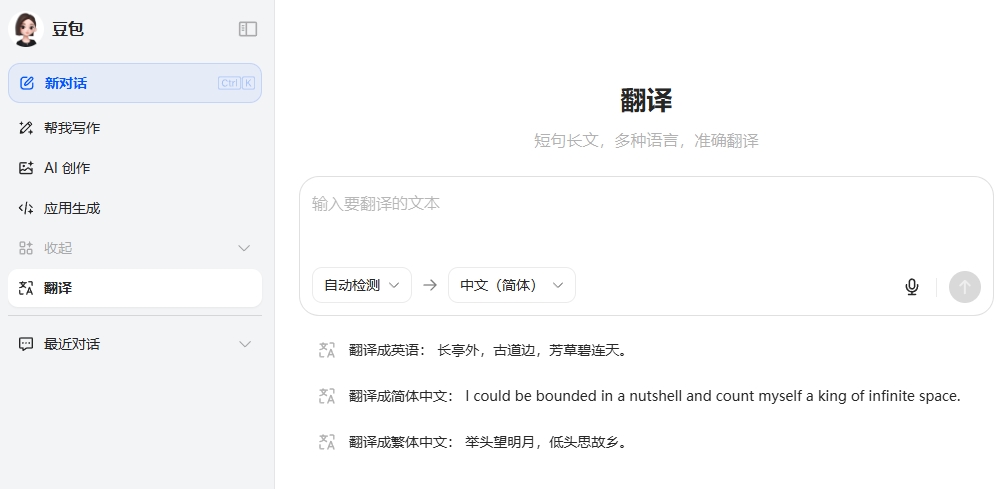
高效语言转换工具的选择直接影响跨文化交流效果 选对翻译工具,往往能让跨文化交流事半功倍。今天我们就来详细解析豆包AI翻译网页版的核心功能与操作要点,帮你快速掌握这个实用工具的使用诀窍。 豆包AI翻译网页版入口: 访问地址再简单不过:https://www.doubao.com/ch@t/transl
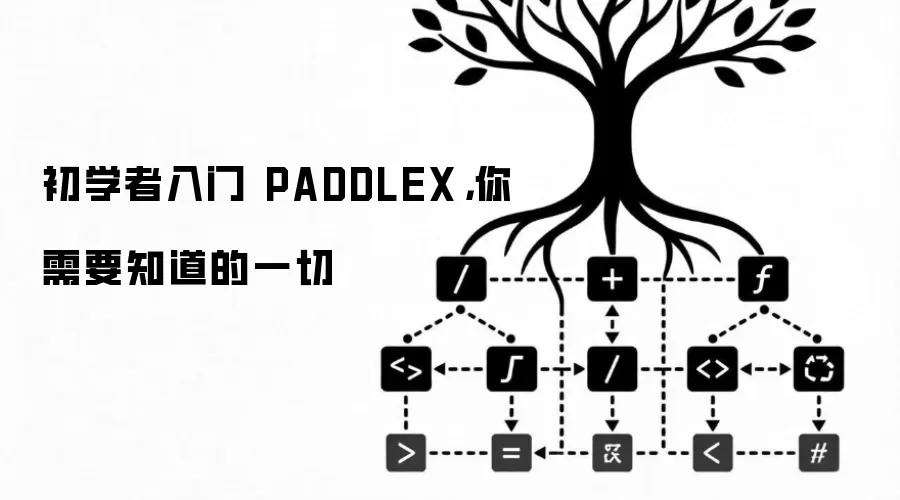
PaddleX是基于百度飞桨的一站式视觉开发套件,封装了模型训练、压缩与部署流程,显著降低开发门槛。它支持图像分类、目标检测等任务,提供图形界面与PythonAPI双模式,便于从可视化操作平滑过渡到代码开发。典型工作流程包括数据准备、模型选择、训练评估及部署。
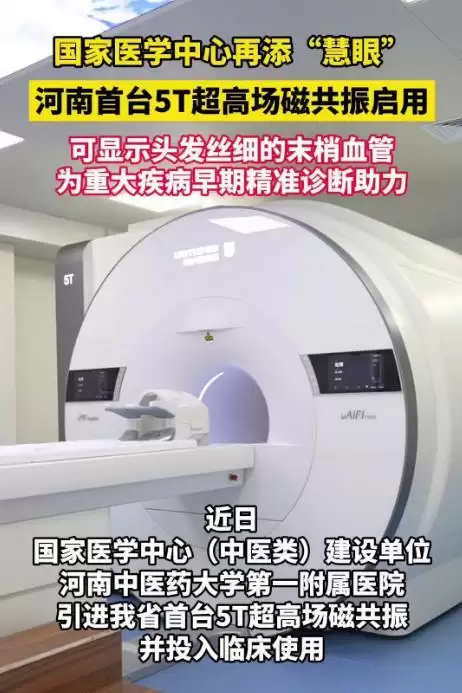
河南省首台5T超高场磁共振在河南中医药大学第一附属医院启用,搭载AI智能加速与深度学习技术,提升图像信噪比与分辨率,助力早期微小病灶检出,实现早发现、早诊断、早治疗。同期引进西门子Cima.X介观核磁,实现微米级高清成像,支持脑科学等前沿研究。
Caffe 头文件找不到与库链接冲突的排查方法 在使用 Caffe 进行深度学习开发或二次编译时,经常遇到两类问题:头文件找不到导致编译失败,以及库链接冲突导致链接错误。本指南针对这些常见问题,提供从基础检查到解决方案的逐步排查流程。 问题现象 编译时提示“fatal error: caffe/ca





火山引擎是字节跳动旗下企业级云与AI服务平台。聚焦大模型核心能力,依托字节自研豆包多模态大模型,凭借火山方舟一站式平台,提供模型精调、推理部署、智能应用搭建等全链路服务,结合高性能AI算力,助力各行业快速落地大模型数字化与智能化应用。



