

怎么使用SpringBoot+SpringSecurity+jwt实现验证
环境springBoot2.3.3springSecurity5.0jjwt0.91pox.xml文件主要信息io.jsonwebtokenjjwt0.9.1org.springframework.bootspring-boot-starter-securityorg.springframework.bootspring-boot-starter-web目录结构信息请忽略文件命名jwtAccessDeniedHandler和JwtAuthenticationEntryPoint这两个类的作用是用户访问没有
环境
springBoot 2.3.3
springSecurity 5.0
jjwt 0.91
pox.xml 文件主要信息
            io.jsonwebtoken
            jjwt
            0.9.1


            org.springframework.boot
            spring-boot-starter-security


            org.springframework.boot
            spring-boot-starter-web
目录结构信息
请忽略文件命名
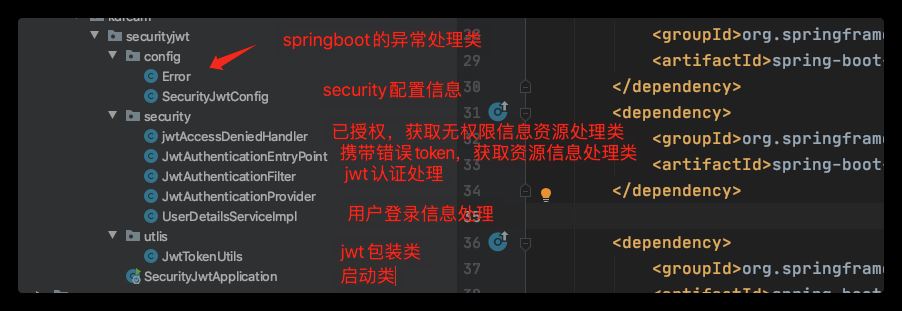
jwtAccessDeniedHandler 和 JwtAuthenticationEntryPoint
这两个类的作用是用户访问没有授权资源和携带错误token的错误返回处理信息类,要使用这两个类只需要在security的配置文件中配置一下就可以只用了
/**
 * @author Bxsheng
 * @blogAddress www.kdream.cn
 * @createTIme 2020/9/17
 * since JDK 1.8
 * 当用户在没有授权的时候,返回的指定信息
 */
@Component
public class jwtAccessDeniedHandler implements AccessDeniedHandler {
    @Override
    public void handle(HttpServletRequest httpServletRequest, HttpServletResponse httpServletResponse, AccessDeniedException e) throws IOException, ServletException {
        System.out.println("用户访问没有授权资源");
        System.out.println(e.getMessage());
        httpServletResponse.sendError(HttpServletResponse.SC_UNAUTHORIZED, e==null?"用户访问没有授权资源":e.getMessage());

    }
}
/**
* @author Bxsheng
* @blogAddress www.kdream.cn
* @createTIme 2020/9/17
* since JDK 1.8
*/
@Component
public class JwtAuthenticationEntryPoint implements AuthenticationEntryPoint {
@Override
public void commence(HttpServletRequest httpServletRequest, HttpServletResponse httpServletResponse, AuthenticationException e) throws IOException, ServletException {
System.out.println("用户访问资源没有携带正确的token");
System.out.println(e.getMessage());
httpServletResponse.sendError(HttpServletResponse.SC_UNAUTHORIZED, e==null?"用户访问资源没有携带正确的token":e.getMessage());
}
}UserDetailsServiceImpl 登录信息验证
该类直接继承UserDetailsService 进行登录信息验证,在输入账户密码进行登录的时候,会进入这个类进行验证信息。
当然我这里是直接使用了写死的密码,正常应该从数据库中获取用户的信息和权限信息
@Service
public class UserDetailsServiceImpl implements UserDetailsService {
    @Override
    public UserDetails loadUserByUsername(String s) throws UsernameNotFoundException {

        //直接写死数据信息,可以在这里获取数据库的信息并进行验证

        UserDetails userDetails  = User.withUsername(s).password(new BCryptPasswordEncoder().encode("123456"))
                .authorities("bxsheng").build();
        return userDetails;
    }
}
JwtTokenUtils jwt包装类
该类直接使用 slyh 的 [SpringBoot+JWT实现登录权限控制(代码))](( https://www.yisu.com/article/257119.htm)的文章里面的类。
package cn.kdream.securityjwt.utlis;

import io.jsonwebtoken.*;

import java.util.Date;
import java.util.HashMap;
import java.util.Map;

/**
 * @author Bxsheng
 * @blogAddress www.kdream.cn
 * @createTIme 2020/9/16
 * since JDK 1.8
 */
public class JwtTokenUtils {
    public static final String TOKEN_HEADER = "Authorization";
    public static final String TOKEN_PREFIX = "Bearer ";
    public static final String SECRET = "jwtsecret";
    public static final String ISS = "echisan";

    private static final Long EXPIRATION = 60 * 60 * 3L; //过期时间3小时

    private static final String ROLE = "role";

    //创建token
    public static String createToken(String username, String role, boolean isRememberMe){
        Map map = new HashMap();
        map.put(ROLE, role);
        return Jwts.builder()
                .signWith(SignatureAlgorithm.HS512, SECRET)
                .setClaims(map)
                .setIssuer(ISS)
                .setSubject(username)
                .setIssuedAt(new Date())
                .setExpiration(new Date(System.currentTimeMillis() + EXPIRATION * 1000))
                .compact();
    }

    //从token中获取用户名(此处的token是指去掉前缀之后的)
    public static String getUserName(String token){
        String username;
        try {
            username = getTokenBody(token).getSubject();
        } catch (    Exception e){
            username = null;
        }
        return username;
    }

    public static String getUserRole(String token){
        return (String) getTokenBody(token).get(ROLE);
    }

    private static Claims getTokenBody(String token){
        Claims claims = null;
        try{
            claims = Jwts.parser().setSigningKey(SECRET).parseClaimsJws(token).getBody();
        } catch(ExpiredJwtException e){
            e.printStackTrace();
        } catch(UnsupportedJwtException e){
            e.printStackTrace();
        } catch(MalformedJwtException e){
            e.printStackTrace();
        } catch(SignatureException e){
            e.printStackTrace();
        } catch(IllegalArgumentException e){
            e.printStackTrace();
        }
        return claims;
    }

    //是否已过期
    public static boolean isExpiration(String token){
        try{
            return getTokenBody(token).getExpiration().before(new Date());
        } catch(Exception e){
            System.out.println(e.getMessage());
        }
        return true;
    }
}
JwtAuthenticationFilter 自定义验证jwt
该类直接使用 slyh 的 [SpringBoot+JWT实现登录权限控制(代码))](( https://www.yisu.com/article/257119.htm))的文章里面的类。
这个类主要的作用是验证jwt信息 ,主要携带了token请求过来,解析jwt并设置在security的上下文中。这样做的其中一个目的是你获得了token中携带的权限信息,并保存在上下文中。你就可以对用户进行权限认证了
/**
 * @author Bxsheng
 * @blogAddress www.kdream.cn
 * @createTIme 2020/9/16
 * since JDK 1.8
 */
public class JwtAuthenticationFilter extends BasicAuthenticationFilter {

    public JwtAuthenticationFilter(AuthenticationManager authenticationManager) {
        super(authenticationManager);
    }

    @Override
    protected void doFilterInternal(HttpServletRequest request, HttpServletResponse response, FilterChain chain) throws IOException, ServletException {
        String tokenHeader = request.getHeader(JwtTokenUtils.TOKEN_HEADER);
        //如果请求头中没有Authorization信息则直接放行了
        if(tokenHeader == null || !tokenHeader.startsWith(JwtTokenUtils.TOKEN_PREFIX)){
            chain.doFilter(request, response);
            return;
        }
        //如果请求头中有token,则进行解析,并且设置认证信息
        if(!JwtTokenUtils.isExpiration(tokenHeader.replace(JwtTokenUtils.TOKEN_PREFIX,""))){
            //设置上下文
            UsernamePasswordAuthenticationToken authentication = getAuthentication(tokenHeader);
            SecurityContextHolder.getContext().setAuthentication(authentication);
        }
        super.doFilterInternal(request, response, chain);
    }

    //获取用户信息
    private UsernamePasswordAuthenticationToken getAuthentication(String tokenHeader){
        String token = tokenHeader.replace(JwtTokenUtils.TOKEN_PREFIX, "");
        String username = JwtTokenUtils.getUserName(token);
        // 获得权限 添加到权限上去
        String role = JwtTokenUtils.getUserRole(token);
        List roles = new ArrayList();
        roles.add(new GrantedAuthority() {
            @Override
            public String getAuthority() {
                return role;
            }
        });
        if(username != null){
            return new UsernamePasswordAuthenticationToken(username, null,roles);
        }
        return null;
    }

}
security的配置信息
@EnableGlobalMethodSecurity(prePostEnabled = true) 开启prePostEnabled注解方式授权
@Configuration
@EnableWebSecurity
@EnableGlobalMethodSecurity(prePostEnabled = true)
public class SecurityJwtConfig extends WebSecurityConfigurerAdapter {


    @Autowired
    private jwtAccessDeniedHandler jwtAccessDeniedHandler;

    @Autowired
    private JwtAuthenticationEntryPoint jwtAuthenticationEntryPoint;

    @Override
    protected void configure(HttpSecurity http) throws Exception {
       http.cors().and().csrf().disable().authorizeRequests()
               .antMatchers(HttpMethod.OPTIONS,"/**")
               .permitAll()
               .antMatchers("/").permitAll()
               //login 不拦截
               .antMatchers("/login").permitAll()
               .anyRequest().authenticated()
               //授权
               .and()
               // 禁用session
               .sessionManagement().sessionCreationPolicy(SessionCreationPolicy.STATELESS);
       // 使用自己定义的拦截机制,拦截jwt
        http.addFilterBefore(new JwtAuthenticationFilter(authenticationManager()), UsernamePasswordAuthenticationFilter.class)
        //授权错误信息处理
                .exceptionHandling()
                //用户访问资源没有携带正确的token
                .authenticationEntryPoint(jwtAuthenticationEntryPoint)
                //用户访问没有授权资源
                .accessDeniedHandler(jwtAccessDeniedHandler);
    }

    @Bean
    public PasswordEncoder passwordEncoder(){
        //使用的密码比较方式
        return  new BCryptPasswordEncoder();
    }

}
启动类
我在启动类中配置了三个方法,一个是用来进行登录信息的,另外两个设置了需要权限访问
@SpringBootApplication
@RestController
public class SecurityJwtApplication {

    private final AuthenticationManagerBuilder authenticationManagerBuilder;

    public SecurityJwtApplication(AuthenticationManagerBuilder authenticationManagerBuilder) {
        this.authenticationManagerBuilder = authenticationManagerBuilder;
    }

    public static void main(String[] args) {
        SpringApplication.run(SecurityJwtApplication.class, args);
    }


    @GetMapping("/")
    public String index(){
        return "security jwt";
    }

    @PostMapping("/login")
    public String login(@RequestParam String u,@RequestParam String p){
        // 登陆验证
        UsernamePasswordAuthenticationToken token =
                new UsernamePasswordAuthenticationToken(u, p);
        Authentication authentication = authenticationManagerBuilder.getObject().authenticate(token);
        SecurityContextHolder.getContext().setAuthentication(authentication);
        //创建jwt信息
        String token1 = JwtTokenUtils.createToken(u,"bxsheng", true);
        return token1;
    }

    @GetMapping("/role")
    @PreAuthorize("hasAnyAuthority('bxsheng')")
    public String roleInfo(){
        return "需要获得bxsheng权限,才可以访问";
    }

    @GetMapping("/roles")
    @PreAuthorize("hasAnyAuthority('kdream')")
    public String rolekdream(){
        return "需要获得kdream权限,才可以访问";
    }
}
效果
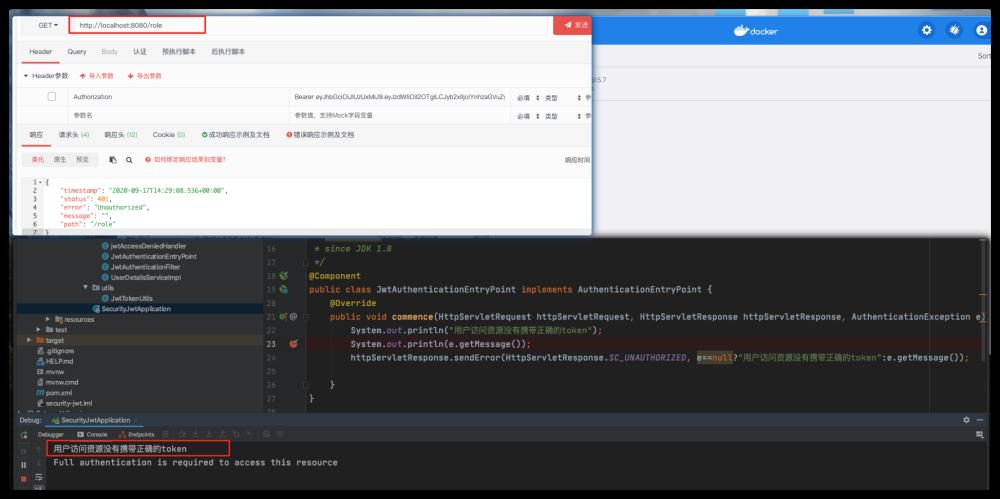
直接访问需要授权的用户信息
直接没有使用token直接访问只要授权的资源信息,会进入JwtAuthenticationEntryPoint 类
获取token
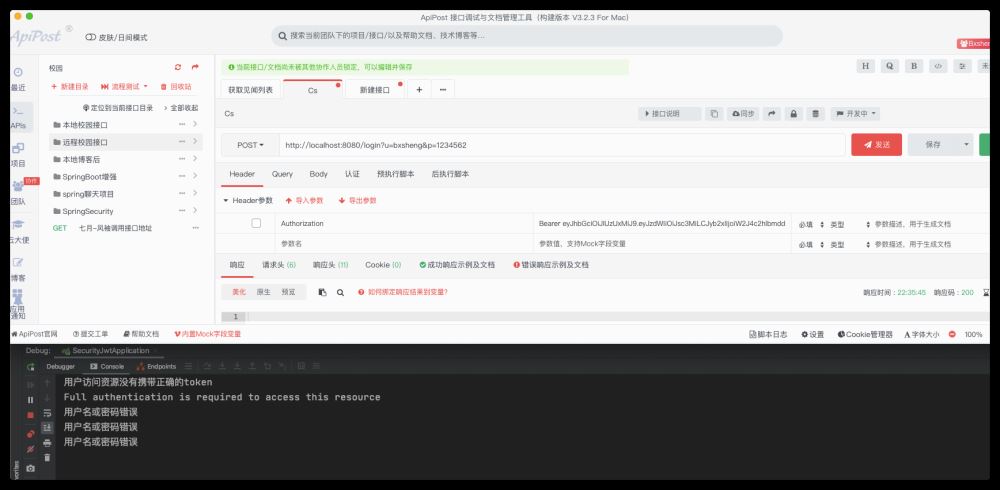
访问在启动类中的login方法,获取token信息
因为我使用了固定的密码,所以在使用错误的密码访问的时候,可以在springboot的全局异常处理中捕获到异常信息
/**
 * @author Bxsheng
 * @blogAddress www.kdream.cn
 * @createTIme 2020/9/17
 * since JDK 1.8
 */
@RestControllerAdvice
public class Error {
    @ExceptionHandler(BadCredentialsException.class)
    public void badCredentialsException(BadCredentialsException e){
        System.out.println(e.getMessage());//用户名或密码错误

       // throw new  BadCredentialsException(e.getMessage());
    }
}
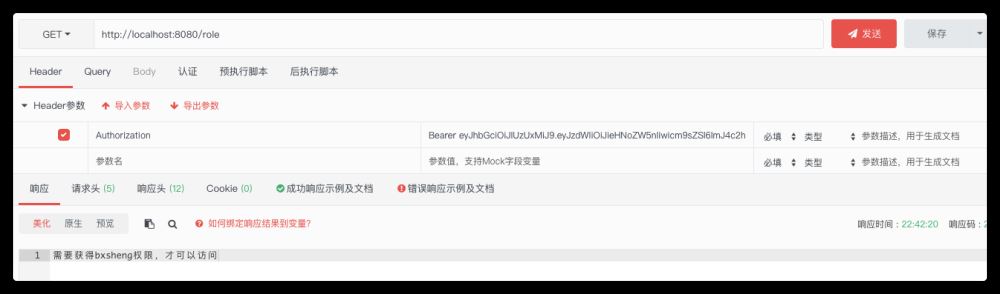
正确的获取token,并进行受保护的资源访问
里面有写死的bxsheng权限信息,所以正常是可以获取bxsheng标识的资源信息的。
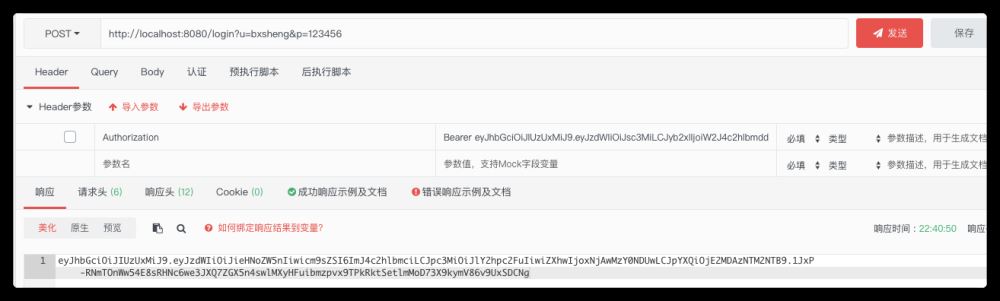
成功获取信息
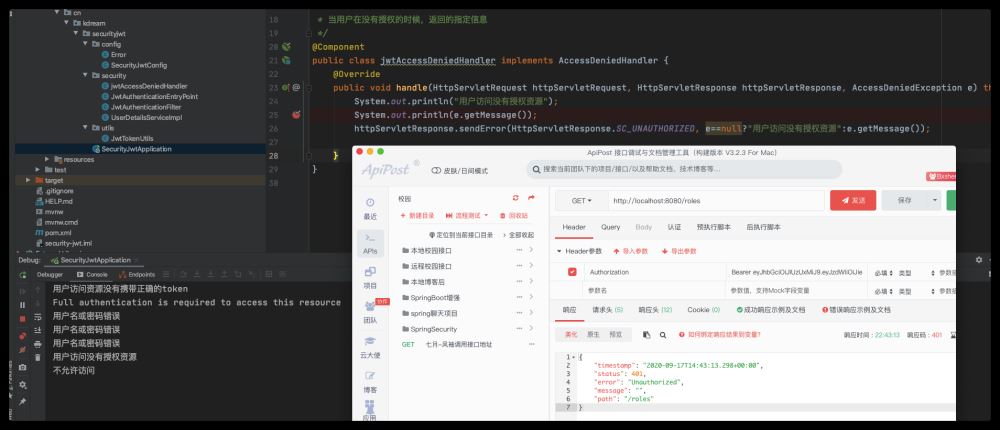
尝试获取无权限资源信息
使用token直接访问无权限资源信息,会进入jwtAccessDeniedHandler 类
如何在Golang中实现JWT身份验证?最常用的方法是使用gin-jwt库。步骤包括:1.安装gin和gin-jwt库;2.定义用户数据结构,如User;3.创建JWT中间件并配置密钥、过期时间、PayloadFunc、IdentityHandler、Authenticator、Authorizator等参数;4.配置路由,将LoginHandler和RefreshHandler绑定到对应路径,并对需认证的接口应用中间件;5.选择合适的JWT库时应考虑性能、安全性、易用性和社区支持;6.确保JWT安全需使

JWT白名单允许特定JWT直接通过验证无需重复检查签名或过期时间适用于内部服务快速授权但存在安全风险。核心解决方案包括:1.验证前先检查JWT是否在白名单中若在则直接通过;2.白名单可存储于数据库缓存或配置文件;3.验证流程优先查白名单未命中则执行标准JWT验证;4.需提供接口管理白名单并定期清理过期项。主要安全风险包括JWT泄露后长期有效权限过大及管理难度增加。为安全使用应限制场景缩短有效期控制权限加强管理使用jti标识并结合其他安全措施。替代方案有刷新令牌Session机制OAuth2.0和ACL。白

在现代Web应用及分布式系统中,身份认证与授权是保障系统安全性的关键环节。JWT(JSONWebTokens)、Session、SSO(SingleSign-On,单点登录)和OAuth2.0是四种常见的身份认证与授权机制,它们各自有不同的应用场景、优缺点。本文将对这四种机制进行对比分析,以便读者能够更好地理解和选择适合自身业务需求的认证授权方案。一、JWT(JSONWebTokens)JWT是一种在双方之间安全传输信息的开放标准(RFC7519)。这些信息可以被验证和信任,因为它们经过数字签名。JWT可
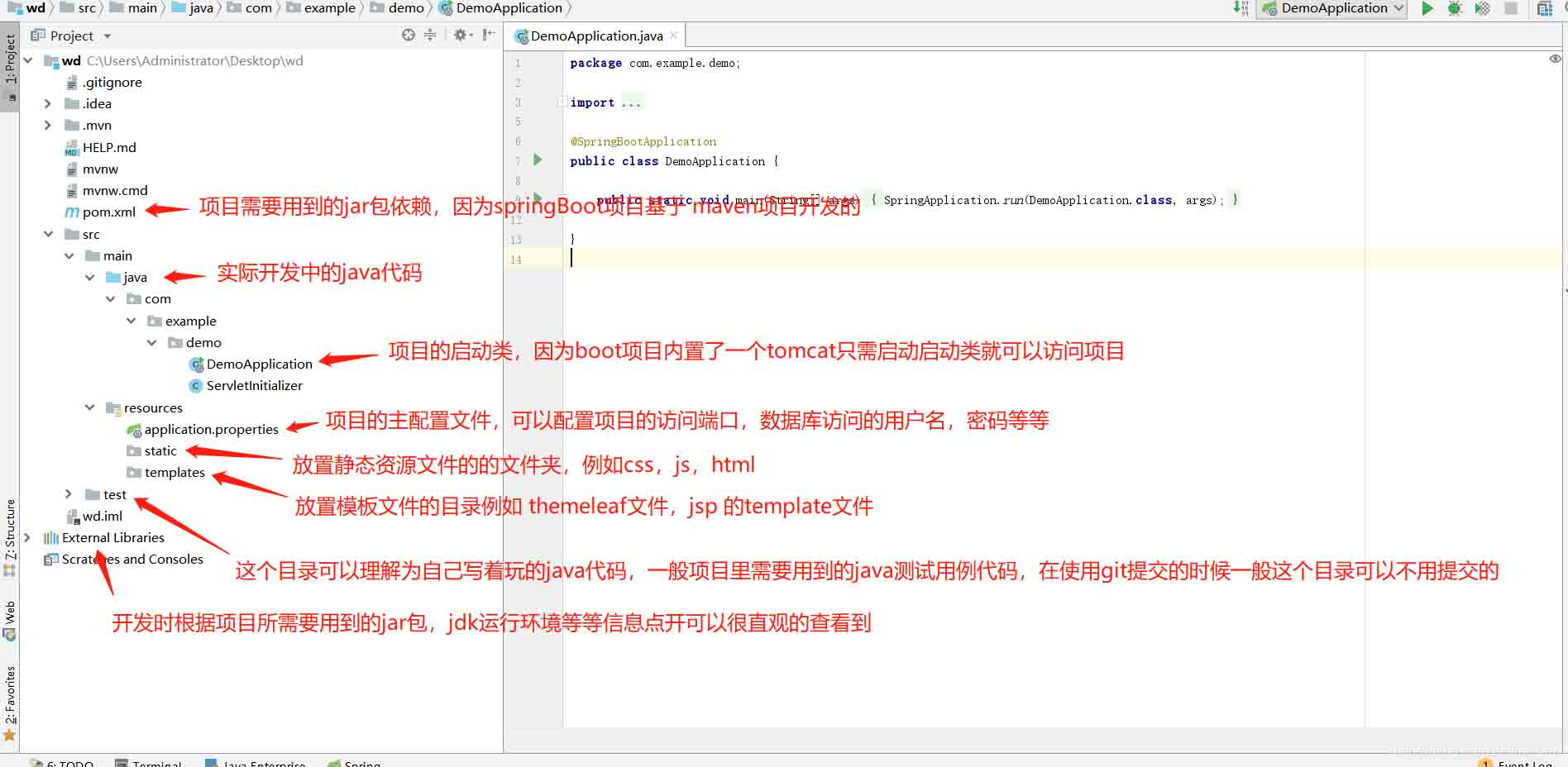
springBoot项目常用目录springBoot项目的目录结构及名规范介绍基于SpringBoot开发时的目录结构及命名规范,通过介绍能够为你解决,在实际项目中如何规划目录结构?如何命名目录更规范?各个目录分别代表什么含义?等三个问题。目录说明servicex//项目名|-admin-ui//管理服务前端代码(一般将UI和SERVICE放到一个工程中,便于管理)|-servicex-auth//模块1|-servicex-common//模块2|-servicex-gateway//模块3|-serv

随着互联网应用的广泛使用,安全性问题也逐渐成为重要的话题。为了保证应用的安全性,开发人员需要采取各种措施来防止未授权的访问和攻击。JWT(JSONWebToken)就是一种在网络应用中用于声明的一种安全传输方式。在JavaAPI开发中使用JWT鉴权,可以有效保护API的安全性,并且方便开发过程中的访问控制。JWT的基本概念JWT是由
随着Web应用程序的普及和应用范围的扩大,保护用户数据和身份信息越来越重要。在应用程序中进行身份验证是非常必要的,本文将介绍在Go语言中如何使用JWT实现身份验证的最佳实践。什么是JWTJWT是JSONWebToken的缩写,是一种不需要Cookie等存储方式而能够安全传递信息的身份验证机制。一个JWT由三部分组成:Header:包含算法和类型等信息。P
JWT(JSONWebToken)是一种轻量级的认证和授权机制,它使用JSON对象作为安全令牌,可以在多个系统之间安全地传输用户身份信息。而ThinkPHP6是一种基于PHP语言的高效、灵活的MVC框架,它提供了许多有用的工具和功能,其中就包括JWT认证机制。在本文中,我们将介绍如何使用ThinkPHP6进行JWT认证,以保障Web应用程序的安全性和可靠
随着网络技术的快速发展,越来越多的网站和应用需要实现用户认证功能。但是,传统的用户名和密码认证方式存在安全风险,因为它们通常会被保存在数据库中,一旦数据库被攻击,就会导致用户信息泄露。为了解决这个问题,JWT(JSONWebToken)应运而生。JWT是一种开放标准(RFC7519),它定义了一种简单的、自包含的方式来传输信息,该信息可以被验证和信任。
解析SpringBoot和SpringMVC之间的异同SpringBoot和SpringMVC是Java领域中非常重要的开发框架。虽然它们都属于Spring框架的一部分,但是在使用和功能上有一些明显的区别。本文将对SpringBoot和SpringMVC进行比较,解析它们之间的异同。首先,让我们来了解一下SpringBoot。SpringBo
近年来,随着云计算和分布式架构的兴起,微服务架构的应用越来越广泛。而SpringCloud和SpringBoot作为Java开发中的两个重要框架,对于微服务的实现起到了重要的作用。然而,很多人对于它们在微服务领域的不同应用方式还存在一定的疑惑。本文将从不同的角度探索SpringCloud和SpringBoot在微服务中的应用方式。首先,我们来了解一下Spri





火山引擎是字节跳动旗下企业级云与AI服务平台。聚焦大模型核心能力,依托字节自研豆包多模态大模型,凭借火山方舟一站式平台,提供模型精调、推理部署、智能应用搭建等全链路服务,结合高性能AI算力,助力各行业快速落地大模型数字化与智能化应用。