

如何使用Python实现windows倒计时锁屏功能

Windows 11 是微软全新操作系统,现代化界面,流畅操作体验,适用于学习、工作与日常生活。它更偏向把系统状态查看和常用调节动作放在一起,适合需要持续观察和微调设备状态的场景。
实现思路1)主要介绍了python实现windows倒计时锁屏功能python实现实windows倒计时锁屏功能#倒计时锁屏importtimefromctypesimport*defclosewindows(closetime):whileclosetime>0:print(closetime)time.sleep(1)closetime-=1user32=windll.LoadLibrary('user32.dll')user32.LockWorkStation()if__name__
实现思路
1)主要介绍了python实现windows倒计时锁屏功能
python实现实windows倒计时锁屏功能
# 倒计时锁屏
import time
from ctypes import *
def closewindows(closetime):
while closetime>0:
print(closetime)
time.sleep(1)
closetime-=1
user32 = windll.LoadLibrary('user32.dll')
user32.LockWorkStation()
if __name__ == "__main__":
closewindows(3)
2)知识点扩展
Python在windows锁屏的代码
C:\Users\HAS>python
Python 3.6.4 (v3.6.4:d48eceb, Dec 19 2017, 06:54:40) [MSC v.1900 64 bit (AMD64)]
on win32
Type "help", "copyright", "credits" or "license" for more information.
>>> from ctypes import *
>>> user32 = windll.LoadLibrary('user32.dll')
>>> user32.LockWorkStation()
3)python实现倒计时小工具
#!/usr/bin/env python
# coding=utf-8
import threading
import time
import Queue
from Tkinter import *
import tkMessageBox
import logging
logging.basicConfig(level=logging.INFO)
## Communication queue
commQueue = Queue.Queue()
g_time = 0
## Function run in thread
def timeThread():
global g_time
g_time = timeVar.get() * 60
while 1:
logging.info("线程放入队列:%d".decode("utf-8") % g_time)
commQueue.put(g_time)
try:
root.event_generate('<>', when='tail')
except TclError:
break
time.sleep(1)
g_time -= 1
if g_time==-1:
begin_btn["fg"] = "black"
clockVar.set("开始计时")
break
def timeChanged(event):
x = commQueue.get()
logging.info("获取队列:%d".decode("utf-8") % x)
minits = x//60
seconds = x%60
s = "剩余时间 {:02}:{:02}".format(minits, seconds)
begin_btn["fg"] = "blue"
clockVar.set(s)
if x==0:
tkMessageBox.showinfo("提醒","时间已到")
def clock_func(*args):
global g_time
if threading.activeCount()>1:
g_time = timeVar.get() * 60
else:
th=threading.Thread(target=timeThread)
th.start()
## Create main window
root = Tk()
root.title("计时工具")
root.geometry("180x95-0-45")
root.resizable(width=FALSE,height=FALSE)
root.wm_attributes("-topmost",1)
frame = Frame(root)
frame.pack()
Label(frame,text="设定时间间隔").grid(row=1,column=2)
timeVar = IntVar()
clockVar = StringVar()
time_entry = Entry(frame, textvariable=timeVar, width=8)
time_entry["justify"] = "center"
time_entry.grid(row=2,column=2,sticky="W,E")
begin_btn = Button(frame,textvariable=clockVar,command=clock_func)
begin_btn.grid(row=3,column=2)
timeVar.set(8)
begin_btn["fg"] = "black"
clockVar.set("开始计时")
for child in frame.winfo_children():
child.grid_configure(pady=3)
time_entry.focus()
root.bind('<>', timeChanged)
root.bind("",clock_func)
root.mainloop() 
遇到Windows蓝屏提示“Your Device Ran Into a Problem”?本文详解该错误的可能原因,包括驱动冲突、硬件故障和系统文件损坏,并提供实用的修复步骤,如进入安全模式、更新驱动和使用系统还原。
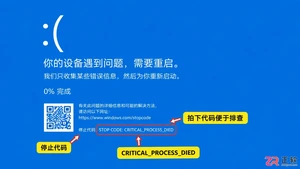
电脑出现蓝屏(BSOD)时如何快速恢复?本文详解记录停止代码、进入安全模式、卸载冲突驱动及使用系统还原点的实用步骤,助您高效解决系统崩溃难题。
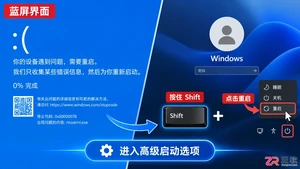
电脑开机蓝屏进不去系统?别急着重装。本教程详解如何利用Windows自带的高级启动选项、安全模式及命令提示符进行系统修复,保留数据并解决常见启动故障。
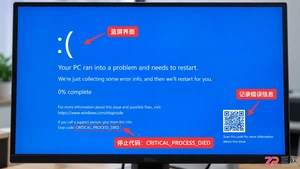
遇到电脑蓝屏不要慌,本文提供无需专业知识的简单修复步骤,包括进入安全模式、卸载问题驱动及运行内存诊断,帮助快速恢复系统并预防再次发生。
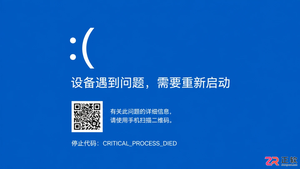
遇到电脑蓝屏怎么办?本文详解Windows蓝屏界面结构,教您识别QR码、停止代码及失败模块。解析CRITICAL_PROCESS_DIED、IRQL_NOT_LESS_OR_EQUAL等常见代码含义,提供针对性的硬件与驱动排查建议,助您快速定位系统崩溃根源。

电脑出现蓝屏死机(BSOD)时如何快速修复?本文提供从记录错误代码到检查硬件驱动的标准化排查流程,帮助用户自行解决常见的系统崩溃问题。

电脑频繁蓝屏怎么办?本教程提供从进入安全模式、卸载冲突驱动到使用CMD命令修复系统文件的完整操作流程,帮助新手快速定位并解决Windows蓝屏故障。
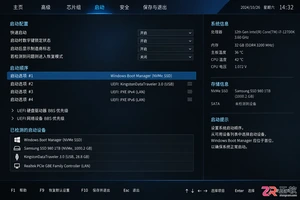
电脑开机提示找不到启动设备?本教程指导你检查硬盘连接、在BIOS中确认Windows Boot Manager启动顺序,并通过Windows恢复环境运行启动修复,快速解决引导问题。
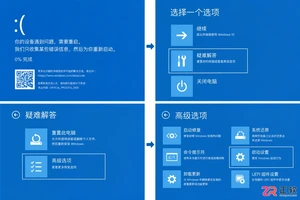

电脑开机卡在Logo界面或陷入重启循环?本文指导你通过移除外设、重置BIOS启动项及运行系统启动修复来解决问题,快速恢复电脑正常引导。





火山引擎是字节跳动旗下企业级云与AI服务平台。聚焦大模型核心能力,依托字节自研豆包多模态大模型,凭借火山方舟一站式平台,提供模型精调、推理部署、智能应用搭建等全链路服务,结合高性能AI算力,助力各行业快速落地大模型数字化与智能化应用。



