

SpringBoot怎么集成SFTP客户端实现文件上传下载
背景在项目开发中,一般文件存储很少再使用SFTP服务,但是也不排除合作伙伴使用SFTP来存储项目中的文件或者通过SFTP来实现文件数据的交互。我遇到的项目中,就有银行和保险公司等合作伙伴通过SFTP服务来实现与我们项目的文件数据的交互。为了能够顺利地完成与友商的SFTP服务的连通,我们需要在自己的项目中实现一套SFTP客户端工具。一般我们会采用Jsch来实现SFTP客户端。依赖com.jcraftjsch0.1.55org.apache.commonscommons-pool22.11.1首先我们一定要引
背景
在项目开发中,一般文件存储很少再使用SFTP服务,但是也不排除合作伙伴使用SFTP来存储项目中的文件或者通过SFTP来实现文件数据的交互。
我遇到的项目中,就有银行和保险公司等合作伙伴通过SFTP服务来实现与我们项目的文件数据的交互。
为了能够顺利地完成与友商的SFTP服务的连通,我们需要在自己的项目中实现一套SFTP客户端工具。一般我们会采用Jsch来实现SFTP客户端。
依赖
    com.jcraft
    jsch
    0.1.55


    org.apache.commons
    commons-pool2
    2.11.1
首先我们一定要引入jsch依赖,这个是我们实现SFTP客户端的基石;其次我们引入了链接池工具,为了避免每次执行SFTP命令都要重新创建链接,我们使用池化的方式优化了比较消耗资源的创建操作。
创建工具类
为了更好的使用SFTP工具,我们把jsch中关于SFTP的相关功能提炼出来,做了一次简单的封装,做成了我们可以直接使用的工具类。
里面只有两类方法:
1.创建Session与开启Session;
session创建好后,还不能创建channel,需要开启session后才能创建channel;
2.创建channel与开启channel;
channel也是一样,创建好的channel需要开启后才能真正地执行命令;
public class JschUtil {
  /**
   * 创建session
   *
   * @param userName       用户名
   * @param password       密码
   * @param host           域名
   * @param port           端口
   * @param privateKeyFile 密钥文件
   * @param passphrase     口令
   * @return
   * @throws AwesomeException
   */
  public static Session createSession(String userName, String password, String host, int port, String privateKeyFile, String passphrase) throws AwesomeException {
    return createSession(new JSch(), userName, password, host, port, privateKeyFile, passphrase);
  }
  /**
   * 创建session
   *
   * @param jSch
   * @param userName       用户名
   * @param password       密码
   * @param host           域名
   * @param port           端口
   * @param privateKeyFile 密钥
   * @param passphrase     口令
   * @return
   * @throws AwesomeException
   */
  public static Session createSession(JSch jSch, String userName, String password, String host, int port, String privateKeyFile, String passphrase) throws AwesomeException {
    try {
      if (!StringUtils.isEmpty(privateKeyFile)) {
        // 使用密钥验证方式,密钥可以是有口令的密钥,也可以是没有口令的密钥
        if (!StringUtils.isEmpty(passphrase)) {
          jSch.addIdentity(privateKeyFile, passphrase);
        } else {
          jSch.addIdentity(privateKeyFile);
        }
      }
      // 获取session
      Session session = jSch.getSession(userName, host, port);
      if (!StringUtils.isEmpty(password)) {
        session.setPassword(password);
      }
      // 不校验域名
      session.setConfig("StrictHostKeyChecking", "no");
      return session;
    } catch (Exception e) {
      throw new AwesomeException(500, "create session fail");
    }
  }
  /**
   * 创建session
   *
   * @param jSch
   * @param userName 用户名
   * @param password 密码
   * @param host     域名
   * @param port     端口
   * @return
   * @throws AwesomeException
   */
  public static Session createSession(JSch jSch, String userName, String password, String host, int port) throws AwesomeException {
    return createSession(jSch, userName, password, host, port, StringUtils.EMPTY, StringUtils.EMPTY);
  }
  /**
   * 创建session
   *
   * @param jSch
   * @param userName 用户名
   * @param host     域名
   * @param port     端口
   * @return
   * @throws AwesomeException
   */
  private Session createSession(JSch jSch, String userName, String host, int port) throws AwesomeException {
    return createSession(jSch, userName, StringUtils.EMPTY, host, port, StringUtils.EMPTY, StringUtils.EMPTY);
  }
  /**
   * 开启session链接
   *
   * @param jSch
   * @param userName       用户名
   * @param password       密码
   * @param host           域名
   * @param port           端口
   * @param privateKeyFile 密钥
   * @param passphrase     口令
   * @param timeout        链接超时时间
   * @return
   * @throws AwesomeException
   */
  public static Session openSession(JSch jSch, String userName, String password, String host, int port, String privateKeyFile, String passphrase, int timeout) throws AwesomeException {
    Session session = createSession(jSch, userName, password, host, port, privateKeyFile, passphrase);
    try {
      if (timeout >= 0) {
        session.connect(timeout);
      } else {
        session.connect();
      }
      return session;
    } catch (Exception e) {
      throw new AwesomeException(500, "session connect fail");
    }
  }
  /**
   * 开启session链接
   *
   * @param userName       用户名
   * @param password       密码
   * @param host           域名
   * @param port           端口
   * @param privateKeyFile 密钥
   * @param passphrase     口令
   * @param timeout        链接超时时间
   * @return
   * @throws AwesomeException
   */
  public static Session openSession(String userName, String password, String host, int port, String privateKeyFile, String passphrase, int timeout) throws AwesomeException {
    Session session = createSession(userName, password, host, port, privateKeyFile, passphrase);
    try {
      if (timeout >= 0) {
        session.connect(timeout);
      } else {
        session.connect();
      }
      return session;
    } catch (Exception e) {
      throw new AwesomeException(500, "session connect fail");
    }
  }
  /**
   * 开启session链接
   *
   * @param jSch
   * @param userName 用户名
   * @param password 密码
   * @param host     域名
   * @param port     端口
   * @param timeout  链接超时时间
   * @return
   * @throws AwesomeException
   */
  public static Session openSession(JSch jSch, String userName, String password, String host, int port, int timeout) throws AwesomeException {
    return openSession(jSch, userName, password, host, port, StringUtils.EMPTY, StringUtils.EMPTY, timeout);
  }
  /**
   * 开启session链接
   *
   * @param userName 用户名
   * @param password 密码
   * @param host     域名
   * @param port     端口
   * @param timeout  链接超时时间
   * @return
   * @throws AwesomeException
   */
  public static Session openSession(String userName, String password, String host, int port, int timeout) throws AwesomeException {
    return openSession(userName, password, host, port, StringUtils.EMPTY, StringUtils.EMPTY, timeout);
  }
  /**
   * 开启session链接
   *
   * @param jSch
   * @param userName 用户名
   * @param host     域名
   * @param port     端口
   * @param timeout  链接超时时间
   * @return
   * @throws AwesomeException
   */
  public static Session openSession(JSch jSch, String userName, String host, int port, int timeout) throws AwesomeException {
    return openSession(jSch, userName, StringUtils.EMPTY, host, port, StringUtils.EMPTY, StringUtils.EMPTY, timeout);
  }
  /**
   * 开启session链接
   *
   * @param userName 用户名
   * @param host     域名
   * @param port     端口
   * @param timeout  链接超时时间
   * @return
   * @throws AwesomeException
   */
  public static Session openSession(String userName, String host, int port, int timeout) throws AwesomeException {
    return openSession(userName, StringUtils.EMPTY, host, port, StringUtils.EMPTY, StringUtils.EMPTY, timeout);
  }
  /**
   * 创建指定通道
   *
   * @param session
   * @param channelType
   * @return
   * @throws AwesomeException
   */
  public static Channel createChannel(Session session, ChannelType channelType) throws AwesomeException {
    try {
      if (!session.isConnected()) {
        session.connect();
      }
      return session.openChannel(channelType.getValue());
    } catch (Exception e) {
      throw new AwesomeException(500, "open channel fail");
    }
  }
  /**
   * 创建sftp通道
   *
   * @param session
   * @return
   * @throws AwesomeException
   */
  public static ChannelSftp createSftp(Session session) throws AwesomeException {
    return (ChannelSftp) createChannel(session, ChannelType.SFTP);
  }
  /**
   * 创建shell通道
   *
   * @param session
   * @return
   * @throws AwesomeException
   */
  public static ChannelShell createShell(Session session) throws AwesomeException {
    return (ChannelShell) createChannel(session, ChannelType.SHELL);
  }
  /**
   * 开启通道
   *
   * @param session
   * @param channelType
   * @param timeout
   * @return
   * @throws AwesomeException
   */
  public static Channel openChannel(Session session, ChannelType channelType, int timeout) throws AwesomeException {
    Channel channel = createChannel(session, channelType);
    try {
      if (timeout >= 0) {
        channel.connect(timeout);
      } else {
        channel.connect();
      }
      return channel;
    } catch (Exception e) {
      throw new AwesomeException(500, "connect channel fail");
    }
  }
  /**
   * 开启sftp通道
   *
   * @param session
   * @param timeout
   * @return
   * @throws AwesomeException
   */
  public static ChannelSftp openSftpChannel(Session session, int timeout) throws AwesomeException {
    return (ChannelSftp) openChannel(session, ChannelType.SFTP, timeout);
  }
  /**
   * 开启shell通道
   *
   * @param session
   * @param timeout
   * @return
   * @throws AwesomeException
   */
  public static ChannelShell openShellChannel(Session session, int timeout) throws AwesomeException {
    return (ChannelShell) openChannel(session, ChannelType.SHELL, timeout);
  }
  enum ChannelType {
    SESSION("session"),
    SHELL("shell"),
    EXEC("exec"),
    X11("x11"),
    AGENT_FORWARDING("auth-agent@openssh.com"),
    DIRECT_TCPIP("direct-tcpip"),
    FORWARDED_TCPIP("forwarded-tcpip"),
    SFTP("sftp"),
    SUBSYSTEM("subsystem");
    private final String value;
    ChannelType(String value) {
      this.value = value;
    }
    public String getValue() {
      return this.value;
    }
  }
}
SFTP链接池化
我们通过实现BasePooledObjectFactory类来池化通道ChannelSftp。这并不是真正池化的代码,下面的代码只是告知池化管理器如何创建对象和销毁对象。
static class SftpFactory extends BasePooledObjectFactoryimplements AutoCloseable { private Session session; private SftpProperties properties; // 初始化SftpFactory // 里面主要是创建目标session,后续可用通过这个session不断地创建ChannelSftp。 SftpFactory(SftpProperties properties) throws AwesomeException { this.properties = properties; String username = properties.getUsername(); String password = properties.getPassword(); String host = properties.getHost(); int port = properties.getPort(); String privateKeyFile = properties.getPrivateKeyFile(); String passphrase = properties.getPassphrase(); session = JschUtil.createSession(username, password, host, port, privateKeyFile, passphrase); } // 销毁对象,主要是销毁ChannelSftp @Override public void destroyObject(PooledObject p) throws Exception { p.getObject().disconnect(); } // 创建对象ChannelSftp @Override public ChannelSftp create() throws Exception { int timeout = properties.getTimeout(); return JschUtil.openSftpChannel(this.session, timeout); } // 包装创建出来的对象 @Override public PooledObject wrap(ChannelSftp channelSftp) { return new DefaultPooledObject<>(channelSftp); } // 验证对象是否可用 @Override public boolean validateObject(PooledObject p) { return p.getObject().isConnected(); } // 销毁资源,关闭session @Override public void close() throws Exception { if (Objects.nonNull(session)) { if (session.isConnected()) { session.disconnect(); } session = null; } } }
为了实现真正的池化操作,我们还需要以下代码:
1.我们需要在SftpClient对象中创建一个GenericObjectPool对象池,这个才是真正的池子,它负责创建和存储所有的对象。
2.我们还需要提供资源销毁的功能,也就是实现AutoCloseable,在服务停止时,需要把相关的资源销毁。
public class SftpClient implements AutoCloseable {
  private SftpFactory sftpFactory;
  GenericObjectPool objectPool;
  // 构造方法1
  public SftpClient(SftpProperties properties, GenericObjectPoolConfig poolConfig) throws AwesomeException {
    this.sftpFactory = new SftpFactory(properties);
    objectPool = new GenericObjectPool<>(this.sftpFactory, poolConfig);
  }
  // 构造方法2
  public SftpClient(SftpProperties properties) throws AwesomeException {
    this.sftpFactory = new SftpFactory(properties);
    SftpProperties.PoolConfig config = properties.getPool();
    // 默认池化配置
    if (Objects.isNull(config)) {
      objectPool = new GenericObjectPool<>(this.sftpFactory);
    } else {
      // 自定义池化配置
      GenericObjectPoolConfig poolConfig = new GenericObjectPoolConfig<>();
      poolConfig.setMaxIdle(config.getMaxIdle());
      poolConfig.setMaxTotal(config.getMaxTotal());
      poolConfig.setMinIdle(config.getMinIdle());
      poolConfig.setTestOnBorrow(config.isTestOnBorrow());
      poolConfig.setTestOnCreate(config.isTestOnCreate());
      poolConfig.setTestOnReturn(config.isTestOnReturn());
      poolConfig.setTestWhileIdle(config.isTestWhileIdle());
      poolConfig.setBlockWhenExhausted(config.isBlockWhenExhausted());
      poolConfig.setMaxWait(Duration.ofMillis(config.getMaxWaitMillis()));
      poolConfig.setTimeBetweenEvictionRuns(Duration.ofMillis(config.getTimeBetweenEvictionRunsMillis()));
      objectPool = new GenericObjectPool<>(this.sftpFactory, poolConfig);
    }
  }

  // 销毁资源
    @Override
  public void close() throws Exception {
    // 销毁链接池
    if (Objects.nonNull(this.objectPool)) {
      if (!this.objectPool.isClosed()) {
        this.objectPool.close();
      }
    }
    this.objectPool = null;
    // 销毁sftpFactory
    if (Objects.nonNull(this.sftpFactory)) {
      this.sftpFactory.close();
    }
  }
}
SFTP链接池的使用
我们已经对链接池进行了初始化,下面我们就可以从链接池中获取我们需要的ChannelSftp来实现文件的上传下载了。
下面实现了多种文件上传和下载的方式:
1.直接把本地文件上传到SFTP服务器的指定路径;
2.把InputStream输入流提交到SFTP服务器指定路径中;
3.可以针对以上两种上传方式进行进度的监测;
4.把SFTP服务器中的指定文件下载到本地机器上;
5.把SFTP服务器˙中的文件写入指定的输出流;
6.针对以上两种下载方式,监测下载进度;
  /**
   * 上传文件
   *
   * @param srcFilePath
   * @param targetDir
   * @param targetFileName
   * @return
   * @throws AwesomeException
   */
  public boolean uploadFile(String srcFilePath, String targetDir, String targetFileName) throws AwesomeException {
    return uploadFile(srcFilePath, targetDir, targetFileName, null);
  }
  /**
   * 上传文件
   *
   * @param srcFilePath
   * @param targetDir
   * @param targetFileName
   * @param monitor
   * @return
   * @throws AwesomeException
   */
  public boolean uploadFile(String srcFilePath, String targetDir, String targetFileName, SftpProgressMonitor monitor) throws AwesomeException {
    ChannelSftp channelSftp = null;
    try {
      // 从链接池获取对象
      channelSftp = this.objectPool.borrowObject();
      // 如果不存在目标文件夹
      if (!exist(channelSftp, targetDir)) {
        mkdirs(channelSftp, targetDir);
      }
      channelSftp.cd(targetDir);
      // 上传文件
      if (Objects.nonNull(monitor)) {
        channelSftp.put(srcFilePath, targetFileName, monitor);
      } else {
        channelSftp.put(srcFilePath, targetFileName);
      }
      return true;
    } catch (Exception e) {
      throw new AwesomeException(500, "upload file fail");
    } finally {
      if (Objects.nonNull(channelSftp)) {
        // 返还对象给链接池
        this.objectPool.returnObject(channelSftp);
      }
    }
  }
  /**
   * 上传文件到目标文件夹
   *
   * @param in
   * @param targetDir
   * @param targetFileName
   * @return
   * @throws AwesomeException
   */
  public boolean uploadFile(InputStream in, String targetDir, String targetFileName) throws AwesomeException {
    return uploadFile(in, targetDir, targetFileName, null);
  }
  /**
   * 上传文件,添加进度监视器
   *
   * @param in
   * @param targetDir
   * @param targetFileName
   * @param monitor
   * @return
   * @throws AwesomeException
   */
  public boolean uploadFile(InputStream in, String targetDir, String targetFileName, SftpProgressMonitor monitor) throws AwesomeException {
    ChannelSftp channelSftp = null;
    try {
      channelSftp = this.objectPool.borrowObject();
      // 如果不存在目标文件夹
      if (!exist(channelSftp, targetDir)) {
        mkdirs(channelSftp, targetDir);
      }
      channelSftp.cd(targetDir);
      if (Objects.nonNull(monitor)) {
        channelSftp.put(in, targetFileName, monitor);
      } else {
        channelSftp.put(in, targetFileName);
      }
      return true;
    } catch (Exception e) {
      throw new AwesomeException(500, "upload file fail");
    } finally {
      if (Objects.nonNull(channelSftp)) {
        this.objectPool.returnObject(channelSftp);
      }
    }
  }
  /**
   * 下载文件
   *
   * @param remoteFile
   * @param targetFilePath
   * @return
   * @throws AwesomeException
   */
  public boolean downloadFile(String remoteFile, String targetFilePath) throws AwesomeException {
    return downloadFile(remoteFile, targetFilePath, null);
  }
  /**
   * 下载目标文件到本地
   *
   * @param remoteFile
   * @param targetFilePath
   * @return
   * @throws AwesomeException
   */
  public boolean downloadFile(String remoteFile, String targetFilePath, SftpProgressMonitor monitor) throws AwesomeException {
    ChannelSftp channelSftp = null;
    try {
      channelSftp = this.objectPool.borrowObject();
      // 如果不存在目标文件夹
      if (!exist(channelSftp, remoteFile)) {
        // 不用下载了
        return false;
      }
      File targetFile = new File(targetFilePath);
      try (FileOutputStream outputStream = new FileOutputStream(targetFile)) {
        if (Objects.nonNull(monitor)) {
          channelSftp.get(remoteFile, outputStream, monitor);
        } else {
          channelSftp.get(remoteFile, outputStream);
        }
      }
      return true;
    } catch (Exception e) {
      throw new AwesomeException(500, "upload file fail");
    } finally {
      if (Objects.nonNull(channelSftp)) {
        this.objectPool.returnObject(channelSftp);
      }
    }
  }
  /**
   * 下载文件
   *
   * @param remoteFile
   * @param outputStream
   * @return
   * @throws AwesomeException
   */
  public boolean downloadFile(String remoteFile, OutputStream outputStream) throws AwesomeException {
    return downloadFile(remoteFile, outputStream, null);
  }
  /**
   * 下载文件
   *
   * @param remoteFile
   * @param outputStream
   * @param monitor
   * @return
   * @throws AwesomeException
   */
  public boolean downloadFile(String remoteFile, OutputStream outputStream, SftpProgressMonitor monitor) throws AwesomeException {
    ChannelSftp channelSftp = null;
    try {
      channelSftp = this.objectPool.borrowObject();
      // 如果不存在目标文件夹
      if (!exist(channelSftp, remoteFile)) {
        // 不用下载了
        return false;
      }
      if (Objects.nonNull(monitor)) {
        channelSftp.get(remoteFile, outputStream, monitor);
      } else {
        channelSftp.get(remoteFile, outputStream);
      }
      return true;
    } catch (Exception e) {
      throw new AwesomeException(500, "upload file fail");
    } finally {
      if (Objects.nonNull(channelSftp)) {
        this.objectPool.returnObject(channelSftp);
      }
    }
  }
  /**
   * 创建文件夹
   *
   * @param channelSftp
   * @param dir
   * @return
   */
  protected boolean mkdirs(ChannelSftp channelSftp, String dir) {
    try {
      String pwd = channelSftp.pwd();
      if (StringUtils.contains(pwd, dir)) {
        return true;
      }
      String relativePath = StringUtils.substringAfter(dir, pwd);
      String[] dirs = StringUtils.splitByWholeSeparatorPreserveAllTokens(relativePath, "/");
      for (String path : dirs) {
        if (StringUtils.isBlank(path)) {
          continue;
        }
        try {
          channelSftp.cd(path);
        } catch (SftpException e) {
          channelSftp.mkdir(path);
          channelSftp.cd(path);
        }
      }
      return true;
    } catch (Exception e) {
      return false;
    }
  }
  /**
   * 判断文件夹是否存在
   *
   * @param channelSftp
   * @param dir
   * @return
   */
  protected boolean exist(ChannelSftp channelSftp, String dir) {
    try {
      channelSftp.lstat(dir);
      return true;
    } catch (Exception e) {
      return false;
    }
  }
集成到SpringBoot中
我们可以通过java config的方式,把我们已经实现好的SftpClient类实例化到Spring IOC容器中来管理,以便让开发人员在整个项目中通过@Autowired的方式就可以直接使用。
配置
import lombok.Data;
import org.springframework.boot.context.properties.ConfigurationProperties;
import org.springframework.context.annotation.Configuration;
/**
 * @author zouwei
 * @className SftpProperties
 * @date: 2022/8/19 下午12:12
 * @description:
 */
@Data
@Configuration
@ConfigurationProperties(prefix = "sftp.config")
public class SftpProperties {
  // 用户名
  private String username;
  // 密码
  private String password;
  // 主机名
  private String host;
  // 端口
  private int port;
  // 密钥
  private String privateKeyFile;
  // 口令
  private String passphrase;
  // 通道链接超时时间
  private int timeout;
  // 链接池配置
  private PoolConfig pool;
  @Data
  public static class PoolConfig {
    //最大空闲实例数,空闲超过此值将会被销毁淘汰
    private int maxIdle;
    // 最小空闲实例数,对象池将至少保留2个空闲对象
    private int minIdle;
    //最大对象数量,包含借出去的和空闲的
    private int maxTotal;
    //对象池满了,是否阻塞获取(false则借不到直接抛异常)
    private boolean blockWhenExhausted;
    // BlockWhenExhausted为true时生效,对象池满了阻塞获取超时,不设置则阻塞获取不超时,也可在borrowObject方法传递第二个参数指定本次的超时时间
    private long maxWaitMillis;
    // 创建对象后是否验证对象,调用objectFactory#validateObject
    private boolean testOnCreate;
    // 借用对象后是否验证对象 validateObject
    private boolean testOnBorrow;
    // 归还对象后是否验证对象 validateObject
    private boolean testOnReturn;
    // 定时检查期间是否验证对象 validateObject
    private boolean testWhileIdle;
    //定时检查淘汰多余的对象, 启用单独的线程处理
    private long timeBetweenEvictionRunsMillis;
    //jmx监控,和springboot自带的jmx冲突,可以选择关闭此配置或关闭springboot的jmx配置
    private boolean jmxEnabled;
  }
}
java Bean注入
import com.example.awesomespring.exception.AwesomeException;
import com.example.awesomespring.sftp.SftpClient;
import org.springframework.beans.factory.annotation.Autowired;
import org.springframework.boot.autoconfigure.condition.ConditionalOnProperty;
import org.springframework.context.annotation.Bean;
import org.springframework.context.annotation.Configuration;
/**
 * @author zouwei
 * @className SftpConfig
 * @date: 2022/8/19 下午12:12
 * @description:
 */
@Configuration
public class SftpConfig {
  @Autowired
  private SftpProperties properties;
  // 创建SftpClient对象
  @Bean(destroyMethod = "close")
  @ConditionalOnProperty(prefix = "sftp.config")
  public SftpClient sftpClient() throws AwesomeException {
    return new SftpClient(properties);
  }
}
通过以上代码,我们就可以在项目的任何地方直接使用SFTP客户端来上传和下载文件了。
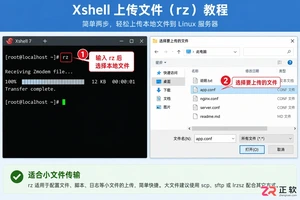
遇到Xshell无法直接拖拽上传文件的困扰?本文详解如何通过安装lrzsz使用rz命令快速上传小文件,以及利用内置SFTP功能稳定传输大文件的具体操作步骤。

配置PHP支持SSH2扩展需要三个步骤:首先下载与PHP版本和线程安全类型匹配的php_ssh2.dll动态库文件,将其复制到PHP的ext扩展目录,然后在php.ini配置文件中添加extension=php_ssh2.dll一行,最后重启Apache服务器或PHP-FPM进程管理器,通过运行phpinfo()函数验证扩展是否成功加载。

Java操作SFTP的核心是使用JSch库实现安全传输,1.引入JSch依赖;2.建立SFTP连接并配置密钥认证;3.严格校验主机指纹;4.创建SFTP通道进行文件传输;5.关闭连接释放资源;常见连接失败原因包括网络问题、防火墙限制、用户名或密码错误、密钥权限或格式问题、主机密钥校验失败、JSch版本冲突及服务器配置问题;为保障安全性,应使用密钥认证,1.生成密钥对并设置强密码;2.将公钥上传至服务器authorized_keys文件;3.在代码中配置JSch使用私钥路径;4.可选禁用密码认证提升安全性;
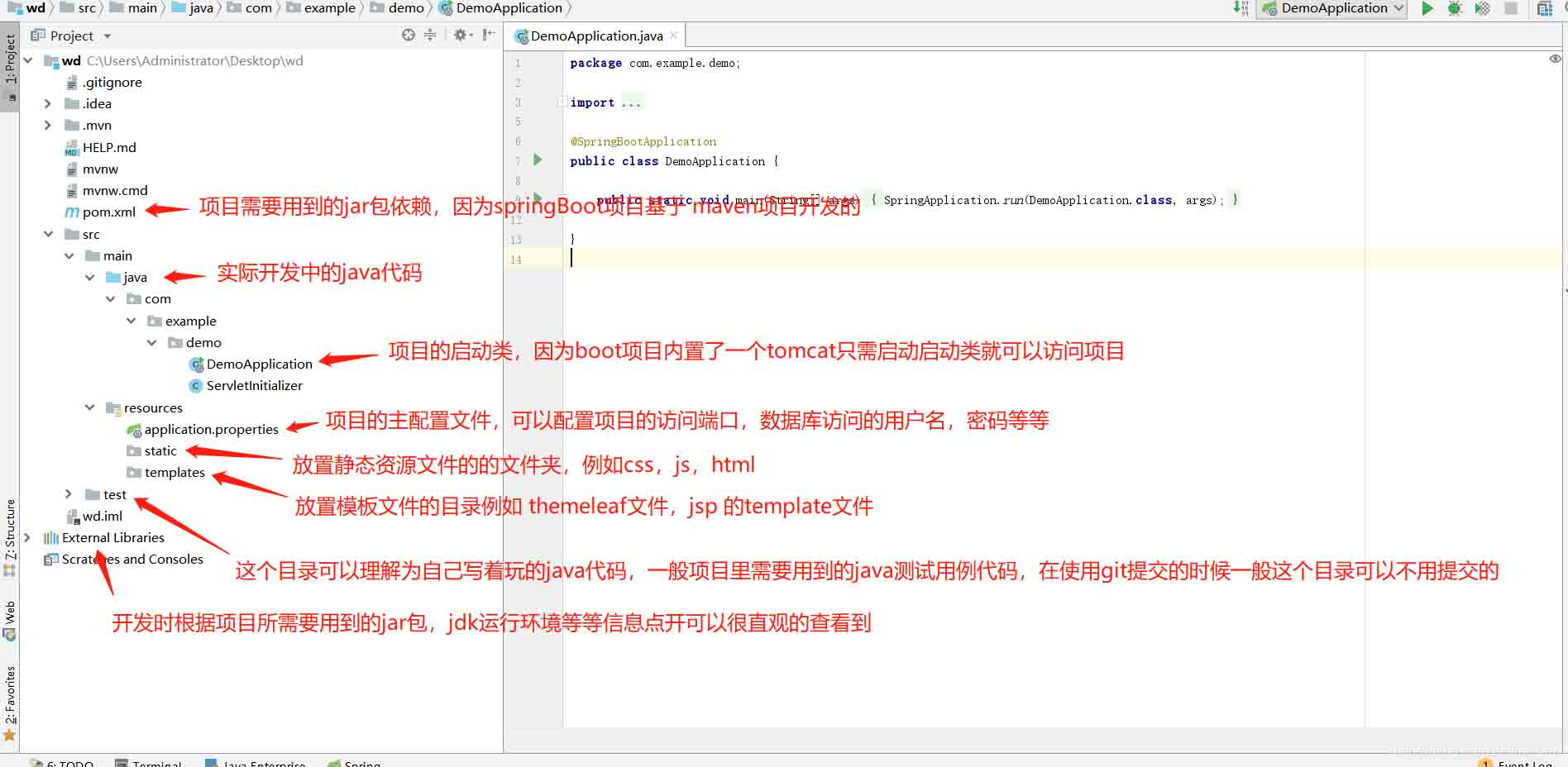
springBoot项目常用目录springBoot项目的目录结构及名规范介绍基于SpringBoot开发时的目录结构及命名规范,通过介绍能够为你解决,在实际项目中如何规划目录结构?如何命名目录更规范?各个目录分别代表什么含义?等三个问题。目录说明servicex//项目名|-admin-ui//管理服务前端代码(一般将UI和SERVICE放到一个工程中,便于管理)|-servicex-auth//模块1|-servicex-common//模块2|-servicex-gateway//模块3|-serv
SFTP是一种基于SSH协议的文件传输协议,通过安全的加密方式进行数据传输,实现了更为安全可靠的文件传输。SFTP可以作为FTP的替代方案,也可以通过终端来管理,以便更加灵活。那么Linux中使用sftp无法获取目录怎么办?具体请看下文。 如果在Linux中使用SFTP无法获取目录,可能有几种原因导致。下面提供几种常见的解决方法:检查用户权限:确保SFTP登录用户有访问目录的权限,运行ls-l命令检查目录权限和所有者信息,确保用户有读取权限。确保路径正确:验证提供的路径是否准确,并与SFTP服务器的

解析SpringBoot和SpringMVC之间的异同SpringBoot和SpringMVC是Java领域中非常重要的开发框架。虽然它们都属于Spring框架的一部分,但是在使用和功能上有一些明显的区别。本文将对SpringBoot和SpringMVC进行比较,解析它们之间的异同。首先,让我们来了解一下SpringBoot。SpringBo
近年来,随着云计算和分布式架构的兴起,微服务架构的应用越来越广泛。而SpringCloud和SpringBoot作为Java开发中的两个重要框架,对于微服务的实现起到了重要的作用。然而,很多人对于它们在微服务领域的不同应用方式还存在一定的疑惑。本文将从不同的角度探索SpringCloud和SpringBoot在微服务中的应用方式。首先,我们来了解一下Spri
SpringBoot与SpringMVC的不同之处在哪里?SpringBoot和SpringMVC是两个非常流行的Java开发框架,用于构建Web应用程序。尽管它们经常分别被使用,但它们之间的不同之处也是很明显的。首先,SpringBoot可以被看作是一个Spring框架的扩展或者增强版。它旨在简化Spring应用程序的初始化和配置过程,以帮助开发人
SpringBoot和SpringMVC都是Java开发中常用的框架,但它们之间有一些明显的差异。本文将探究这两个框架的特点和用途,并对它们的差异进行比较。首先,我们来了解一下SpringBoot。SpringBoot是由Pivotal团队开发的,它旨在简化基于Spring框架的应用程序的创建和部署。它提供了一种快速、轻量级的方式来构建独立的、可执行
SpringBoot和SpringMVC是Java开发中常用的两个框架,它们都是由Spring框架所提供的,但在功能和使用方式上有着一些区别。本文将分别介绍SpringBoot和SpringMVC的特点和区别。一、SpringBoot的特点:简化配置:SpringBoot通过约定优于配置的原则,大大简化了项目的配置过程。它可以自动配置项目所需要的参数,开发人





火山引擎是字节跳动旗下企业级云与AI服务平台。聚焦大模型核心能力,依托字节自研豆包多模态大模型,凭借火山方舟一站式平台,提供模型精调、推理部署、智能应用搭建等全链路服务,结合高性能AI算力,助力各行业快速落地大模型数字化与智能化应用。



