

SpringBoot怎么整合JdbcTemplate
前言Spring对数据库的操作在jdbc上面做了更深层次的封装,而JdbcTemplate便是Spring提供的一个操作数据库的便捷工具。我们可以借助JdbcTemplate来执行所有数据库操作,例如插入,更新,删除和从数据库中检索数据,并且有效避免直接使用jdbc带来的繁琐编码初始化SpringBoot项目使用IDEA创建项目点击File–>New–>Project点击springinitializr,注意自己的SDK版本,再点击next填写自己的group、artifact,注
前言
Spring对数据库的操作在jdbc上面做了更深层次的封装,而JdbcTemplate便是Spring提供的一个操作数据库的便捷工具。我们可以借助JdbcTemplate来执行所有数据库操作,例如插入,更新,删除和从数据库中检索数据,并且有效避免直接使用jdbc带来的繁琐编码
初始化SpringBoot项目
使用IDEA创建项目
点击File–>New–>Project
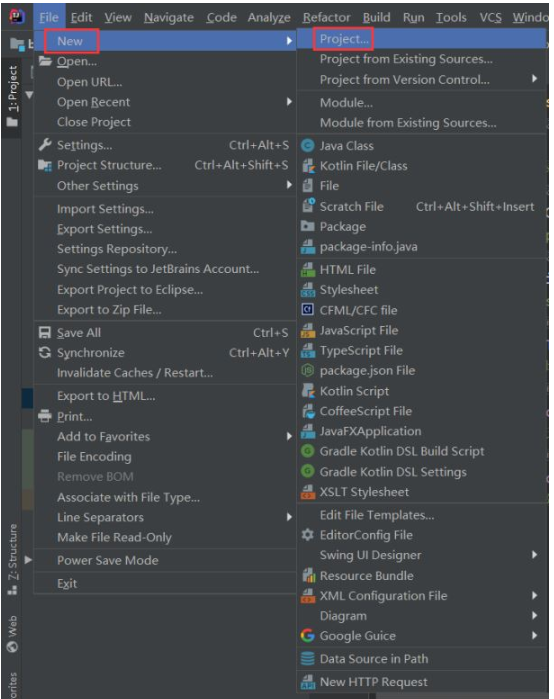
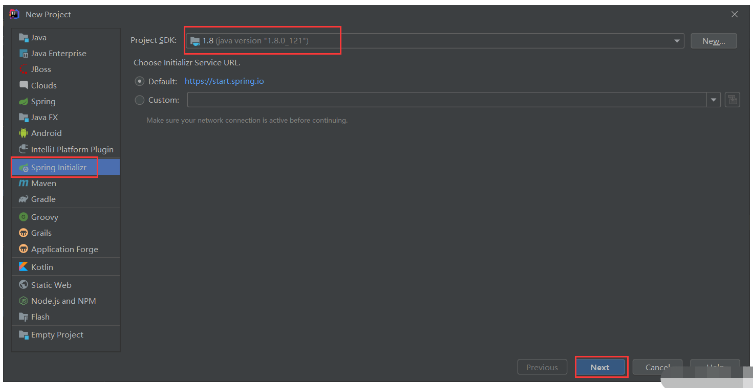
点击spring initializr,注意自己的SDK版本,再点击next
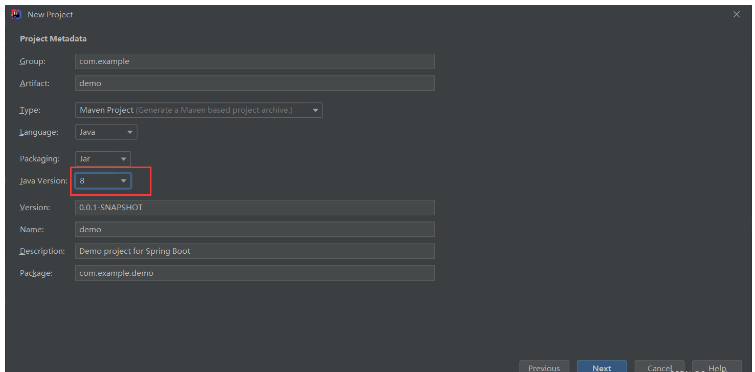
填写自己的group、artifact,注意Java version的版本和前面的SDK版本一致,点击next
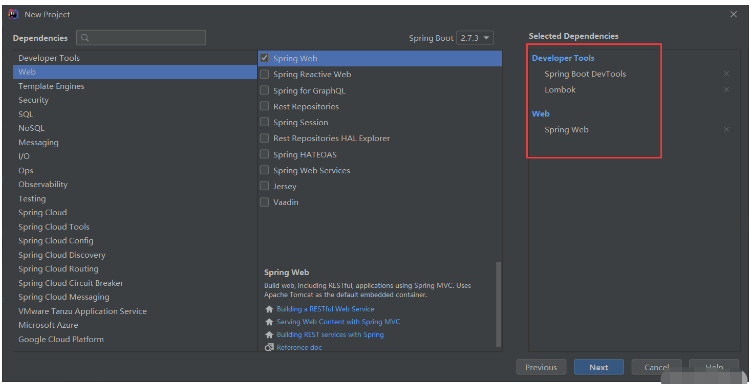
选择自己要添加的依赖,项目创建的时候会自动加入到maven中,然后
点击next
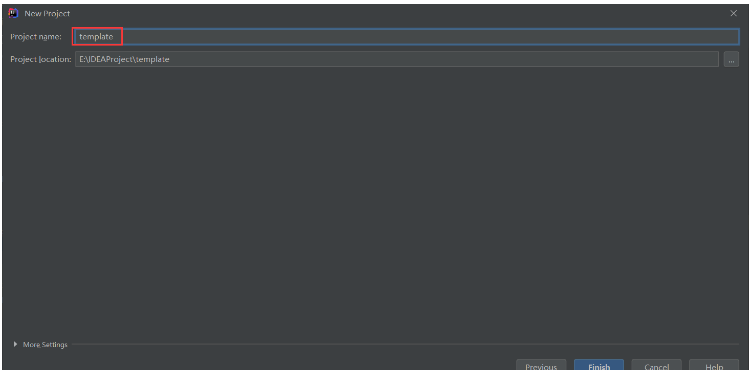
填写自己的项目名,点击finish
导入JDBC依赖
            org.springframework.boot
            spring-boot-starter-data-jdbc
导入数据库驱动
我这里使用的MySQL数据库,就导入MySQL数据库驱动
            mysql
            mysql-connector-java
            5.1.42
修改配置文件
我这里使用的是yml格式配置文件
spring:
  datasource:
    url: jdbc:mysql://localhost:3306/test?characterEncoding=utf8
    username: root
    password: admin
    driver-class-name: com.mysql.jdbc.Driver
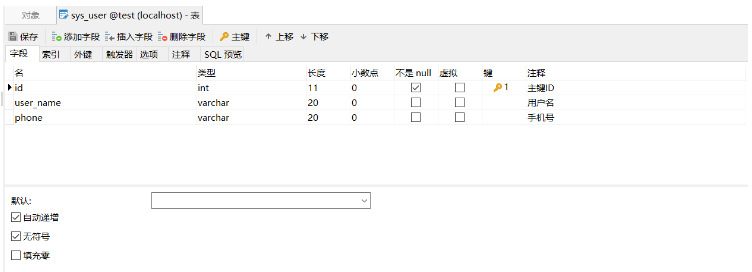
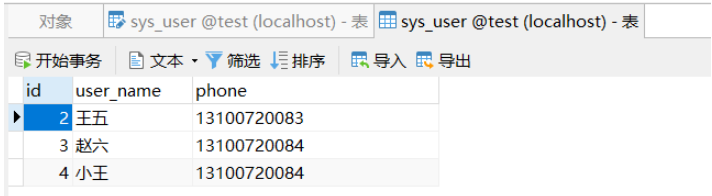
数据库sys_user表结构
测试类代码
查询sys_user表数据量
package com.gavin.boot;

import lombok.extern.slf4j.Slf4j;
import org.junit.jupiter.api.Test;
import org.springframework.beans.factory.annotation.Autowired;
import org.springframework.boot.test.context.SpringBootTest;
import org.springframework.jdbc.core.JdbcTemplate;
import java.util.List;
import java.util.Map;

@Slf4j
@SpringBootTest
class BootJdbcApplicationTests {

    @Autowired
    JdbcTemplate jdbcTemplate;

    @Test
    void contextLoads() {
        //获取sys_user表数据量
        Long aLong = jdbcTemplate.queryForObject("select count(*) from sys_user", Long.class);
        log.info("记录总数:{}", aLong);
}
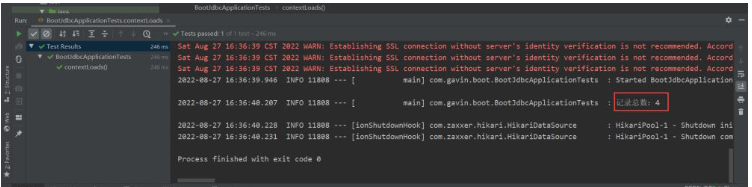
运行结果
查询sys_user表一条数据
package com.gavin.boot;

import lombok.extern.slf4j.Slf4j;
import org.junit.jupiter.api.Test;
import org.springframework.beans.factory.annotation.Autowired;
import org.springframework.boot.test.context.SpringBootTest;
import org.springframework.jdbc.core.JdbcTemplate;
import java.util.List;
import java.util.Map;

@Slf4j
@SpringBootTest
class BootJdbcApplicationTests {

    @Autowired
    JdbcTemplate jdbcTemplate;

    @Test
    void contextLoads() {
        //获取sys_user表一条数据
        Map map = jdbcTemplate.queryForMap("select * from sys_user where id = 1");
        log.info("map数据为:" +  map);
    }
}
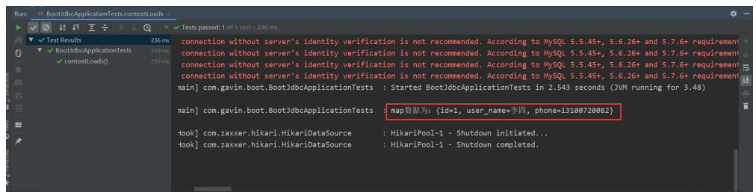
运行结果
查询sys_user表所有数据
package com.gavin.boot;

import lombok.extern.slf4j.Slf4j;
import org.junit.jupiter.api.Test;
import org.springframework.beans.factory.annotation.Autowired;
import org.springframework.boot.test.context.SpringBootTest;
import org.springframework.jdbc.core.JdbcTemplate;
import java.util.List;
import java.util.Map;

@Slf4j
@SpringBootTest
class BootJdbcApplicationTests {

    @Autowired
    JdbcTemplate jdbcTemplate;

    @Test
    void contextLoads() {
    	//获取sys_user表所有数据
        List> list = jdbcTemplate.queryForList("select * from sys_user");
        log.info("list数据为:" + list);
    }
}
新增sys_user表一条数据
package com.gavin.boot;

import lombok.extern.slf4j.Slf4j;
import org.junit.jupiter.api.Test;
import org.springframework.beans.factory.annotation.Autowired;
import org.springframework.boot.test.context.SpringBootTest;
import org.springframework.jdbc.core.JdbcTemplate;
import java.util.List;
import java.util.Map;

@Slf4j
@SpringBootTest
class BootJdbcApplicationTests {

    @Autowired
    JdbcTemplate jdbcTemplate;

    @Test
    void contextLoads() {
        //新增一条数据
        int i = jdbcTemplate.update("insert into sys_user(user_name, phone) values(?,?)", new String[]{"小王", "13100720084"});
        log.info("新增了" + i + "条数据");
    }
}
运行结果
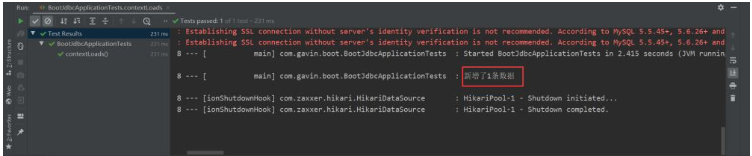
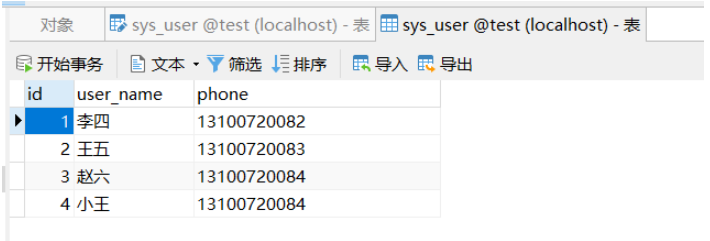
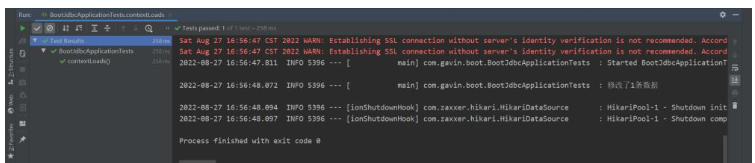
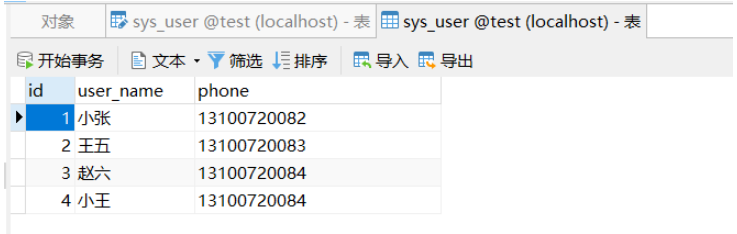
修改sys_user表一条数据
package com.gavin.boot;

import lombok.extern.slf4j.Slf4j;
import org.junit.jupiter.api.Test;
import org.springframework.beans.factory.annotation.Autowired;
import org.springframework.boot.test.context.SpringBootTest;
import org.springframework.jdbc.core.JdbcTemplate;
import java.util.List;
import java.util.Map;

@Slf4j
@SpringBootTest
class BootJdbcApplicationTests {

    @Autowired
    JdbcTemplate jdbcTemplate;

    @Test
    void contextLoads() {
        //修改一条数据
        int i2 = jdbcTemplate.update("update sys_user set user_name = ? where id = 1", new String[]{"小张"});
        log.info("修改了" + i2 + "条数据");
    }
}
运行结果
删除sys_user表一条数据
package com.gavin.boot;

import lombok.extern.slf4j.Slf4j;
import org.junit.jupiter.api.Test;
import org.springframework.beans.factory.annotation.Autowired;
import org.springframework.boot.test.context.SpringBootTest;
import org.springframework.jdbc.core.JdbcTemplate;
import java.util.List;
import java.util.Map;

@Slf4j
@SpringBootTest
class BootJdbcApplicationTests {

    @Autowired
    JdbcTemplate jdbcTemplate;

    @Test
    void contextLoads() {
        //删除一条数据
        int i3 = jdbcTemplate.update("delete from sys_user where id = ?", 1);
        log.info("删除了" + i3 + "条数据");
    }
}
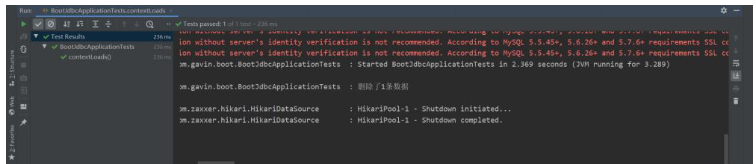
运行结果
springBoot项目常用目录springBoot项目的目录结构及名规范介绍基于SpringBoot开发时的目录结构及命名规范,通过介绍能够为你解决,在实际项目中如何规划目录结构?如何命名目录更规范?各个目录分别代表什么含义?等三个问题。目录说明servicex//项目名|-admin-ui//管理服务前端代码(一般将UI和SERVICE放到一个工程中,便于管理)|-servicex-auth//模块1|-servicex-common//模块2|-servicex-gateway//模块3|-serv

解析SpringBoot和SpringMVC之间的异同SpringBoot和SpringMVC是Java领域中非常重要的开发框架。虽然它们都属于Spring框架的一部分,但是在使用和功能上有一些明显的区别。本文将对SpringBoot和SpringMVC进行比较,解析它们之间的异同。首先,让我们来了解一下SpringBoot。SpringBo
近年来,随着云计算和分布式架构的兴起,微服务架构的应用越来越广泛。而SpringCloud和SpringBoot作为Java开发中的两个重要框架,对于微服务的实现起到了重要的作用。然而,很多人对于它们在微服务领域的不同应用方式还存在一定的疑惑。本文将从不同的角度探索SpringCloud和SpringBoot在微服务中的应用方式。首先,我们来了解一下Spri
SpringBoot与SpringMVC的不同之处在哪里?SpringBoot和SpringMVC是两个非常流行的Java开发框架,用于构建Web应用程序。尽管它们经常分别被使用,但它们之间的不同之处也是很明显的。首先,SpringBoot可以被看作是一个Spring框架的扩展或者增强版。它旨在简化Spring应用程序的初始化和配置过程,以帮助开发人
SpringBoot和SpringMVC都是Java开发中常用的框架,但它们之间有一些明显的差异。本文将探究这两个框架的特点和用途,并对它们的差异进行比较。首先,我们来了解一下SpringBoot。SpringBoot是由Pivotal团队开发的,它旨在简化基于Spring框架的应用程序的创建和部署。它提供了一种快速、轻量级的方式来构建独立的、可执行
SpringBoot和SpringMVC是Java开发中常用的两个框架,它们都是由Spring框架所提供的,但在功能和使用方式上有着一些区别。本文将分别介绍SpringBoot和SpringMVC的特点和区别。一、SpringBoot的特点:简化配置:SpringBoot通过约定优于配置的原则,大大简化了项目的配置过程。它可以自动配置项目所需要的参数,开发人
SpringCloud和SpringBoot是目前Java领域中最热门的开源框架,它们分别提供了一套完善的微服务架构和快速构建应用程序的解决方案。本文将对它们的功能进行比较,并给出选择指南,以帮助读者了解它们的优势和适用场景。SpringBoot是一个用于开发Java应用程序的框架,它提供了一个简化的开发流程,集成了大量常用的功能和组件,减少了开发者的工作量
深入剖析SpringCloud和SpringBoot的异同引言:在构建企业级应用程序时,Spring框架已经成为开发者们的首选。它提供了一种简单而强大的方式来构建独立于平台的应用程序。Spring框架由两个核心模块组成:SpringBoot和SpringCloud。虽然它们都可以帮助开发者快速搭建应用程序,但它们的目标和用途存在一些差异。本文将深入剖析Spr
从架构角度看SpringCloud与SpringBoot的差异引言:在当今的互联网时代,构建分布式系统已经成为了一种必要的需求。而SpringBoot和SpringCloud正是为了满足这个需求而诞生的。尽管它们都是由Spring框架所提供的解决方案,但从架构角度来看,它们存在着一些重要的差异。本文将从架构的角度出发,对SpringBoot和SpringCl
JavaAPI开发中使用SpringBoot的利弊分析随着互联网的快速发展和技术的不断更新迭代,Java技术在开发中的广泛应用引起了人们的重视。而SpringBoot作为一种微服务架构的解决方案,已经逐渐成为Java开发中的热门选择。那么,在JavaAPI开发中使用SpringBoot,到底有哪些利弊呢?下面来分析一下。利:简化开发





火山引擎是字节跳动旗下企业级云与AI服务平台。聚焦大模型核心能力,依托字节自研豆包多模态大模型,凭借火山方舟一站式平台,提供模型精调、推理部署、智能应用搭建等全链路服务,结合高性能AI算力,助力各行业快速落地大模型数字化与智能化应用。



