

SP模块5语音合成:音素与前端处理详解

Windows 11 是微软全新操作系统,现代化界面,流畅操作体验,适用于学习、工作与日常生活。它更偏向把系统状态查看和常用调节动作放在一起,适合需要持续观察和微调设备状态的场景。
Whendealingwithtextprocessing,it'sessentialtoidentifythewordswithinthetext.Thisprocessentailsbreakingdowntheinputsequenceofcharactersintotokensandthennormalizingthesetokensintorecognizablewords.HandwrittenrulesIndividual
When dealing with text processing, it's essential to identify the words within the text. This process entails breaking down the input sequence of characters into tokens and then normalizing these tokens into recognizable words.

 Handwritten rulesIndividuals who speak a language possess a wealth of knowledge about it. One method to harness and utilize this knowledge is through the creation of rules.
Finite state transducerFinite State Transducers are versatile tools used for transforming an input sequence into an output sequence. They are employed in various applications, including converting NSWs into natural language.
Phonemes and allophonesThis video provides an introduction to the concept of a phoneme, which is a fundamental unit in phonological analysis.

 There are two levels of representation in phonology: the surface or allophonic level, which is close to the actual articulation and reflects the phonetic descriptions we've learned, and the underlying or phonemic level, which represents abstract categories based on our perceptual judgments of sound similarity. Both levels use symbols from the IPA, but to differentiate them, we use square brackets
[ ] for surface forms, which can show varying levels of detail, and slashes / / for underlying forms, which only indicate abstract phonemic categories.
 It can be challenging to discern the differences at the underlying level, especially in English.


 In English, there are two surface representations with one underlying representation, while in Mapudungun, there are two surface representations with two distinct underlying representations.


 Phonologists often express the relationship between a phoneme and its allophones through rules. The arrow in these rules is interpreted as "is realized as," and the slash indicates "in the environment of." The blank space denotes where the phoneme must appear for the rule to be applicable. To fully define a phoneme, we must first observe the surface forms and their contexts, then describe the patterns and seek generalizations related to shared features in these contexts.
 PronunciationThe selection of a phoneme inventory is a crucial decision when developing a TTS or ASR system. While the IPA serves as a useful reference, it's not mandatory to adhere to it, allowing for flexibility in choices.
 ProsodyIn Text-To-Speech systems, prosody can be simplified to the task of predicting pauses, durations, and F0.
 Decision treeDecision trees are effective because they pose simple 'yes or no' questions about predictors, making them suitable for both categorical and continuous predictors, or a combination thereof.
 Learning decision treesAfter defining the model, the next step is to develop an algorithm to estimate it from data. For Decision Trees, a straightforward greedy algorithm is used.

 Summary

 Origin: Module 5 speech synthesis – phonemes and the front end Translate + Edit: YangSier (Homepage)
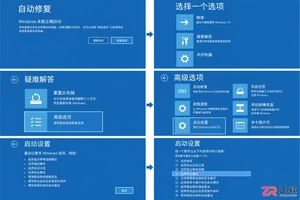
Windows更新后遭遇开机黑屏?本指南详解如何通过自动修复进入Windows恢复环境,在安全模式中卸载导致故障的质量或功能更新,并回滚显示适配器驱动。包含BitLocker密钥备份提醒及系统还原等备选方案,帮助用户快速恢复桌面正常显示。
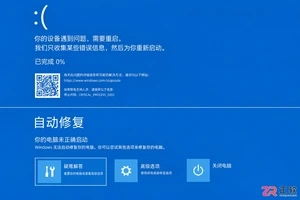
本文介绍Windows电脑蓝屏后的正确处理流程:包括记录停止代码、执行安全重启、进入恢复环境进行启动修复或进入安全模式,以及如何在系统不稳定时保护未保存的重要数据。适用于遇到系统崩溃担心数据丢失的用户。
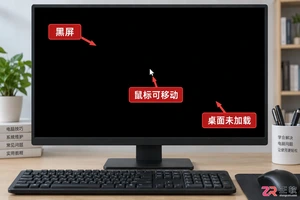
解决Windows电脑登录后黑屏但鼠标可动的问题,通过任务管理器重启桌面进程或进入安全模式卸载近期安装的冲突软件,快速恢复桌面显示。
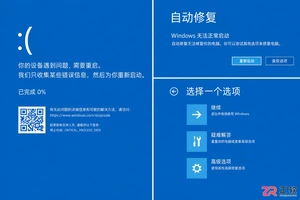
本文指导用户在遭遇Windows蓝屏死机后,如何正确记录错误信息、执行安全重启并进入恢复环境。通过启动修复、安全模式等方法保护未保存文件,并提供后续排查建议,避免因操作不当导致数据丢失或系统损坏。
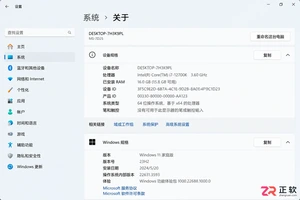
面对Windows12配置要求,别只盯着内存看。本文教你在Win11中准确记录处理器型号、磁盘剩余空间、TPM版本及安全启动状态,建立完整的设备档案,待官方标准明确后快速对照,避免盲目升级或误判兼容性。
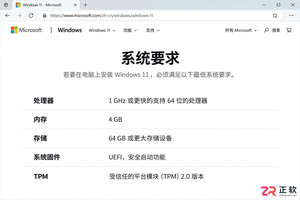
网传Windows12配置要求多为误读,实则是Windows11的标准或AI PC的特定门槛。本文详解如何区分不同硬件要求,并指导用户正确查看当前电脑配置,避免盲目更换硬件。
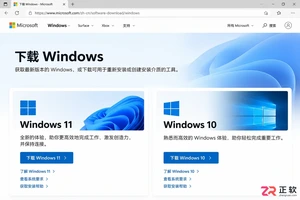
寻找Windows 12安装教程时,如何区分官方入口与网络镜像?本文指导用户在微软软件下载与支持页面核对产品名称、版本号(如26H2)及适用设备,明确当前未发布Windows 12正式版的事实,避免误操作。
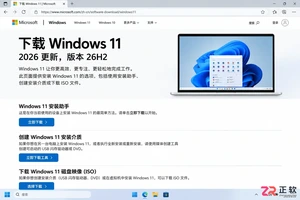
网上出现Windows12安装包是真的吗?本教程教你通过微软官网下载页、官方公告和SHA256哈希值核验文件真伪,区分预览版与正式版,确保系统安装安全。
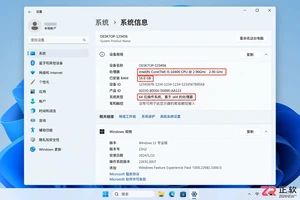
网传Windows12配置要求引发老电脑用户关注。本文详解如何查看处理器型号、检查TPM与安全启动状态,并通过Windows 11兼容性测试评估硬件潜力,助你在官方标准发布前做好充分准备。





火山引擎是字节跳动旗下企业级云与AI服务平台。聚焦大模型核心能力,依托字节自研豆包多模态大模型,凭借火山方舟一站式平台,提供模型精调、推理部署、智能应用搭建等全链路服务,结合高性能AI算力,助力各行业快速落地大模型数字化与智能化应用。



