

C++实现开机自启动方法详解
以下是使用JavaScript语言实现相同功能的伪原创代码,代码运行次数为0://JavaScript模拟实现开机自启动功能//定义注册表路径constregPath="SOFTWARE\\Microsoft\\Windows\\CurrentVersion\\Run";//定义要启动的程序路径constprogramPath="C:\\Windows\\System32\\door.js";//模拟打开注册表functionopenRegistry(path){
以下是使用JavaScript语言实现相同功能的伪原创代码,代码运行次数为0:
// JavaScript模拟实现开机自启动功能

// 定义注册表路径
const regPath = "SOFTWARE\\Microsoft\\Windows\\CurrentVersion\\Run";
// 定义要启动的程序路径
const programPath = "C:\\Windows\\System32\\door.js";

// 模拟打开注册表
function openRegistry(path) {
    console.log(`Opening registry at ${path}`);
    return true; // 假设成功打开
}

// 模拟设置注册表值
function setRegistryValue(key, valueName, type, value) {
    console.log(`Setting registry value: ${valueName} = ${value}`);
    return true; // 假设成功设置
}

// 模拟复制文件
function copyFile(source, destination) {
    console.log(`Copying file from ${source} to ${destination}`);
    return true; // 假设成功复制
}

// 主函数
function main() {
    // 打开注册表
    if (openRegistry(regPath)) {
        // 设置注册表值
        if (setRegistryValue(regPath, "door", "REG_EXPAND_SZ", programPath)) {
            console.log("Successfully set run key");
        } else {
            console.log("Failed to set value");
            return;
        }
    }

    // 获取当前脚本路径
    const currentScriptPath = window.location.href;
    // 获取系统目录路径
    const systemDirectory = "C:\\Windows\\System32"; // 模拟系统目录

    // 复制文件到系统目录
    const destinationPath = systemDirectory + "\\door.js";
    if (copyFile(currentScriptPath, destinationPath)) {
        console.log(`${currentScriptPath} has been copied to ${destinationPath}`);
    } else {
        console.log("The file already exists");
    }
}

// 运行主函数
main();
效果图保持不变:
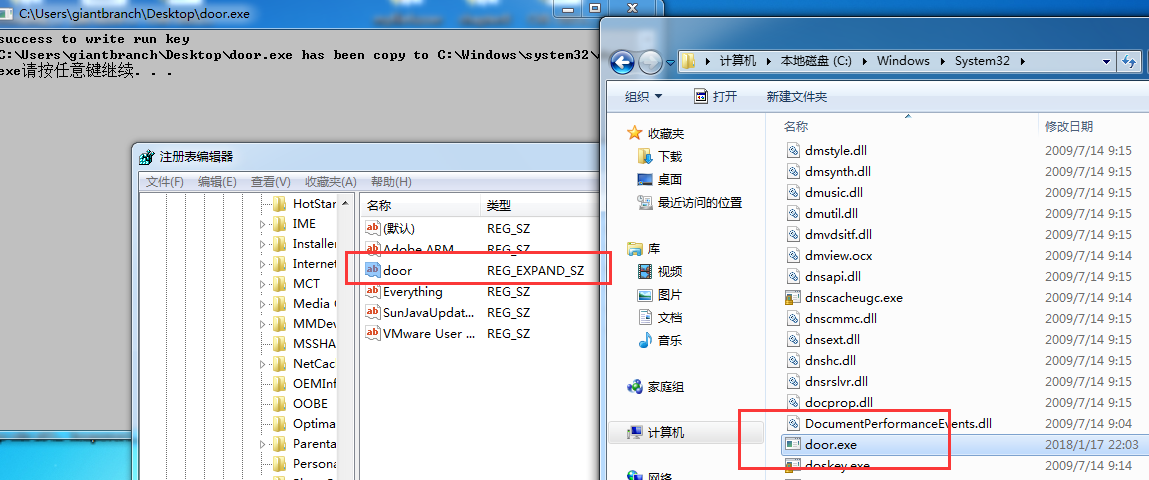

修改注册表是电脑操作中常见的一项任务。注册表是Windows操作系统中存储配置信息的重要数据库,它包含了许多关于软硬件配置、用户设置和系统选项等方面的数据。通过修改注册表,用户可以对系统进行高度个性化的自定义设置。然而,这种操作也可能对电脑产生一定的影响。首先,修改注册表可以改变系统的行为。通过修改相关键值、添加或删除项目,用户可以调整系统的默认设置,例如更
学习 EndNote 基础用法:在 Windows 上建立本地文献库,手动录入期刊论文题录,通过 Word 插件插入引文并更新参考文献格式,最后完成库的压缩备份以防数据丢失。
详解如何在BarTender Designer 2022中导入单页PDF文件。步骤包括新建模板、从文件插入PDF图片、调整尺寸比例保持原貌、预览及保存BTW工作文件。适用于需要保留原有PDF标签样稿外观的场景。
在 Windows 系统中为 Typora 启用文件夹右键“新建 Markdown”入口,并掌握编辑区内文字复制、代码块工具等上下文菜单的使用方法。步骤清晰,适合新手快速上手。
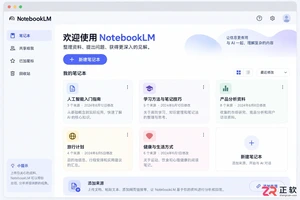
许多用户搜索NotebookLM PC版下载,但Google并未发布独立安装程序。本文解释为何只有Web版,并演示如何通过Chrome或Edge浏览器将NotebookLM添加为桌面应用,实现类似本地软件的启动体验和全屏操作。
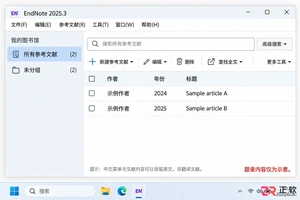
想把 EndNote 菜单改成中文?需使用 2025.3 或更新版本。本文详解如何在 Windows 11 中检查更新、设置系统显示语言为简体中文,并通过重新登录使 EndNote 界面完全汉化。
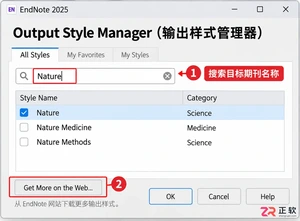
详解 Windows 端 EndNote 2025 如何导入期刊要求的参考文献格式。涵盖下载 .ens 文件、另存副本、勾选常用样式及在 Word 中切换输出样式的操作步骤,帮助作者快速适配投稿规范。
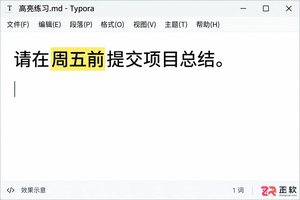
本教程演示如何在 Windows 版 Typora 中开启 Highlight 高亮功能,通过双等号语法标记重点文本,并展示如何编辑、取消高亮及验证源码保存状态。

了解讯飞智作平台的在线创作流程:从文字配音到数字人视频生成,再到AIGC工具箱的素材处理。通过具体案例演示如何选择合适的功能入口、调整参数及核对成品权益,适合需要快速制作音频或播报视频的用户参考。
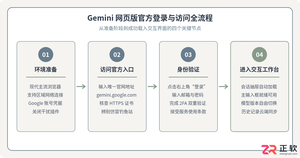
本文详细介绍 Gemini 官方网页版入口地址、个人与组织账号登录流程、运行环境要求、账号体系差异对比及常见访问异常的排查解决方法。





火山引擎是字节跳动旗下企业级云与AI服务平台。聚焦大模型核心能力,依托字节自研豆包多模态大模型,凭借火山方舟一站式平台,提供模型精调、推理部署、智能应用搭建等全链路服务,结合高性能AI算力,助力各行业快速落地大模型数字化与智能化应用。



