

C++跨平台文件存在检测方法
答案:跨平台检查文件存在性可通过条件编译使用_access(Windows)或access(POSIX),结合stat/lstat获取详细信息,也可用std::ifstream尝试打开文件;处理符号链接时需用lstat判断链接本身是否存在,Windows则需通过FindFirstFile检查重解析点属性。
答案:跨平台检查文件存在性可通过条件编译使用 _access(Windows)或 access(POSIX),结合 stat/lstat 获取详细信息,也可用 std::ifstream 尝试打开文件;处理符号链接时需用 lstat 判断链接本身是否存在,Windows 则需通过 FindFirstFile 检查重解析点属性。

检查C++中文件是否存在,跨平台的方法需要考虑不同操作系统API的差异,但可以使用一些标准库或第三方库来简化这个过程。核心在于使用stat函数(POSIX标准)或_stat函数(Windows)。
解决方案:
跨平台检测文件是否存在,主要思路是封装操作系统相关的API,提供统一的接口。以下是一种实现方式:
#include#include // For std::ifstream (alternative approach) #ifdef _WIN32 #include // For _access #include // For _mkdir #else #include // For access and mkdir #include // For stat #endif #include bool fileExists(const std::string& filename) { #ifdef _WIN32 return (_access(filename.c_str(), 0) != -1); #else return (access(filename.c_str(), F_OK) != -1); #endif } // 创建目录,跨平台实现 bool createDirectory(const std::string& path) { #ifdef _WIN32 if (_mkdir(path.c_str()) == 0) { return true; } else { // 检查目录是否已存在,避免重复创建失败 if (fileExists(path)) return true; return false; } #else if (mkdir(path.c_str(), 0777) == 0) { return true; } else { // 检查目录是否已存在 if (fileExists(path)) return true; return false; } #endif } int main() { std::string filename = "test.txt"; std::string dirname = "test_dir"; if (fileExists(filename)) { std::cout << "File " << filename << " exists." << std::endl; } else { std::cout << "File " << filename << " does not exist." << std::endl; // 创建一个空文件 std::ofstream outfile(filename); outfile.close(); if (fileExists(filename)) { std::cout << "File " << filename << " created successfully." << std::endl; } } if (createDirectory(dirname)) { std::cout << "Directory " << dirname << " created successfully." << std::endl; } else { std::cout << "Failed to create directory " << dirname << ". It may already exist." << std::endl; } return 0; }
这段代码首先包含了必要的头文件,然后定义了一个fileExists函数,它使用条件编译来选择正确的API(_access在Windows上,access在POSIX系统上)。access函数的F_OK参数检查文件是否存在。createDirectory函数类似地创建目录。
如何处理文件不存在时的异常?
直接使用access或_access通常不会抛出异常。它们返回一个整数值来表示操作是否成功(0表示成功,-1表示失败)。因此,错误处理通常通过检查返回值来完成。如果文件不存在,并且你的程序需要采取特定的行动,你应该在fileExists函数返回false后立即处理。
if (!fileExists(filename)) {
    std::cerr << "Error: File " << filename << " not found." << std::endl;
    // 可以选择抛出自定义异常,如果这是你的错误处理策略
    // throw std::runtime_error("File not found: " + filename);
    return 1; // 或者退出程序,如果文件缺失是致命错误
}除了access和_access,还有其他跨平台检查文件是否存在的方法吗?
当然,std::ifstream提供了一种更C++风格的方式。你可以尝试打开文件,如果打开成功,则文件存在,否则文件不存在。但这有个缺点:它会实际尝试打开文件,这可能不是你想要的,特别是如果文件很大或打开文件有副作用。
#includebool fileExistsStream(const std::string& filename) { std::ifstream file(filename); return file.good(); // 或者使用 file.is_open() }
还有使用stat函数的方法,它提供更详细的文件信息,但需要处理不同平台上的stat结构体差异。
如何处理符号链接?access函数会跟随符号链接吗?
access函数在大多数POSIX系统上会跟随符号链接。这意味着如果filename是一个指向现有文件的符号链接,access会返回0(表示存在)。如果你需要检查符号链接本身是否存在,而不是它指向的文件,你需要使用lstat函数代替stat。lstat不会跟随符号链接,而是返回关于链接本身的信息。
#ifdef _WIN32 // Windows 没有 lstat 的直接等价物,通常需要使用 FindFirstFile/FindNextFile // 并且检查 FILE_ATTRIBUTE_REPARSE_POINT 属性来判断是否为符号链接。 // 这部分实现比较复杂,这里简化处理,不专门区分符号链接。 #else #includebool symlinkExists(const std::string& filename) { struct stat buffer; return (lstat(filename.c_str(), &buffer) == 0); } bool isSymbolicLink(const std::string& filename) { struct stat buffer; if (lstat(filename.c_str(), &buffer) == 0) { return S_ISLNK(buffer.st_mode); } return false; // 出现错误,假设不是符号链接 } #endif
注意Windows上处理符号链接的方式非常不同,通常需要使用FindFirstFile和FindNextFile函数,并检查FILE_ATTRIBUTE_REPARSE_POINT属性。出于简洁性,上面的代码省略了Windows上完整的符号链接处理。
遇到PHP递归报错时,不要盲目调大max_nesting_level。本文教你区分Xdebug限制、内存耗尽和正则递归错误,提供代码级的终止条件优化与迭代替代方案,彻底解决栈溢出问题。

本文分析PHP递归中static变量导致的状态污染及引用传递引发的共享数据修改问题。提供具体的代码复现、缓存键设计建议及调试打印技巧,帮助开发者避免隐蔽的逻辑错误。
解析PHP递归函数在树形数据处理中的性能瓶颈,提供预加载数据消除I/O、使用显式栈替代深层递归的实战方案,帮助开发者在代码可读性与执行效率间做出合理取舍。

详细讲解在Java单元测试中如何使用Mockito模拟依赖对象,包括引入依赖、创建Mock、打桩返回值、行为验证以及Mock与Spy的核心差异和常见陷阱排查。

详细分析链表删除节点的时间复杂度,深入探讨单链表与双向链表在不同已知前提下的查找与删除开销,并结合完整代码与清晰图解进行对比总结。
想知道如何让AI写出的代码更贴合你的习惯?本文手把手教你在VS Code中调整Codex相关模型参数,通过修改配置文件优化温度值和令牌限制,解决代码建议不准确或响应慢的问题。

通过实测展示Claude Code在终端中如何理解自然语言指令、自动修改代码文件并处理复杂编程任务,帮助开发者评估其实际辅助能力。
本教程详细讲解如何使用Visual Studio创建WinForms项目,通过添加按钮和标签控件并编写点击事件代码,实现一个基础的计数器功能,适合C#初学者快速上手Windows窗体应用开发。
详解Cursor编辑器中自动补全功能的开启与优化设置,涵盖Tab触发机制、上下文窗口调整及模型切换,帮助开发者解决补全延迟、干扰大等问题,提升编码流畅度。
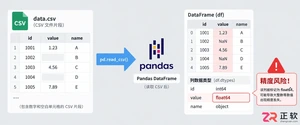
详解Pandas中数据格式转换的核心方法,包括astype强制转换、to_numeric容错处理及日期解析技巧,解决常见类型错误并提升数据处理效率。




Photoshop 2026 是 Adobe 推出的专业图像处理与视觉设计软件,支持 Windows、macOS 和 iPad 等平台,广泛应用于摄影修图、电商设计、平面海报、数字绘画及视觉合成等创作场景。

Blender 是一款免费开源、跨平台的专业 3D 创作软件,集建模、动画、渲染、视频编辑与视觉合成等功能于一体,广泛应用于影视动画、游戏设计和建筑可视化等领域。软件支持 Cycles 物理渲染器与 Eevee 实时渲染引擎,并提供多边形建模、骨骼绑定、物理模拟等专业工具。Blender 兼容 Windows、macOS 和 Linux 系统,安装包轻巧、运行流畅,依托活跃的全球开发者社区持续更新,是从初学者到专业创作者都值得选择的正版 3D 创作工具。


Photoshop 2026 是 Adobe 推出的专业图像处理与视觉设计软件,支持 Windows、macOS 和 iPad 等平台,广泛应用于摄影修图、电商设计、平面海报、数字绘画及视觉合成等创作场景。
Blender 是一款免费开源、跨平台的专业 3D 创作软件,集建模、动画、渲染、视频编辑与视觉合成等功能于一体,广泛应用于影视动画、游戏设计和建筑可视化等领域。软件支持 Cycles 物理渲染器与 Eevee 实时渲染引擎,并提供多边形建模、骨骼绑定、物理模拟等专业工具。Blender 兼容 Windows、macOS 和 Linux 系统,安装包轻巧、运行流畅,依托活跃的全球开发者社区持续更新,是从初学者到专业创作者都值得选择的正版 3D 创作工具。