

Java数组排序与索引查找教程
本文旨在指导Java初学者如何对数组中的元素进行排序,并按照特定的表格格式输出排序后的结果,同时保持原始索引信息的对应关系。通过修改现有的代码,我们将实现一个额外的输出,以展示按升序排列的测试分数,并保留它们在原始输入中的索引位置。
本文旨在指导 Java 初学者如何对数组中的元素进行排序,并按照特定的表格格式输出排序后的结果,同时保持原始索引信息的对应关系。通过修改现有的代码,我们将实现一个额外的输出,以展示按升序排列的测试分数,并保留它们在原始输入中的索引位置。
问题分析
原始代码存在的问题在于,排序算法 selectionSort() 对整个数组进行排序,包括未使用的数组元素。这导致输出结果中包含大量的 0,并且索引信息没有正确保留。我们需要修改代码,使其仅对用户输入的有效分数进行排序,并输出排序后的分数及其对应的原始索引。
解决方案
我们可以通过以下步骤解决问题:
- 修改 selectionSort() 方法: 使其只对 TestGrades 数组中前 ScoreCount 个元素进行排序。
- 创建索引数组: 创建一个新的数组 indices,用于存储 TestGrades 数组中每个元素的原始索引。
- 修改排序逻辑: 在 selectionSort() 方法中,同时交换 TestGrades 数组和 indices 数组中的元素,以保持索引信息的对应关系。
- 添加输出方法: 创建一个新的方法 OutputSortedArray(),用于输出排序后的测试分数及其对应的原始索引。
代码实现
以下是修改后的代码:
import java.util.Scanner;

public class ArrayIntro2 {

    public static void main(String[] args) {
        //integer array
        int[] TestGrades = new int[25];

        //creating object of ArrayIntro2T
        ArrayIntro2T pass = new ArrayIntro2T(TestGrades, 0, 0, 0);

        //getting total and filling array
        int scoreCount = ArrayIntro2T.FillArray(TestGrades, 0);

        //get average score
        double avg = pass.ComputeAverage(TestGrades, scoreCount);

        //outputting table
        ArrayIntro2T.OutputArray(TestGrades, scoreCount, avg);

        // Outputting sorted table
        ArrayIntro2T.selectionSort(TestGrades, scoreCount); // Sort only valid scores
        ArrayIntro2T.OutputSortedArray(TestGrades, scoreCount);
    }
}

//new class to store methods
class ArrayIntro2T {
    //variable declaration

    double CalcAvg = 0;
    int ScoreTotal = 0;
    int ScoreCount = 0;
    int[] TestGrades = new int[25];


    //constructor
    public ArrayIntro2T(int[] TestGradesT, int ScoreCountT, double CalcAvgT, int ScoreTotalT) {
        TestGrades = TestGradesT;
        ScoreCount = ScoreCountT;
        CalcAvg = CalcAvgT;
        ScoreTotal = ScoreTotalT;
    }

    //method to fill array
    public static int FillArray(int[] TestGrades, int ScoreCount) {

        Scanner scan = new Scanner(System.in);

        System.out.println("Please enter test scores one at a time, up to 25 values or enter -1 to quit");
        TestGrades[ScoreCount] = scan.nextInt();

        if (TestGrades[ScoreCount] == -1) {
            System.out.println("You have chosen to quit ");
        }

        while (TestGrades[ScoreCount] >= 0 && ScoreCount < 25) { // Corrected the loop condition
            ScoreCount++;
            if (ScoreCount < 25) { // Added check to prevent ArrayIndexOutOfBoundsException
                System.out.println("Enter the next test score or -1 to finish ");
                TestGrades[ScoreCount] = scan.nextInt();
            } else {
                System.out.println("Maximum number of scores reached.");
                break;
            }
        }
        return ScoreCount;
    }

    //method to compute average
    public double ComputeAverage(int[] TestGrades, int ScoreCount) {

        for (int i = 0; i < ScoreCount; i++) {
            ScoreTotal += TestGrades[i];
            CalcAvg = (double) ScoreTotal / (double) ScoreCount;
        }

        return CalcAvg;

    }

    public static void selectionSort(int[] TestGrades, int scoreCount) {
        int startScan, index, minIndex, minValue;
        int[] indices = new int[scoreCount];
        for (int i = 0; i < scoreCount; i++) {
            indices[i] = i; // Initialize indices array
        }

        for (startScan = 0; startScan < (scoreCount - 1); startScan++) {
            minIndex = startScan;
            minValue = TestGrades[indices[startScan]]; // Use indices array for comparison
            for (index = startScan + 1; index < scoreCount; index++) {
                if (TestGrades[indices[index]] < minValue) { // Use indices array for comparison
                    minValue = TestGrades[indices[index]];
                    minIndex = index;
                }
            }
            // Swap both TestGrades and indices
            int temp = indices[startScan];
            indices[startScan] = indices[minIndex];
            indices[minIndex] = temp;
        }
        // Reorder TestGrades based on sorted indices
        int[] sortedGrades = new int[scoreCount];
        for (int i = 0; i < scoreCount; i++) {
            sortedGrades[i] = TestGrades[indices[i]];
        }
        // Copy the sorted grades back to TestGrades array
        System.arraycopy(sortedGrades, 0, TestGrades, 0, scoreCount);
    }

    //method to output scores and average
    public static void OutputArray(int[] TestGrades, int ScoreCount, double CalcAvg) {

        System.out.println("Grade Number\t\tGrade Value");

        for (int i = 0; i < ScoreCount; i++) {
            System.out.println((i + 1) + "\t" + "\t" + "\t" + TestGrades[i]);
        }

        System.out.printf("Calculated Average\t" + "%.2f%%\n", CalcAvg); // Added newline for better formatting
    }

    public static void OutputSortedArray(int[] TestGrades, int scoreCount) {
        System.out.println("\nTable of sorted test scores");
        System.out.println("Grade Number\t\tGrade Value");
        for (int i = 0; i < scoreCount; i++) {
            System.out.println((i + 1) + "\t" + "\t" + "\t" + TestGrades[i]);
        }
    }
}
代码解释:
selectionSort(int[] TestGrades, int scoreCount):
- 接受数组 TestGrades 和有效分数数量 scoreCount 作为参数。
- 创建 indices 数组,初始化为 0 到 scoreCount-1,表示原始索引。
- 修改排序逻辑,使用 indices 数组间接访问 TestGrades 中的元素进行比较。
- 交换 indices 数组中的元素,以保持索引信息的对应关系。
- 创建一个新的数组sortedGrades,用来存储排序后的数组,然后将排序后的数组拷贝到原数组中。
OutputSortedArray(int[] TestGrades, int scoreCount):
- 接受数组 TestGrades 和有效分数数量 scoreCount 作为参数。
- 按照表格格式输出排序后的测试分数及其对应的原始索引。
注意事项
- 确保 ScoreCount 的值正确,避免数组越界异常。
- 在 FillArray() 方法中,需要检查 ScoreCount 的值,防止超出数组的最大长度。
- 该代码使用了选择排序算法,时间复杂度为 O(n^2)。对于大型数组,可以考虑使用更高效的排序算法,例如归并排序或快速排序。
总结
通过修改 selectionSort() 方法并添加 OutputSortedArray() 方法,我们成功地实现了对数组中有效元素的排序,并按照特定的表格格式输出排序后的结果,同时保持了原始索引信息的对应关系。这个例子展示了如何使用 Java 数组和排序算法解决实际问题。
解析六个GitHub AI开源项目的具体用途,包括软件静态分析、智能体回答检查、多语言配音、求职材料生成、本地代码检索及动态歌词展示,帮助开发者根据实际需求筛选工具并正确验证结果。

遇到OpenCode Skills无法加载或配置无效?本文手把手教你完成Skills的安装、环境变量设置及本地调试,避开常见坑点,让AI助手更懂你的代码习惯。
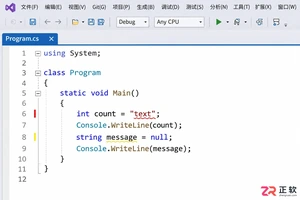
解决 Visual Studio 2022 编辑时不显示代码分析警告的问题。指南涵盖 .NET 项目实时分析设置、Roslyn 分析器范围调整及错误列表来源筛选,确保开发者能高效利用实时代码诊断功能。
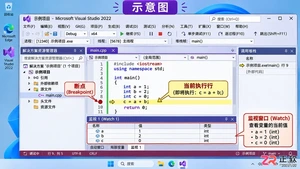
详解 Visual Studio 2022 调试技巧:包括断点设置、监视窗口开启方法、变量添加步骤以及通过 F10 单步执行观察变量值变化的全过程。
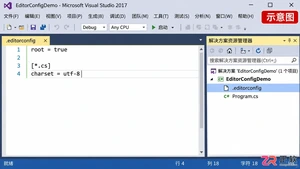
针对 Visual Studio 2017 缺乏全局默认编码选项的情况,详解如何利用 .editorconfig 设定项目级 UTF-8 无 BOM 规则,以及手动转换现有文件并校验字节的方法。
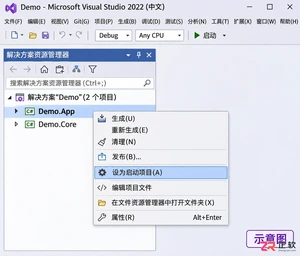
解决 Visual Studio 2022 F5 调试报错问题,通过设置启动项目、检查解决方案属性及正确区分类库与应用项目,快速恢复调试功能。
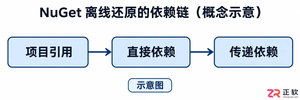
解决Visual Studio 2022离线环境中NuGet包还原失败的难题,涵盖依赖链分析、本地源配置、包集收集及隔离验证步骤,帮助开发者构建稳定的离线开发环境。

解决Visual Studio 2017大型项目加载慢的实用指南。涵盖性能监测、扩展管理、文档恢复优化及版本兼容性检查,帮助开发者精准定位瓶颈并提升工作效率。
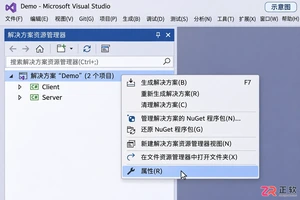
详解 Visual Studio 2022 多启动项目配置方法,包括启动动作选择、顺序调整及调试技巧,帮助开发者高效调试分布式或前后端分离应用。
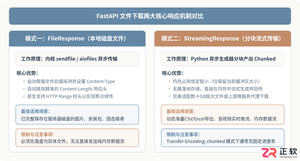
深入解析在FastAPI框架中实现文件下载接口的完整方案,涵盖基于FileResponse的本地静态文件传输、基于StreamingResponse的分块流式传输、RFC 5987中文文件名编码规范、路径穿越安全防御及BackgroundTasks临时文件清理,并配备详细代码示例与架构解析图。





火山引擎是字节跳动旗下企业级云与AI服务平台。聚焦大模型核心能力,依托字节自研豆包多模态大模型,凭借火山方舟一站式平台,提供模型精调、推理部署、智能应用搭建等全链路服务,结合高性能AI算力,助力各行业快速落地大模型数字化与智能化应用。



