

Google Cloud Pub/Sub发布服务策略测试解析
本文旨在解决在JUnit测试中直接模拟GoogleCloudPub/Sub客户端库(如Publisher.newBuilder())时遇到的挑战。核心策略是引入一个抽象层(接口和实现),将外部服务调用封装起来,从而实现对业务逻辑的独立测试,并提升代码的可维护性和可测试性。
本文旨在解决在JUnit测试中直接模拟Google Cloud Pub/Sub客户端库(如`Publisher.newBuilder()`)时遇到的挑战。核心策略是引入一个抽象层(接口和实现),将外部服务调用封装起来,从而实现对业务逻辑的独立测试,并提升代码的可维护性和可测试性。
1. 问题背景:直接模拟Google Cloud Pub/Sub客户端的挑战
在编写单元测试时,我们通常希望隔离被测试代码与外部依赖(如数据库、网络服务、第三方库)。对于Google Cloud Pub/Sub的Java客户端库,直接模拟Publisher.newBuilder()等链式调用的静态或最终方法会遇到困难。这是因为Mockito等模拟框架主要针对接口或非最终类的方法进行模拟,而Publisher.Builder的设计模式使得其内部状态和构建过程难以在不修改源代码的情况下进行拦截和模拟。
考虑以下原始代码片段,它直接使用了Pub/Sub客户端库来发布消息:
public String publishJSON(String json, AppConfig config) throws InterruptedException, IOException, ExecutionException {
    log.info(" Publishing payload to: "+config.getTopicId());
    TopicName topicName=TopicName.of(config.getPubsubProjectId(),config.getTopicId());
    Publisher publisher=null;
    try {
         publisher =
                Publisher.newBuilder(topicName)
                    .build();
          ByteString data = ByteString.copyFromUtf8(json);
          PubsubMessage pubsubMessage = PubsubMessage.newBuilder().setData(data).build();
          ApiFuture messageIdFuture = publisher.publish(pubsubMessage);
          String messageId = messageIdFuture.get();
          log.info("Published message ID: " + messageId);
       return messageId;
    } catch (ExecutionException e) {
        log.error("Error while publishing messsage" + e.getMessage());
        throw e;
    } catch (IOException e) {
        log.error( "PubSub exception "+ e.getMessage());
        throw e;
    } catch (InterruptedException e) {
        log.error("Connection making exception for PubSub" + e.getMessage());
        throw e;
    } catch (Exception e) {
        log.error( "publishJSON Error : "+ e.getMessage());
        throw e;
    }
    finally {
        if (publisher != null) {
            // When finished with the publisher, shutdown to free up resources.
            publisher.shutdown();
            publisher.awaitTermination(1, TimeUnit.MINUTES);
        }
    }
}
这段代码直接创建并管理Publisher实例。在单元测试中,我们不希望真正连接到Pub/Sub服务,因此需要一种方式来“假装”发布成功或失败。
2. 解决方案:引入抽象层与依赖注入
为了有效测试依赖于外部服务的代码,最佳实践是引入一个抽象层。这意味着我们将直接调用外部库的代码封装在一个独立的类中,并通过接口对其进行抽象。然后,我们的业务逻辑代码将依赖于这个接口,而不是具体的实现。在测试时,我们可以轻松地模拟这个接口。
2.1 定义Pub/Sub发布服务接口
首先,定义一个接口来抽象Pub/Sub的发布操作。
package com.example.pubsub;

import com.google.protobuf.ByteString;
import com.google.pubsub.v1.PubsubMessage;
import java.util.concurrent.ExecutionException;

/**
 * PubSub消息发布服务的接口。
 * 定义了向PubSub主题发布消息的核心操作。
 */
public interface PubSubPublisherService {

    /**
     * 发布一个JSON字符串作为PubSub消息。
     *
     * @param jsonPayload 要发布的JSON字符串。
     * @return 发布成功的消息ID。
     * @throws PubSubPublishException 如果发布过程中发生错误。
     */
    String publishJsonMessage(String jsonPayload) throws PubSubPublishException;

    /**
     * 发布一个字节数组作为PubSub消息。
     *
     * @param data 要发布的字节数据。
     * @return 发布成功的消息ID。
     * @throws PubSubPublishException 如果发布过程中发生错误。
     */
    String publishBytesMessage(byte[] data) throws PubSubPublishException;
}
为了更好地处理发布过程中可能出现的各种异常,我们定义一个自定义异常类:
package com.example.pubsub;

/**
 * PubSub发布操作的自定义异常。
 */
public class PubSubPublishException extends Exception {
    public PubSubPublishException(String message) {
        super(message);
    }

    public PubSubPublishException(String message, Throwable cause) {
        super(message, cause);
    }
}
2.2 实现Pub/Sub发布服务
接下来,创建接口的具体实现,它将包含实际的Google Cloud Pub/Sub客户端调用逻辑。
package com.example.pubsub;

import com.google.api.core.ApiFuture;
import com.google.cloud.pubsub.v1.Publisher;
import com.google.protobuf.ByteString;
import com.google.pubsub.v1.PubsubMessage;
import com.google.pubsub.v1.TopicName;
import org.slf4j.Logger;
import org.slf4j.LoggerFactory;

import java.io.IOException;
import java.util.concurrent.ExecutionException;
import java.util.concurrent.TimeUnit;

/**
 * 默认的PubSubPublisherService实现,直接与Google Cloud Pub/Sub交互。
 */
public class DefaultPubSubPublisherService implements PubSubPublisherService {

    private static final Logger log = LoggerFactory.getLogger(DefaultPubSubPublisherService.class);
    private final TopicName topicName;

    /**
     * 构造函数,初始化PubSub发布服务的配置。
     *
     * @param projectId Google Cloud项目ID。
     * @param topicId PubSub主题ID。
     */
    public DefaultPubSubPublisherService(String projectId, String topicId) {
        this.topicName = TopicName.of(projectId, topicId);
    }

    @Override
    public String publishJsonMessage(String jsonPayload) throws PubSubPublishException {
        if (jsonPayload == null || jsonPayload.isEmpty()) {
            throw new IllegalArgumentException("JSON payload cannot be null or empty.");
        }
        return publishBytesMessage(ByteString.copyFromUtf8(jsonPayload).toByteArray());
    }

    @Override
    public String publishBytesMessage(byte[] data) throws PubSubPublishException {
        Publisher publisher = null;
        try {
            log.info("Attempting to publish payload to topic: {}", topicName.toString());
            publisher = Publisher.newBuilder(topicName).build();
            PubsubMessage pubsubMessage = PubsubMessage.newBuilder().setData(ByteString.copyFrom(data)).build();
            ApiFuture messageIdFuture = publisher.publish(pubsubMessage);
            String messageId = messageIdFuture.get(); // 阻塞等待消息发布完成
            log.info("Published message with ID: {}", messageId);
            return messageId;
        } catch (InterruptedException e) {
            Thread.currentThread().interrupt(); // 恢复中断状态
            log.error("PubSub publish interrupted for topic {}: {}", topicName.toString(), e.getMessage());
            throw new PubSubPublishException("PubSub publish operation interrupted.", e);
        } catch (ExecutionException e) {
            log.error("Error during PubSub message publishing for topic {}: {}", topicName.toString(), e.getMessage());
            throw new PubSubPublishException("Failed to publish message to PubSub.", e);
        } catch (IOException e) {
            log.error("PubSub publisher creation failed for topic {}: {}", topicName.toString(), e.getMessage());
            throw new PubSubPublishException("Failed to create PubSub publisher.", e);
        } catch (Exception e) { // 捕获其他所有未预期的异常
            log.error("Unexpected error during PubSub publishing for topic {}: {}", topicName.toString(), e.getMessage());
            throw new PubSubPublishException("An unexpected error occurred during PubSub publishing.", e);
        } finally {
            if (publisher != null) {
                try {
                    // 确保Publisher资源被正确关闭
                    publisher.shutdown();
                    publisher.awaitTermination(1, TimeUnit.MINUTES);
                } catch (InterruptedException e) {
                    Thread.currentThread().interrupt(); // 恢复中断状态
                    log.warn("PubSub publisher shutdown interrupted for topic {}.", topicName.toString());
                }
            }
        }
    }
}
2.3 修改业务服务类以使用接口
现在,修改你的业务逻辑服务类,使其通过构造函数注入PubSubPublisherService接口的实例。
package com.example.service;

import com.example.config.AppConfig;
import com.example.pubsub.PubSubPublishException;
import com.example.pubsub.PubSubPublisherService;
import org.slf4j.Logger;
import org.slf4j.LoggerFactory;

/**
 * 示例业务服务类,负责处理数据并将其发布到PubSub。
 */
public class MyBusinessService {

    private static final Logger log = LoggerFactory.getLogger(MyBusinessService.class);
    private final PubSubPublisherService pubSubPublisherService;
    private final AppConfig appConfig; // 假设AppConfig包含项目和主题ID

    /**
     * 构造函数,通过依赖注入接收PubSubPublisherService和AppConfig。
     *
     * @param pubSubPublisherService PubSub发布服务的实例。
     * @param appConfig 应用程序配置。
     */
    public MyBusinessService(PubSubPublisherService pubSubPublisherService, AppConfig appConfig) {
        this.pubSubPublisherService = pubSubPublisherService;
        this.appConfig = appConfig;
        // 在实际应用中,DefaultPubSubPublisherService的实例化可能在DI框架中完成
        // 或者在这里根据appConfig创建DefaultPubSubPublisherService实例
        // 比如:this.pubSubPublisherService = new DefaultPubSubPublisherService(appConfig.getPubsubProjectId(), appConfig.getTopicId());
    }

    /**
     * 处理并发布JSON数据到PubSub。
     *
     * @param jsonInput 待处理和发布的JSON字符串。
     * @return 发布成功的消息ID。
     * @throws PubSubPublishException 如果PubSub发布失败。
     */
    public String processAndPublishData(String jsonInput) throws PubSubPublishException {
        // 这里可以包含任何业务逻辑,例如数据验证、转换等
        log.info("Processing data for PubSub publication...");
        // 假设这里有一些业务逻辑处理,然后调用PubSub服务
        String messageId = pubSubPublisherService.publishJsonMessage(jsonInput);
        log.info("Data successfully processed and published with ID: {}", messageId);
        return messageId;
    }

    // 假设AppConfig类如下
    public static class AppConfig {
        private String pubsubProjectId;
        private String topicId;

        public AppConfig(String pubsubProjectId, String topicId) {
            this.pubsubProjectId = pubsubProjectId;
            this.topicId = topicId;
        }

        public String getPubsubProjectId() { return pubsubProjectId; }
        public String getTopicId() { return topicId; }
    }
}
3. 编写JUnit测试
现在,我们可以轻松地为MyBusinessService编写单元测试,而无需实际连接到Pub/Sub。我们将模拟PubSubPublisherService接口。
package com.example.service;

import com.example.pubsub.PubSubPublishException;
import com.example.pubsub.PubSubPublisherService;
import org.junit.jupiter.api.BeforeEach;
import org.junit.jupiter.api.Test;
import org.mockito.InjectMocks;
import org.mockito.Mock;
import org.mockito.MockitoAnnotations;

import static org.junit.jupiter.api.Assertions.*;
import static org.mockito.Mockito.*;

class MyBusinessServiceTest {

    @Mock
    private PubSubPublisherService pubSubPublisherService; // 模拟接口

    @Mock
    private MyBusinessService.AppConfig appConfig; // 模拟配置类

    @InjectMocks
    private MyBusinessService myBusinessService; // 注入被测试的服务

    @BeforeEach
    void setUp() {
        // 初始化Mockito注解,将mock对象注入到myBusinessService中
        MockitoAnnotations.openMocks(this);
        // 模拟AppConfig的行为,如果MyBusinessService的构造函数需要
        when(appConfig.getPubsubProjectId()).thenReturn("test-project");
        when(appConfig.getTopicId()).thenReturn("test-topic");
        // 注意:如果MyBusinessService的构造函数中手动创建了DefaultPubSubPublisherService,
        // 则@InjectMocks可能无法按预期工作,需要手动实例化MyBusinessService并传入mock对象。
        // 在当前设计中,MyBusinessService直接依赖PubSubPublisherService接口,所以@InjectMocks是有效的。
    }

    @Test
    void testProcessAndPublishData_success() throws PubSubPublishException {
        String testJsonPayload = "{\"data\":\"test_message\"}";
        String expectedMessageId = "mock-message-id-123";

        // 配置模拟对象的行为:当调用publishJsonMessage时,返回预期的消息ID
        when(pubSubPublisherService.publishJsonMessage(testJsonPayload))
                .thenReturn(expectedMessageId);

        // 调用被测试方法
        String actualMessageId = myBusinessService.processAndPublishData(testJsonPayload);

        // 验证结果
        assertEquals(expectedMessageId, actualMessageId);
        // 验证pubSubPublisherService的publishJsonMessage方法是否被调用了一次,且参数正确
        verify(pubSubPublisherService, times(1)).publishJsonMessage(testJsonPayload);
    }

    @Test
    void testProcessAndPublishData_publishFailure() throws PubSubPublishException {
        String testJsonPayload = "{\"data\":\"error_message\"}";

        // 配置模拟对象的行为:当调用publishJsonMessage时,抛出自定义异常
        when(pubSubPublisherService.publishJsonMessage(testJsonPayload))
                .thenThrow(new PubSubPublishException("Mock PubSub publish error"));

        // 验证被测试方法是否抛出了预期的异常
        assertThrows(PubSubPublishException.class, () -> {
            myBusinessService.processAndPublishData(testJsonPayload);
        });

        // 验证pubSubPublisherService的publishJsonMessage方法是否被调用了一次
        verify(pubSubPublisherService, times(1)).publishJsonMessage(testJsonPayload);
    }

    @Test
    void testProcessAndPublishData_emptyPayload() throws PubSubPublishException {
        String emptyJsonPayload = "";

        // 如果业务逻辑层有对空数据的处理,可以在这里测试
        // 假设pubSubPublisherService在接收到空字符串时会抛出IllegalArgumentException
        when(pubSubPublisherService.publishJsonMessage(emptyJsonPayload))
            .thenThrow(new IllegalArgumentException("JSON payload cannot be null or empty."));

        assertThrows(IllegalArgumentException.class, () -> {
            myBusinessService.processAndPublishData(emptyJsonPayload);
        });

        verify(pubSubPublisherService, times(1)).publishJsonMessage(emptyJsonPayload);
    }
}
4. 注意事项与总结
- 依赖注入的重要性: 通过依赖注入(Dependency Injection, DI),我们的业务服务不再直接创建外部服务的实例,而是通过构造函数或setter方法接收它们。这使得测试替换真实依赖变得简单。
- 模拟粒度: 模拟应该发生在系统边界。对于外部服务,我们应该模拟其接口,而不是尝试模拟其内部的复杂实现细节(如Publisher.Builder)。
- 错误处理: 封装层(DefaultPubSubPublisherService)负责捕获并转换底层的特定异常(如IOException, ExecutionException)为更具业务含义的自定义异常(PubSubPublishException),这有助于提高业务逻辑层的可读性和错误处理的统一性。
- 资源管理: 在DefaultPubSubPublisherService中,务必在finally块中正确关闭Publisher资源,调用publisher.shutdown()和publisher.awaitTermination(),以避免资源泄露。
- 集成测试: 尽管单元测试非常重要,但它不能替代集成测试。在某些情况下,你可能还需要编写集成测试来验证DefaultPubSubPublisherService与真实的Google Cloud Pub/Sub服务是否能正确交互。
- Spring Boot集成: 如果你使用Spring Boot等框架,可以利用其DI容器(如Spring IoC)来管理PubSubPublisherService的实例。例如,将DefaultPubSubPublisherService声明为一个@Service或@Component,并通过@Autowired注入到MyBusinessService中。
通过采用这种“封装外部服务”和“依赖注入”的策略,我们能够有效地对依赖于Google Cloud Pub/Sub的服务进行单元测试,从而提高代码质量、减少耦合,并确保业务逻辑的正确性。
解析六个GitHub AI开源项目的具体用途,包括软件静态分析、智能体回答检查、多语言配音、求职材料生成、本地代码检索及动态歌词展示,帮助开发者根据实际需求筛选工具并正确验证结果。
遇到OpenCode Skills无法加载或配置无效?本文手把手教你完成Skills的安装、环境变量设置及本地调试,避开常见坑点,让AI助手更懂你的代码习惯。
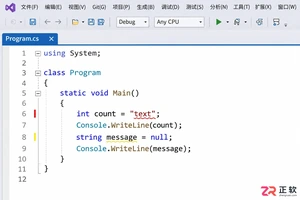
解决 Visual Studio 2022 编辑时不显示代码分析警告的问题。指南涵盖 .NET 项目实时分析设置、Roslyn 分析器范围调整及错误列表来源筛选,确保开发者能高效利用实时代码诊断功能。
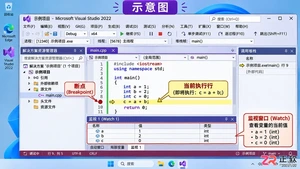
详解 Visual Studio 2022 调试技巧:包括断点设置、监视窗口开启方法、变量添加步骤以及通过 F10 单步执行观察变量值变化的全过程。
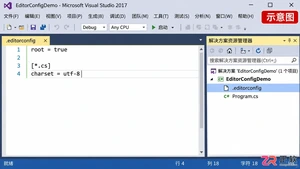
针对 Visual Studio 2017 缺乏全局默认编码选项的情况,详解如何利用 .editorconfig 设定项目级 UTF-8 无 BOM 规则,以及手动转换现有文件并校验字节的方法。
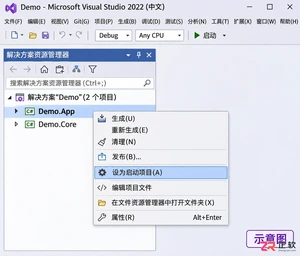
解决 Visual Studio 2022 F5 调试报错问题,通过设置启动项目、检查解决方案属性及正确区分类库与应用项目,快速恢复调试功能。
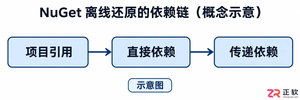
解决Visual Studio 2022离线环境中NuGet包还原失败的难题,涵盖依赖链分析、本地源配置、包集收集及隔离验证步骤,帮助开发者构建稳定的离线开发环境。
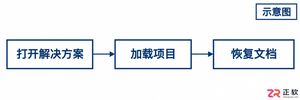
解决Visual Studio 2017大型项目加载慢的实用指南。涵盖性能监测、扩展管理、文档恢复优化及版本兼容性检查,帮助开发者精准定位瓶颈并提升工作效率。
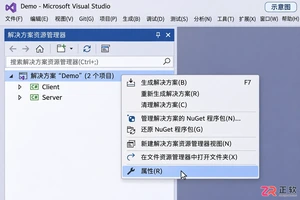
详解 Visual Studio 2022 多启动项目配置方法,包括启动动作选择、顺序调整及调试技巧,帮助开发者高效调试分布式或前后端分离应用。
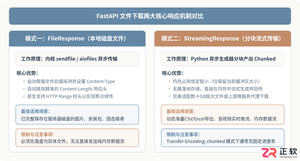
深入解析在FastAPI框架中实现文件下载接口的完整方案,涵盖基于FileResponse的本地静态文件传输、基于StreamingResponse的分块流式传输、RFC 5987中文文件名编码规范、路径穿越安全防御及BackgroundTasks临时文件清理,并配备详细代码示例与架构解析图。





火山引擎是字节跳动旗下企业级云与AI服务平台。聚焦大模型核心能力,依托字节自研豆包多模态大模型,凭借火山方舟一站式平台,提供模型精调、推理部署、智能应用搭建等全链路服务,结合高性能AI算力,助力各行业快速落地大模型数字化与智能化应用。



