

C++词频统计程序开发与map应用详解
答案:C++利用map容器实现词频统计,通过stringstream分割单词,normalize函数统一大小写并去除标点,processText读取文本并统计,wordCount自动计数,最后printResults输出结果。
答案:C++利用map容器实现词频统计,通过stringstream分割单词,normalize函数统一大小写并去除标点,processText读取文本并统计,wordCount自动计数,最后printResults输出结果。
词频统计是文本分析中的基础任务,C++ 提供了强大的标准库支持,特别是 map 容器,非常适合用来统计每个单词出现的次数。下面介绍如何用 C++ 实现一个简单的词频统计程序。
读取文本并分割单词
程序的第一步是读取输入文本。可以从文件读取,也可以从标准输入获取。使用 std::stringstream 可以方便地按空格分割单词。
示例代码:
#include#include #include #include #include
使用 map 统计词频
std::map
map 的 operator[] 在键不存在时会自动创建并初始化为 0,因此可以直接使用 wordCount[word]++ 进行累加。
优点:
- 自动去重和排序
- 插入和查找平均时间复杂度为 O(log n)
- 代码简洁,逻辑清晰
输出结果
遍历 map 并输出每个单词及其出现次数:
void printResults() {
    for (const auto& pair : wordCount) {
        std::cout << pair.first << ": " << pair.second << std::endl;
    }
}
如果想按频率从高到低排序,可以把 map 内容导入 vector,然后按值排序。
完整调用示例
主函数中可以选择从文件或标准输入读取:
int main() {
    std::ifstream file("input.txt");
    if (file.is_open()) {
        processText(file);
        file.close();
    } else {
        std::cout << "无法打开文件,使用标准输入:" << std::endl;
        processText(std::cin);
    }

    printResults();
    return 0;
}
基本上就这些。通过 map 容器,C++ 能高效、清晰地完成词频统计任务。处理时注意忽略标点、统一大小写,结果会更准确。
详解 CodeKit 在 macOS 下的安装步骤、项目导入方法、Sass与JavaScript编译设置及浏览器自动刷新功能,助您快速搭建高效的前端开发环境。
详解Windows环境下安装OpenAI Codex CLI的步骤,包括WSL环境检查、Node.js/npm配置、npm全局安装命令及首次启动验证,适合开发者快速上手。
学习如何配置 NativeRest REST API 客户端。涵盖 Windows/macOS/Linux 安装后的工作区创建、环境变量管理、请求编辑及响应查看步骤,帮助开发者快速完成基础环境搭建与连通性测试。
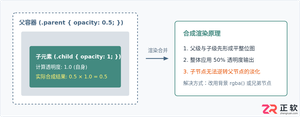
深入解析CSS中设置透明度的核心属性opacity,剖析子元素继承、事件穿透、层叠上下文等关键注意事项,并提供与rgba、hsla的实用选型对比。

本文通过具体的旧版与新版代码对比,详细剖析Java 8引入的Lambda表达式、Java 14/16引入的Record类,以及Java 12至21逐步演进完善的Switch表达式与模式匹配,展示代码简化路径与避坑要点。
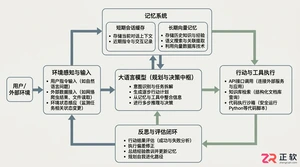
系统梳理AI智能体开发培训的核心知识模块、技术栈选型与典型实战项目,解析低代码平台与纯代码框架的差异,提供从零构建可落地智能体的完整学习与实施路径。
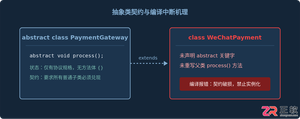
针对Java开发中常见的“子类未实现抽象方法”编译错误,深入分析报错原因,提供重写实现、声明抽象子类两种标准修复路径,并总结参数签名、访问修饰符等典型避坑要点。
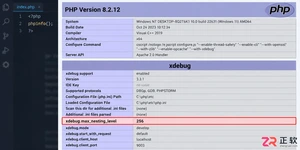
遇到PHP递归报错时,不要盲目调大max_nesting_level。本文教你区分Xdebug限制、内存耗尽和正则递归错误,提供代码级的终止条件优化与迭代替代方案,彻底解决栈溢出问题。
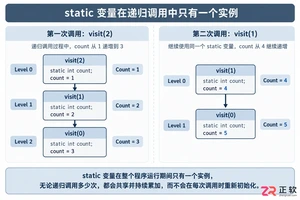
本文分析PHP递归中static变量导致的状态污染及引用传递引发的共享数据修改问题。提供具体的代码复现、缓存键设计建议及调试打印技巧,帮助开发者避免隐蔽的逻辑错误。




Photoshop 2026 是 Adobe 推出的专业图像处理与视觉设计软件,支持 Windows、macOS 和 iPad 等平台,广泛应用于摄影修图、电商设计、平面海报、数字绘画及视觉合成等创作场景。

Blender 是一款免费开源、跨平台的专业 3D 创作软件,集建模、动画、渲染、视频编辑与视觉合成等功能于一体,广泛应用于影视动画、游戏设计和建筑可视化等领域。软件支持 Cycles 物理渲染器与 Eevee 实时渲染引擎,并提供多边形建模、骨骼绑定、物理模拟等专业工具。Blender 兼容 Windows、macOS 和 Linux 系统,安装包轻巧、运行流畅,依托活跃的全球开发者社区持续更新,是从初学者到专业创作者都值得选择的正版 3D 创作工具。


Photoshop 2026 是 Adobe 推出的专业图像处理与视觉设计软件,支持 Windows、macOS 和 iPad 等平台,广泛应用于摄影修图、电商设计、平面海报、数字绘画及视觉合成等创作场景。
Blender 是一款免费开源、跨平台的专业 3D 创作软件,集建模、动画、渲染、视频编辑与视觉合成等功能于一体,广泛应用于影视动画、游戏设计和建筑可视化等领域。软件支持 Cycles 物理渲染器与 Eevee 实时渲染引擎,并提供多边形建模、骨骼绑定、物理模拟等专业工具。Blender 兼容 Windows、macOS 和 Linux 系统,安装包轻巧、运行流畅,依托活跃的全球开发者社区持续更新,是从初学者到专业创作者都值得选择的正版 3D 创作工具。