

Java ArrayList 首元素为 null 原因与解决方法
本文揭示了ArrayList中getProduct(0)返回null的典型错误根源:索引边界判断误用>而非>=,导致合法的第0个元素被错误拦截并返回null。

本文揭示了 ArrayList 中 getProduct(0) 返回 null 的典型错误根源:索引边界判断误用 > 而非 >=,导致合法的第 0 个元素被错误拦截并返回 null。
本文揭示了 `ArrayList` 中 `getProduct(0)` 返回 `null` 的典型错误根源:索引边界判断误用 `>` 而非 `>=`,导致合法的第 0 个元素被错误拦截并返回 `null`。
在 Java 中,ArrayList(以及所有基于索引的集合)采用零起点索引(0-based indexing):第一个元素位于索引 0,第二个在 1,依此类推。因此,任何对 get(index) 的安全访问逻辑,其有效范围必须是 index >= 0 && index < list.size()。
问题代码中,Store.getProduct(int index) 方法存在关键逻辑缺陷:
public Product getProduct(int index) {
    if ((index > 0) && (index < products.size())) // ❌ 错误:使用了 '>'
        return products.get(index);
    return null; // 当 index == 0 时,条件不成立,直接返回 null
}
该条件 index > 0 排除了所有 index == 0 的情况——即永远无法访问到列表的第一个元素。例如:
- s.getProduct(0) → 0 > 0 为 false → 返回 null
- s.getProduct(1) → 1 > 0 && 1 < size 为 true → 正常返回
✅ 正确写法应为:
public Product getProduct(int index) {
    if (index >= 0 && index < products.size()) { // ✅ 修正:使用 '>='
        return products.get(index);
    }
    return null; // 或更佳实践:抛出 IndexOutOfBoundsException
}
⚠️ 注意事项
- ArrayList.get(int) 本身已内置越界检查:若传入非法索引(如负数或 ≥ size),会自动抛出 IndexOutOfBoundsException。因此,手动边界检查后返回 null 反而掩盖了错误,降低了调试效率。推荐做法是直接委托给原生方法,或仅在需要“安全获取”语义(如无则返回默认值)时才做空值处理:
public Product getProduct(int index) { return products.get(index); // 让 JVM 抛出清晰异常,便于定位问题 }- 若业务上确实需容忍无效索引并返回 null,务必确保条件逻辑严谨:index >= 0 && index < products.size()。
- 同类错误常见于循环、查找、复制等场景,务必养成检查索引下界是否包含 0 的习惯。
总结:ArrayList 的 0 索引不是“特殊值”,而是标准起点。将 > 误写为 >= 是初学者高频陷阱,修正后即可恢复对首元素的正常访问。编写索引操作时,始终默念:“索引从 0 开始,0 是合法且常见的”。

了解AI编程如何高效交付产品。本文以电子书阅读器为例,解析从环境搭建、产品设计、技术选型到代码实现及最终验收的标准工作流,帮助开发者规范AI协作过程。
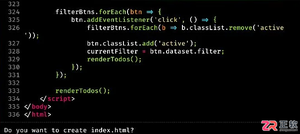
了解 Claude Code 的基础交互流程,包括文件生成确认、使用 /compact 管理对话上下文、通过 CLAUDE.md 设定项目规则以及调用技能复用输出格式,提升开发协作效率。

详细介绍在 Visual Studio 2022 中关闭编辑器垂直滚动条代码缩略图(地图模式)的具体操作方法,包含右键快捷路径与全局选项设置,帮助恢复紧凑清晰的传统滚动条。

详细介绍在 Visual Studio 2022 中使用官方 Microsoft Visual Studio Installer Projects 扩展生成 Windows 桌面应用程序安装包(.msi / setup.exe)的完整操作步骤与配置细节。
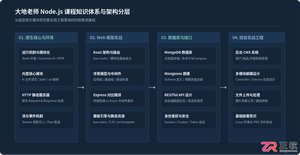
客观全面评析大地老师的Node.js教程:从技术栈覆盖、实战讲解风格到局限短板与进阶路径,帮助初学者和前端开发者客观评估是否适合自身学习需求。
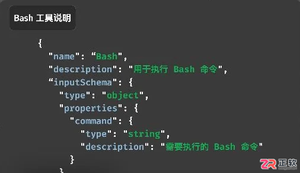
在为大模型Agent接入外部工具时,是选择MCP的结构化参数定义,还是使用CLI的通用命令入口?本文通过图片筛选与上传的实际案例,分析两种方式在上下文开销、任务组合效率及安全风险上的差异,提供选型参考。

初次接触Codex不知从何下手?本文通过一个具体的HTML笔记应用案例,带你走完从建立项目、输入需求、批准执行到验收结果的完整流程,快速掌握Codex的基础使用方法。
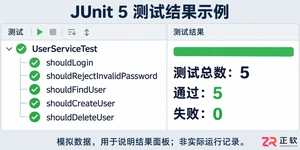
学习如何通过结构化测试、精准断言和参数化设计提升JUnit测试效率,避免常见陷阱,实现高质量、可维护的单元测试代码。
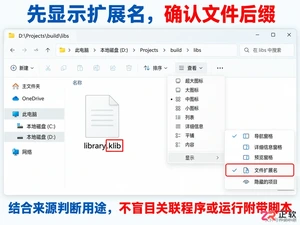
遇到.klib文件打不开?它通常是Kotlin/Native的库文件而非普通文档。本文教你如何在Windows下确认文件来源、安全查看内部结构,以及开发者如何正确使用klib工具,避免误操作。

学习如何在Vue项目中设置文件上传格式限制。本文介绍使用HTML accept属性进行基础过滤,以及结合JavaScript进行严格后缀名校验的方法,确保只允许指定类型的文件被上传。





火山引擎是字节跳动旗下企业级云与AI服务平台。聚焦大模型核心能力,依托字节自研豆包多模态大模型,凭借火山方舟一站式平台,提供模型精调、推理部署、智能应用搭建等全链路服务,结合高性能AI算力,助力各行业快速落地大模型数字化与智能化应用。


Autodesk Maya 是面向影视、电视、动画和游戏行业的专业三维制作软件,集多边形与 NURBS 建模、角色绑定、关键帧和动作捕捉动画、Bifrost 特效模拟、材质开发及 Arnold 渲染于一体,
火山引擎是字节跳动旗下企业级云与AI服务平台。聚焦大模型核心能力,依托字节自研豆包多模态大模型,凭借火山方舟一站式平台,提供模型精调、推理部署、智能应用搭建等全链路服务,结合高性能AI算力,助力各行业快速落地大模型数字化与智能化应用。


