

Delphi提取PDF文本实例
针对当前PDF解析工具稀缺且易出错的现状,本文提出一种利用Delphi语言封装ApachePDFBox开源库的解决方案,通过命令行调用其ExtractText功能,有效实现PDF文档的文本提取。该方法需要Java运行环境以及pdfbox-app-2.0.6.jar包支持,运行稳定可靠,并且能够正确处理中文内容,具有实用性。
市面上能生成 PDF 的控件不少,但真正好用的解析工具可不多。之前试过 pdf Toolkit,结果第一个稍微复杂点的 PDF 就报错,汉字还乱码——可能是版本或用法不对,但折腾下去实在不划算。
于是想起以前用 Ja va 时调过 Apache 的 pdfBox 库,效果很不错。索性下载一份,用 Delphi 来封装调用,把 PDF 文本解析出来。
环境要求:Ja va 运行环境
pdfBox 应用包:pdfbox-app-2.0.6.jar
思路很简单:通过命令行调用 pdfBox 的提取功能,再在 Delphi 里捕获结果。
首先,封装一个执行 DOS 命令的函数:
procedure CheckResult(b: Boolean);
begin
 if not b then
  raise Exception.Create(SysErrorMessage(GetLastError));
end;

function RunDOS(const CommandLine: string): string;
var
 HRead, HWrite: THandle;
 StartInfo: TStartupInfo;
 ProceInfo: TProcessInformation;
 b: Boolean;
 sa: TSecurityAttributes;
 inS: THandleStream;
 sRet: TStrings;
begin
 Result := '';
 FillChar(sa, sizeof(sa), 0);
//设置允许继承,否则在NT和2000下无法取得输出结果
 sa.nLength := sizeof(sa);
 sa.bInheritHandle := True;
 sa.lpSecurityDescriptor := nil;
 b := CreatePipe(HRead, HWrite, @sa, 0);
 CheckResult(b);

 FillChar(StartInfo, SizeOf(StartInfo), 0);
 StartInfo.cb := SizeOf(StartInfo);
 StartInfo.wShowWindow := SW_HIDE;
//使用指定的句柄作为标准输入输出的文件句柄,使用指定的显示方式
 StartInfo.dwFlags := STARTF_USESTDHANDLES or STARTF_USESHOWWINDOW;
 StartInfo.hStdError := HWrite;
 StartInfo.hStdInput := GetStdHandle(STD_INPUT_HANDLE); //HRead;
 StartInfo.hStdOutput := HWrite;

 b := CreateProcess(nil, //lpApplicationName: PChar
  PChar(CommandLine), //lpCommandLine: PChar
  nil, //lpProcessAttributes: PSecurityAttributes
  nil, //lpThreadAttributes: PSecurityAttributes
  True, //bInheritHandles: BOOL
  CREATE_NEW_CONSOLE,
  nil,
  nil,
  StartInfo,
  ProceInfo);

 CheckResult(b);
 WaitForSingleObject(ProceInfo.hProcess, INFINITE);

 inS := THandleStream.Create(HRead);
 if inS.Size > 0 then
 begin
  sRet := TStringList.Create;
  sRet.LoadFromStream(inS);
  Result := sRet.Text;
  sRet.Free;
 end;
 inS.Free;

 CloseHandle(HRead);
 CloseHandle(HWrite);
end;
然后,封装一个专门解析 PDF 文本的函数,把命令拼好,调用上面那个函数:
function TfrmPDFTool.GetPDFText(sFile: string): string;
var
 cmd:string;
 pdfFilePath,pdfFileName,txtFileName:String;
begin
 //ja va -jar pdfbox-app-2.0.6.jar ExtractText -encoding utf-8 e:\temp\test.pdf e:\temp\testiii.txt
 pdfFilePath:=ExtractFilePath(sFile);
 pdfFileName:=ExtractFileName(sFile);
 txtFileName:=FAppPath+'Temp'+pdfFileName+'.txt';
 cmd:='ja va -jar '+FAppPath+'PDFBoxpdfbox-app-2.0.6.jar ExtractText '
  +' -encoding utf-8 '+sFile
  +' '+txtFileName;

 AddLog(cmd);

 Result:=RunDOS(cmd);

 AddLog(Result);

 memTxtFile.Lines.LoadFromFile(txtFileName,TUTF8Encoding.Create);

 FPDFText:=memTxtFile.Text;

 AddLog(FPDFText);

end;
OK,大功告成!

Delphi2010在维护旧代码和开发高性能桌面、数据库及工业控制软件方面仍具价值。项目需明确需求、评估可行性,随后搭建环境并规划结构,采用模块化开发。核心阶段应高效利用数据库与语言特性,借助VCL快速构建界面,最终通过调试、测试与规范部署确保质量并交付。
编程语言仅为工具,真正决定高度的是数据结构和算法及计算机底层逻辑理解。建议从C语言入门,打好基本功。根据目标选择深入方向,避免同时学习多门语言。最终目标是学会用程序解决问题,语言只是实践载体。
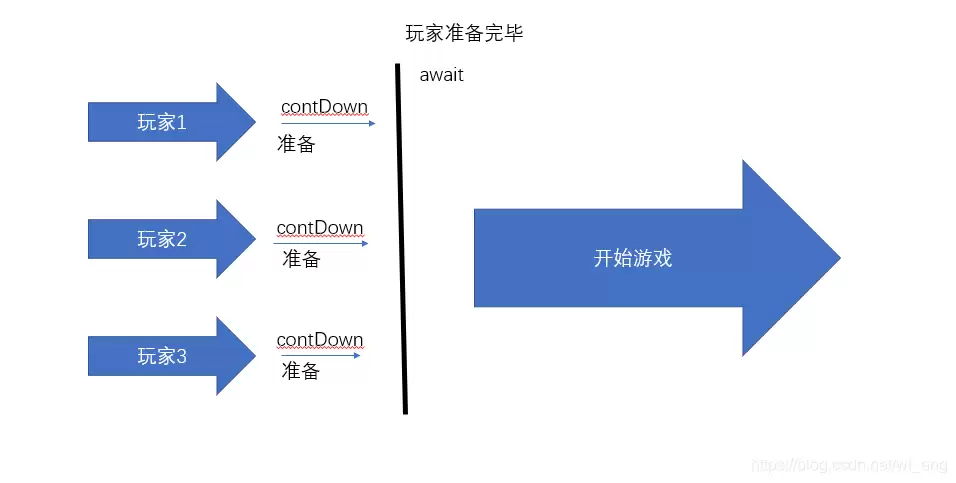
CountDownLatch与CyclicBarrier均为Java同步工具,核心区别:前者计数器可大于等于线程数,由其他线程控制放行且不可重用;后者计数器必须等于线程数,所有线程到达屏障后统一继续并可循环使用。常用于多线程协作,前者等待完成,后者同步任务。

Delphi中判断字符串是否为纯数字组合,常见需求有两种实现方案:一是先去除首尾空格再逐字符检查是否在'0'..'9'范围内,遇非数字即返回假;二是直接遍历字符串,使用Break提前结束循环。核心思路均为字符级判断,区别在于空格处理与退出方式。
Delphi中借助TRegIniFile类可将注册表操作简化为类似INI文件读写,提供CreateKey、OpenKey、EraseSection及读写多种类型值、枚举子键键值等方法。通过创建节点、删除值、删除键等实例展示实际应用,有效完成常见注册表读写场景。

针对超大文件,利用Delphi的内存映射机制分块处理,以10倍页面粒度为单位映射,通过GetSystemInfo获取页面分配粒度。在循环中判断当前映射范围是否足够,不足时保留剩余数据并重新映射,合并后顺序读取指定长度数据。
在Delphi中,通过GetDC获取屏幕设备上下文,创建兼容DC及位图,利用BitBlt复制指定区域,然后赋给TJPEGImage并设置压缩质量70,保存为JPEG文件,需注意释放GDI对象以避免内存泄漏。

在Delphi7环境下,通过安装WinWebMail邮件服务器、配置Indy控件及SMTP账户,实现了考生信息的批量邮件群发。函数封装了发送及地址合法性判断流程,每50封邮件延迟2秒,并注意了反垃圾邮件限制及验证模式问题。

通过调用Printer.Printers属性,可自动检测并枚举系统中所有已安装打印机,返回名称列表。若列表为空则提示未安装。该方法代码简洁、逻辑清晰,非常便于集成到Delphi项目中。

通过修改注册表项HKEY_LOCAL_MACHINE\Software\Microsoft\Windows\CurrentVersion\Run,利用Delphi自定义过程zdyx实现程序开机自启。参数含启动项名称、程序路径及是否单次运行。需管理员权限,可改用HKEY_CURRENT_USER避免权限问题。





火山引擎是字节跳动旗下企业级云与AI服务平台。聚焦大模型核心能力,依托字节自研豆包多模态大模型,凭借火山方舟一站式平台,提供模型精调、推理部署、智能应用搭建等全链路服务,结合高性能AI算力,助力各行业快速落地大模型数字化与智能化应用。



