

Linux怎么安装Seafile企业云盘
安装Seafile企业云盘应使用官网预编译tarball,避免apt安装导致版本滞后和模块缺失。解压时直接在目标目录操作,防止路径嵌套。MySQL配置需使用mysql_native_password插件并授权完整,编辑gunicorn.conf将绑定地址改为0.0.0.0并开放8000端口。
直接说结论:别用 apt install seafile-server。官方源里的版本严重滞后,一装就容易缺模块、启动失败,报错一箩筐——必须走官网预编译 tarball 这条路。以下是把坑踩遍后总结出来的具体门道。
为什么不能直接 apt 或 yum 安装
Debian/Ubuntu 官方源里的 seafile-server 通常卡在 7.1.x,而当前稳定版早已超过 12.0。版本滞后带来的连锁问题很直接:缺失 systemd 单元文件,Python 依赖也是乱成一团,常见的报错包括 ImportError: No module named 'django'、seaf-server not found。CentOS/RHEL 的 EPEL 包同样落后,还不适配新版 MySQL 认证插件。官方文档反复强调过一件事:只认官网 tarball。
下载和解压 tarball 的关键细节
从 Seafile 官网下载页获取 seafile-server_,注意不是 source、不是 docker、也不是 GitHub Actions 构建包。解压后目录结构必须干净:seafile-server- 下直接能看到 setup-seafile.sh、seafile.sh、seahub.sh 等脚本。
- 错误操作:用
tar -zxvf ... -C /opt指定路径,结果多出一层嵌套,./setup-seafile.sh找不到自身位置 - 正确做法:在目标目录下直接运行
tar -zxvf seafile-server_*.tar.gz,不加-C参数 - 验证:进入解压目录后,
ls -l应看到conf/、seafile-data/、logs/等子目录为空(脚本会自动创建)
MySQL 配置最容易卡住的三个点
setup-seafile-mysql.sh 跑到“creating seafile database…”时卡死,90% 是 MySQL 权限或连接配置出了问题。需要特别注意这几点:
- 创建用户必须用
CREATE USER 'seafile'@'localhost' IDENTIFIED WITH mysql_native_password BY 'xxx';,CentOS 7 默认用auth_socket插件,不兼容就会直接卡住 - 授权语句里
CREATE、DROP、SELECT、INSERT、UPDATE、DELETE一个都不能少 - 脚本里填数据库 host 时写
localhost,别写127.0.0.1,MySQL socket 连接逻辑不同,后者会失败 - 确认
/etc/my.cnf中没有skip-networking,且bind-address没有强制为127.0.0.1
启动后局域网打不开?改 gunicorn.conf 和防火墙
默认 seahub 只监听 127.0.0.1:8000,其他机器访问 http:// 当然会超时。解决方法很简单:
- 编辑
conf/gunicorn.conf,把bind = "127.0.0.1:8000"改成bind = "0.0.0.0:8000" - Ubuntu/Debian 执行
sudo ufw allow 8000 - CentOS/RHEL 执行
sudo firewall-cmd --permanent --add-port=8000/tcp && sudo firewall-cmd --reload - 改完重启服务:
./seafile.sh restart && ./seahub.sh restart
真正容易被忽略的是:所有路径(conf/、seafile-data/、logs/)一旦由 setup-seafile.sh 创建,就不能移动或重命名,否则 seafile.sh 启动时会直接报错退出——它硬编码读取这些相对路径。
了解如何在Windows 10/11中打开和使用Microsoft Store。本文详解开始菜单入口、应用搜索、库管理及更新操作,并提供安装异常时的排查思路与缓存重置方法。
新手如何设置 Process Lasso 专业版?本文详解主窗口、ProBalance、性能模式、应用电源计划及效率模式的配置方法,助您优化系统响应与进程优先级。
适合新手的Windows自学教程,详解开始菜单搜索、任务栏快速设置、文件资源管理器导航及系统设置入口,助你快速熟悉Windows 11/10基础操作。
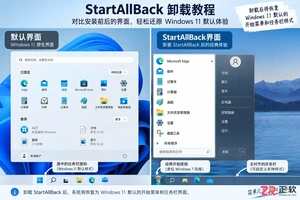
指导用户安全卸载StartAllBack,包括恢复界面设置、通过Windows设置移除程序、重启验证及处理残留异常的方法,避免误操作导致系统不稳定。
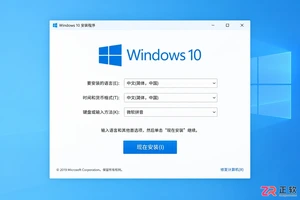
遇到Windows 10安装时找不到U盘的情况?本文详解如何区分系统识别、启动菜单和安装界面三类问题,涵盖官方介质制作、USB接口选择、UEFI设置及驱动加载方法,助您快速解决安装障碍。
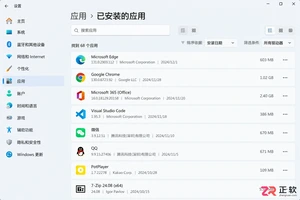
想知道Windows卸载软件在哪里操作?本文详解设置、控制面板、开始菜单及Store应用的卸载入口,提供备份数据、处理卸载向导及清理残留的完整指南,避免误删系统组件。
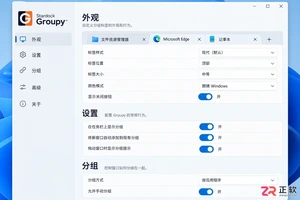
想让Groupy登录Windows后自动运行?本文详解在系统设置和任务管理器中开启Groupy开机启动的方法,以及通过启动文件夹手动添加的技巧,最后演示如何验证窗口拖放分组效果。
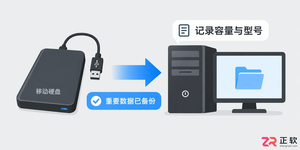
详解 Windows 10 自定义安装中清空目标硬盘全部分区的操作步骤。从数据备份、U盘启动到删除分区重建系统结构,提供安全的界面导览与注意事项,适合需要彻底重置电脑的用户。
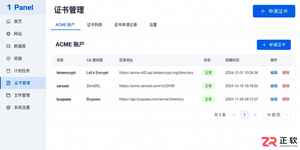
遇到 1Panel 申请证书失败?本文通过界面区域导览,详细讲解 ACME 账户、DNS 账号权限、手动解析记录、HTTP 80 端口连通性及网站 SSL 配置等关键排查点,助你解决证书申请难题。
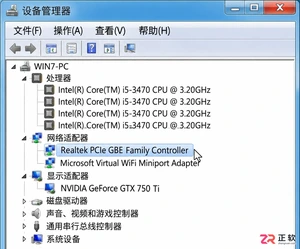
详细讲解如何将Windows 7系统替换为Windows 10,包括升级与全新安装的选择、关键数据备份、U盘启动盘制作、磁盘分区操作及驱动恢复步骤。注意Windows 10支持周期已结束,需做好安全规划。




WPS Office是一款面向macOS用户的综合办公套件,将文字处理、电子表格、演示文稿、PDF工具、模板与云协作整合在同一应用中。它兼容常见Microsoft Office格式,支持Intel及Apple芯片Mac,基础功能可免费使用,
Shapr3D是一款面向工业设计、机械工程、建筑概念和三维打印工作流的CAD软件。Mac版采用Parasolid建模内核,支持草图约束、实体建模、工程图、可视化渲染及常见CAD格式交换,并可通过账户在多台设备之间同步项目。

REAPER是Cockos开发的数字音频工作站,提供多轨音频与MIDI录制、剪辑、处理、混音和母带制作工具。Mac版兼容Intel与Apple芯片,支持AU、VST、VST3、CLAP等插件格式,并提供高度可定制的工作流程。

Adobe Photoshop 是面向摄影师、设计师和内容创作者的专业图像处理工具,可在 Windows 上完成照片修饰、选区抠图、图层合成、文字排版、绘画及生成式编辑。软件采用订阅授权,由 Creative Cloud 管理安装、更新与许

Adobe InDesign 是面向印刷与数字出版的专业页面排版工具,可制作书籍、杂志、宣传册、海报、交互式 PDF 和电子书。它提供精细的文字样式、多页面管理、印前检查及多格式输出能力,并能与 Photoshop、Illustrator

Adobe Illustrator 是用于绘制矢量图形、插画、图标、徽标和版式的专业设计工具。它以路径和锚点为核心,作品放大后仍能保持清晰,并提供画板、文字、渐变、图像描摹及精确变换等功能,适合品牌视觉、印刷物料、数字界面和商业插画创作。