

lsnrctl如何测试监听器连接
通过lsnrctl工具可测试Oracle监听器连接。启动交互环境后使用status查看监听器状态,再使用test命令配合用户名、密码及连接描述符进行测试。根据返回结果判断连接是否成功,失败时依据错误提示排查网络、配置或防火墙问题。
lsnrctl如何测试监听器连接
在Oracle数据库的日常运维中,监听器连接测试是一项基础但至关重要的操作。通过lsnrctl这个命令行工具,你可以快速验证客户端与数据库之间的网络通路是否正常。下面就是具体的操作流程,跟着走一遍就能掌握。
首先,打开命令提示符(Windows)或终端(Linux/Unix)。
然后输入
lsnrctl并按回车键,这会启动lsnrctl交互环境。接着用
status命令查看监听器的状态。这个命令会返回监听器的名称、版本、启动时间等关键信息,让你快速确认监听器是否在运行。例如:LSNRCTL for Linux: Version 19.0.0.0.0 - Production on 01-JAN-2021 12:34:56 Copyright (c) 1991, 2019, Oracle.All rights reserved. Connecting to (DESCRIPTION=(ADDRESS=(PROTOCOL=TCP)(HOST=myhost.example.com)(PORT=1521))) STATUS of the LISTENER ------------------------ Alias LISTENER Version TNSLSNR for Linux: Version 19.0.0.0.0 - Production Start Date01-JAN-2021 12:34:56 Uptime0 days 0 hr. 30 min. 12 sec Trace Level off SecurityON: Local OS Authentication SNMPOFF Listener Parameter File /u01/app/oracle/product/19.0.0/dbhome_1/network/admin/listener.ora Listener Log File /u01/app/oracle/diag/tnslsnr/myhost/listener/alert/log.xml Listening Endpoints Summary... (DESCRIPTION=(ADDRESS=(PROTOCOL=tcp)(HOST=myhost.example.com)(PORT=1521))) Services Summary... Service "CLRExtProc" has 1 instance(s). Instance "clrextproc", status READY, has 1 handler(s) for this service... Service "mydb" has 1 instance(s). Instance "orcl", status READY, has 1 handler(s) for this service... The command completed successfully确认监听器正常后,就可以用
test命令来测试具体的连接了。你需要提供用户名、密码和连接描述符,格式如下:lsnrctl test/ @ 其中连接描述符的写法是
(DESCRIPTION=(ADDRESS=(PROTOCOL=TCP)(HOST=。举个例子:)(PORT= ))) lsnrctl test scott/tiger@(DESCRIPTION=(ADDRESS=(PROTOCOL=TCP)(HOST=myhost.example.com)(PORT=1521)))执行命令后,看看返回结果。如果连接成功,你会看到类似这样的消息:
TNS-12541: TNS:no listener如果连接失败,则会显示错误信息,比如:
TNS-12560: TNS:protocol adapter error
TNS-00516: Lost connection
根据这些错误提示,你可以逐步排查网络、监听器配置或防火墙方面的问题。
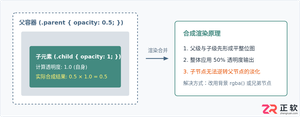
深入解析CSS中设置透明度的核心属性opacity,剖析子元素继承、事件穿透、层叠上下文等关键注意事项,并提供与rgba、hsla的实用选型对比。
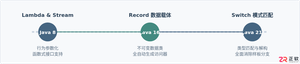
本文通过具体的旧版与新版代码对比,详细剖析Java 8引入的Lambda表达式、Java 14/16引入的Record类,以及Java 12至21逐步演进完善的Switch表达式与模式匹配,展示代码简化路径与避坑要点。
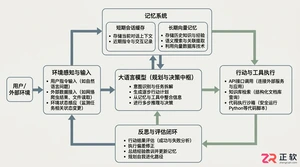
系统梳理AI智能体开发培训的核心知识模块、技术栈选型与典型实战项目,解析低代码平台与纯代码框架的差异,提供从零构建可落地智能体的完整学习与实施路径。
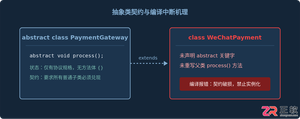
针对Java开发中常见的“子类未实现抽象方法”编译错误,深入分析报错原因,提供重写实现、声明抽象子类两种标准修复路径,并总结参数签名、访问修饰符等典型避坑要点。
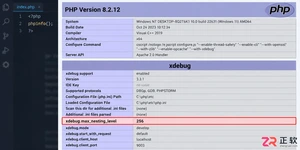
遇到PHP递归报错时,不要盲目调大max_nesting_level。本文教你区分Xdebug限制、内存耗尽和正则递归错误,提供代码级的终止条件优化与迭代替代方案,彻底解决栈溢出问题。
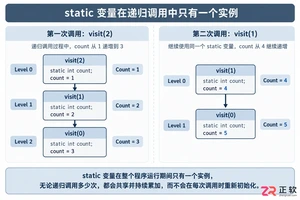
本文分析PHP递归中static变量导致的状态污染及引用传递引发的共享数据修改问题。提供具体的代码复现、缓存键设计建议及调试打印技巧,帮助开发者避免隐蔽的逻辑错误。
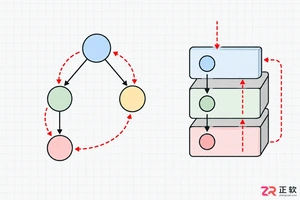
解析PHP递归函数在树形数据处理中的性能瓶颈,提供预加载数据消除I/O、使用显式栈替代深层递归的实战方案,帮助开发者在代码可读性与执行效率间做出合理取舍。

详细讲解在Java单元测试中如何使用Mockito模拟依赖对象,包括引入依赖、创建Mock、打桩返回值、行为验证以及Mock与Spy的核心差异和常见陷阱排查。





Photoshop 2026 是 Adobe 推出的专业图像处理与视觉设计软件,支持 Windows、macOS 和 iPad 等平台,广泛应用于摄影修图、电商设计、平面海报、数字绘画及视觉合成等创作场景。

Blender 是一款免费开源、跨平台的专业 3D 创作软件,集建模、动画、渲染、视频编辑与视觉合成等功能于一体,广泛应用于影视动画、游戏设计和建筑可视化等领域。软件支持 Cycles 物理渲染器与 Eevee 实时渲染引擎,并提供多边形建模、骨骼绑定、物理模拟等专业工具。Blender 兼容 Windows、macOS 和 Linux 系统,安装包轻巧、运行流畅,依托活跃的全球开发者社区持续更新,是从初学者到专业创作者都值得选择的正版 3D 创作工具。


Photoshop 2026 是 Adobe 推出的专业图像处理与视觉设计软件,支持 Windows、macOS 和 iPad 等平台,广泛应用于摄影修图、电商设计、平面海报、数字绘画及视觉合成等创作场景。
Blender 是一款免费开源、跨平台的专业 3D 创作软件,集建模、动画、渲染、视频编辑与视觉合成等功能于一体,广泛应用于影视动画、游戏设计和建筑可视化等领域。软件支持 Cycles 物理渲染器与 Eevee 实时渲染引擎,并提供多边形建模、骨骼绑定、物理模拟等专业工具。Blender 兼容 Windows、macOS 和 Linux 系统,安装包轻巧、运行流畅,依托活跃的全球开发者社区持续更新,是从初学者到专业创作者都值得选择的正版 3D 创作工具。