

CKEditor中加入syntaxhighlighter代码高亮插件
在CKEditor3.3.1中集成SyntaxHighlighter需新建insertcode插件目录,包含plugin.js、对话框配置及图标;修改ckeditor.js添加插件引用,调整语言文件,在前端引入样式与脚本,完成插入代码高亮功能。
从官网下载CKEditor(我用的版本是3.3.1)之后,你会发现新版和原来的FCKeditor差别还挺大的。做个人博客时,贴代码是刚需,所以顺手给它写了个插入代码的插件。高亮部分用的是SyntaxHighlighter,下面直接上步骤。
1. 插件目录与核心文件
在ckeditor/plugins/下新建一个insertcode目录,然后在里面创建plugin.js,写入以下代码:
CKEDITOR.plugins.add('insertcode', {
    requires: ['dialog'],
    init: function(a){
        var b = a.addCommand('insertcode', new CKEDITOR.dialogCommand('insertcode'));
        a.ui.addButton('insertcode', {
            label: a.lang.insertcode.toolbar,
            command: 'insertcode',
            icon: this.path + 'images/code.jpg'
        });
        CKEDITOR.dialog.add('insertcode', this.path + 'dialogs/insertcode.js');
    }
});
2. 图标文件
在insertcode目录下新建images文件夹,放入一个code.jpg图片(附件中已提供,可直接使用)。
3. 对话框配置
再新建dialogs目录,创建insertcode.js,内容如下:
CKEDITOR.dialog.add('insertcode', function(editor){
var escape = function(value){
return value;
};
return {
title: 'Insert Code Dialog',
resizable: CKEDITOR.DIALOG_RESIZE_BOTH,
minWidth: 720,
minHeight: 480,
contents: [{
id: 'cb',
name: 'cb',
label: 'cb',
title: 'cb',
elements: [{
type: 'select',
label: 'Language',
id: 'lang',
required: true,
'default': 'csharp',
items: [
['ActionScript3', 'as3'], ['Bash/shell', 'bash'], ['C#', 'csharp'],
['C++', 'cpp'], ['CSS', 'css'], ['Delphi', 'delphi'],
['Diff', 'diff'], ['Groovy', 'groovy'], ['Html', 'xhtml'],
['Ja vaScript', 'js'], ['Ja va', 'ja va'], ['Ja vaFX', 'jfx'],
['Perl', 'perl'], ['PHP', 'php'], ['Plain Text', 'plain'],
['PowerShell', 'ps'], ['Python', 'py'], ['Ruby', 'rails'],
['Scala', 'scala'], ['SQL', 'sql'], ['Visual Basic', 'vb'], ['XML', 'xml']
]
}, {
type: 'textarea',
style: 'width:700px;height:420px',
label: 'Code',
id: 'code',
rows: 31,
'default': ''
}]
}],
onOk: function(){
code = this.getValueOf('cb', 'code');
lang = this.getValueOf('cb', 'lang');
html = '' + escape(code) + '';
editor.insertHtml("" + html + "
");
},
onLoad: function(){}
};
});
这里用的是SyntaxHighlighter做高亮,如果你喜欢其他工具,替换掉相应部分即可。
4. 将插件集成到CKEditor核心
接下来的操作比较直接,因为我是把“插入代码”当作编辑器标配功能来用的,所以直接修改核心文件ckeditor.js。注意,这个文件是压缩过的,我们以原有的about插件为参考。
首先,搜索 ,insertcodefullPage:false,height:200,plugins:'about,basicstyles,在about后面加上,insertcode,变成:plugins:'about。
然后,继续搜索about,找到类似这样的代码段:
j.add('about',{init:function(l){var m=l.addCommand('about',new a.dialogCommand('about'));m.modes={wysiwyg:1,source:1};m.canUndo=false;l.ui.addButton('About',{label:l.lang.about.title,command:'about'});a.dialog.add('about',this.path+'dialogs/about.js');}});
在这个分号后面插入以下代码:
j.add('insertcode', {requires: ['dialog'],init: function(l){l.addCommand('insertcode', new a.dialogCommand('insertcode'));l.ui.addButton('insertcode', {label: l.lang.insertcode.toolbar,command: 'insertcode',icon: this.path + 'images/code.jpg'});a.dialog.add('insertcode', this.path + 'dialogs/insertcode.js');}});
接下来,查找 ,insertcode ['Maximize','ShowBlocks','-','insertcode']i.toolbar_Basic=,这是CKEditor默认工具栏的配置。在其中加上
5. 语言文件调整
进入ckeditor/lang目录,分别修改en.js、zh.js和zh-cn.js。在合适的位置添加:
- 英文版:
,insertcode:'Insert Code'
- 繁体中文:
,insertcode:'插入代碼'
- 简体中文:
,insertcode:'插入代码'
6. 前端页面引用
最后,在需要高亮代码的页面中引入SyntaxHighlighter的样式和脚本:
这四个文件都在SyntaxHighlighter的下载包里。另外,在页面底部添加初始化代码:
至此,CKEditor的“插入代码”插件就完工了。
提示个小bug
修改之后,insertcode图标的title会显示为空。解决办法很简单:把代码中两处label: a.lang.insertcode.toolbar改为label: a.lang.insertcode即可。
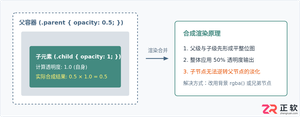
深入解析CSS中设置透明度的核心属性opacity,剖析子元素继承、事件穿透、层叠上下文等关键注意事项,并提供与rgba、hsla的实用选型对比。
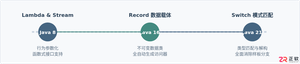
本文通过具体的旧版与新版代码对比,详细剖析Java 8引入的Lambda表达式、Java 14/16引入的Record类,以及Java 12至21逐步演进完善的Switch表达式与模式匹配,展示代码简化路径与避坑要点。
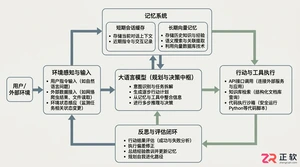
系统梳理AI智能体开发培训的核心知识模块、技术栈选型与典型实战项目,解析低代码平台与纯代码框架的差异,提供从零构建可落地智能体的完整学习与实施路径。
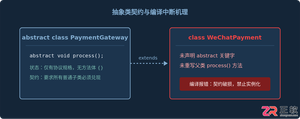
针对Java开发中常见的“子类未实现抽象方法”编译错误,深入分析报错原因,提供重写实现、声明抽象子类两种标准修复路径,并总结参数签名、访问修饰符等典型避坑要点。
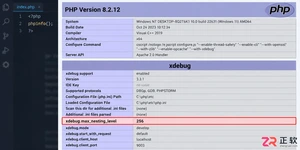
遇到PHP递归报错时,不要盲目调大max_nesting_level。本文教你区分Xdebug限制、内存耗尽和正则递归错误,提供代码级的终止条件优化与迭代替代方案,彻底解决栈溢出问题。
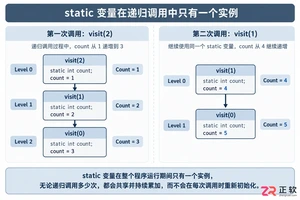
本文分析PHP递归中static变量导致的状态污染及引用传递引发的共享数据修改问题。提供具体的代码复现、缓存键设计建议及调试打印技巧,帮助开发者避免隐蔽的逻辑错误。
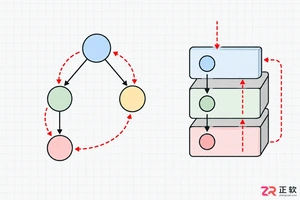
解析PHP递归函数在树形数据处理中的性能瓶颈,提供预加载数据消除I/O、使用显式栈替代深层递归的实战方案,帮助开发者在代码可读性与执行效率间做出合理取舍。
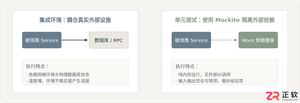
详细讲解在Java单元测试中如何使用Mockito模拟依赖对象,包括引入依赖、创建Mock、打桩返回值、行为验证以及Mock与Spy的核心差异和常见陷阱排查。

详细分析链表删除节点的时间复杂度,深入探讨单链表与双向链表在不同已知前提下的查找与删除开销,并结合完整代码与清晰图解进行对比总结。




Photoshop 2026 是 Adobe 推出的专业图像处理与视觉设计软件,支持 Windows、macOS 和 iPad 等平台,广泛应用于摄影修图、电商设计、平面海报、数字绘画及视觉合成等创作场景。

Blender 是一款免费开源、跨平台的专业 3D 创作软件,集建模、动画、渲染、视频编辑与视觉合成等功能于一体,广泛应用于影视动画、游戏设计和建筑可视化等领域。软件支持 Cycles 物理渲染器与 Eevee 实时渲染引擎,并提供多边形建模、骨骼绑定、物理模拟等专业工具。Blender 兼容 Windows、macOS 和 Linux 系统,安装包轻巧、运行流畅,依托活跃的全球开发者社区持续更新,是从初学者到专业创作者都值得选择的正版 3D 创作工具。


Photoshop 2026 是 Adobe 推出的专业图像处理与视觉设计软件,支持 Windows、macOS 和 iPad 等平台,广泛应用于摄影修图、电商设计、平面海报、数字绘画及视觉合成等创作场景。
Blender 是一款免费开源、跨平台的专业 3D 创作软件,集建模、动画、渲染、视频编辑与视觉合成等功能于一体,广泛应用于影视动画、游戏设计和建筑可视化等领域。软件支持 Cycles 物理渲染器与 Eevee 实时渲染引擎,并提供多边形建模、骨骼绑定、物理模拟等专业工具。Blender 兼容 Windows、macOS 和 Linux 系统,安装包轻巧、运行流畅,依托活跃的全球开发者社区持续更新,是从初学者到专业创作者都值得选择的正版 3D 创作工具。