

如何制作一个Web日程安排表?
这个页面用来展示已经安排好的日程事项,底部还提供了按月份前后翻动的链接。代码里封装了一个获取数据库连接的函数,这样一旦数据源发生变化,只需要修改一个地方(服务器、用户和口令)就能搞定,维护起来省心不少。 来看看具体的实现。首先是ASP页面头部,它包含所有页面启动时需要的全局函数。 星河影动之精英日程
这个页面用来展示已经安排好的日程事项,底部还提供了按月份前后翻动的链接。代码里封装了一个获取数据库连接的函数,这样一旦数据源发生变化,只需要修改一个地方(服务器、用户和口令)就能搞定,维护起来省心不少。
来看看具体的实现。首先是ASP页面头部,它包含所有页面启动时需要的全局函数。
<@ LANGUAGE="VBscript"
ENABLESESSIONSTATE = False %>
<%
Option Explicit
Response.Buffer = True
Response.Expires = 0
sub Dochunfeng(strtitle)
%>


     星河影动之精英日程安排<%= strtitle %>


     我的日程安排
     <%= strtitle %>
<%
     ' 创建数据库连接.
end sub
' 调用Connection对象的Execute方法,将命令文本字符串传入,获取记录集后循环处理。
function GetDataConnection()
    dim oConn, strConn
    Set oConn = Server.CreateObject("ADODB.Connection")
    strConn = "Provider=SQLOLEDB; Data Source=adspm; Initial Catalog=TeamWeb; "
    strConn = strConn && "User Id=TeamWeb; Password=x"
    oConn.Open strConn
    ' 最终,使用set命令传出新连接.
    set GetDataConnection = oConn
end function
%>
接下来是数据库端的SQL脚本。这里只要求保存一个文本字符串来标识事件性质,最长100个字符,简洁明了。
-- 创建表
create table Schedule
(
    idSchedule smallint identity primary key,
    dtDate smalldatetime not null,
    vcEvent varchar(100) not null
)
go

-- 存储过程
create procedure GetSchedule (@nMonth tinyint, @nYear smallint)
as
    select idSchedule, convert(varchar, datepart(dd, dtDate)) 'nDay', vcEvent
    from Schedule
    where datepart(yy, dtDate) = @nYear and datepart(mm, dtDate) = @nMonth
    order by datepart(dd, dtDate)
go

create procedure AddEvent (@vcDate varchar(20), @vcEvent varchar(100))
as
    insert Schedule
    select @vcDate, @vcEvent
go

create procedure DeleteEvent (@idSchedule smallint)
as
    delete Schedule where idSchedule = @idSchedule
go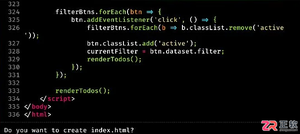
了解 Claude Code 的基础交互流程,包括文件生成确认、使用 /compact 管理对话上下文、通过 CLAUDE.md 设定项目规则以及调用技能复用输出格式,提升开发协作效率。
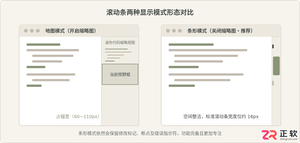
详细介绍在 Visual Studio 2022 中关闭编辑器垂直滚动条代码缩略图(地图模式)的具体操作方法,包含右键快捷路径与全局选项设置,帮助恢复紧凑清晰的传统滚动条。
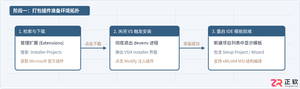
详细介绍在 Visual Studio 2022 中使用官方 Microsoft Visual Studio Installer Projects 扩展生成 Windows 桌面应用程序安装包(.msi / setup.exe)的完整操作步骤与配置细节。
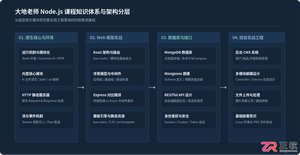
客观全面评析大地老师的Node.js教程:从技术栈覆盖、实战讲解风格到局限短板与进阶路径,帮助初学者和前端开发者客观评估是否适合自身学习需求。
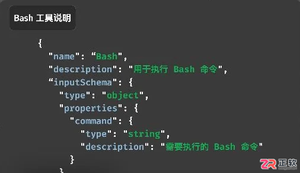
在为大模型Agent接入外部工具时,是选择MCP的结构化参数定义,还是使用CLI的通用命令入口?本文通过图片筛选与上传的实际案例,分析两种方式在上下文开销、任务组合效率及安全风险上的差异,提供选型参考。
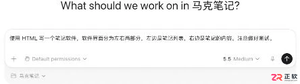
初次接触Codex不知从何下手?本文通过一个具体的HTML笔记应用案例,带你走完从建立项目、输入需求、批准执行到验收结果的完整流程,快速掌握Codex的基础使用方法。
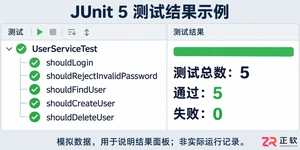
学习如何通过结构化测试、精准断言和参数化设计提升JUnit测试效率,避免常见陷阱,实现高质量、可维护的单元测试代码。
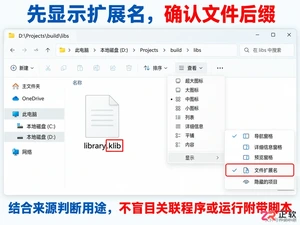
遇到.klib文件打不开?它通常是Kotlin/Native的库文件而非普通文档。本文教你如何在Windows下确认文件来源、安全查看内部结构,以及开发者如何正确使用klib工具,避免误操作。
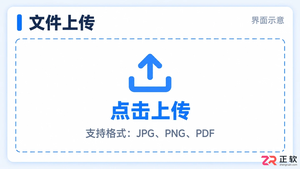
学习如何在Vue项目中设置文件上传格式限制。本文介绍使用HTML accept属性进行基础过滤,以及结合JavaScript进行严格后缀名校验的方法,确保只允许指定类型的文件被上传。
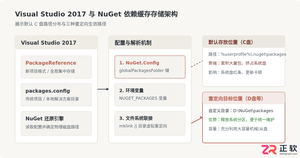
本文详细介绍在Visual Studio 2017中修改NuGet包全局缓存存放路径的实用方案,包括修改全局NuGet.Config文件、配置系统环境变量以及利用NTFS目录联接进行透明迁移,并提供验证与旧缓存清理步骤。





火山引擎是字节跳动旗下企业级云与AI服务平台。聚焦大模型核心能力,依托字节自研豆包多模态大模型,凭借火山方舟一站式平台,提供模型精调、推理部署、智能应用搭建等全链路服务,结合高性能AI算力,助力各行业快速落地大模型数字化与智能化应用。


Autodesk Maya 是面向影视、电视、动画和游戏行业的专业三维制作软件,集多边形与 NURBS 建模、角色绑定、关键帧和动作捕捉动画、Bifrost 特效模拟、材质开发及 Arnold 渲染于一体,
火山引擎是字节跳动旗下企业级云与AI服务平台。聚焦大模型核心能力,依托字节自研豆包多模态大模型,凭借火山方舟一站式平台,提供模型精调、推理部署、智能应用搭建等全链路服务,结合高性能AI算力,助力各行业快速落地大模型数字化与智能化应用。


